> ## Documentation Index
> Fetch the complete documentation index at: https://tools.lunchpaillabs.com/llms.txt
> Use this file to discover all available pages before exploring further.
# Transcribe a meeting
export const feature_0 = "action"
🔐 Bundle plugin only: This {feature_0} is exclusive to the [Video, Audio & Live
Bundle](/bubble/video-audio-live-bundle/getting-started). Get the bundle
plugin
[here](https://bubble.io/plugin/video-audio--live-bundle-1727441795463x240182085842370560).
Learn how to transcribe your meetings with this guide. This guide covers the auto-transcribe method, but you can also manually start transcription with the [**start transcription**](/bubble/daily/plugin-reference/actions/start-transcription) action while in a call.
If you prefer a video walkthrough, check out our step-by-step tutorial below. Otherwise, keep reading for the written guide:
## Steps
### 1. Add the Daily Events Element (Optional)
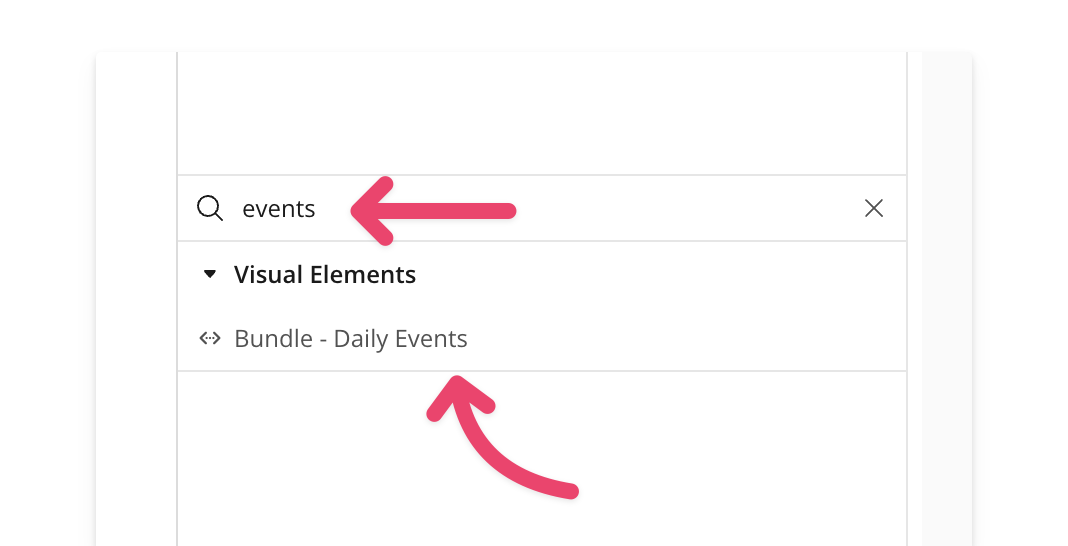
Place the [**events element**](/bubble/daily/plugin-reference/elements/daily-events) element on your page. It’s common to put it inside a hidden popup so it stays offscreen but can still listen for events like `transcription-started`, `transcription-stopped`, or `transcription-error`.
### 2. Enable Transcription in Your Room
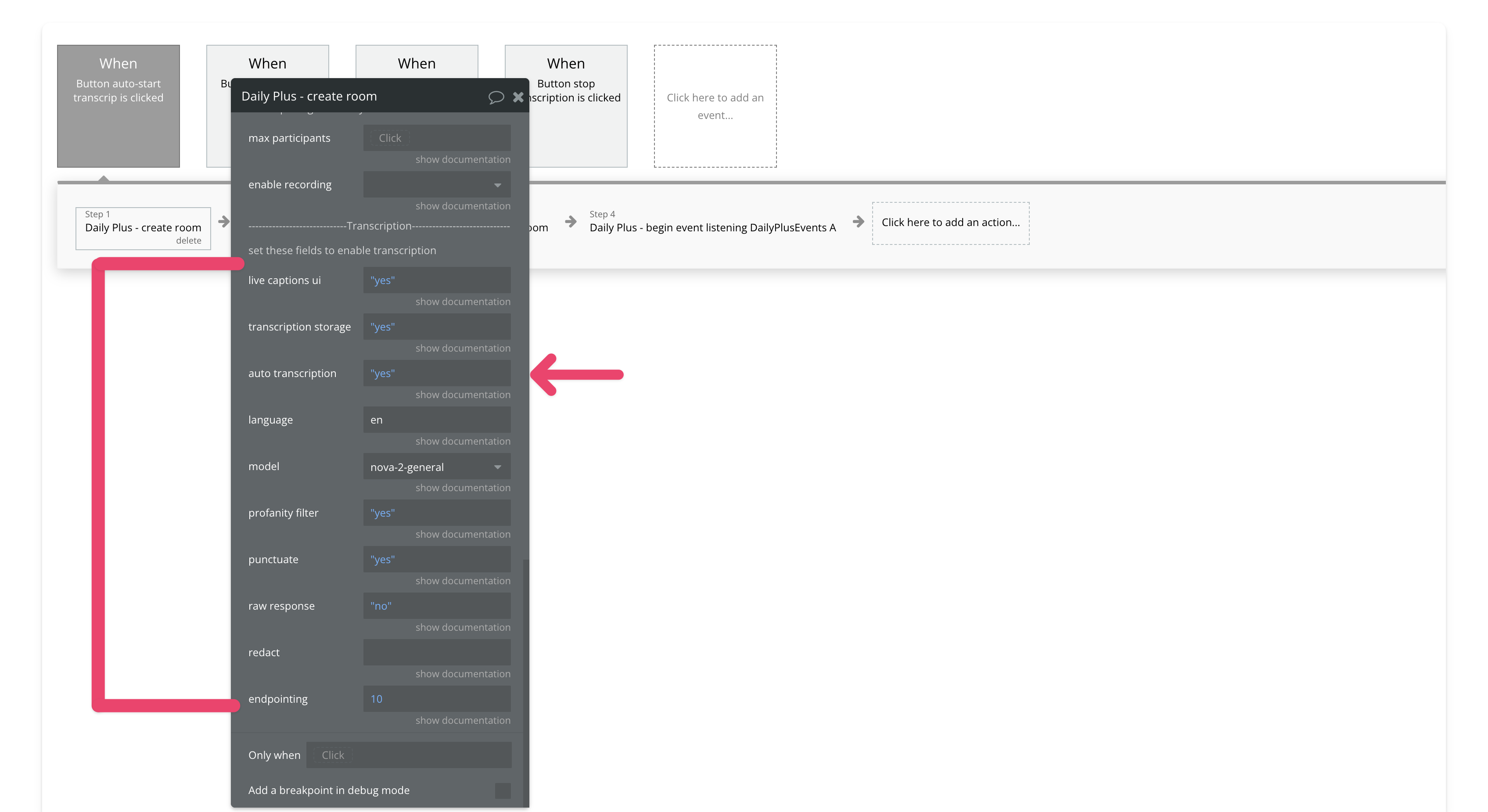
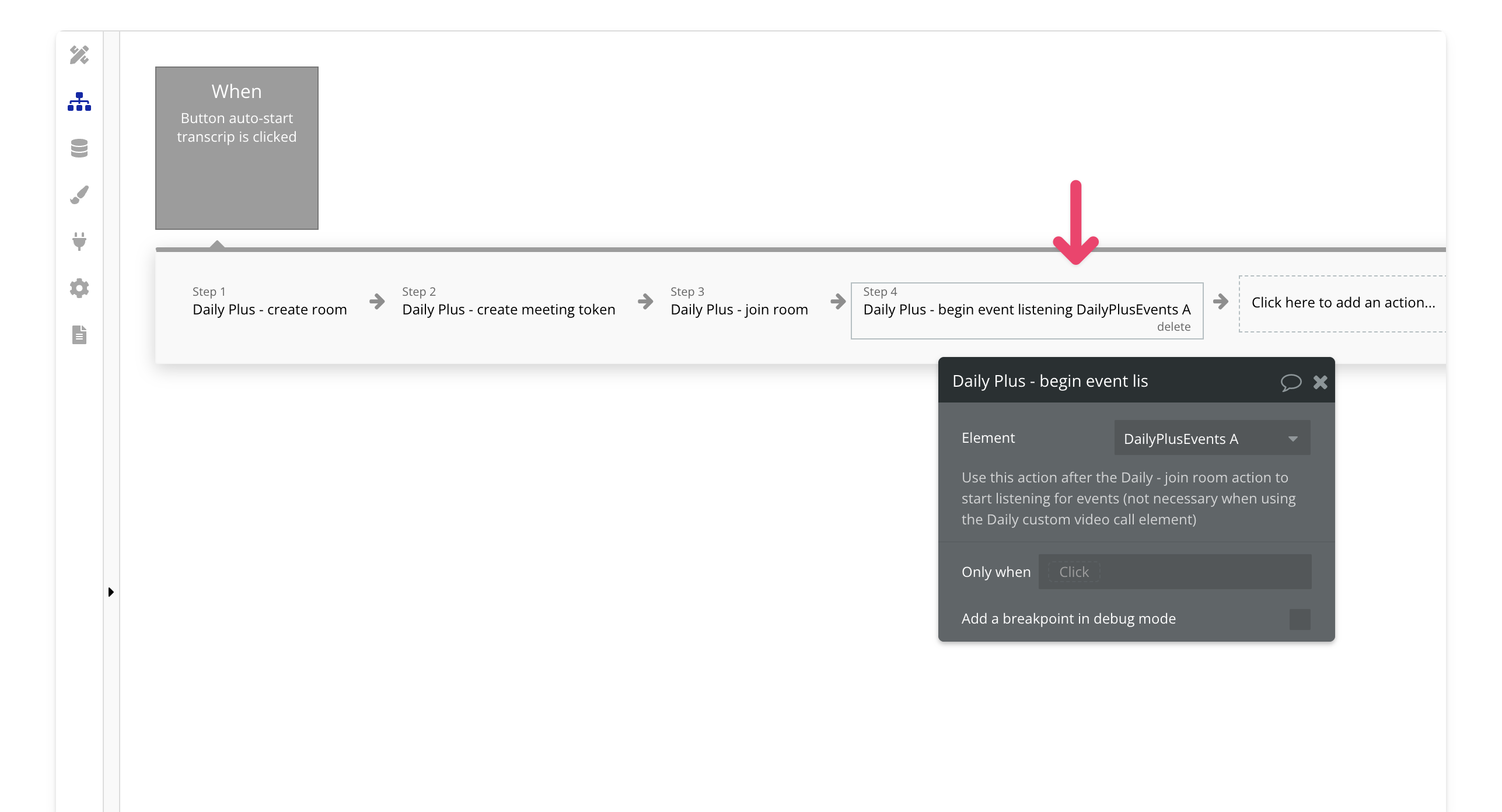
Next, [create](/bubble/daily/plugin-reference/actions/create-room) or [update](/bubble/daily/plugin-reference/actions/update-room) a room and enable transcription. Be sure to set the `auto transcription` field to `yes`. For a full list of transcription fields, check the [documentation](/bubble/daily/plugin-reference/actions/create-room#transcription).
### 3. Create a Meeting Token for the Transcription Owner
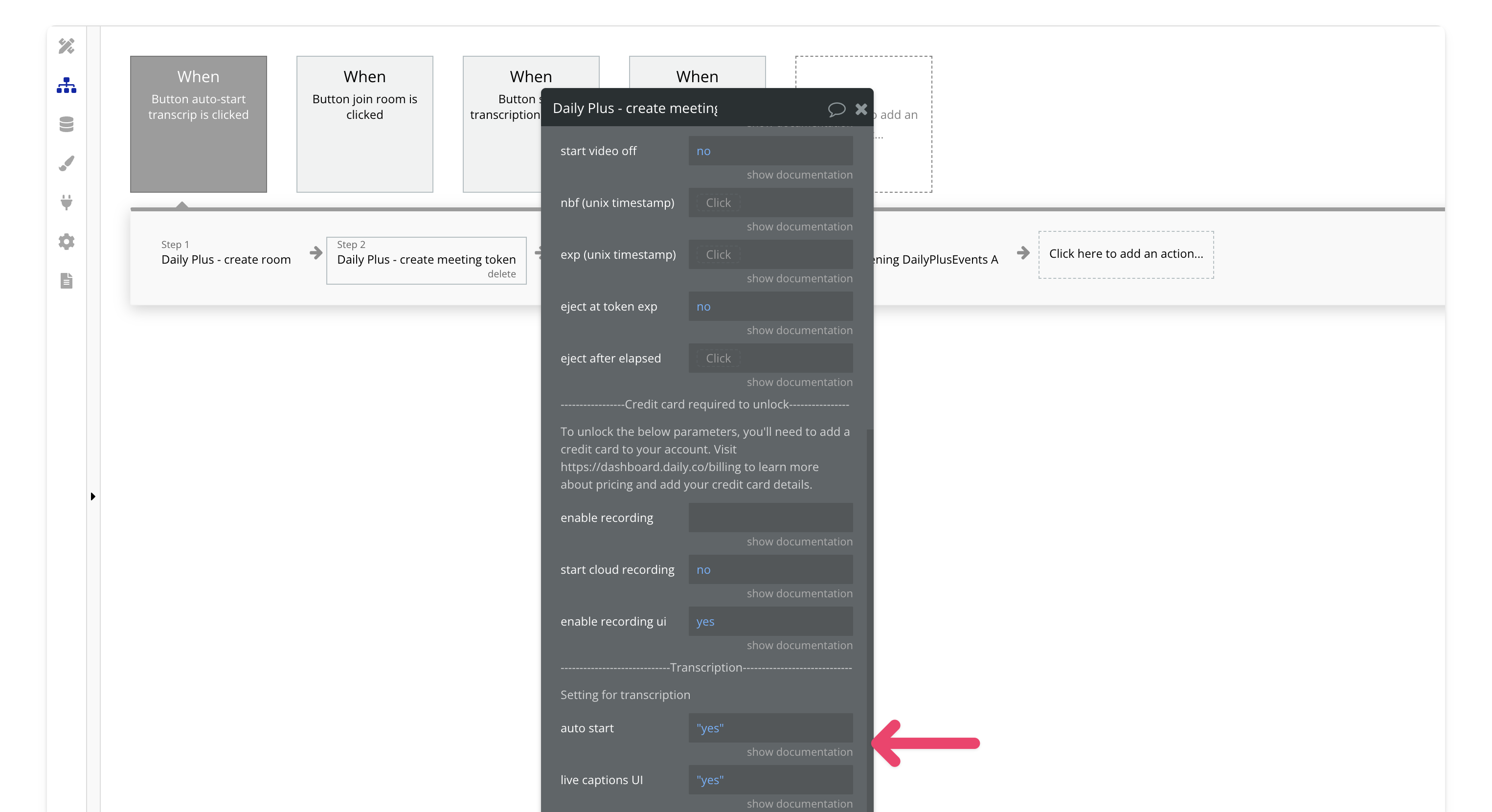
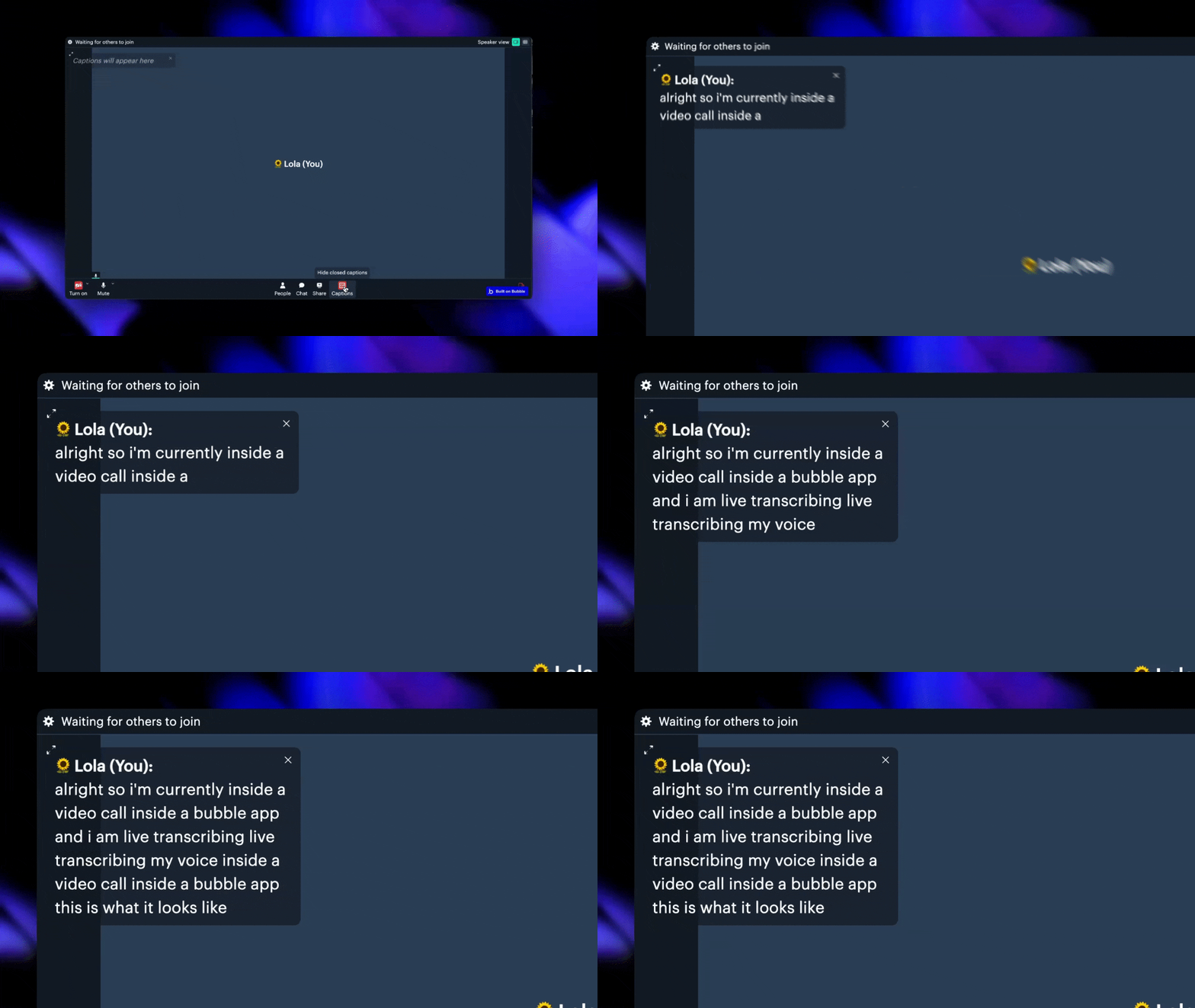
Create a [meeting token](/bubble/daily/plugin-reference/actions/create-meeting-token) with the `is owner` field set to `yes` and `auto-start transcription` set to `yes`. If you want live captions, make sure to enable them too. Only meeting owners can start transcriptions in this plugin.
### 4. Join the Meeting
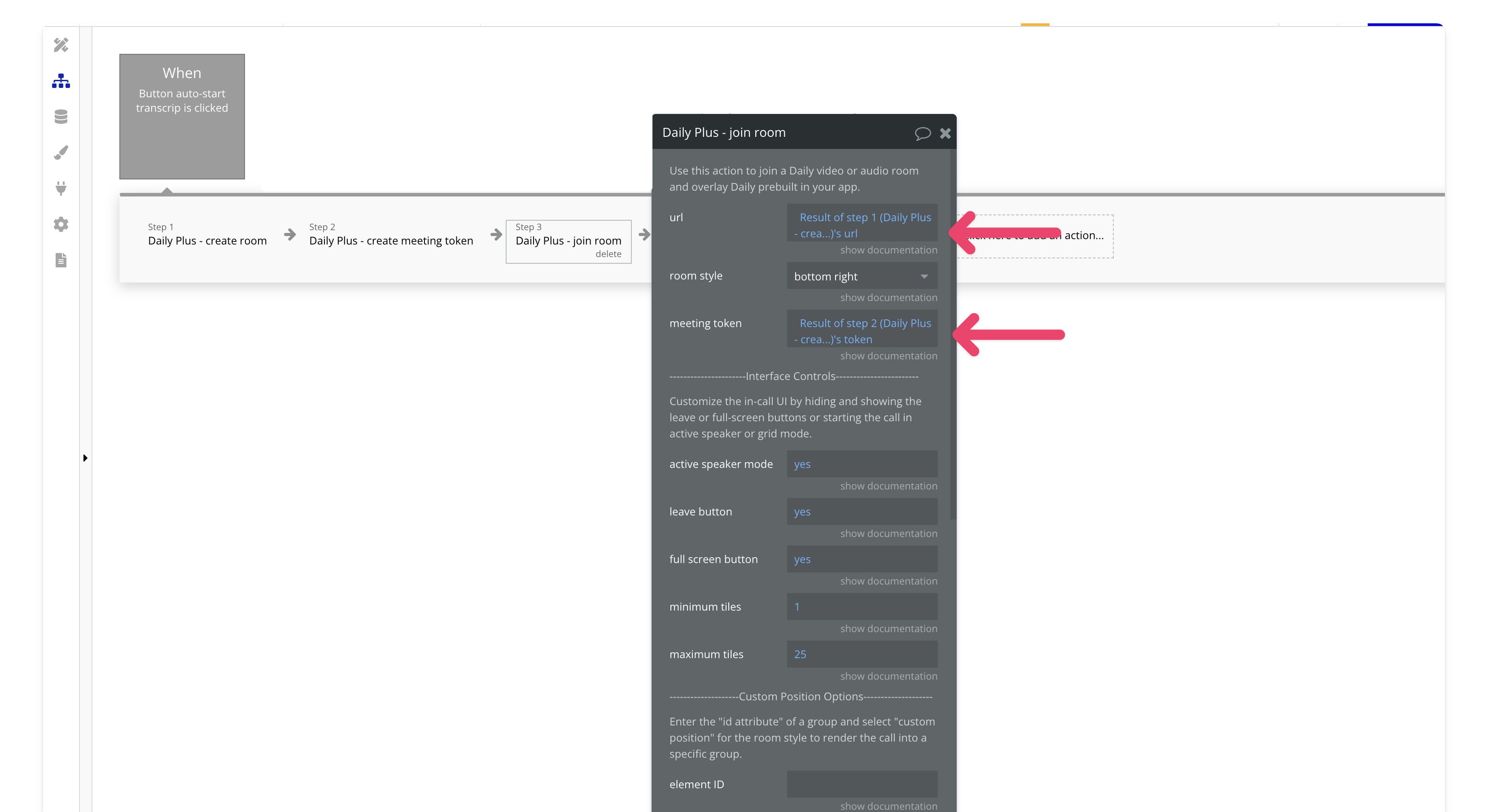
[**Join**](/bubble/daily/plugin-reference/actions/join-room) a room . Make sure to input the room URL from [Step 2](/bubble/daily/how-tos/transcribe-a-meeting#2-enable-transcription-in-your-room) and the meeting token from [Step 3](/bubble/daily/how-tos/transcribe-a-meeting#3-create-a-meeting-token-for-the-transcription-owner).
### 5. Begin Listening for Events (Optional)
If you want to listen to transcription events, add the [**begin event listening action**](/bubble/daily/plugin-reference/elements/daily-events#element-actions) after joining the room.
View our options for free community and priority support.
Post your feature request on our
idea board.
 If you prefer a video walkthrough, check out our step-by-step tutorial below. Otherwise, keep reading for the written guide:
## Steps
### 1. Add the Daily Events Element (Optional)
Place the [**events element**](/bubble/daily/plugin-reference/elements/daily-events) element on your page. It’s common to put it inside a hidden popup so it stays offscreen but can still listen for events like `transcription-started`, `transcription-stopped`, or `transcription-error`.

### 2. Enable Transcription in Your Room
Next, [create](/bubble/daily/plugin-reference/actions/create-room) or [update](/bubble/daily/plugin-reference/actions/update-room) a room and enable transcription. Be sure to set the `auto transcription` field to `yes`. For a full list of transcription fields, check the [documentation](/bubble/daily/plugin-reference/actions/create-room#transcription).

### 3. Create a Meeting Token for the Transcription Owner
Create a [meeting token](/bubble/daily/plugin-reference/actions/create-meeting-token) with the `is owner` field set to `yes` and `auto-start transcription` set to `yes`. If you want live captions, make sure to enable them too. Only meeting owners can start transcriptions in this plugin.

### 4. Join the Meeting
[**Join**](/bubble/daily/plugin-reference/actions/join-room) a room . Make sure to input the room URL from [Step 2](/bubble/daily/how-tos/transcribe-a-meeting#2-enable-transcription-in-your-room) and the meeting token from [Step 3](/bubble/daily/how-tos/transcribe-a-meeting#3-create-a-meeting-token-for-the-transcription-owner).

### 5. Begin Listening for Events (Optional)
If you want to listen to transcription events, add the [**begin event listening action**](/bubble/daily/plugin-reference/elements/daily-events#element-actions) after joining the room.

If you prefer a video walkthrough, check out our step-by-step tutorial below. Otherwise, keep reading for the written guide:
## Steps
### 1. Add the Daily Events Element (Optional)
Place the [**events element**](/bubble/daily/plugin-reference/elements/daily-events) element on your page. It’s common to put it inside a hidden popup so it stays offscreen but can still listen for events like `transcription-started`, `transcription-stopped`, or `transcription-error`.

### 2. Enable Transcription in Your Room
Next, [create](/bubble/daily/plugin-reference/actions/create-room) or [update](/bubble/daily/plugin-reference/actions/update-room) a room and enable transcription. Be sure to set the `auto transcription` field to `yes`. For a full list of transcription fields, check the [documentation](/bubble/daily/plugin-reference/actions/create-room#transcription).

### 3. Create a Meeting Token for the Transcription Owner
Create a [meeting token](/bubble/daily/plugin-reference/actions/create-meeting-token) with the `is owner` field set to `yes` and `auto-start transcription` set to `yes`. If you want live captions, make sure to enable them too. Only meeting owners can start transcriptions in this plugin.

### 4. Join the Meeting
[**Join**](/bubble/daily/plugin-reference/actions/join-room) a room . Make sure to input the room URL from [Step 2](/bubble/daily/how-tos/transcribe-a-meeting#2-enable-transcription-in-your-room) and the meeting token from [Step 3](/bubble/daily/how-tos/transcribe-a-meeting#3-create-a-meeting-token-for-the-transcription-owner).

### 5. Begin Listening for Events (Optional)
If you want to listen to transcription events, add the [**begin event listening action**](/bubble/daily/plugin-reference/elements/daily-events#element-actions) after joining the room.
