# Reference
Source: https://tools.lunchpaillabs.com/adalo/daily/component-reference
Component reference for the Daily Kit for Adalo.
> [!WARNING]
>
> This component is currently unavailable for new downloads due to recent
> platform updates. We appreciate your understanding and are exploring options
> for future availability.
### **Video Chat by Daily**
This component is for the video call element; it’s the element you’ll use to join calls. You can configure the following fields:
| **Parameter** | **Description** | **Required** |
| - | - | - |
| **Room Url** | Add the URL for the room you would like to join; you can choose static or dynamic data. | Yes |
| **Meeting Token** | Enter a meeting token for the video session. Tokens configure the video session on a per-user basis. You can create a meeting token with the create meeting token component. | No |
### **Create Room Button**
This component configures and styles a button to create a new video room. You can configure the following fields:
| **Parameter** | **Description** | **Required** |
| - | - | - |
| **API key** | The private key that you will retrieve from the [Daily Developer Dashboard](https://dashboard.daily.co/developers). It enables creating rooms, creating meeting tokens, deleting rooms, and updating rooms. | Yes |
| **Privacy** | Determines who can access the room. Options are public and private. If set to private, a user will need a corresponding meeting token to access the room. | Yes |
| **Not before time** | Users cannot join a meeting in this room before this time. If not set, the user will be able to join a room as soon as it is created. | No |
| **Expiration time** | Users cannot join a meeting in this room after this time. If not set, the room will never expire. | No |
| **Enable Prejoin UI** | Determines whether participants enter a waiting room with a camera, mic, and browser check before joining a call. Options are true and false. | No |
| **Enable Chat** | Determines whether chat is enabled. Options are true and false. | No |
| **Owner Only Broadcast** | Options are true and false. If set to true, only meeting owners are allowed to turn on the camera, unmute the mic, and share the screen. | No |
| **Enable Knocking** | Turns on a lobby experience for private rooms. A participant without a corresponding meeting token can request to be admitted with a 'knock'. | No |
| **Start Video Off** | When participants first join a meeting, keep their camera off. This property can be overridden by a meeting token. | No |
| **Start Audio Off** | When participants first join a meeting, keep their microphone muted. This property can be overridden by a meeting token. | No |
| **Show button styles** | Edit the button styles of the create room button, including text, fonts, colors, and rounding. | No |
| **Additional actions after a room is created** | Configure actions in Adalo that should occur after a room is created. | No |
### **Create Meeting Token Button**
This component configures and styles a button to create a meeting token. You can configure the following fields:
| **Parameter** | **Description** | **Required** |
| - | - | - |
| **API key** | The private key that you will retrieve from the [Daily Developer Dashboard](https://dashboard.daily.co/developers). It enables creating rooms, creating meeting tokens, deleting rooms, and updating rooms. | Yes |
| **Room Name** | The room for which this token is valid. | Yes |
| **Username** | Optional parameter to set the user's name in this meeting. The name displays in the user interface when the user is muted or has turned off the camera, and in the chat window. | No |
| **Is Owner** | Determines whether the user has meeting owner privileges. Options are true and false. | No |
| **Start Video Off** | When a participant first joins a meeting, keep their camera off. Setting this on a meeting token overrides the setting on the room. | No |
| **Start Audio Off** | When participants first join a meeting, keep their microphone muted. Setting this on a meeting token overrides the setting on the room. | No |
| **Show button styles** | Edit the button styles of the create meeting token button, including text, fonts, colors, and rounding. | No |
| **Additional actions after a token is created** | Configure actions in Adalo that should occur after a meeting token is created. | No |
### **Delete Room Button**
This component configures and styles a button to delete a room. You can configure the following fields:
| **Parameter** | **Description** | **Required** |
| - | - | - |
| **API key** | The private key that you will retrieve from the [Daily Developer Dashboard](https://dashboard.daily.co/developers). It enables creating rooms, creating meeting tokens, deleting rooms, and updating rooms. | Yes |
| **Room Name** | The name of the room to delete. | Yes |
| **Show button styles** | Edit the button styles of the delete room button, including text, fonts, colors, and rounding. | No |
| **Additional actions after a room is deleted** | Configure actions in Adalo that should occur after a room is deleted. | No |
### **Update Room Button**
This component configures and styles a button to update a room. You can configure the following fields:
| **Parameter** | **Description** | **Required** |
| - | - | - |
| **API key** | The private key that you will retrieve from the [Daily Developer Dashboard](https://dashboard.daily.co/developers). It enables creating rooms, creating meeting tokens, deleting rooms, and updating rooms. | Yes |
| **Room Name** | The name of the room that will be updated. | Yes |
| **Privacy** | Determines who can access the room. Options are public and private. If set to private, a user will need a corresponding meeting token to access the room. | Yes |
| **Not before time** | Users cannot join a meeting in this room before this time. If not set, the user will be able to join a room as soon as it is created. | No |
| **Expiration time** | Users cannot join a meeting in this room after this time. If not set, the room will never expire. | No |
| **Enable Prejoin UI** | Determines whether participants enter a waiting room with a camera, mic, and browser check before joining a call. Options are true and false. | No |
| **Enable Chat** | Determines whether chat is enabled. Options are true and false. | No |
| **Owner Only Broadcast** | Options are true and false. If set to true, only meeting owners are allowed to turn on the camera, unmute the mic, and share the screen. | No |
| **Enable Knocking** | Turns on a lobby experience for private rooms. A participant without a corresponding meeting token can request to be admitted with a 'knock'. | No |
| **Start Video Off** | When participants first join a meeting, keep their camera off. This property can be overridden by a meeting token. | No |
| **Start Audio Off** | When participants first join a meeting, keep their microphone muted. This property can be overridden by a meeting token. | No |
| **Show button styles** | Edit the button styles of the update room button, including text, fonts, colors, and rounding. | No |
| **Additional actions after a room is updated** | Configure actions in Adalo that should occur after a room is updated. | No |
***
> **[Need Help?](/support/plans)**
>
> Access community or premium support.
> **[Have a feature request?](https://lunchpaillabs.canny.io/feature-requests?selectedCategory=video-chat-kit-for-adalo)**
>
> Share your feature request on our
>
> [idea board.](https://lunchpaillabs.canny.io/feature-requests?selectedCategory=video-chat-kit-for-adalo)
# Getting started
Source: https://tools.lunchpaillabs.com/adalo/daily/getting-started
Get started with the Daily Kit for Adalo by Lunch Pail Labs.
> [!WARNING]
>
> This component is currently unavailable for new downloads due to recent
> platform updates. We appreciate your understanding and are exploring options
> for future availability.
## About the Component
The Daily Kit for Adalo lets you add video chat functionality to your Adalo app in minutes.
[Daily](https://www.daily.co/) is a company that lets you add WebRTC video and audio to your apps and create live video experiences.
With this kit, you’ll be able to embed [Daily Prebuilt](https://www.daily.co/prebuilt), which comes automatically with a pre-join call UX, chat and participant views, and host controls.
This component is developed and managed by [Lunch Pail Labs](https://lunchpaillabs.com/), a Daily development partner and software service specializing in building and managing SaaS integrations. For any help with this component add a question to the [forum discussion](https://forum.adalo.com/t/coming-soon-free-daily-co-video-chat-component/24154).
## Getting Started with the Component
Before getting started, you’ll want to make sure you have a Daily account. You can sign up for an account on [Daily’s website](https://dashboard.daily.co/signup).
You’ll also want to save your API key, which you can find in your [developer dashboard](https://dashboard.daily.co/developers). You’ll need this key for all the button actions.

You can add the kit to your workspace by searching for “Video chat and conferencing” in Adalo’s marketplace from within your Adalo editor.
## Demo Application
If you’d like to clone an example setup, you can demo the app and clone it [here](https://previewer.adalo.com/cd2ebd72-9e57-468e-aaa5-fd6eec972283). The cloneable includes creating rooms that expire and joining rooms.

We’re always adding to the help documentation, so if there’s something you need help with add a question to the [forum discussion](https://forum.adalo.com/t/coming-soon-free-daily-co-video-chat-component/24154).
## What’s Included
When you add the Daily Kit to your project, it brings several components along with it, navigate to the component reference [component reference](/adalo/daily/component-reference/) to learn more about what is included.
## Frequently asked questions
> **Where can I learn more about Daily?**
>
> Visit the [Daily website](https://www.daily.co/) to learn more about Daily.
> **Where can I learn more about Adalo?**
>
> Visit the [Adalo website](https://www.adalo.com/) to learn more about Adalo.
***
> **[Need Help?](/support/plans)**
>
> Access community or premium support.
> **[Have a feature request?](https://lunchpaillabs.canny.io/feature-requests?selectedCategory=video-chat-kit-for-adalo)**
>
> Post your feature request on our
>
> [idea board.](https://lunchpaillabs.canny.io/feature-requests?selectedCategory=video-chat-kit-for-adalo)
# Overview
Source: https://tools.lunchpaillabs.com/adalo/overview
Enhance your Adalo apps with components developed and maintained by Lunch Pail Labs.
### For Adalo
[Adalo](https://adalo.com) is a no-code platform that allows you to build powerful apps without writing a single line of code. Our components are designed to seamlessly integrate into your Adalo projects, enhancing functionality and providing a richer user experience.
> **[TalkJS Chat](/adalo/talkjs/getting-started)**
>
> Embed rich chat functionality into your Adalo app with the TalkJS component.
> **[Daily Video Chat](/adalo/daily/getting-started)**
>
> Add video chat capabilities to your Adalo projects with ease using the Daily
> Video Chat component.
### Get Started
Ready to enhance your Adalo apps? Click on any of the components above to explore detailed documentation.
# Reference
Source: https://tools.lunchpaillabs.com/adalo/talkjs/component-reference
Detailed reference for all settings and customization options available in the TalkJS Chat component for Adalo.
> [!WARNING]
>
> This component is currently unavailable for new downloads due to recent
> platform updates. We appreciate your understanding and are exploring options
> for future availability.
## Parameters and Customization
This component is for the audio call and represents a view of a type of participant. You can configure the following fields:
| **Setting** | **Description** |
| - | - |
| **App ID** | Your TalkJS app ID is found on the Settings page of your [TalkJS Dashboard](https://talkjs.com/dashboard). |
| **ID** | The user ID of the local user joining the conversation. You can use Adalo’s ID field. |
| **Name** | The user's name or username—use whatever you want others to see when communicating with this user. |
| **Photo** | The photo or avatar of this user. Shown to others in conversations with this user. |
| **Role** | A user role that you can set up from the Roles page of your TalkJS dashboard. Make sure the role corresponds precisely to a role name you chose in the dashboard. |
| **Loader Color** | Optional parameter to set the color of any loaders. |
| **Start in chat view** | Starts the component in a chat view instead of the inbox view; add participants if enabled. |
| **Inbox Header Color** | Optional parameter for custom themes, specify inbox header background color for Android and iOS. Web inherits color automatically. |
| **Inbox Font Color** | Optional parameter for custom themes, specify inbox header font color for Android and iOS. Web inherits color automatically. |
| **Participants** | Any participants to add to the conversation should be a list of users, and for each participant, you can specify the ID, Email, Photo, or Role. If no participants are added, it will show the inbox view for all the conversations the user is involved in. |
***
> **[Need Help?](/support/plans)**
>
> Access community or premium support.
> **[Have a feature request?](https://lunchpaillabs.canny.io/feature-requests?selectedCategory=chat-component-for-adalo)**
>
> Post your feature request on our
>
> [idea board.](https://lunchpaillabs.canny.io/feature-requests?selectedCategory=chat-component-for-adalo)
# Getting started
Source: https://tools.lunchpaillabs.com/adalo/talkjs/getting-started
Getting started with the TalkJS Chat component for Adalo.
> [!WARNING]
>
> This component is currently unavailable for new downloads due to recent
> platform updates. We appreciate your understanding and are exploring options
> for future availability.
## Overview
This component brings chat functionality to Adalo apps, leveraging the sophisticated chat UIs and APIs from TalkJS.The component is maintained by [Lunch Pail Labs](https://lunchpaillabs.com/).
***
## Installation and Configuration
### Prerequisites
Before starting, ensure you have:
* An Adalo app with users eligible for adding to conversations.
* A TalkJS account. Here's what you'll need:
* Your App ID, available in [your dashboard](https://talkjs.com/dashboard/) under the settings tab.
* To customize the Chat UI, adjust settings at [Chat UI settings](https://talkjs.com/dashboard/roles/settings/default/chat-ui) and assign roles appropriately through your dashboard.
### Installation
1. From the Adalo component library, drag and drop the chat component onto your app screen.
2. Input your TalkJS App ID into the component settings.
### Adding Participants
* **"Me" parameter**: Essential for the component's functionality, this parameter identifies the user entering the chat.
* **Adding other participants**: To include more people in a conversation, provide a list of users in the 'participant' parameter. Specify their details like ID, Email, Photo, or Role.
* **Default view**: Without added participants, the component defaults to the inbox view, displaying all conversations involving the user, and will be empty if there are no conversations.
***
> **[Need Help?](/support/plans)**
>
> Access community or premium support.
> **[Have a feature request?](https://lunchpaillabs.canny.io/feature-requests?selectedCategory=chat-component-for-adalo)**
>
> Post your feature request on our
>
> [idea board.](https://lunchpaillabs.canny.io/feature-requests?selectedCategory=chat-component-for-adalo)
# Get bot status and results
Source: https://tools.lunchpaillabs.com/api-reference/get-bot-status-and-results
/pailflow/api-reference/openapi.json get /api/bot/{bot_id}/status
Check the status of a bot session and retrieve results (transcript, Q&A pairs, insights) when the bot has finished.
# Start bot
Source: https://tools.lunchpaillabs.com/api-reference/start-bot
/pailflow/api-reference/openapi.json post /api/bot/join
Start an AI bot that will join an existing video meeting room. The bot will transcribe the conversation and can process insights when the meeting ends.
# Stop Bot
Source: https://tools.lunchpaillabs.com/api-reference/stop-bot
/pailflow/api-reference/openapi.json post /v1/bots/leave/{bot_id}
Stop a running bot and trigger the full exit pipeline. The bot will save the transcript, process insights (if enabled), send results via email/webhook, and leave the video meeting room. The bot typically exits within 5 seconds of the request.
# Changelog
Source: https://tools.lunchpaillabs.com/bubble/daily/changelog
Track updates made to the free Daily Video Conferencing & Chat Plugin. For updates to the paid bundle version, see the [Video, Audio & Live Bundle changelog](/bubble/video-audio-live-bundle/changelog).
***
**v4.6**
October 17, 2024
Added the ability to customize live streams in the Start Live Stream action,
and introduced new states—Recording Instance ID and Recording ID Published—to
enhance tracking and management of recording sessions.
**v4.5**
October 02, 2024
This patch update removed `console.log` statements and added a video tutorial
to the plugin description.
**v4.4**
September 27, 2024
Introduced an action to [update
recordings](/bubble/daily/plugin-reference/actions/update-recording)
mid-session and added the `recording-error` event to the [events
element](/bubble/daily/plugin-reference/elements/daily-events).
**v4.3**
September 26, 2024
Added support for [breakout
rooms](/bubble/daily/how-tos/enable-breakout-rooms) and shared chat history.
New fields for managing **video bitrate**, **audio bitrate**, and **layout
types** were also added to the [start
recording](/bubble/daily/plugin-reference/actions/start-recording) action.
> **[Need Help?](/support/plans)**
>
> View our options for free community and priority support.
> **[Have a feature request?](https://lunchpaillabs.canny.io/feature-requests?selectedCategory=daily-video-plugin-for-bubble)**
>
> Post your feature request on our
>
> [idea board.](https://lunchpaillabs.canny.io/feature-requests?selectedCategory=daily-video-plugin-for-bubble)
# Getting started
Source: https://tools.lunchpaillabs.com/bubble/daily/getting-started
Get started with the Daily video conferencing plugin for Bubble.
## What is Daily?
[Daily](https://www.daily.co/) is a platform for video and audio chat. The Daily plugin for Bubble, maintained by [Lunch Pail Labs](https://www.lunchpaillabs.com), makes it easy to integrate real-time communication into your app.
## Feature Overview
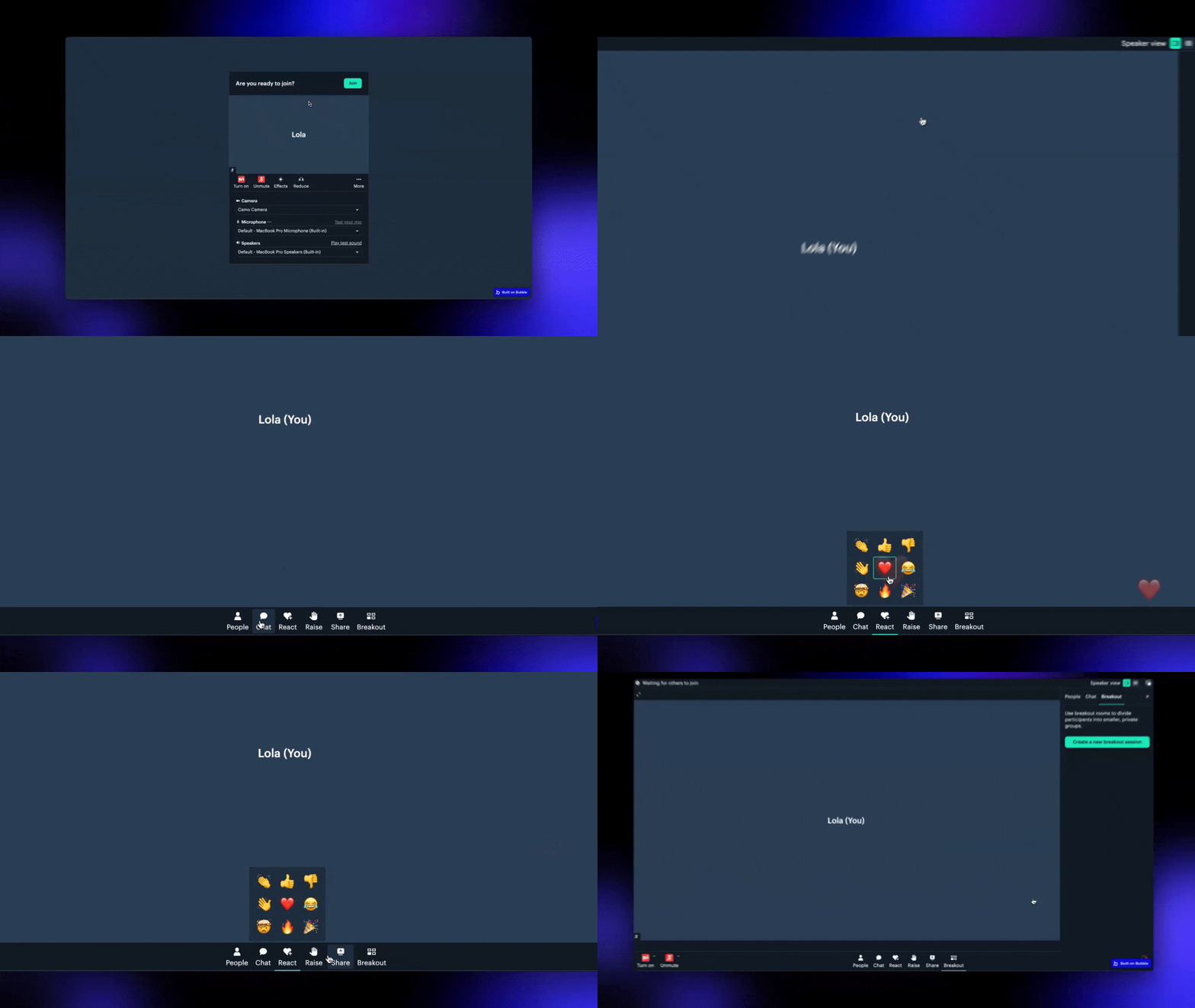
The [**free version**](https://bubble.io/plugin/daily-video-chat-1622494385281x917140771709124600) of the plugin provides core video and audio call features. The [**Bundle version**](https://bubble.io/plugin/video-audio--live-bundle-1727441795463x240182085842370560) includes an advanced version of the Daily plugin along with additional plugins for building enhanced media experiences. Learn more about the bundle [here](/bubble/video-audio-live-bundle/getting-started).
| **Feature** | **Free Version** | **Bundle Version** |
| - | :-: | :-: |
| **Video Calls** | ✅ | ✅ |
| **Audio Calls** | ✅ | ✅ |
| **Shared Chat History** | ✅ | ✅ |
| **Embed Daily Prebuilt Interface** | ✅ | ✅ |
| **Start Breakout Rooms** | ✅ | ✅ |
| **Room-Based Conferencing** | ✅ | ✅ |
| **Participant Controls** | ✅ | ✅ |
| **Live Streaming** *(pay as you go)* | ✅ | ✅ |
| **Record Calls** *(pay as you go)* | ✅ | ✅ |
| **Embed Third-Party Apps** (e.g., Miro, Figma) | ❌ | ✅ |
| **Custom Buttons in Call Interface** | ❌ | ✅ |
| **Media Player for Recordings & Live Streams** | ❌ | ✅ |
| **Webhooks** *(pay as you go)* | ❌ | ✅ |
| **Real-Time Transcription** *(pay as you go)* | ❌ | ✅ |
| **Store Transcripts** *(pay as you go)* | ❌ | ✅ |
| **HLS Live Streaming via Mux** *(pay as you go)* | ❌ | ✅ |
## Watch the Tutorial
Learn how to set up and use the plugin in just a few minutes by watching the video below:
[YouTube video player](https://www.youtube.com/embed/jQGVUxl9WV4)
## What Can You Build?
Here's a quick overview of what you can build with the plugin:
> **[Video calls](https://www.daily.co/blog/integrate-daily-video-chat-in-your-bubble-app-in-less-than-30-minutes)**
>
> Create and manage high-quality video calls.
> **[Live streams](/bubble/daily/how-tos/set-up-livestream)**
>
> Stream video calls live to platforms like YouTube or Twitch.
> **[Broadcasts](/bubble/daily/how-tos/owner-only-broadcast)**
>
> Allow only the call owner to share their screen.
> **[Real-Time Transcriptions](/bubble/daily/how-tos/transcribe-a-meeting)**
>
> Generate live meeting transcripts for note-taking or accessibility.
> **[Collaborative Apps](/bubble/daily/how-tos/add-custom-integrations)**
>
> Embed apps like Miro, Figma or Google Docs in your calls and collaborate in
> real-time.
## Installation and Setup
**1. Install the plugin**
Install the
[**free**](https://bubble.io/plugin/daily-video-chat-1622494385281x917140771709124600)
or
[**Bundle**](https://bubble.io/plugin/video-audio--live-bundle-1727441795463x240182085842370560)
version based on your needs.
**2. Create a Daily account**
[Sign up for Daily](https://dashboard.daily.co/u/signup). Note: Daily now
requires a credit card for all accounts, including the Free tier. Your card
won't be charged as long as you stay within the Free tier limits. [Add a
credit card here](https://dashboard.daily.co/billing).
**3. Get Your API Key**
Head to the [Daily Developer
Dashboard](https://dashboard.daily.co/developers) to grab your API key.
**4. Configure the Plugin**
Enter your API key in the Bubble plugin settings, starting with `Bearer`
(e.g., `Bearer 4ffad...`)
Once installed, you're ready to start hosting calls, managing participants, and leveraging advanced features.
## Next Steps
Explore the [plugin reference](/bubble/daily/plugin-reference/actions/create-room) or check out the [how-tos](/bubble/daily/how-tos/use-daily-events) to dive deeper.
> **[Need Help?](/support/plans)**
>
> View our options for free community and priority support.
> **[Have a feature request?](https://lunchpaillabs.canny.io/feature-requests?selectedCategory=daily-video-plugin-for-bubble)**
>
> Post your feature request on our
>
> [idea board.](https://lunchpaillabs.canny.io/feature-requests?selectedCategory=daily-video-plugin-for-bubble)
# Add custom buttons
Source: https://tools.lunchpaillabs.com/bubble/daily/how-tos/add-custom-buttons
> [!WARNING]
>
> 🔐 Bundle plugin only: This action is exclusive to the [Video, Audio & Live
> Bundle](/bubble/video-audio-live-bundle/getting-started). Get the bundle
> plugin
> [here](https://bubble.io/plugin/video-audio--live-bundle-1727441795463x240182085842370560).
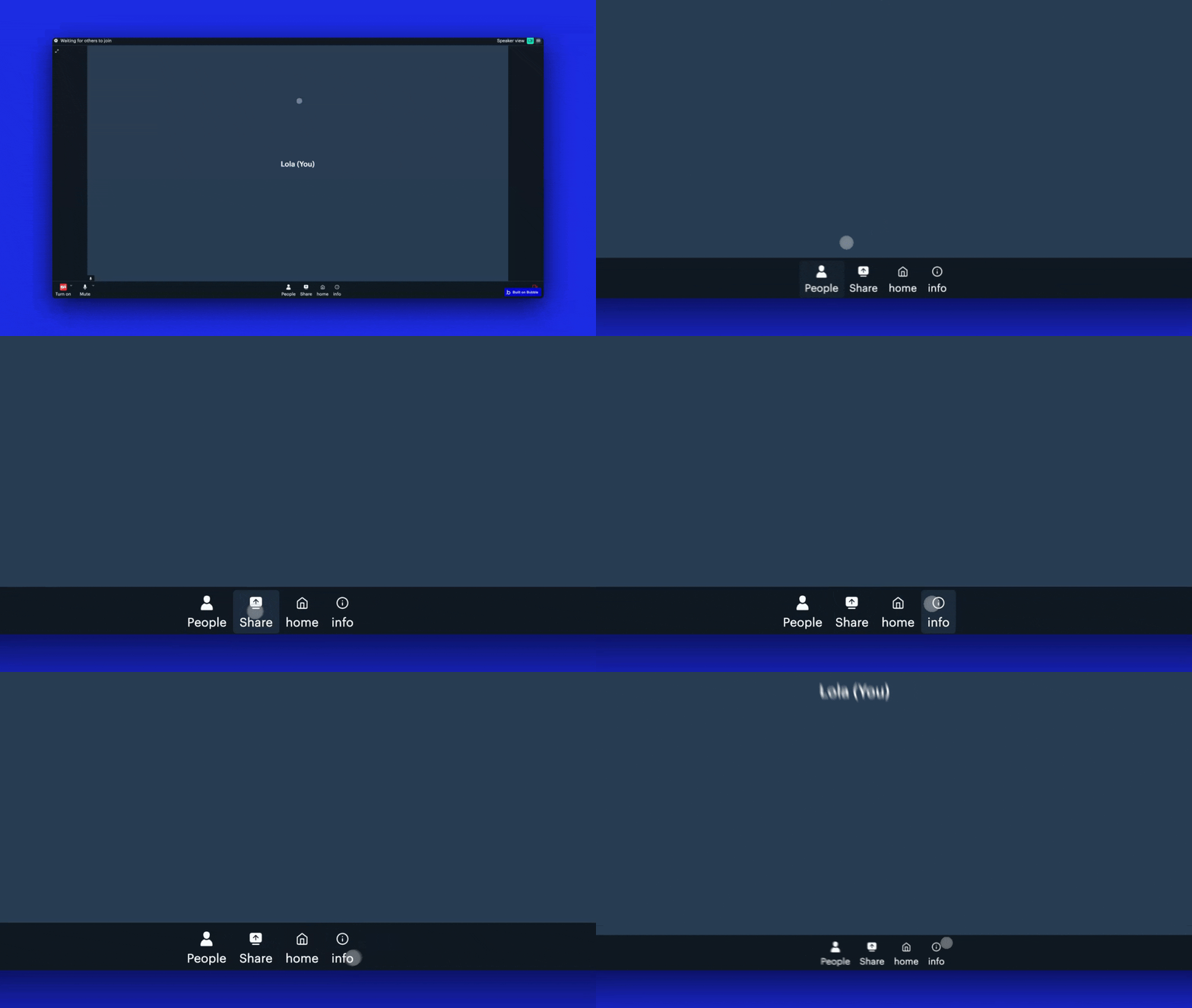
Sometimes, you want to add a custom button in Daily Prebuilt to trigger actions in your Bubble app, such as opening a new page, updating a database, or starting a custom workflow or transcription.
## Video tutorial
If you prefer a video walkthrough, check out our step-by-step tutorial below. Otherwise, keep reading for the written guide:
[YouTube video player](https://www.youtube.com/embed/D0GaduYaD-o)
## Steps
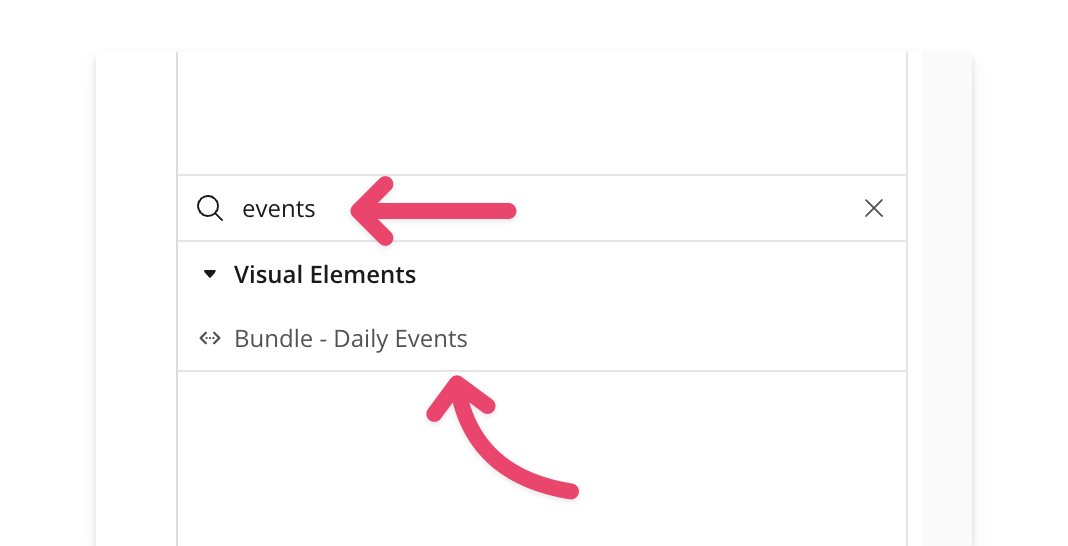
### 1. Add the Bundle Daily Events element
Place the [**Bundle Daily Events**](/bubble/daily/plugin-reference/elements/daily-events) element on your page. A common practice is to place it inside a hidden popup, keeping it offscreen while it listens for events.
### 2. Start listening for events
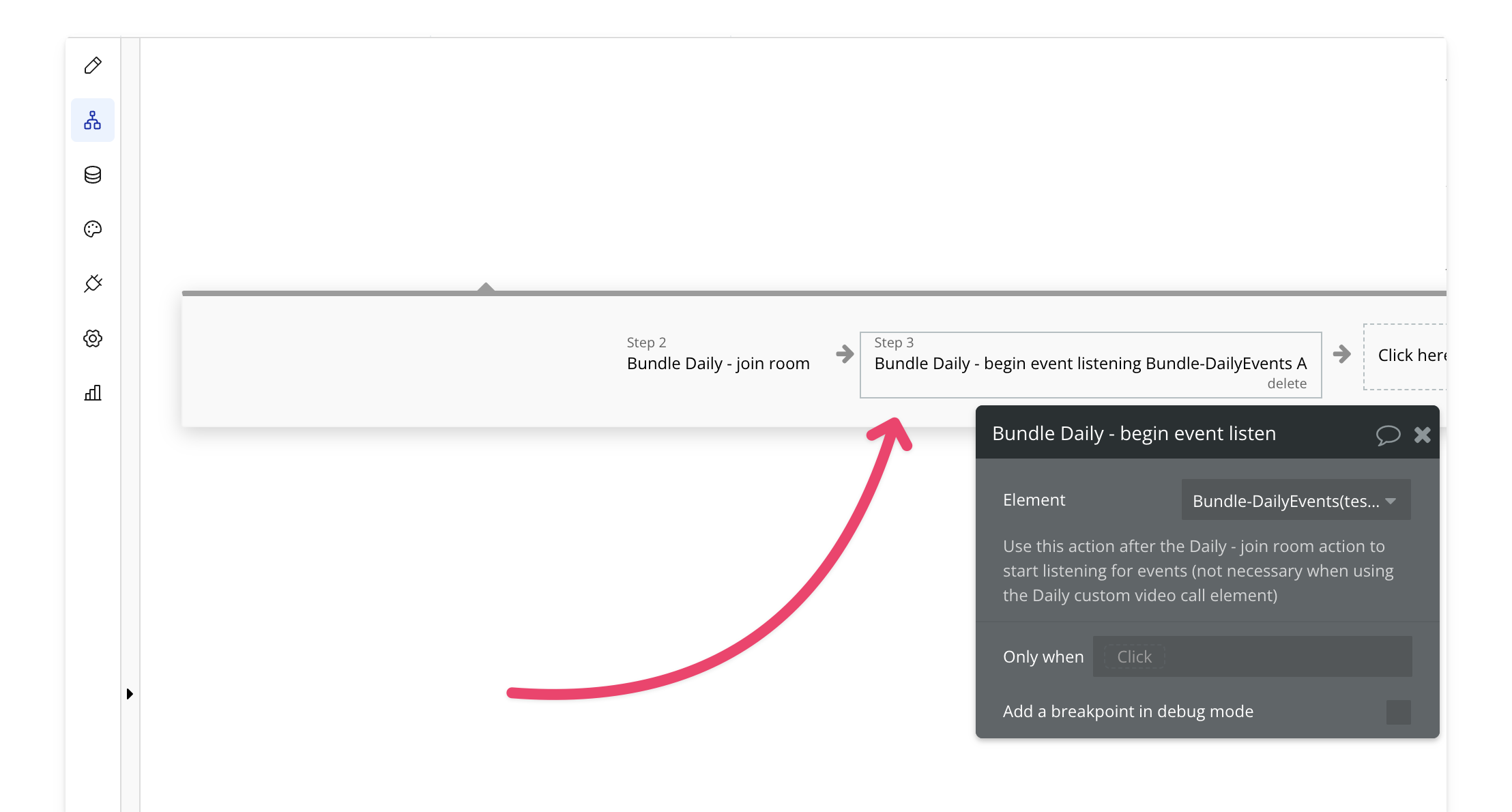
After joining the room, add the `begin listening` action. This ensures Bubble can capture and process events, such as the `custom-button-click` event, triggering the desired action when a user clicks the button.
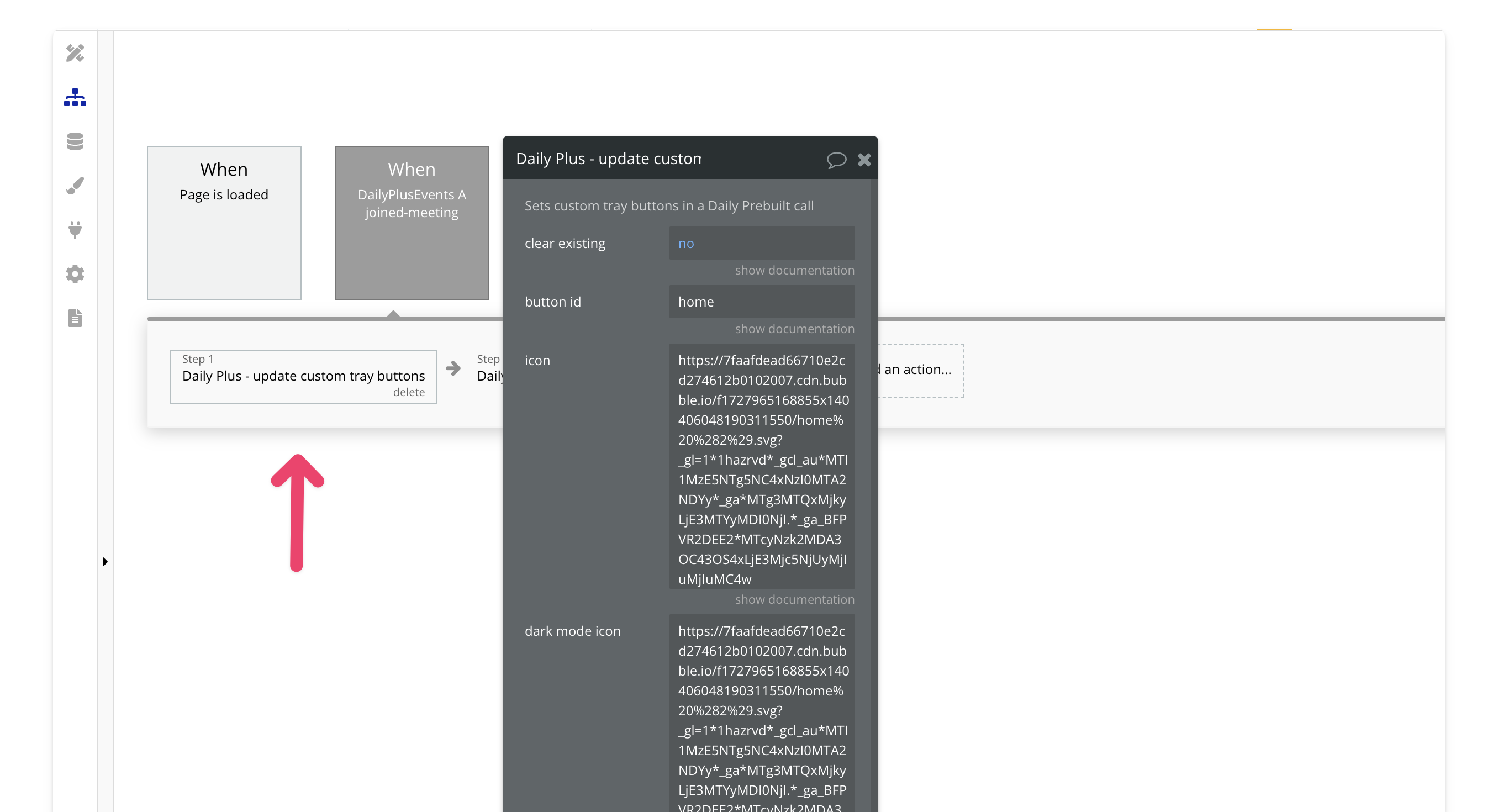
### 3. Add the `Joined-Meeting` Event and Set Custom Button
Next, add the `joined-meeting` event and use the action to [update a custom button](/bubble/daily/plugin-reference/actions/update-custom-tray-buttons).
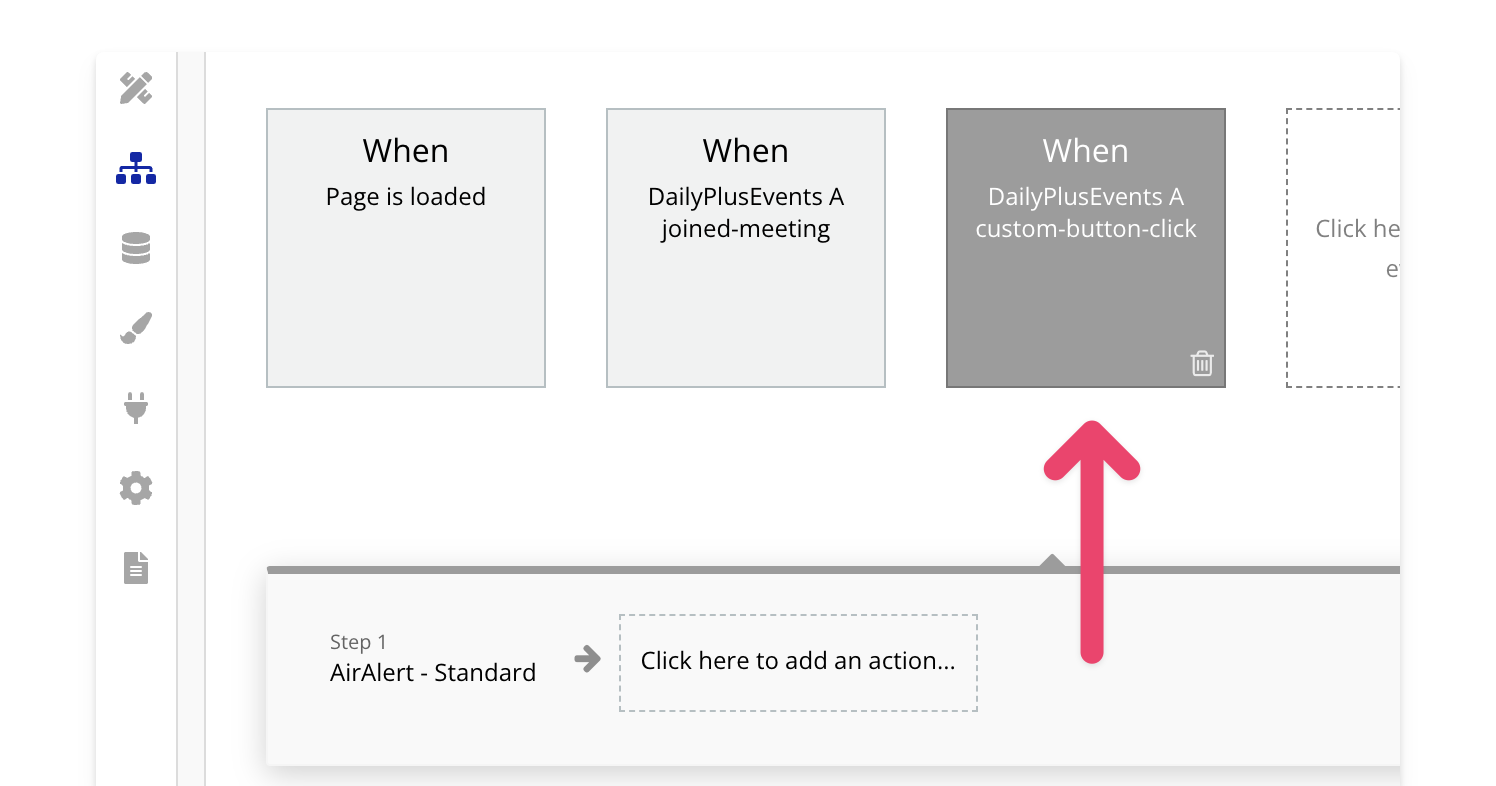
### 4. Listen for the `custom-button-click`
Add the `custom-button-click` event and include the logic to take action in your app whenever the button is clicked.
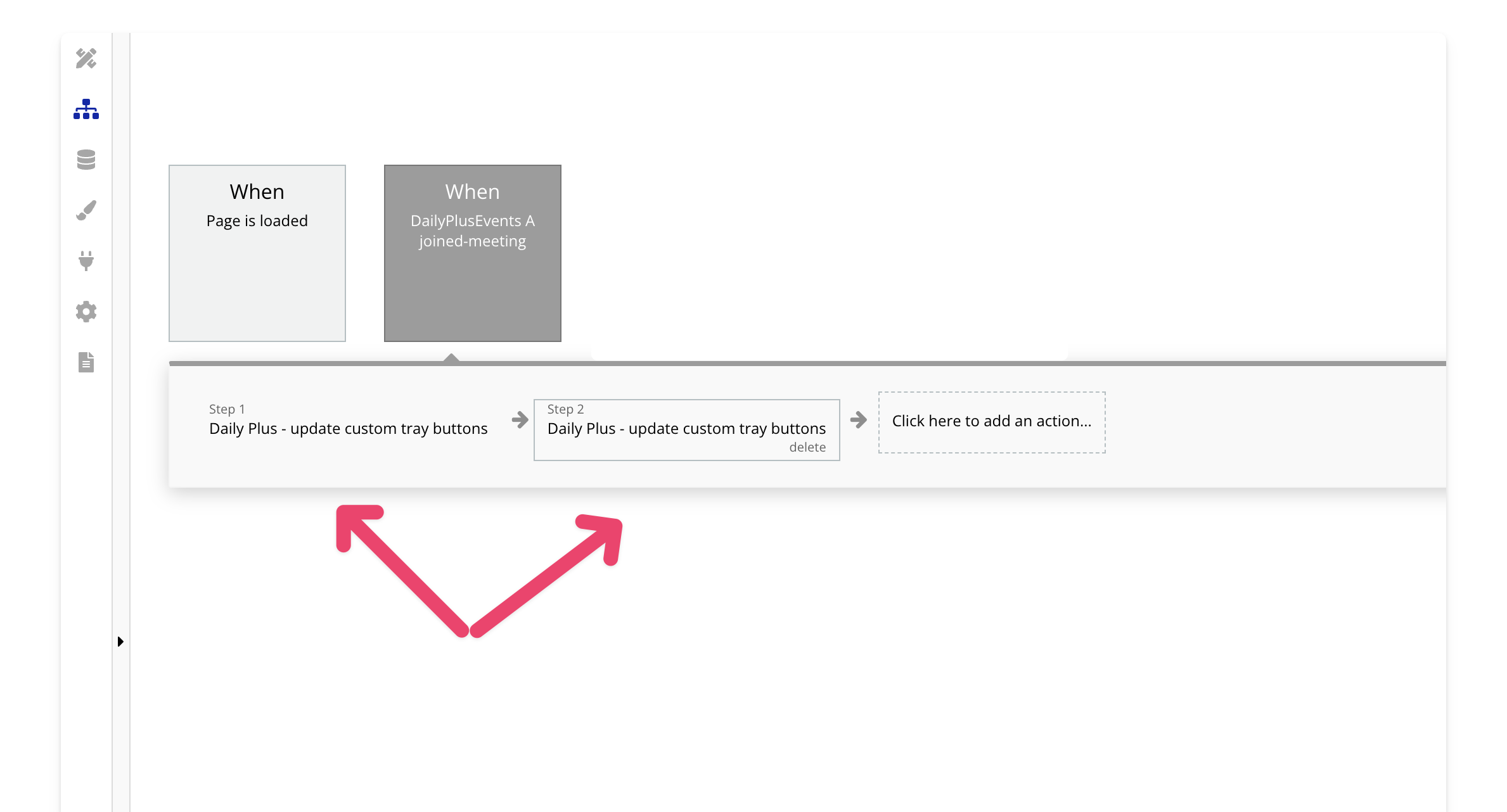
## How to set multiple buttons
You can use the [update custom buttons](/bubble/daily/plugin-reference/actions/update-custom-tray-buttons) action multiple times to set multiple buttons. Just set the `clear existing` field to `no`.
> **[Need Help?](/support/plans)**
>
> View our options for free community and priority support.
> **[Have a feature request?](https://lunchpaillabs.canny.io/feature-requests?selectedCategory=daily-video-plugin-for-bubble)**
>
> Post your feature request on our
>
> [idea board.](https://lunchpaillabs.canny.io/feature-requests?selectedCategory=daily-video-plugin-for-bubble)
# Embed third-party apps
Source: https://tools.lunchpaillabs.com/bubble/daily/how-tos/add-custom-integrations
> [!WARNING]
>
> 🔐 Bundle plugin only: This action is exclusive to the [Video, Audio & Live
> Bundle](/bubble/video-audio-live-bundle/getting-started). Get the bundle
> plugin
> [here](https://bubble.io/plugin/video-audio--live-bundle-1727441795463x240182085842370560).
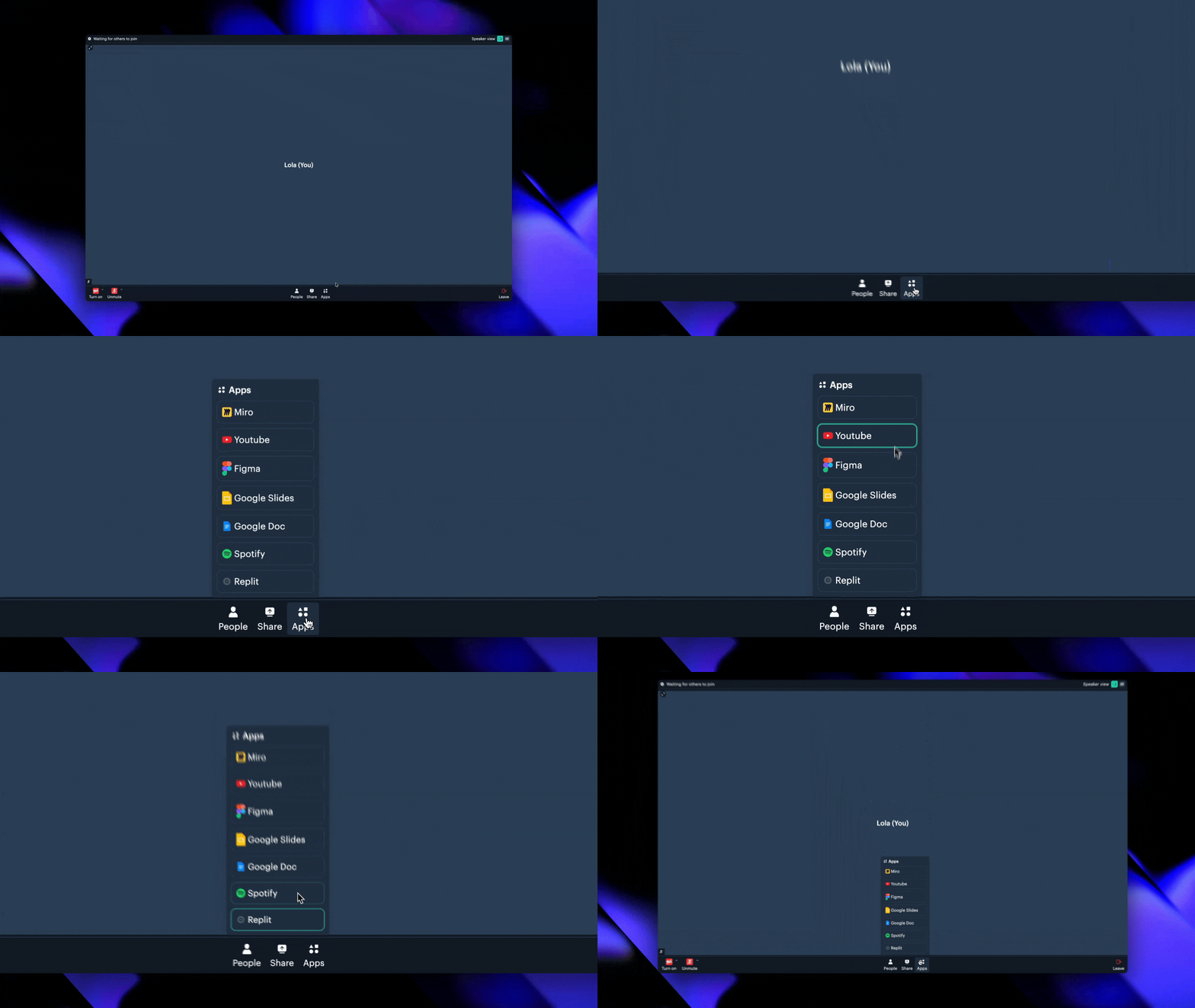
Embed third-party apps into your Daily Prebuilt calls to enhance collaboration. If it supports iframes, you can integrate it—whether it’s Miro, Google Docs, YouTube, or more.
## Video tutorial
If you prefer a video walkthrough, check out our step-by-step tutorial below. Otherwise, keep reading for the written guide:
[YouTube video player](https://www.youtube.com/embed/XUife1mLfSk?si=E9lV_6z6QbX8KAmb)
## Steps
## How to set multiple integrations
There are two ways to set multiple integrations:
1. **Set Custom Integration**: If you only need to add one or two integrations, you can use the [set custom integration](/bubble/daily/plugin-reference/actions/set-custom-integration).
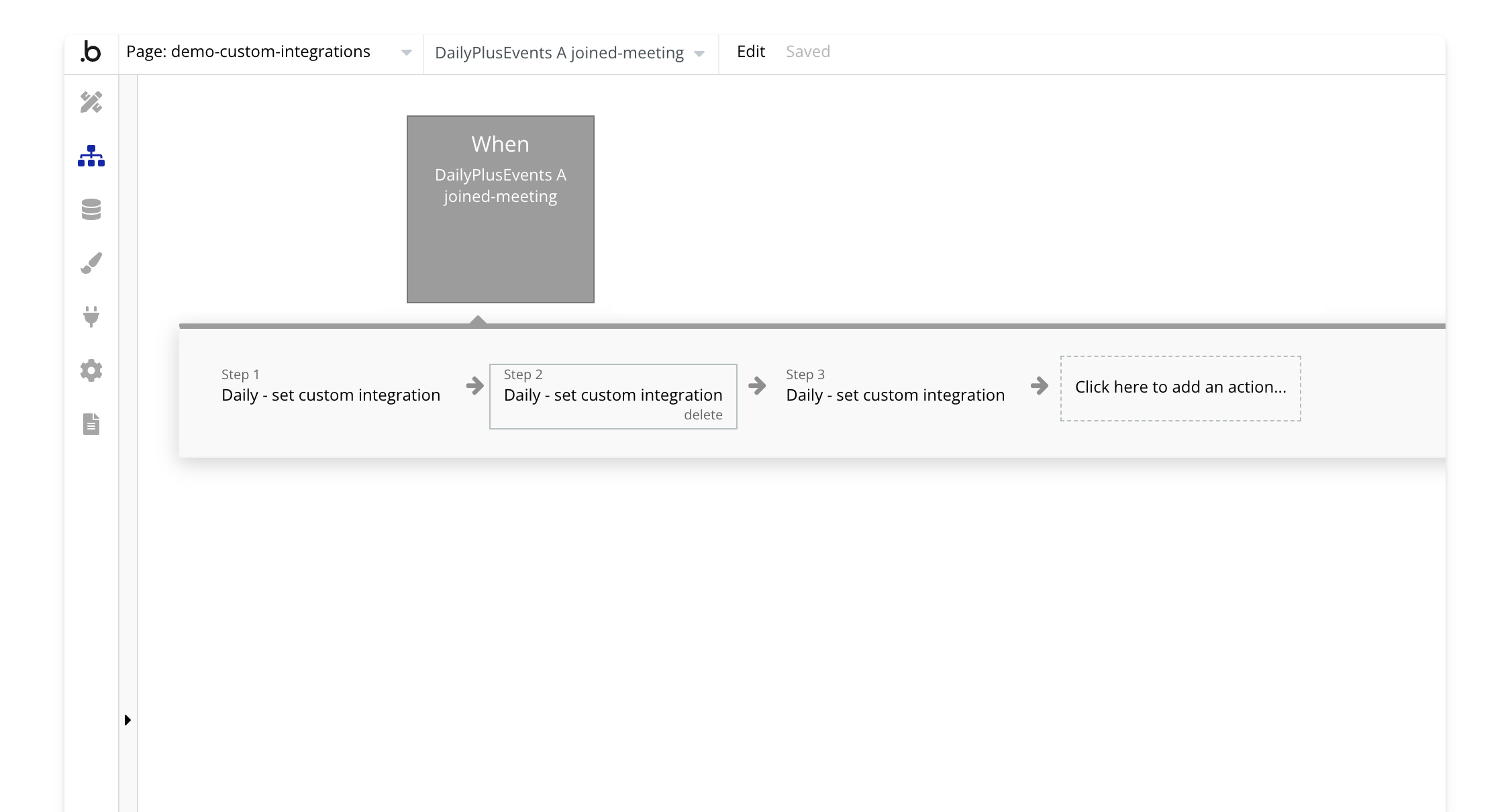
2. **Batch Set Custom Integration**: For adding multiple integrations, you can use the [batch set custom integration](/bubble/daily/plugin-reference/actions/batch-set-custom-integrations). This action takes a correctly formatted JSON object to set several integrations at once.
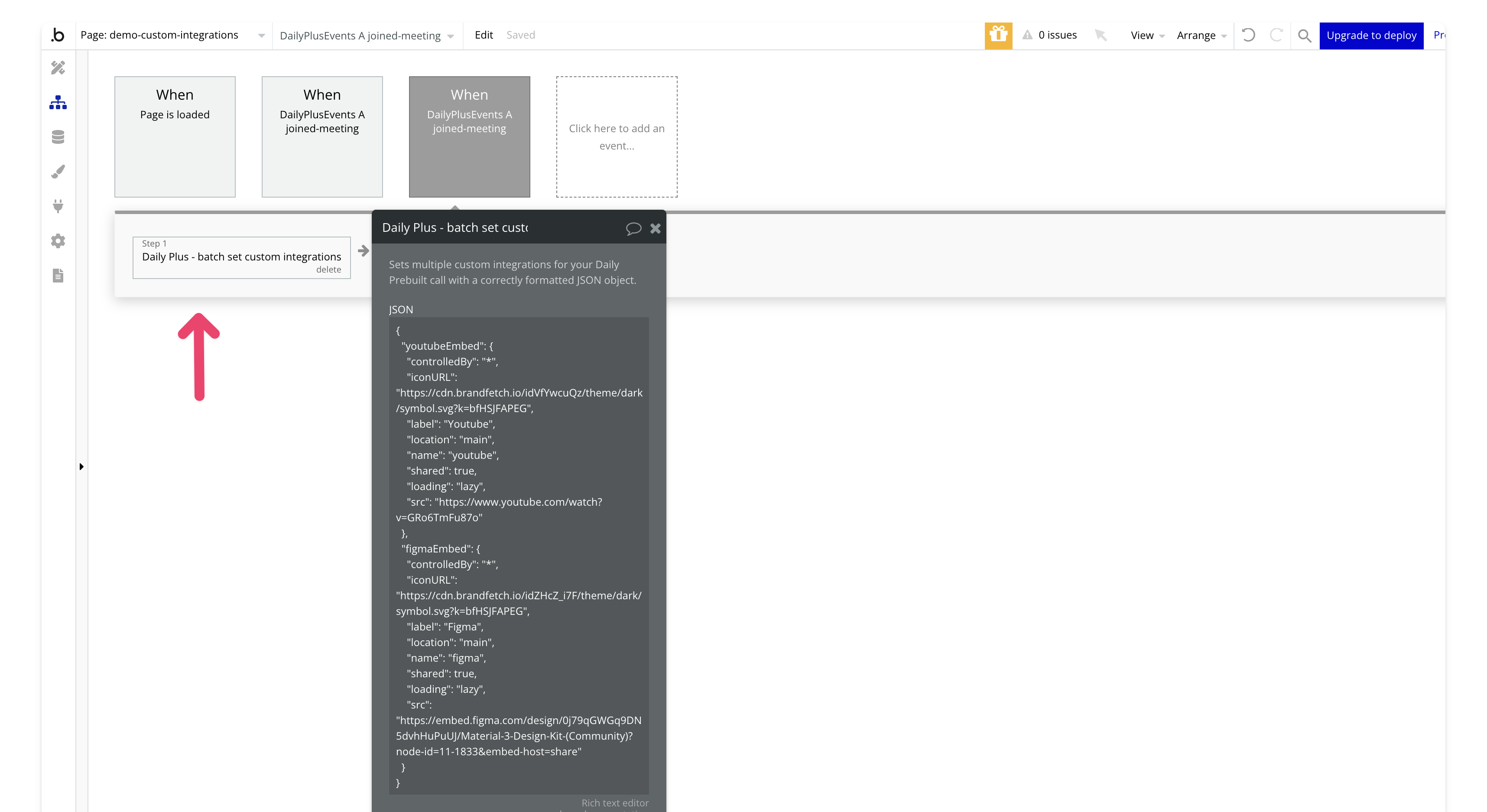
Here’s an example of how to correctly format a JSON object for multiple custom integrations. In this case, we've embedded a YouTube video and a Figma design. You can adapt the src, label, and other fields to match the services you want to integrate.
```json theme={null}
{
"youtubeEmbed": {
"controlledBy": "*",
"iconURL": "https://cdn.brandfetch.io/idVfYwcuQz/theme/dark/symbol.svg?k=bfHSJFAPEG",
"label": "Youtube",
"location": "main",
"name": "youtube",
"shared": true,
"loading": "lazy",
"src": "https://www.youtube.com/watch?v=GRo6TmFu87o"
},
"figmaEmbed": {
"controlledBy": "*",
"iconURL": "https://cdn.brandfetch.io/idZHcZ_i7F/theme/dark/symbol.svg?k=bfHSJFAPEG",
"label": "Figma",
"location": "main",
"name": "figma",
"shared": true,
"loading": "lazy",
"src": "https://embed.figma.com/design/0j79qGWGq9DN5dvhHuPuUJ/Material-3-Design-Kit-(Community)?node-id=11-1833&embed-host=share"
}
}
```
# Common Embed Examples
Here are some common examples of third-party embeds you can use:
### YouTube
```json theme={null}
{
"youtubeEmbed": {
"controlledBy": "*",
"iconURL": "https://cdn.brandfetch.io/idVfYwcuQz/theme/dark/symbol.svg?k=bfHSJFAPEG",
"label": "YouTube",
"location": "main",
"shared": true,
"loading": "lazy",
"src": "https://www.youtube.com/watch?v=YOUR_VIDEO_ID"
}
}
```
### Figma
```json theme={null}
{
"figmaEmbed": {
"controlledBy": "*",
"iconURL": "https://cdn.brandfetch.io/idZHcZ_i7F/theme/dark/symbol.svg?k=bfHSJFAPEG",
"label": "Figma",
"location": "main",
"shared": true,
"loading": "lazy",
"src": "https://embed.figma.com/design/YOUR_PROJECT_URL"
}
}
```
### Miro
```json theme={null}
{
"miroEmbed": {
"controlledBy": "*",
"iconURL": "https://files.readme.io/17d4a23-miro-logo-color-square.png",
"label": "Miro",
"location": "main",
"shared": true,
"loading": "lazy",
"src": "https://miro.com/app/live-embed/YOUR_BOARD_ID/"
}
}
```
### Google Docs
```json theme={null}
{
"googleDocEmbed": {
"controlledBy": "*",
"iconURL": "https://cdn-icons-png.flaticon.com/512/5968/5968517.png",
"label": "Google Docs",
"location": "main",
"shared": true,
"loading": "lazy",
"src": "https://docs.google.com/document/d/YOUR_DOCUMENT_ID/edit?usp=sharing"
}
}
```
### Google Slides
```json theme={null}
{
"googleSlidesEmbed": {
"controlledBy": "*",
"iconURL": "https://upload.wikimedia.org/wikipedia/commons/thumb/1/16/Google_Slides_2020_Logo.svg/440px-Google_Slides_2020_Logo.svg.png",
"label": "Google Slides",
"location": "main",
"shared": true,
"loading": "lazy",
"src": "https://docs.google.com/presentation/d/YOUR_PRESENTATION_ID/edit?usp=sharing"
}
}
```
### Spotify
```json theme={null}
{
"spotifyPlaylistEmbed": {
"controlledBy": "*",
"iconURL": "https://upload.wikimedia.org/wikipedia/commons/1/16/Spotify_logo_with_text.svg",
"label": "Spotify",
"location": "main",
"shared": true,
"loading": "lazy",
"src": "https://open.spotify.com/embed/playlist/YOUR_PLAYLIST_ID"
}
}
```
### Replit
```json theme={null}
{
"replitEmbed": {
"controlledBy": "*",
"iconURL": "https://upload.wikimedia.org/wikipedia/commons/b/b2/Repl.it_logo.svg",
"label": "Replit",
"location": "main",
"shared": true,
"loading": "lazy",
"src": "https://replit.com/@YOUR_USER/YOUR_PROJECT?embed=true"
}
}
```
> **[Need Help?](/support/plans)**
>
> View our options for free community and priority support.
> **[Have a feature request?](https://lunchpaillabs.canny.io/feature-requests?selectedCategory=daily-video-plugin-for-bubble)**
>
> Post your feature request on our
>
> [idea board.](https://lunchpaillabs.canny.io/feature-requests?selectedCategory=daily-video-plugin-for-bubble)
# Add webhooks
Source: https://tools.lunchpaillabs.com/bubble/daily/how-tos/add-webhooks
> [!WARNING]
>
> 🔐 Bundle plugin only: This action is exclusive to the [Video, Audio & Live
> Bundle](/bubble/video-audio-live-bundle/getting-started). Get the bundle
> plugin
> [here](https://bubble.io/plugin/video-audio--live-bundle-1727441795463x240182085842370560).
This guide explains how to add webhooks to notify your Bubble app about various events
in Daily. Note: Backend workflows are required, which are only available on [Bubble's
paid plans](https://bubble.io/pricing).
## Steps
### 1. Enable Backend Workflows
To receive webhooks in your app, go to the API tab in your app's settings and check **Enable Workflow API and backend workflows**.
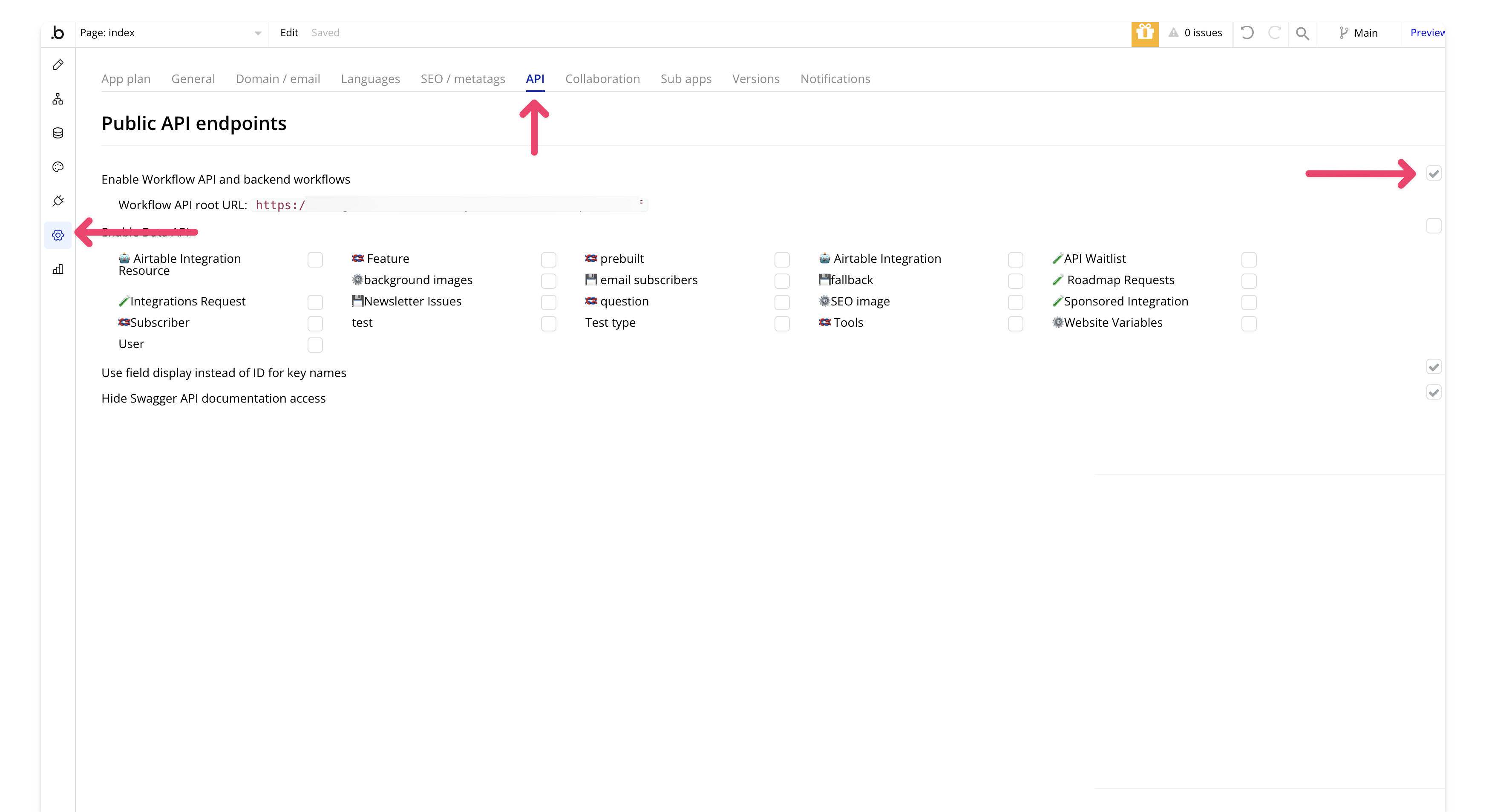
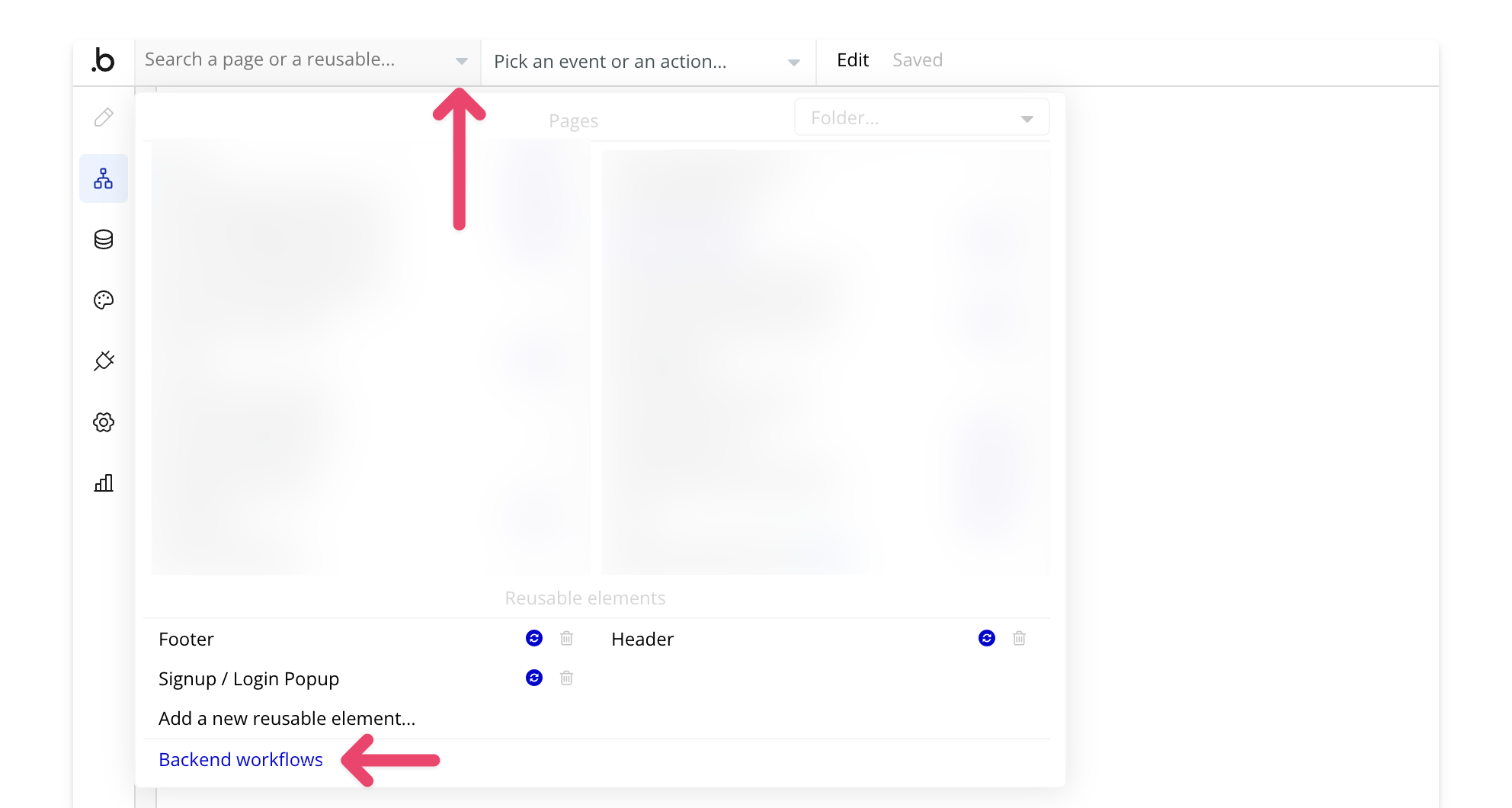
You should now see a new Backend Workflows section in your app.
### 2. Create a New API Workflow
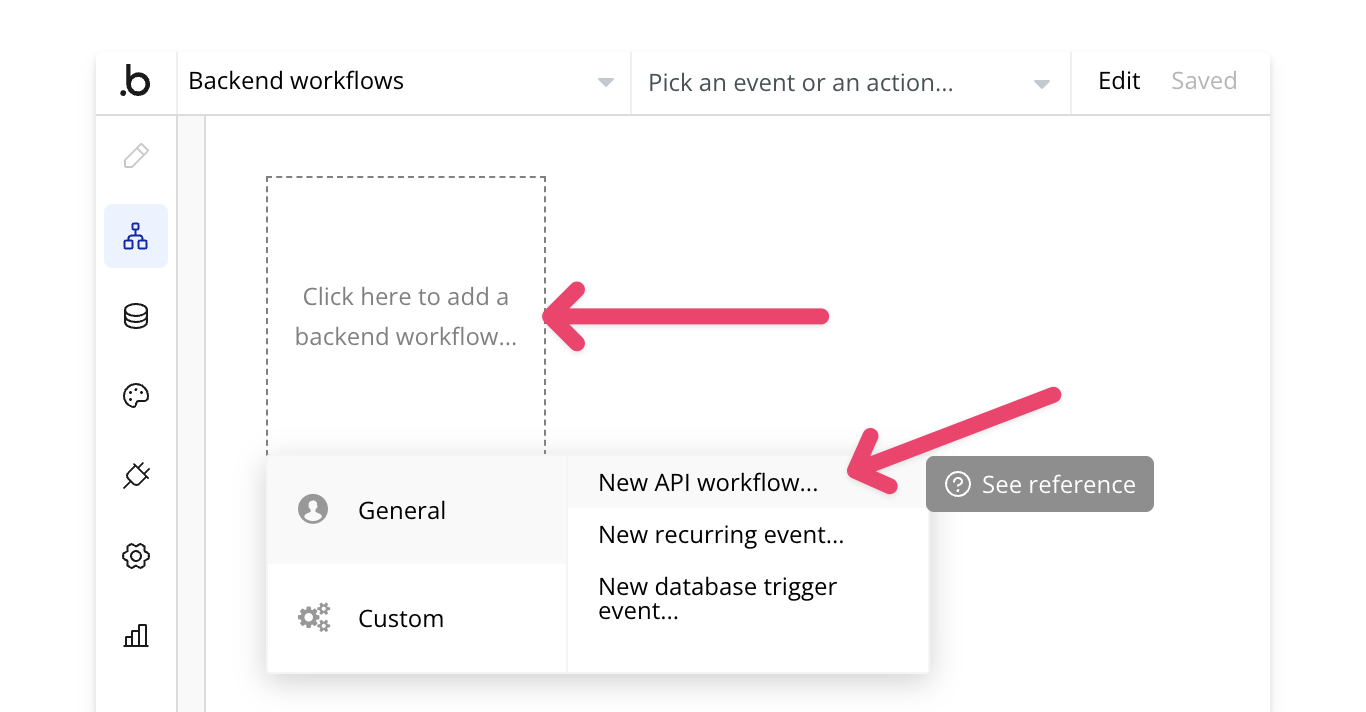
In Bubble, go to **Backend Workflows** and click **"Click here to add a new backend workflow"**. Select **New API Workflow**.
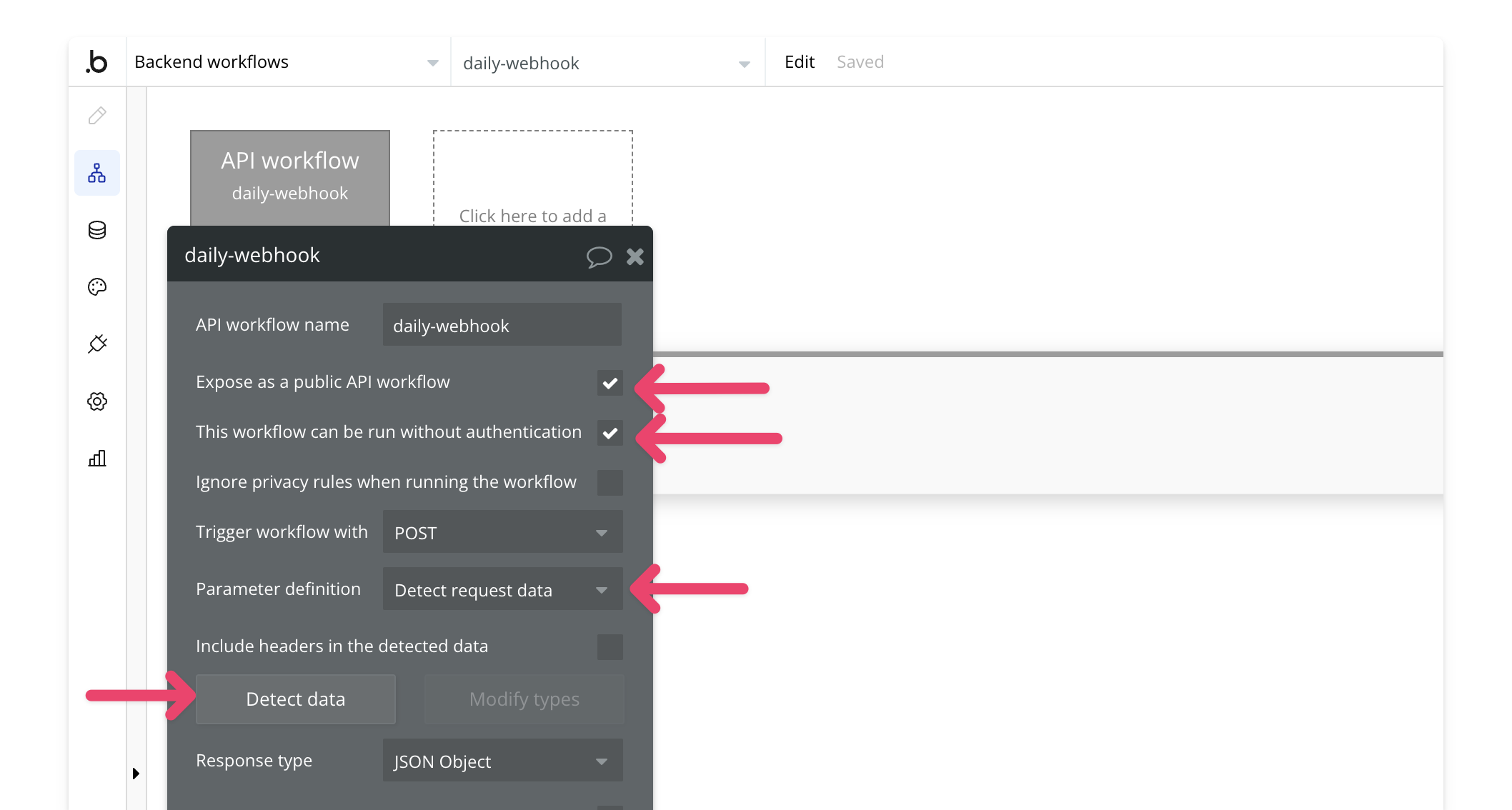
Give the workflow a name, check **"This workflow can be run without authentication"**, and set the parameter definition to **Detect Request Data**.
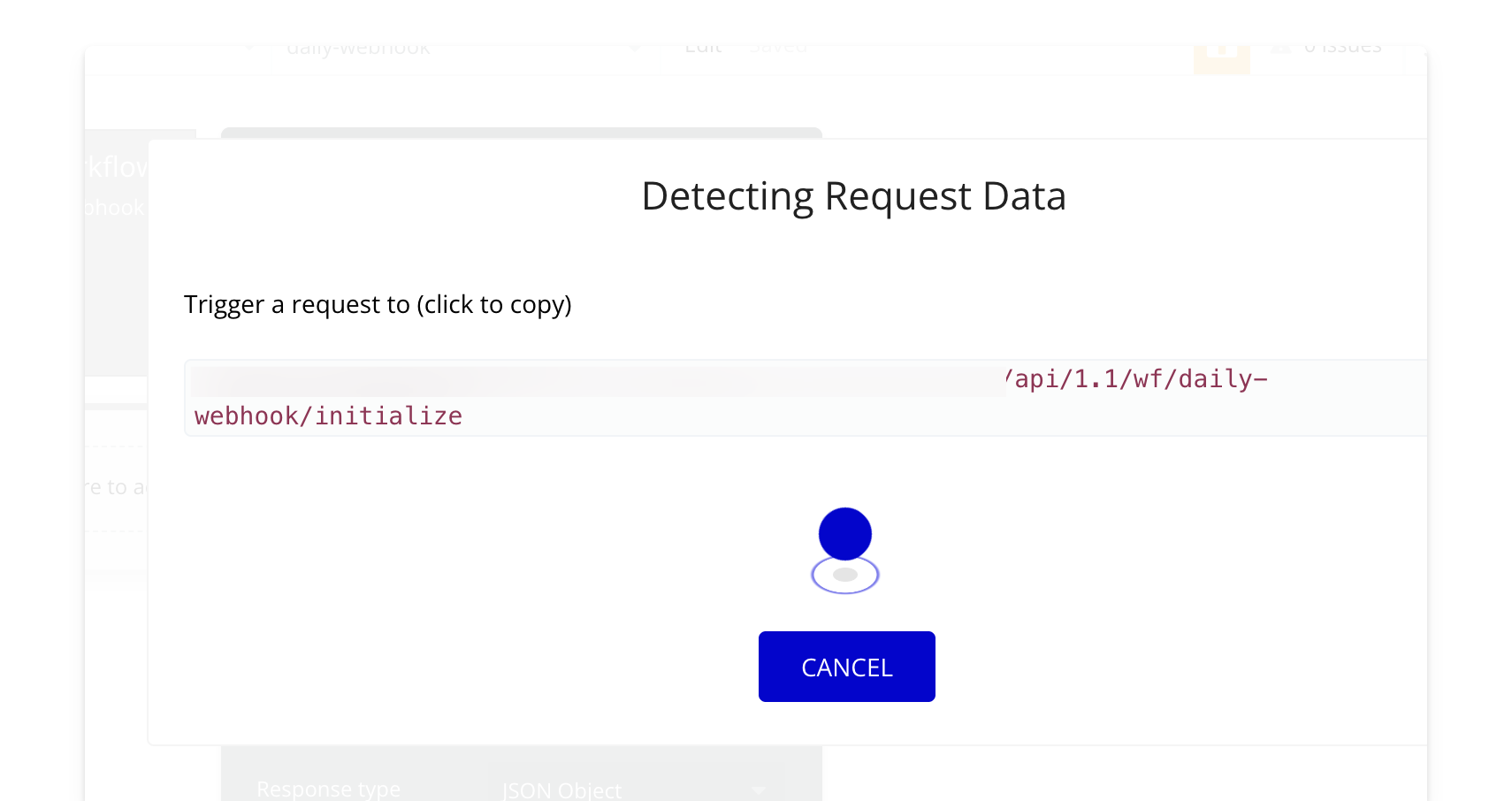
### 4. Detect Data
In **Backend Workflows**, select **Detect Data**. Open another tab with your Bubbles editor to create a workflow that initializes the webhook.
### 5. Create a Webhook
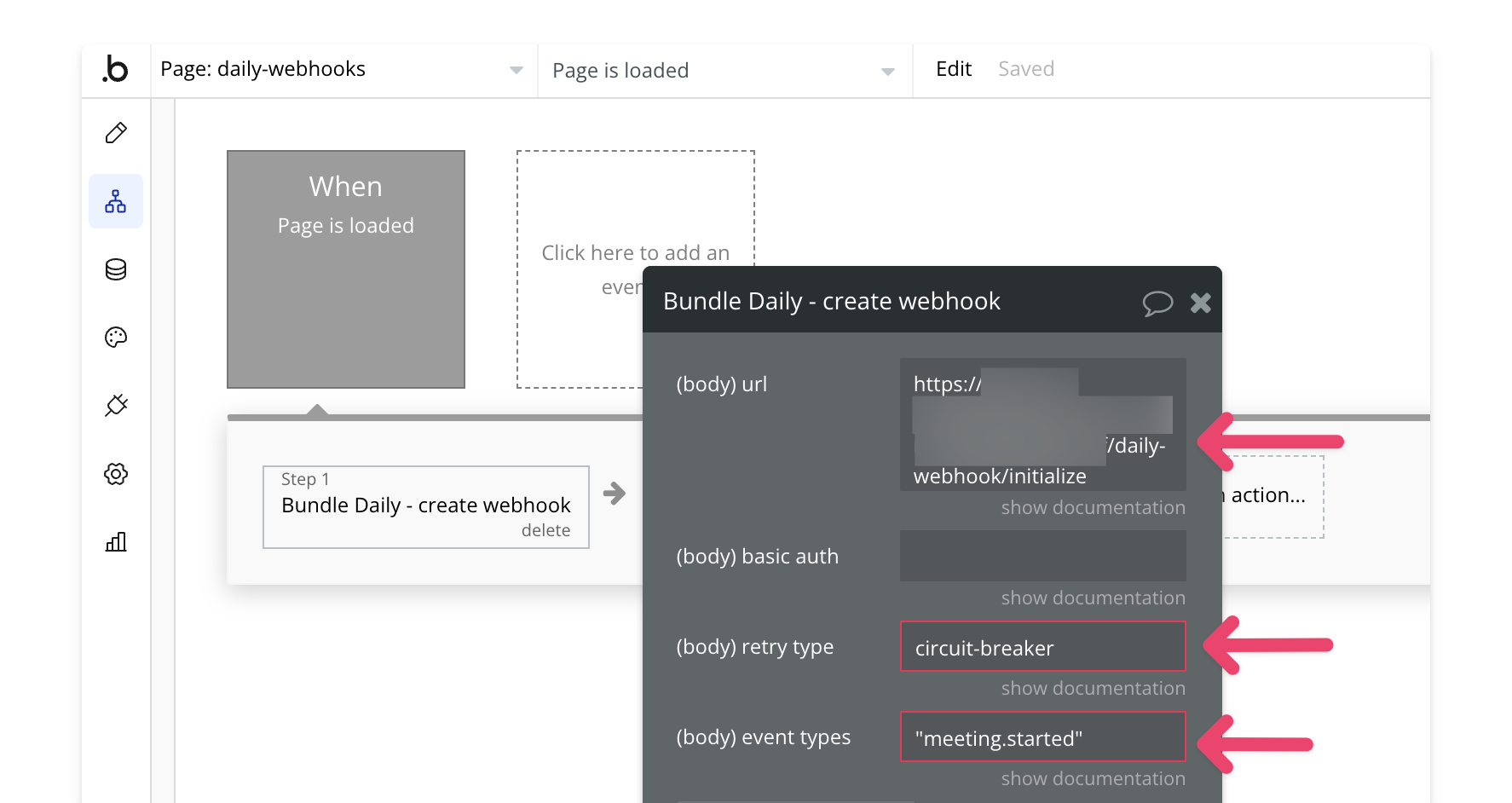
Use the [Create Webhook](/bubble/daily/plugin-reference/actions/create-webhook) action to set up a webhook. In this example, the webhook is initialized on page load, but you can trigger it from any workflow in your app. Note: Only one webhook is allowed per Daily domain.
Add the initialized URL from the previous step, leave basic authentication blank, and set the retry type to **Circuit Breaker**. For event types, refer to [Daily's documentation](https://docs.daily.co/reference/rest-api/webhooks/events) and specify the events you want.
To include multiple events, separate them with commas and wrap each in quotes. Example:
`"meeting.started", "recording.ready-to-download"`
### 6. Update the Webhook
After initializing the webhook, update it with the actual domain using the [Update Webhook](/bubble/daily/plugin-reference/actions/update-webhook) action.
The UUID will be the webhook created in the previous step. The other fields will remain the same as in the previous step, but the URL should be updated to remove the `/initialize` at the end.
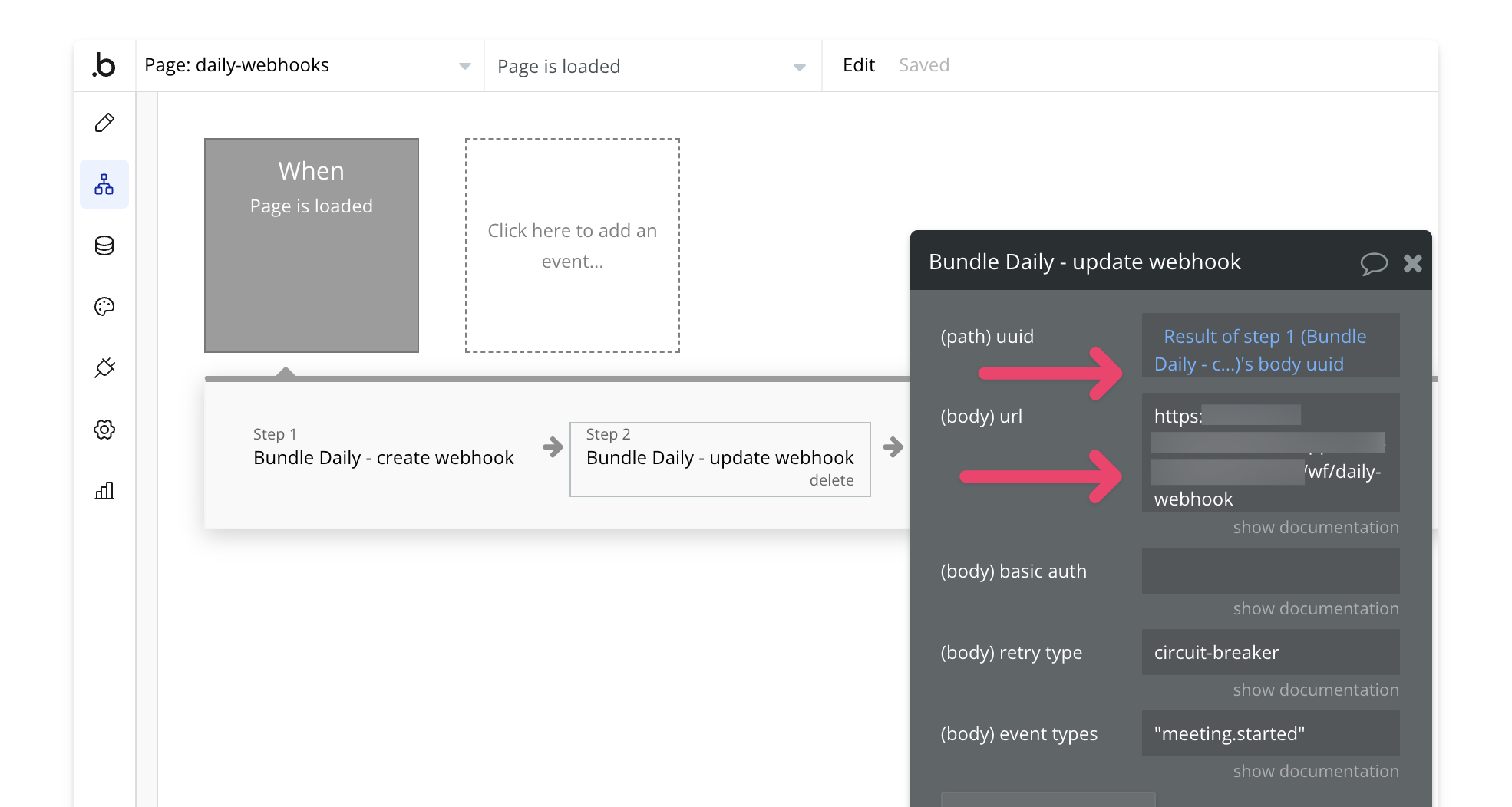
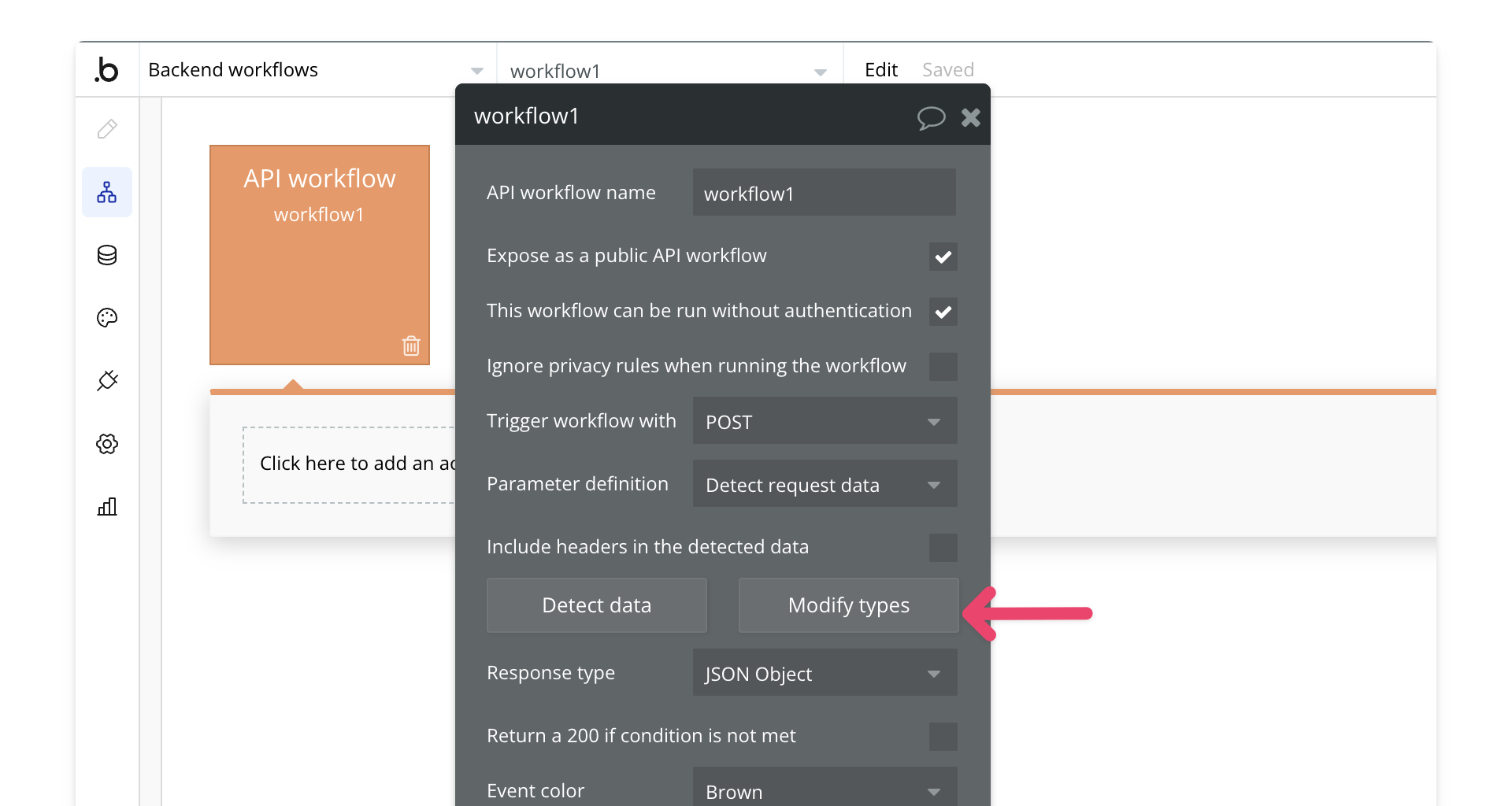
### 7. Update the Response Format
In **Backend Workflows**, select **Modify Types** for the backend workflow you created in Step 2.
Next, select **Edit Raw Data**.
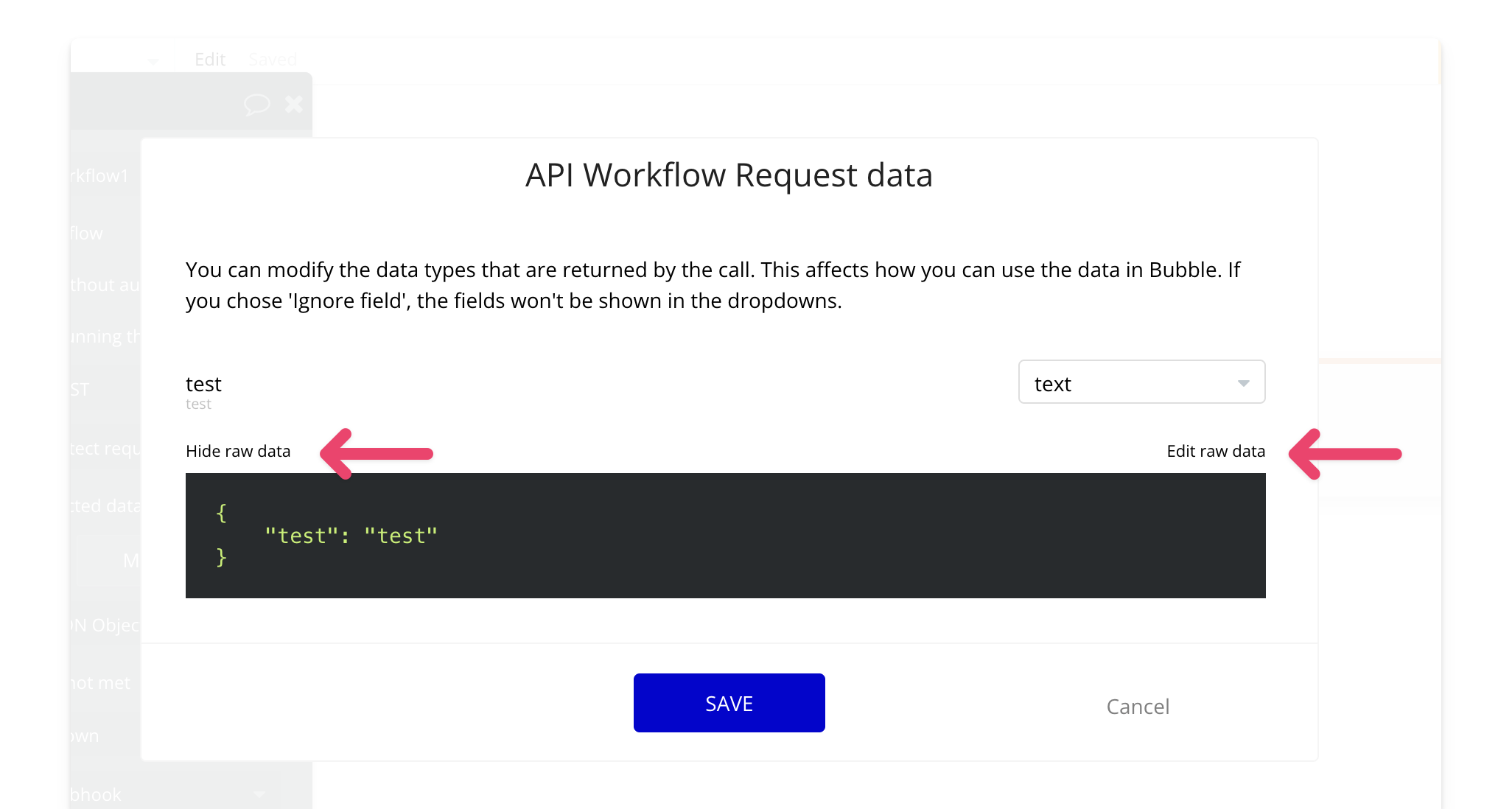
For each webhook event you want to handle, update the response to match the required payload format. You can find the payload format for specific event types in [Daily's documentation](https://docs.daily.co/reference/rest-api/webhooks/events).
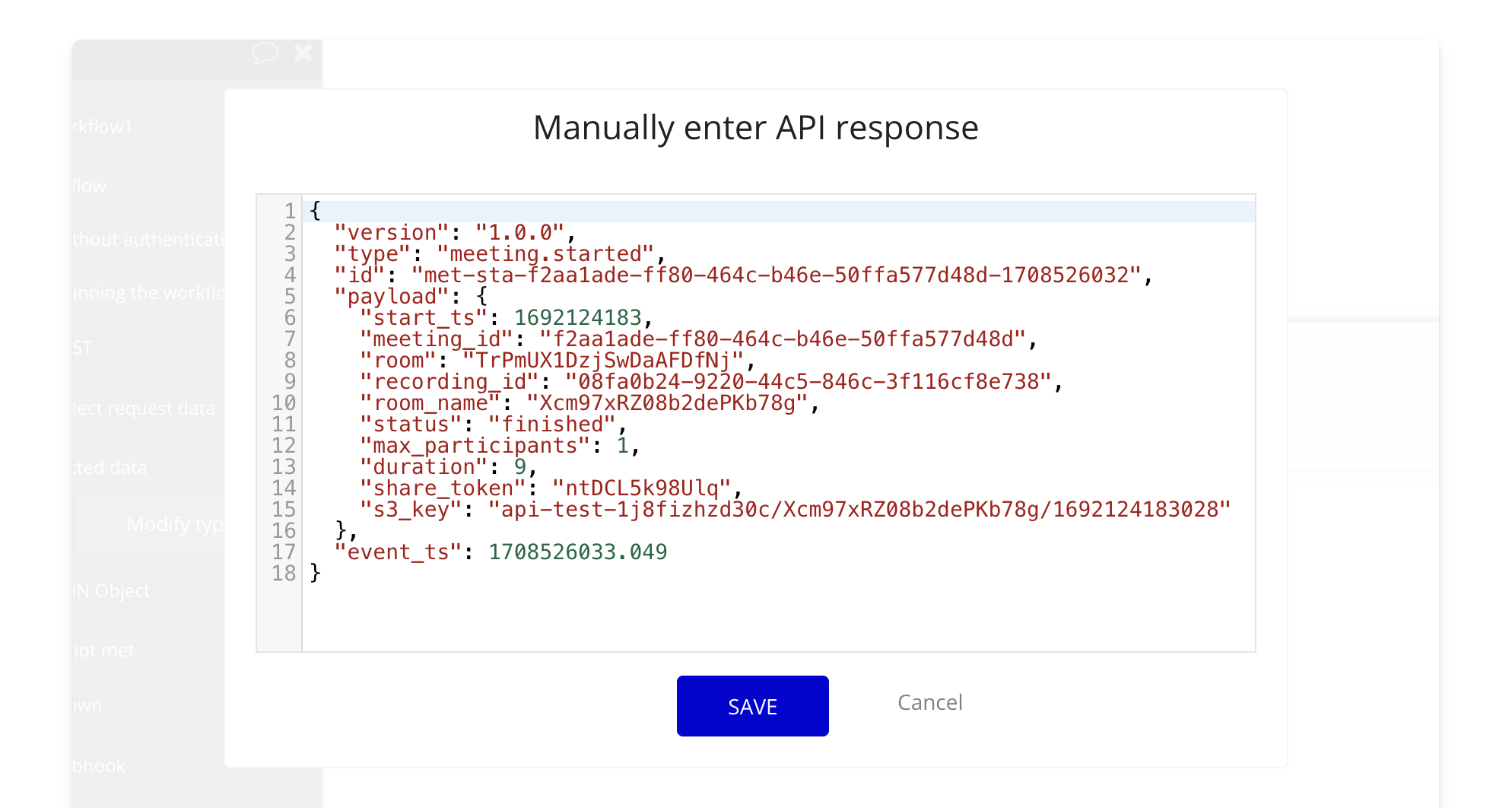
Example: **Meeting Started Payload**
```json theme={null}
{
"version": "1.0.0",
"type": "meeting.started",
"id": "met-sta-f2aa1ade-ff80-464c-b46e-50ffa577d48d-1708526032",
"payload": {
"start_ts": 1708526032.672,
"meeting_id": "f2aa1ade-ff80-464c-b46e-50ffa577d48d",
"room": "TrPmUX1DzjSwDaAFDfNj"
},
"event_ts": 1708526033.049
}
```
For multiple events (e.g., **Recording Ready to Download** and **Meeting Started**), the payload would look like this:
```json theme={null}
{
"version": "1.0.0",
"type": "meeting.started",
"id": "met-sta-f2aa1ade-ff80-464c-b46e-50ffa577d48d-1708526032",
"payload": {
"start_ts": 1692124183,
"meeting_id": "f2aa1ade-ff80-464c-b46e-50ffa577d48d",
"room": "TrPmUX1DzjSwDaAFDfNj",
"recording_id": "08fa0b24-9220-44c5-846c-3f116cf8e738",
"room_name": "Xcm97xRZ08b2dePKb78g",
"status": "finished",
"max_participants": 1,
"duration": 9,
"share_token": "ntDCL5k98Ulq",
"s3_key": "api-test-1j8fizhzd30c/Xcm97xRZ08b2dePKb78g/1692124183028"
},
"event_ts": 1708526033.049
}
```
### 8. Finalize the Workflow
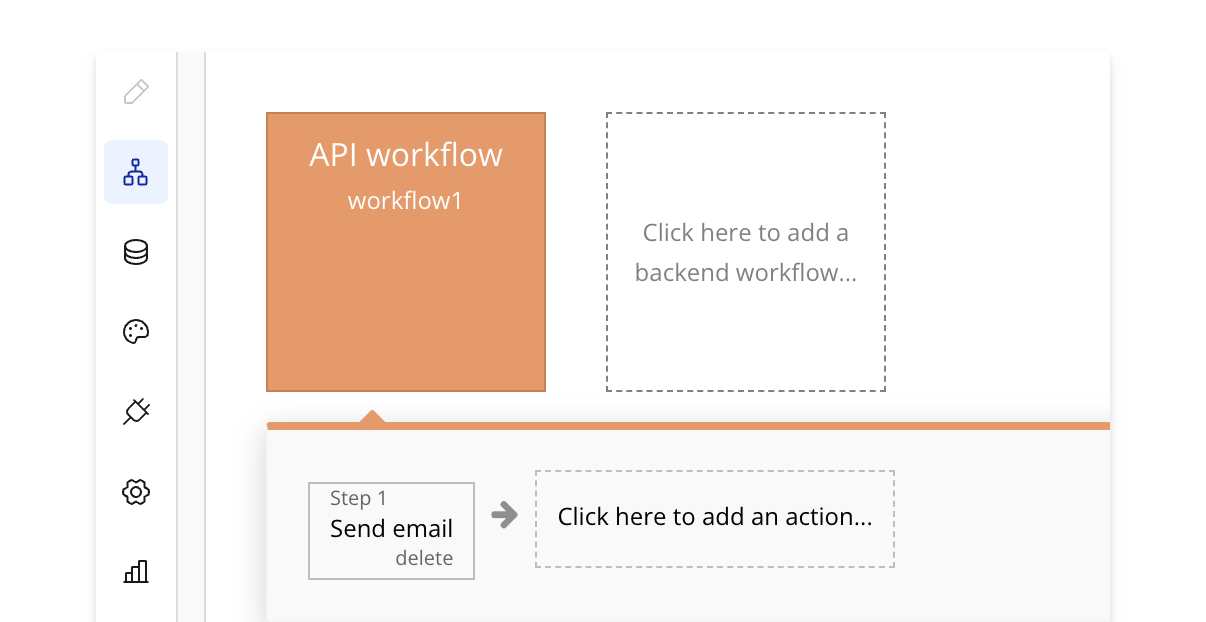
Your webhook is now successfully set up, and you can handle events in your app. For example, you could trigger an email notification or perform any other action when an event occurs.
> **[Need Help?](/support/plans)**
>
> View our options for free community and priority support.
> **[Have a feature request?](https://lunchpaillabs.canny.io/feature-requests?selectedCategory=daily-video-plugin-for-bubble)**
>
> Post your feature request on our
>
> [idea board.](https://lunchpaillabs.canny.io/feature-requests?selectedCategory=daily-video-plugin-for-bubble)
# Build a livestream app (with Daily + Mux)
Source: https://tools.lunchpaillabs.com/bubble/daily/how-tos/build-livestream-daily-mux
> [!WARNING]
>
> 🔐 Bundle plugin only: This action is exclusive to the [Video, Audio & Live
> Bundle](/bubble/video-audio-live-bundle/getting-started). Get the bundle
> plugin
> [here](https://bubble.io/plugin/video-audio--live-bundle-1727441795463x240182085842370560).
> [!NOTE]
>
> Live streams are pay-as-you-go. You'll need to add your [credit card details
> to your Daily account](https://dashboard.daily.co/billing) to enable it.
# What We’ll Build
In this series, we’ll build a live-streaming app that streams directly within Bubble using the [**Video, Audio & Live Bundle**](https://bubble.io/plugin/video-audio--live-bundle-1727441795463x240182085842370560) by Lunch Pail Labs.
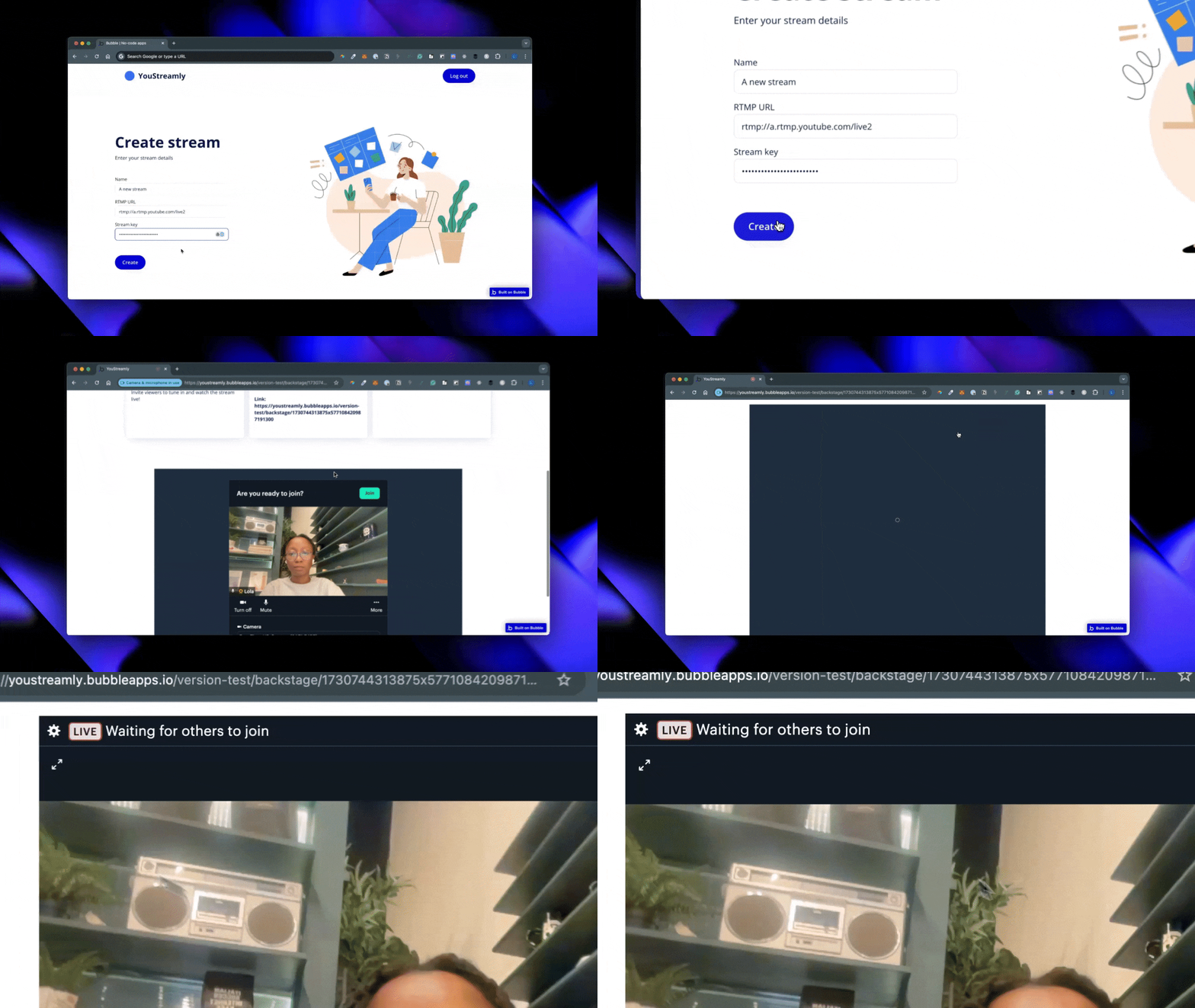
This app is ideal for use cases where users want to host live streams without external platforms like YouTube or Twitch. It integrates Bubble, Daily, and Mux (all included in the bundle) to provide a seamless experience.
Our app will include these features:
* **User Sign-Up & Login**: A simple interface for account creation and access.
* **Stream Creation & Configuration**: Users can create live streams, set details, and share links for others to join. The streams will play directly within the Bubble app.
* **Backstage Area**: A backstage view for hosts and participants to prepare for live streaming.
This setup is perfect for Q\&As, webinars, or virtual meetups hosted directly in Bubble.
# View the Sample Project
You can check out the finished version in the [**sample editor**](https://bubble.io/page?id=youstreamly-bubble-daily-mux\&tab=Design\&name=index\&type=page). Note that, for security reasons, sign-ups are disabled, and API keys have been removed.
# Series Overview
* **Part 1**: [Setting Up Bubble and Installing the Bundle](https://lunchpaillabs.com/blog/create-a-live-streaming-app-with-bubble-daily-mux-part-1)
* **Part 2**: [Designing the Home Page and Creating Stream Workflows](https://lunchpaillabs.com/blog/create-a-live-streaming-app-with-bubble-daily-mux-part-2)
* **Part 3**: [Designing the Backstage View and Going Live](https://lunchpaillabs.com/blog/create-a-live-streaming-app-with-bubble-daily-mux-part-3)
By the end of this series, you’ll have a fully functional live-streaming app for hosting events directly within your Bubble app.
> **[Need Help?](/support/plans)**
>
> View our options for free community and priority support.
> **[Have a feature request?](https://lunchpaillabs.canny.io/feature-requests?selectedCategory=daily-video-plugin-for-bubble)**
>
> Post your feature request on our
>
> [idea board.](https://lunchpaillabs.canny.io/feature-requests?selectedCategory=daily-video-plugin-for-bubble)
# Build a livestream to Youtube app
Source: https://tools.lunchpaillabs.com/bubble/daily/how-tos/build-livestream-to-youtube
> [!NOTE]
>
> Live streams are pay-as-you-go. You'll need to add your [credit card details
> to your Daily account](https://dashboard.daily.co/billing) to enable it.
# What We’ll Build
In this series, we’ll build a live streaming app that broadcasts directly to YouTube using the [**Daily Video Conferencing Plugin**](https://bubble.io/plugin/daily-video-conferencing--chat-1622494385281x917140771709124600).
Our app will include essential features:
* **User Sign-Up & Login**: A simple interface for account creation and access.
* **Stream Creation & Configuration**: Users can create live streams, set details, and share a link for others to join.
* **Backstage Area**: A backstage view for hosts and participants to join and prepare for live streaming.
Whether for Q\&As, webinars, or virtual meetups, this app will allow users to bring audiences together on YouTube with a few clicks.

# View the Sample Project
While the series walks you through each step, you can also explore a finished version in the [**sample editor**](https://bubble.io/page?id=youstreamly-33216\&tab=tabs-1\&name=index). Please note that, for security, sign-ups are disabled and API keys have been removed.
# Series Overview
* **Part 1**: [Setting Up Bubble and Installing the Plugin](https://lunchpaillabs.com/blog/create-a-youtube-live-streaming-app-with-bubble-part-1)
* **Part 2**: [Designing the Home Page and Creating Stream Workflows](https://lunchpaillabs.com/blog/create-a-youtube-live-streaming-app-with-bubble-part-2)
* **Part 3**: [Designing the Backstage View and Going Live](https://lunchpaillabs.com/blog/create-a-youtube-live-streaming-app-with-bubble-part-3)
By the end, you’ll have a fully functional live-streaming app with all the essentials for sharing live events on YouTube.
> **[Need Help?](/support/plans)**
>
> View our options for free community and priority support.
> **[Have a feature request?](https://lunchpaillabs.canny.io/feature-requests?selectedCategory=daily-video-plugin-for-bubble)**
>
> Post your feature request on our
>
> [idea board.](https://lunchpaillabs.canny.io/feature-requests?selectedCategory=daily-video-plugin-for-bubble)
# Customize a recording
Source: https://tools.lunchpaillabs.com/bubble/daily/how-tos/customize-a-recording
> [!NOTE]
>
> Recordings are pay-as-you-go. You'll need to add your [credit card details to
> your Daily account](https://dashboard.daily.co/billing) to enable it.
> Customizations only apply to rooms with `cloud` recordings enabled.
To customize the settings of a Daily recording you can use the [start recording](/bubble/daily/plugin-reference/actions/start-recording) or [update recording](/bubble/daily/plugin-reference/actions/update-recording) actions to do so. This guide walks you through how to update recording settings using recording events.
## 1. Add the daily events element
Place the **Daily Events** element on your page. A common practice is to place it inside a hidden popup that stays offscreen, allowing it to listen for events without being visible.

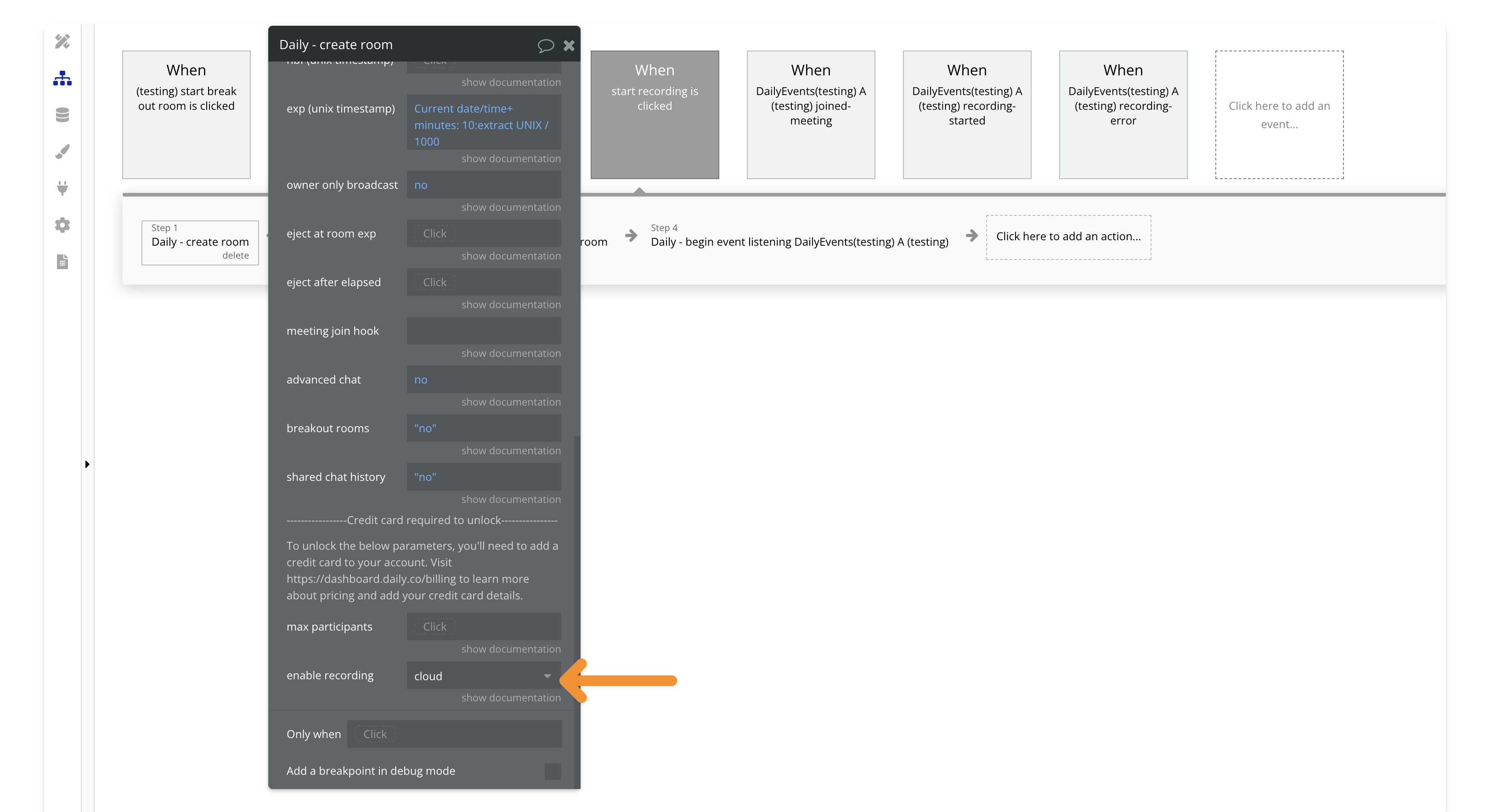
## 2. Enable cloud recording for your room
When creating or updating a room, set the recording type to **cloud**. Customization options are only available for cloud recordings.
## 3. Join the room and start listening for events
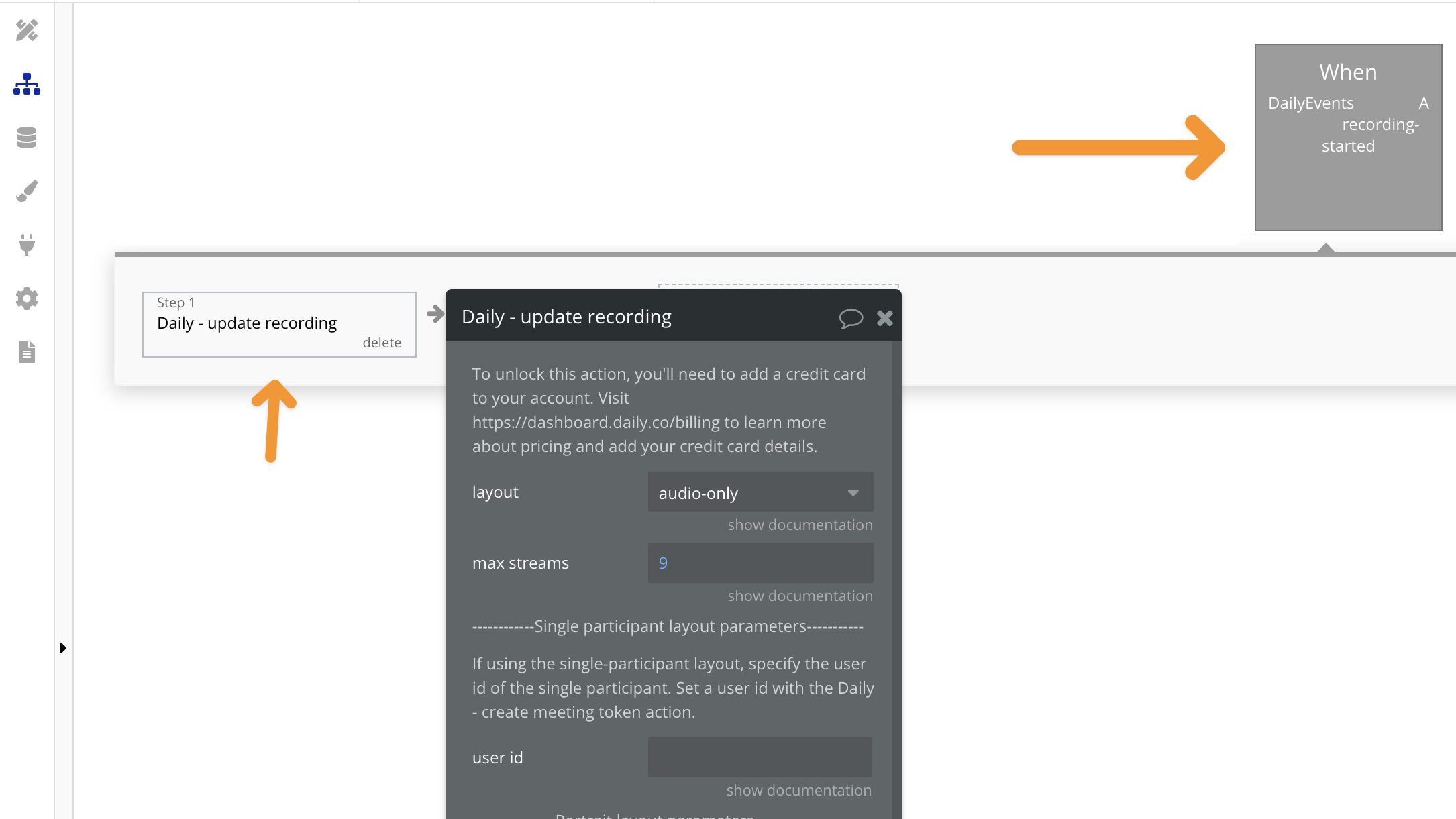
After joining the room, make sure to add the **"begin listening"** action. This step is crucial to ensure Bubble can capture and process the recording events. We’ll listen for the **recording-started** event, which will trigger the update of your recording layout.

## 4. Add the recording-started event and the update recording action
Next, add the **recording-started** event and include the action to update the recording settings, such as layout, bitrate, or resolution.
***
> **[Need Help?](/support/plans)**
>
> View our options for free community and priority support.
> **[Have a feature request?](https://lunchpaillabs.canny.io/feature-requests?selectedCategory=daily-video-plugin-for-bubble)**
>
> Post your feature request on our
>
> [idea board.](https://lunchpaillabs.canny.io/feature-requests?selectedCategory=daily-video-plugin-for-bubble)
# Customize the video call position
Source: https://tools.lunchpaillabs.com/bubble/daily/how-tos/customize-the-position
Customizing the position of your video call allows you to place it exactly where you want on the page.
If you prefer a video walkthrough, check out our step-by-step tutorial below. Otherwise, keep reading for the written guide:
[YouTube video player](https://www.youtube.com/embed/YAYC_YXIhaQ)
Here’s how to set it up:
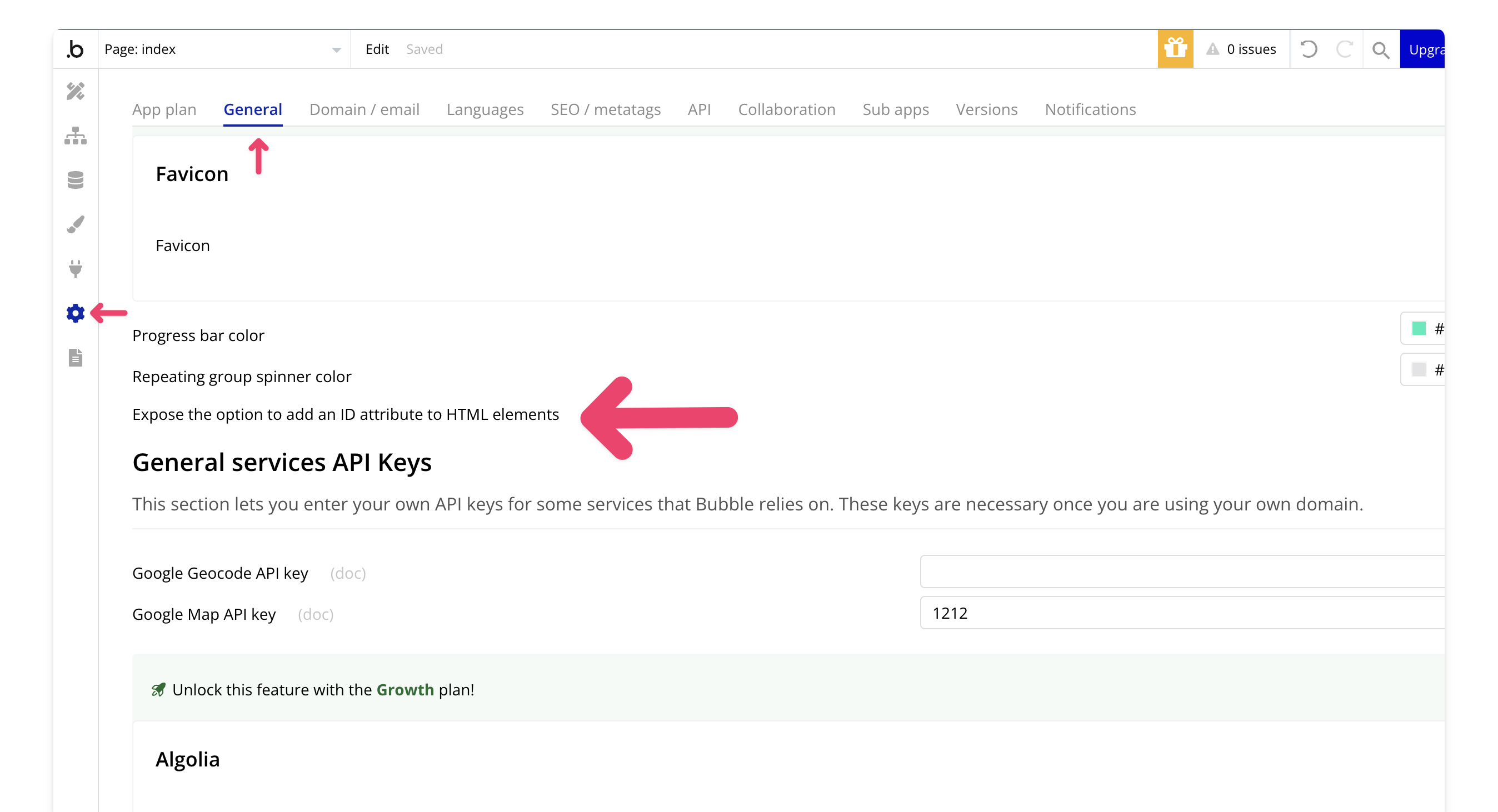
## 1. Enable the option to add an ID attribute to HTML elements
In the General tab of your settings, allow users to add an ID attribute to HTML elements.
## 2. Create a group for the video
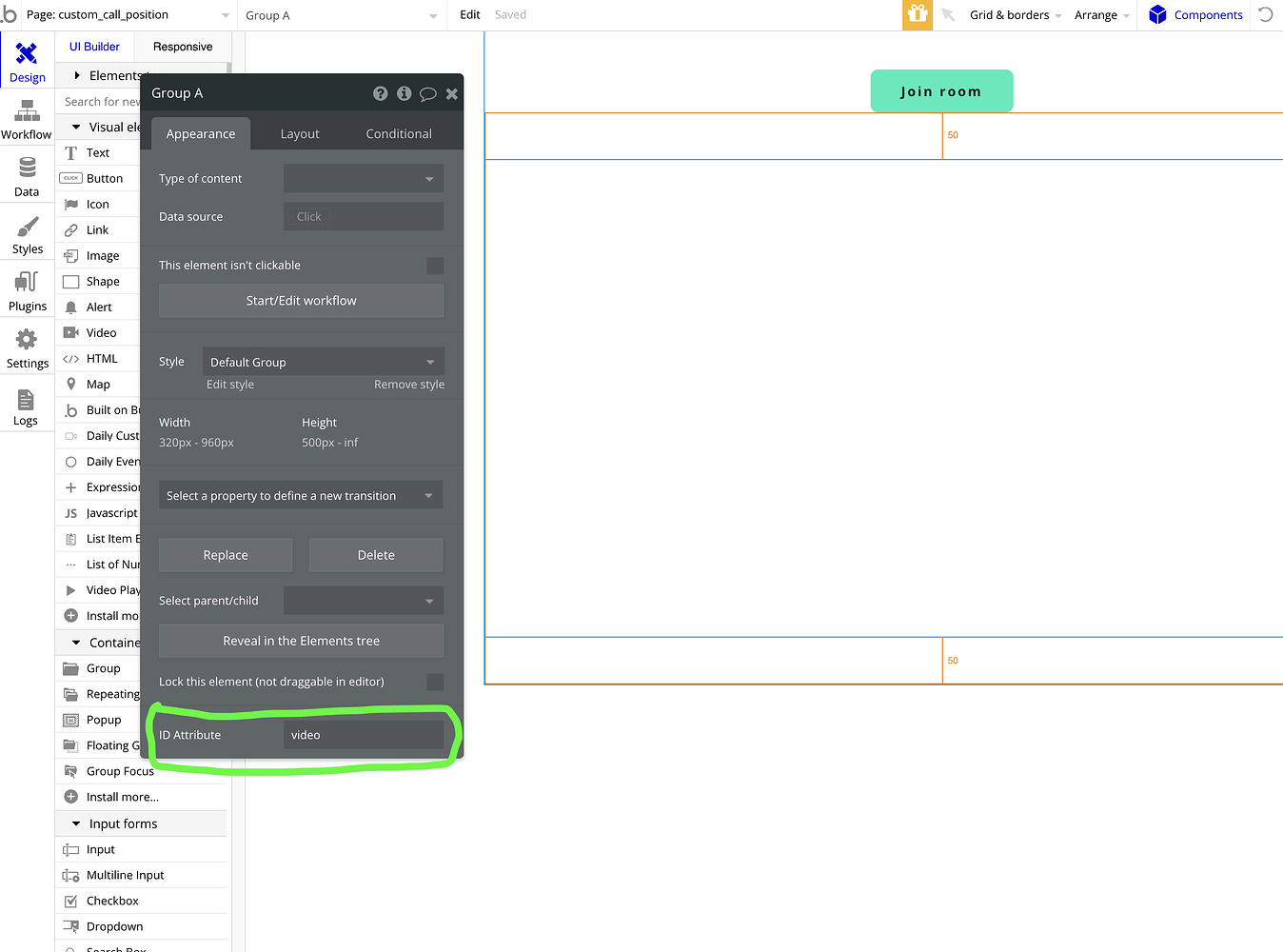
Start by creating a group on your page where you'd like the video to appear. Define its size, position, and width. After that, add the element ID to the group.
## 3. Select custom position in the join call action
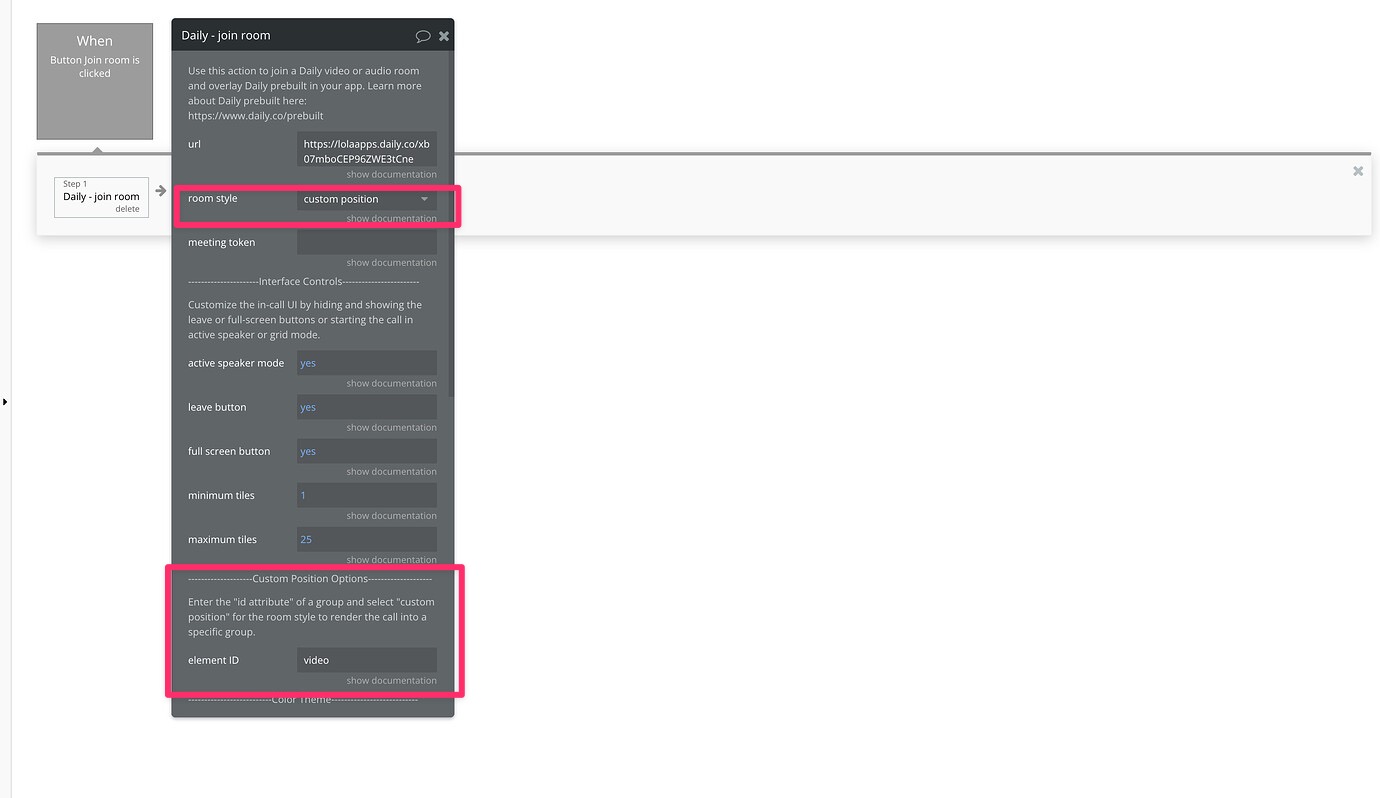
When joining the room, choose the custom position option. Then, input the element ID for the group you created, so the video overlays on top of it.
> **[Need Help?](/support/plans)**
>
> View our options for free community and priority support.
> **[Have a feature request?](https://lunchpaillabs.canny.io/feature-requests?selectedCategory=daily-video-plugin-for-bubble)**
>
> Post your feature request on our
>
> [idea board.](https://lunchpaillabs.canny.io/feature-requests?selectedCategory=daily-video-plugin-for-bubble)
# Enable breakout rooms
Source: https://tools.lunchpaillabs.com/bubble/daily/how-tos/enable-breakout-rooms
Breakout rooms allow you to split participants into smaller groups during a call. If you prefer a video walkthrough, check out our step-by-step tutorial below. Otherwise, keep reading for the written guide:
[YouTube video player](https://www.youtube.com/embed/8pqCwj-7i8k)
Here’s how to set it up:
## 1. Enable breakout rooms in room settings
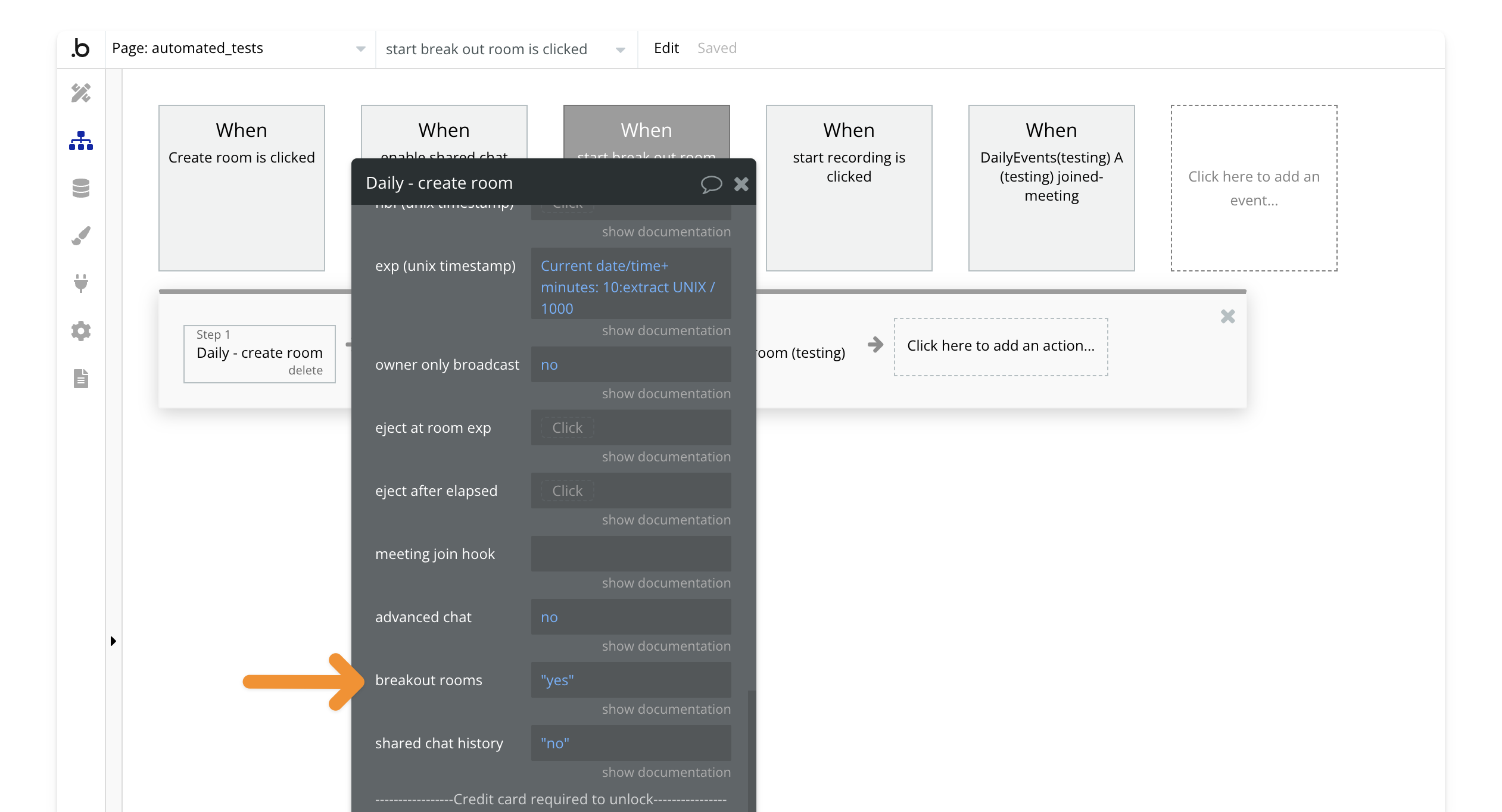
When creating or updating a room, set the `enable breakout rooms` field to `yes` in the [create room](/bubble/daily/plugin-reference/actions/create-room) or [update room](/bubble/daily/plugin-reference/actions/update-room) actions.
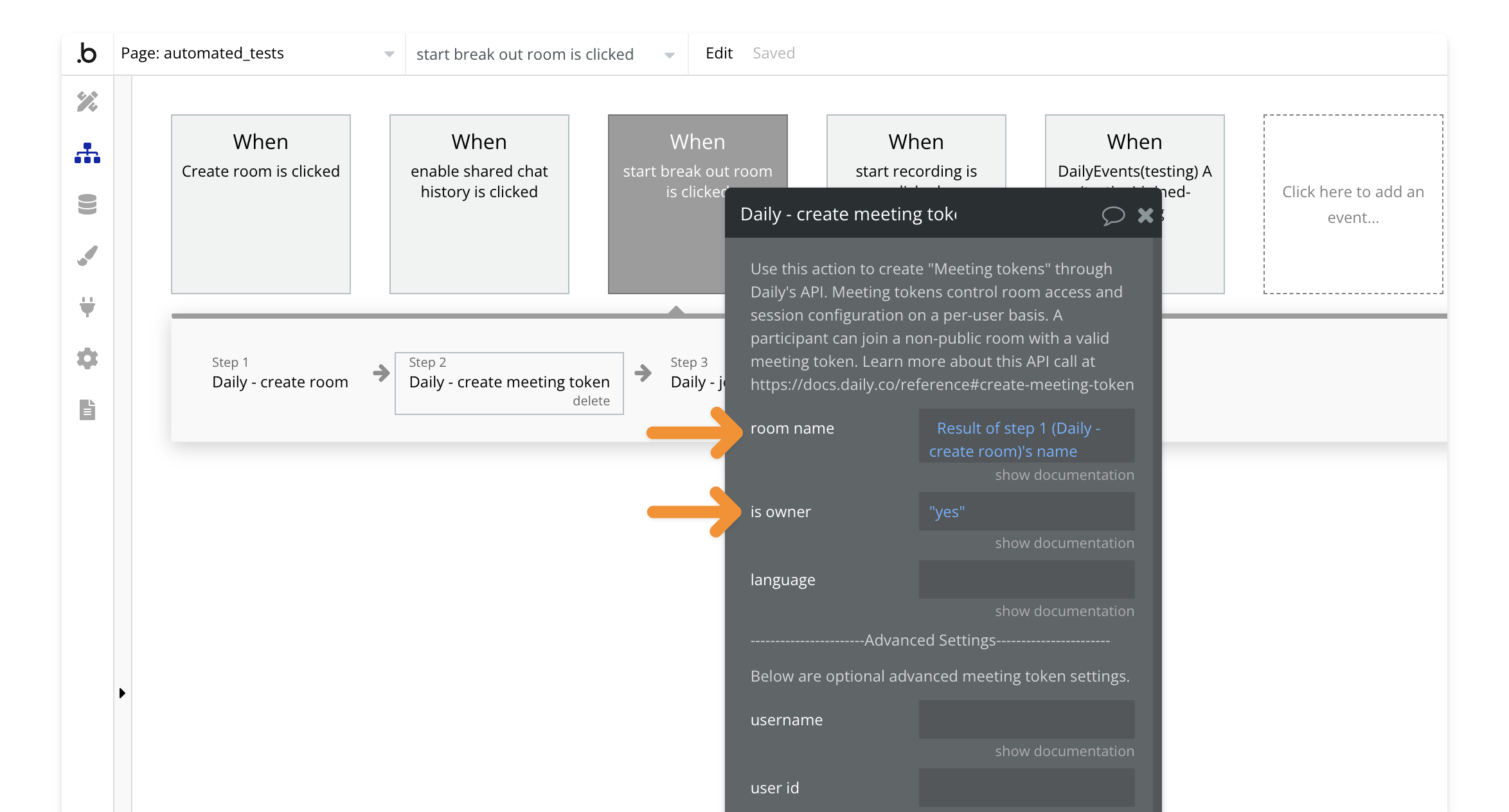
## 2. Create a meeting token for the room owner
To allow someone to create breakout rooms, they need to be the room owner. Use the [create meeting token](/bubble/daily/plugin-reference/actions/create-meeting-token) action, set the `room name` to the room created in [Step 1](#1-enable-breakout-rooms-in-room-settings), and mark `is owner` as `yes`.
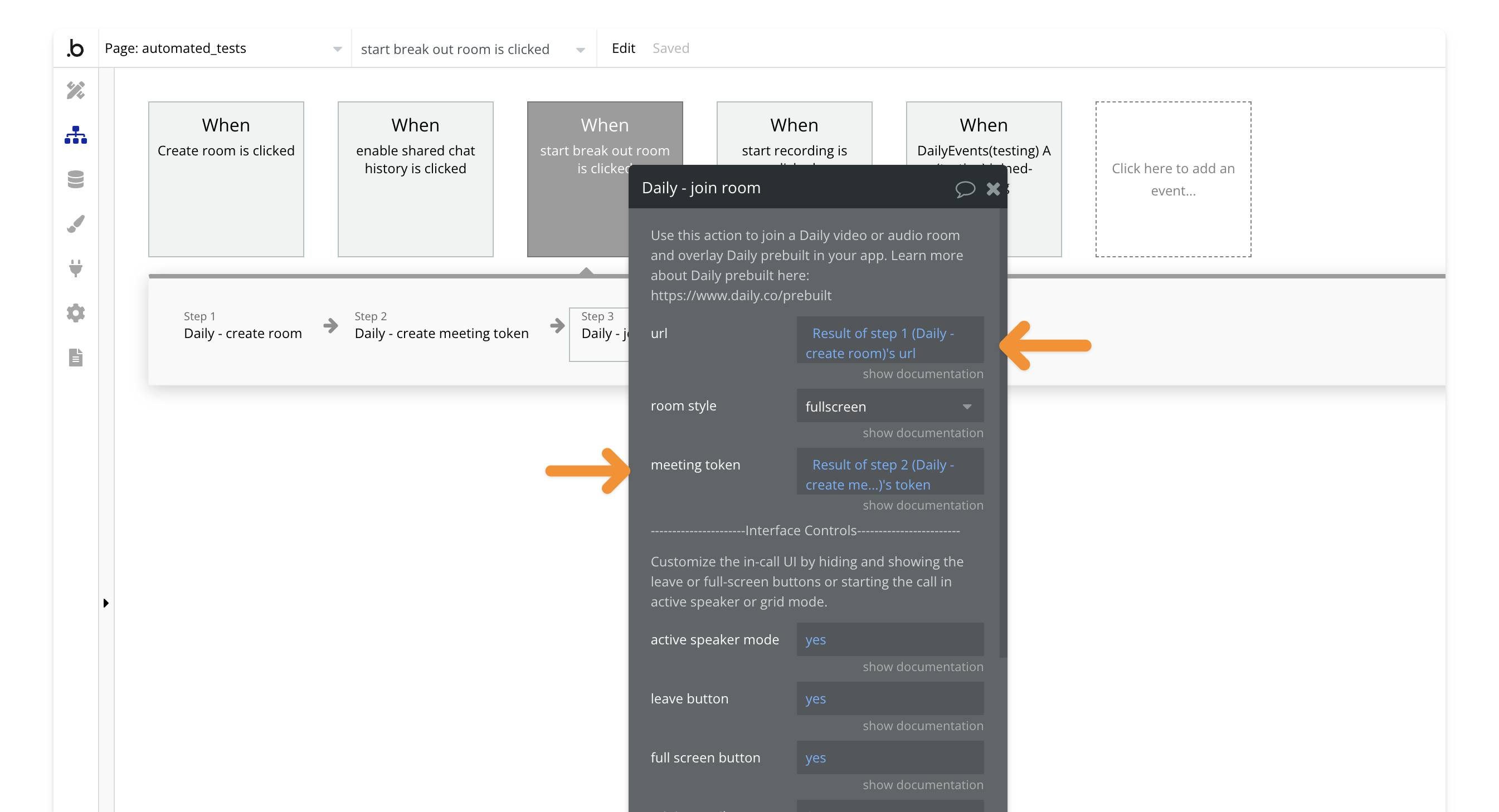
## 3. Join the room with the meeting token
Next, join the room using the [join room](/bubble/daily/plugin-reference/actions/join-room) action. The user creating the breakout rooms must use the meeting token from [Step 2](#2-create-a-meeting-token-for-the-room-owner) and the room name from [Step 1](#1-enable-breakout-rooms-in-room-settings).
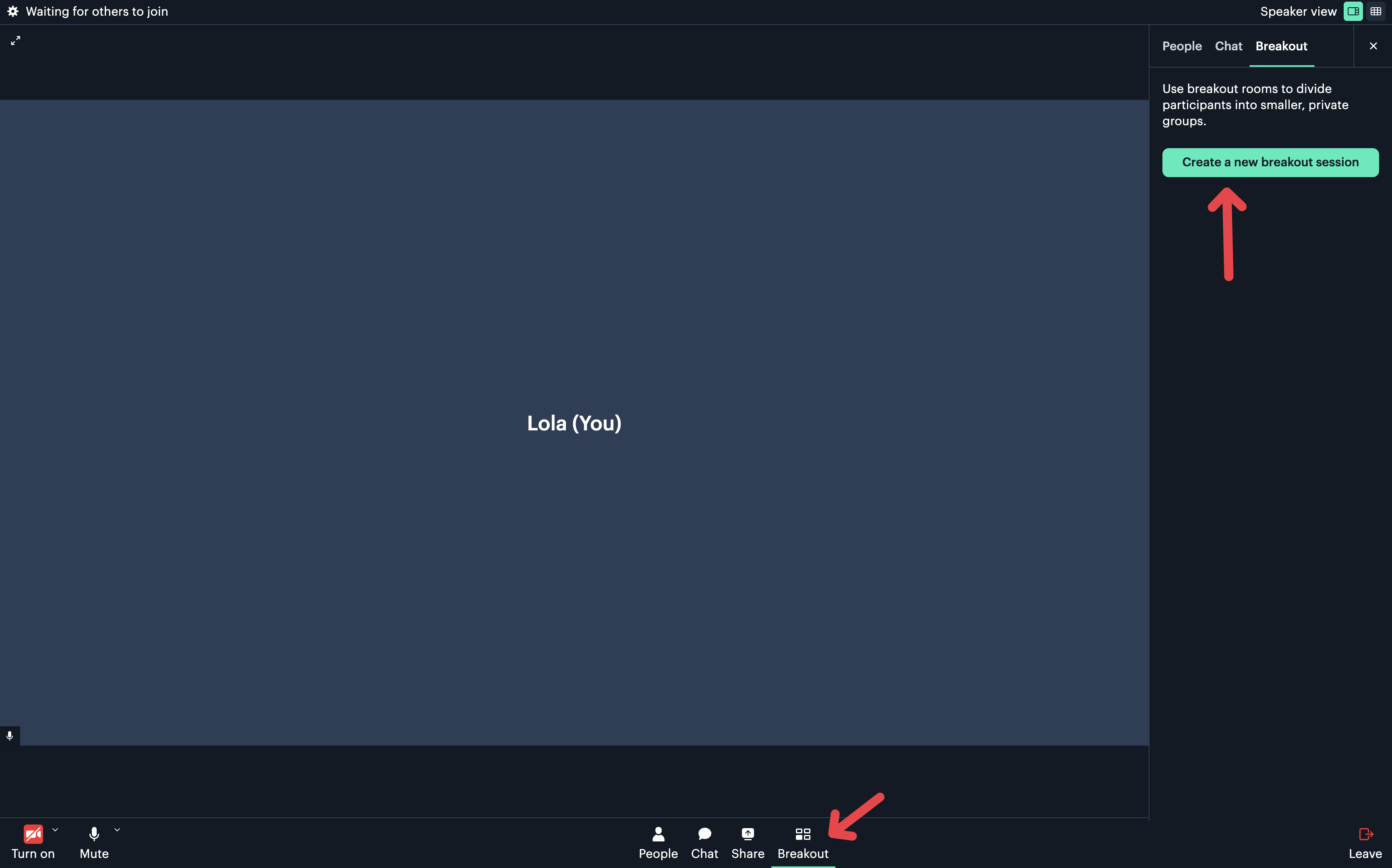
## 4. Start a breakout room
Once in the call, the user will see an option to create a breakout room.
> **[Need Help?](/support/plans)**
>
> View our options for free community and priority support.
> **[Have a feature request?](https://lunchpaillabs.canny.io/feature-requests?selectedCategory=daily-video-plugin-for-bubble)**
>
> Post your feature request on our
>
> [idea board.](https://lunchpaillabs.canny.io/feature-requests?selectedCategory=daily-video-plugin-for-bubble)
# Extend the plugin
Source: https://tools.lunchpaillabs.com/bubble/daily/how-tos/extend-daily-with-api-calls
This guide is intended for advanced users who want to extend the functionality of the [Daily plugin for Bubble](https://bubble.io/plugin/daily-video-chat-1622494385281x917140771709124600) by adding custom API calls. In this example, we'll show how to include meeting session information, but the same approach can be used for any API call available in [Daily's documentation](https://docs.daily.co/) that isn't already included in the plugin. If you're new to the plugin, we recommend starting with this [beginner tutorial](https://www.daily.co/blog/integrate-daily-video-chat-in-your-bubble-app-in-less-than-30-minutes/).
For a video guide, you can watch the Youtube tutorial.
[YouTube video player](https://www.youtube.com/embed/wUdRRU9muu8)
Otherwise, continue reading for detailed instructions.
## 1. Access the Plugins Tab
To get started, navigate to the Plugins tab in your Bubble app. This is where you will manage and install plugins, including the API Connector for extending the Daily plugin.

## 2. Install the API Connector Plugin
If you haven't already installed the API Connector plugin, follow these steps:
1. Click 'Add Plugins' in the plugin management interface.
2. Search for 'API Connector'.
3. Click 'Install' to add it to your app.

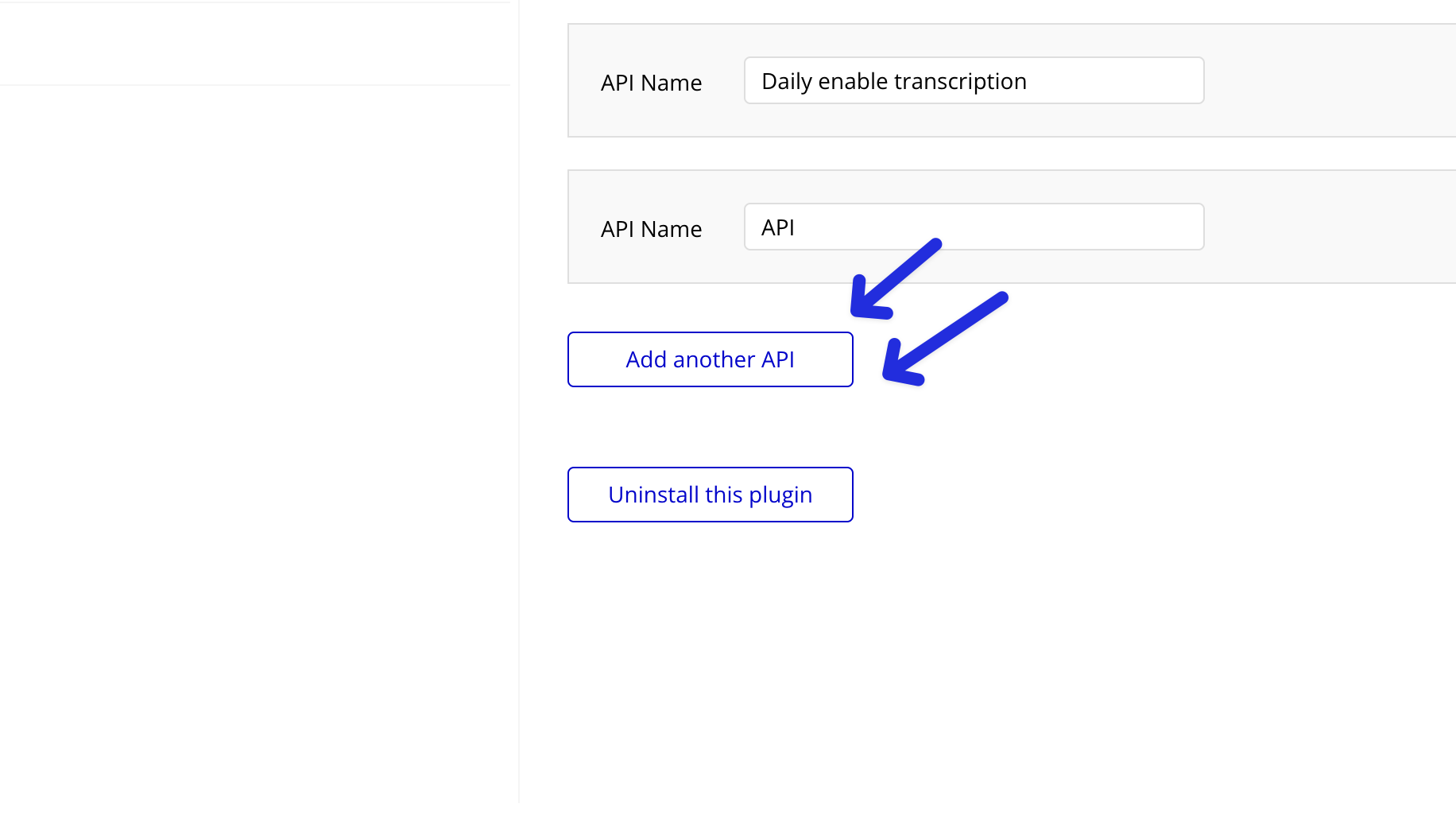
## 3. Configure a New API
Once the API Connector is installed, you'll need to configure a new API call. Click 'Add another API' to begin the setup process.

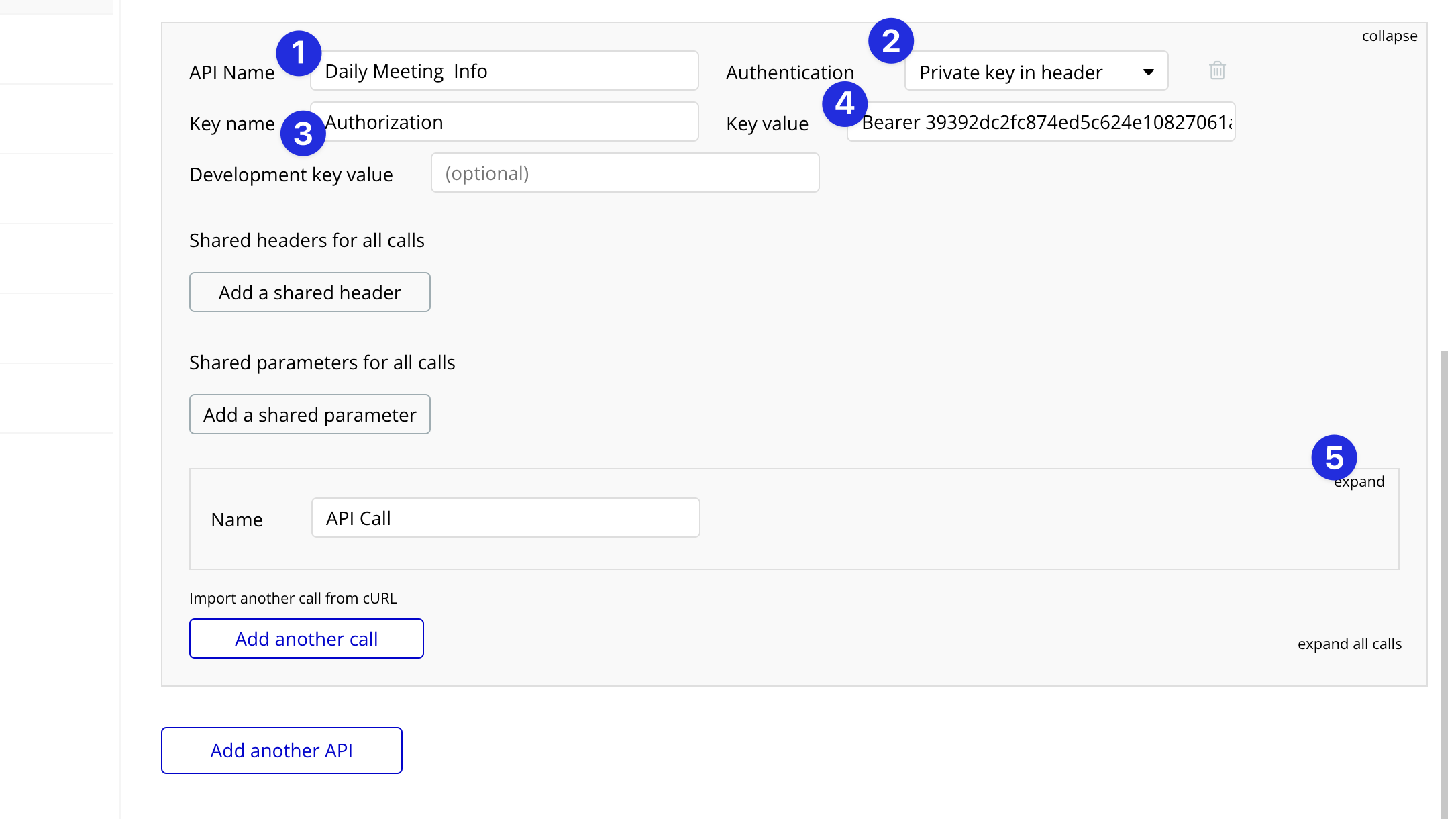
## 4. Fill Out API Header Details
Configure the API call header to authenticate your Daily API requests:
1. **API Name**: Choose a memorable name for this API integration.
2. **Authentication**: Set this to 'Private key in header'.
3. **Key**: Use 'Authorization' for the key.
4. **Key Value**: Enter 'Bearer \[Your API Key]'. You can find your API key on your [Daily developer dashboard](https://dashboard.daily.co/developers).
5. Click 'Expand' to configure the API call details.
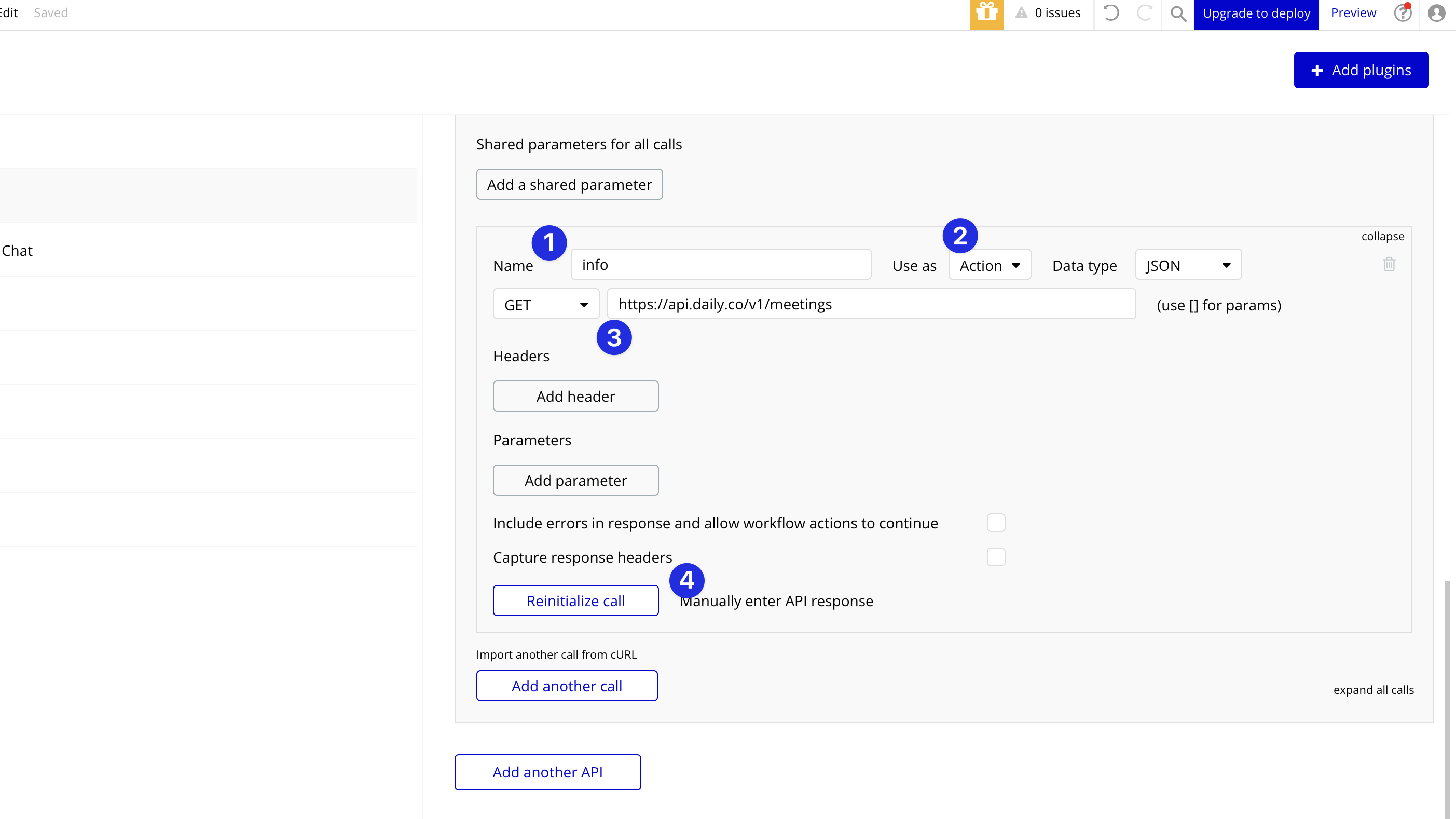
## 5. Set Up the API Call
Now, you'll set up the actual API call:
1. **Name**: Give the API call a clear name, such as 'Get Meeting Info'.
2. **Use as**: Select 'Action' if you'll use this in a workflow, or 'Data' to use it as a data source.
3. **Method and Endpoint**: For fetching [meeting information](https://docs.daily.co/reference/rest-api/meetings), use a GET method and the endpoint `https://api.daily.co/v1/meetings`.
4. Click 'Initialize call' to make the API available within your app.
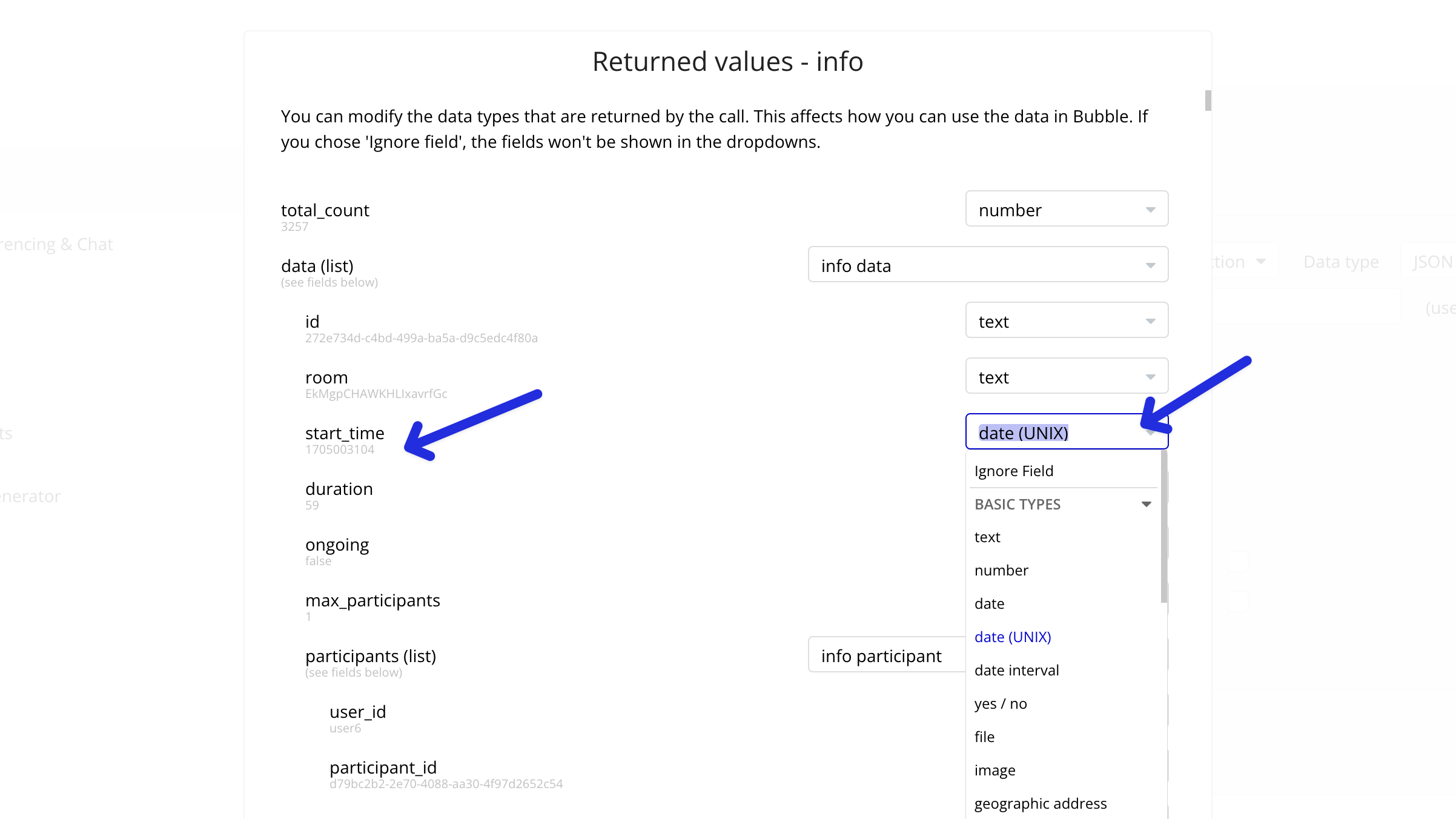
## 6. Format API Types
Ensure that any date fields, such as meeting start and join times, are formatted as Unix timestamps. This will make it easier to display them as readable dates within your Bubble app.
## 7. Using the Custom API Call
Now that your API call is set up, you can use it within your Bubble app as either an action in workflows or as a data source.
### Use as Action Example
1. In your workflow, add an action that triggers the API call by selecting the name you assigned during setup.
2. Use the resulting data from the API call as needed within your workflow logic.
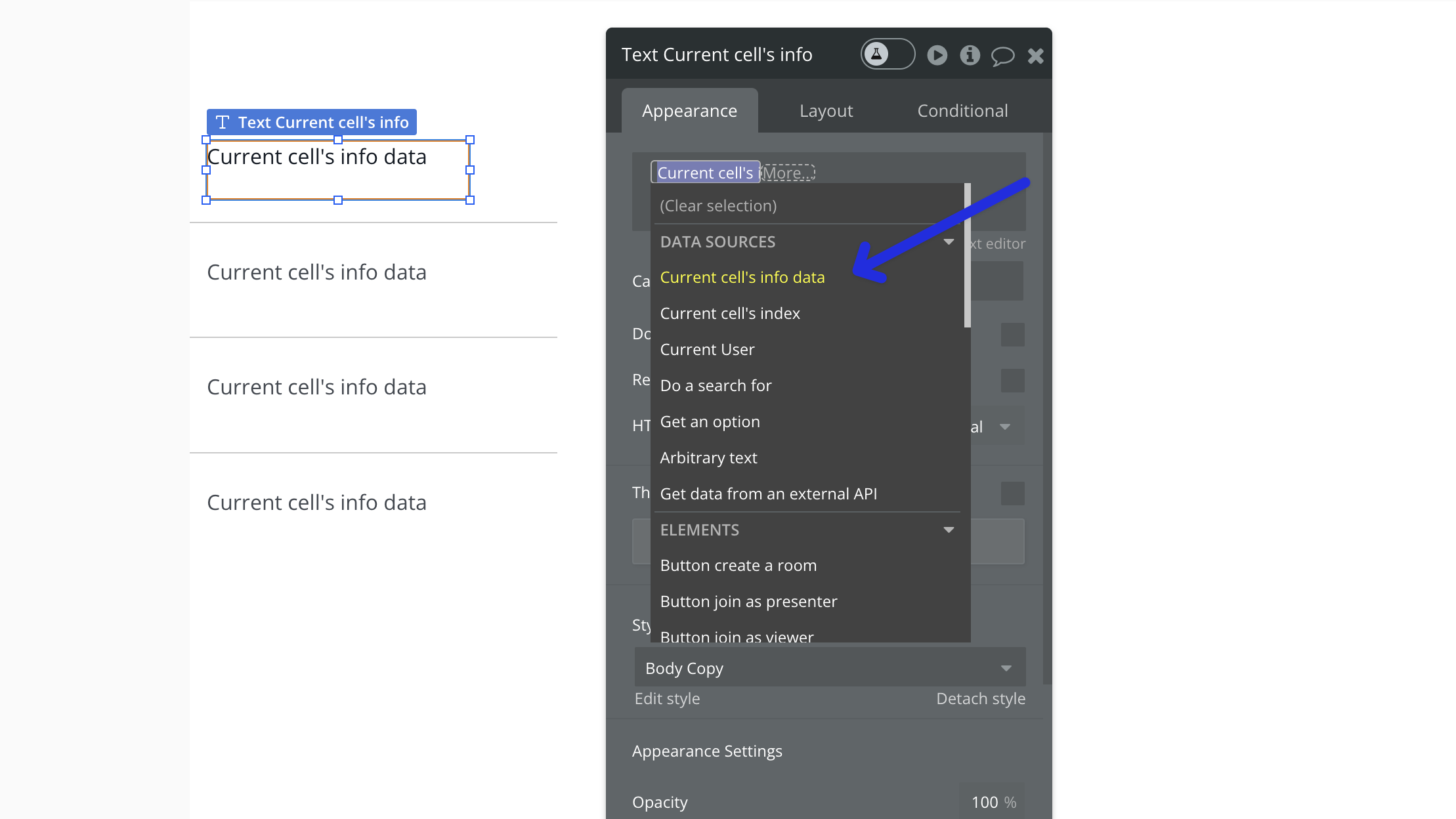
### Use as Data Example
1. Add a group to your page that requires a data source. The data type should match the name of the API call you set up.
2. Set the data source to 'Get external data from API' and select the custom API call.
3. Populate the elements inside the group (e.g., text elements) with the data returned from the API.

In the case where the API returns multiple objects, you can set the data source to a list and display each object in a repeating group.

Inside the repeating group, add elements such as text fields to display specific information, like the meeting start time.
***
> **[Need Help?](/support/plans)**
>
> View our options for free community and priority support.
> **[Have a feature request?](https://lunchpaillabs.canny.io/feature-requests?selectedCategory=daily-video-plugin-for-bubble)**
>
> Post your feature request on our
>
> [idea board.](https://lunchpaillabs.canny.io/feature-requests?selectedCategory=daily-video-plugin-for-bubble)
# Generate post-call summaries
Source: https://tools.lunchpaillabs.com/bubble/daily/how-tos/generate-post-call-summaries
> [!WARNING]
>
> 🔐 Bundle plugin only: This feature is exclusive to the [Video, Audio & Live
> Bundle](/bubble/video-audio-live-bundle/getting-started). Get the bundle
> plugin
> [here](https://bubble.io/plugin/video-audio--live-bundle-1727441795463x240182085842370560).
Learn how to automatically generate summaries and transcripts of your Daily video calls. This guide covers both automatic and manual methods for processing call recordings. This is a pay as you go feature add your credit card details to your [Daily account](https://dashboard.daily.co/billing) to enable it.
## Steps
### 1. Enable Recording in Your Daily Room
First, make sure your room is set up for recording:
1. Use the [create room](/bubble/daily/plugin-reference/actions/create-room) or [update room](/bubble/daily/plugin-reference/actions/update-room) action
2. Enable cloud recording in your room settings
You can start recording either:
* Automatically when an owner joins (set `start cloud recording` in the [meeting token](/bubble/daily/plugin-reference/actions/create-meeting-token)).
* Manually using the [start recording](/bubble/daily/plugin-reference/actions/start-recording) action
### 2. Submit the Recording for Processing
Once you have a recording ID (from the recording event or recording action), submit it for processing:
1. Use the [submit job](/bubble/daily/plugin-reference/actions/submit-job) action
2. Set the `preset` to "summarize" for summaries + transcripts or just "transcript" for transcripts
3. Set the `source type` to "recordingId"
4. Input your `recording ID`
### 3. Retrieve the Output
Since processing takes time, you have two options to get your results:
#### Option A: Manual Retrieval
Use the [get output from job](/bubble/daily/plugin-reference/actions/get-output-from-job) action to fetch the results (note: that processing may take time).
#### Option B: Webhook Automation (Recommended)
Set up [webhooks](/bubble/daily/how-tos/add-webhooks) to automatically process results:
Update your [webhook](/bubble/daily/plugin-reference/actions/create-webhook) to listen for these events:
* `recording.ready-to-download` - Triggers when recording is ready
* `batch-processor.job-finished` - Triggers when processing completes
Update your raw data in bubble to look for this response
```json theme={null}
{
"version": "1.0.0",
"type": "recording.ready-to-download",
"id": "rec-rtd-c3df927c-f738-4471-a2b7-066fa7e95a6b-1692124192",
"payload": {
"recording_id": "08fa0b24-9220-44c5-846c-3f116cf8e738",
"id": "1dae15c5-6a85-4d65-ab00-4b19bb054b84",
"room_name": "Xcm97xRZ08b2dePKb78g",
"start_ts": 1692124183,
"status": "finished",
"max_participants": 1,
"duration": 9,
"share_token": "ntDCL5k98Ulq",
"s3_key": "api-test-1j8fizhzd30c/Xcm97xRZ08b2dePKb78g/1692124183028"
},
"event_ts": 1692124192
}
```
## Example Workflow
Here's a complete workflow for automatic summaries:
1. **Start Recording:**
* Trigger: When owner joins room
* Action: Start Recording (or use automatic start)
2. **Submit for Processing:**
* Trigger: When recording.ready-to-download event fires
* Action: Submit Job with "summarize" preset
3. **Save Results:**
* Trigger: When batch-processor.job-finished event fires
* Action: Get Output from Job
* Action: Save summary to your database
## Best Practices
1. **Recording Setup**
* Always use cloud recording for summaries
* Consider automatic recording start for consistency
* Store recording IDs for reference
2. **Processing**
* Use webhooks for automated workflows
* Consider storing both summaries and transcripts
3. **Storage**
* Save summaries in your database for easy access
> **[Need Help?](/support/plans)**
>
> View our options for free community and priority support.
> **[Have a feature request?](https://lunchpaillabs.canny.io/feature-requests?selectedCategory=daily-video-plugin-for-bubble)**
>
> Post your feature request on our
>
> [idea board.](https://lunchpaillabs.canny.io/feature-requests?selectedCategory=daily-video-plugin-for-bubble)
# Set up broadcasts
Source: https://tools.lunchpaillabs.com/bubble/daily/how-tos/owner-only-broadcast
This guide will walk you through how to configure an owner-only broadcast in your Bubble app. This setup ensures that only the owner can broadcast audio and video, while others can only view the stream.
***
## Difference Between a Broadcast and a Live Stream
A **broadcast** allows only the owner to share their audio and video, while other participants can view the content without interaction. This is a closed environment where the stream is accessible to participants who are part of the room.
A **live stream**, on the other hand, transmits video content to an external platform like YouTube or Twitch. Anyone with access to the stream link can view the content in real time, regardless of whether they are part of the room. Live streaming is typically used to reach a larger audience, while broadcasts are more controlled and limited to specific participants.
If you want to create a livestream, check out our guide on [how to set up a livestream](/bubble/daily/how-tos/set-up-livestream).
***
## Steps
### 1. Create a new room and set "Owner Only Broadcast" to `yes`
[Create a new room](/bubble/daily/plugin-reference/actions/create-room) or [update an existing room](/bubble/daily/plugin-reference/actions/update-room), make sure to set the `owner only broadcast` field to `yes`. This restricts broadcasting to the room owner only.

### Create a meeting token where the`is owner` field to `yes`
Next, you will need to [create a meeting token](/bubble/daily/plugin-reference/actions/create-meeting-token) for the room that you set in step 1. ensure that the `is owner` field is also set to `yes`. This step identifies the user as the room owner, enabling broadcasting privileges.

### Join the room and add the meeting owner token
When you join the room, pass the same token in the `meeting token` field. This confirms the user as the owner, enabling them to broadcast their audio and video.
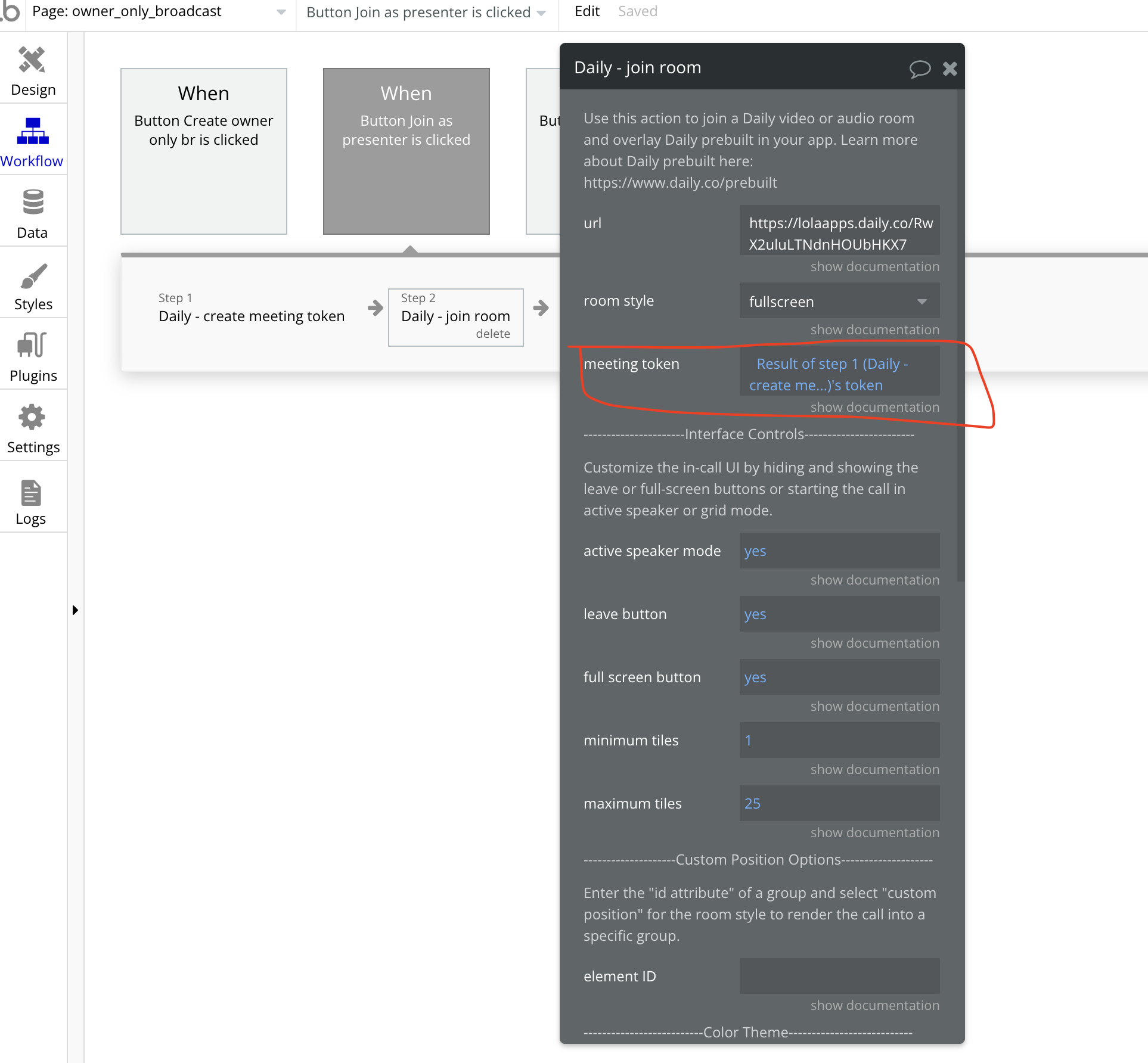
Any users with the meeting owner token will be able to join the room and share their audio and video. Other users who join the room will only be able to view the broadcast.
You can check out a [demo editor](https://bubble.io/page?type=page\&name=owner_only_broadcast\&id=nocodedemos\&tab=tabs-2) or see a live [demo](https://nocodedemos.bubbleapps.io/version-test/owner_only_broadcast) illustrating this feature.
> **[Need Help?](/support/plans)**
>
> View our options for free community and priority support.
> **[Have a feature request?](https://lunchpaillabs.canny.io/feature-requests?selectedCategory=daily-video-plugin-for-bubble)**
>
> Post your feature request on our
>
> [idea board.](https://lunchpaillabs.canny.io/feature-requests?selectedCategory=daily-video-plugin-for-bubble)
# Send an app message
Source: https://tools.lunchpaillabs.com/bubble/daily/how-tos/send-app-message
> [!WARNING]
>
> 🔐 Bundle plugin only: This action is exclusive to the [Video, Audio & Live
> Bundle](/bubble/video-audio-live-bundle/getting-started). Get the bundle
> plugin
> [here](https://bubble.io/plugin/video-audio--live-bundle-1727441795463x240182085842370560).
Sometimes, you want to send an app message to trigger an event in your Bubble app. This guide walks through how.
## Steps
### 1. Add the Bundle Daily Events element
Place the [**Bundle Daily Events**](/bubble/daily/plugin-reference/elements/daily-events) element on your page. A common practice is to place it inside a hidden popup, keeping it offscreen while it listens for events.

### 2. Start listening for events
After joining the room, add the Begin Listening action. This ensures that Bubble can detect and process incoming events, such as app-message.

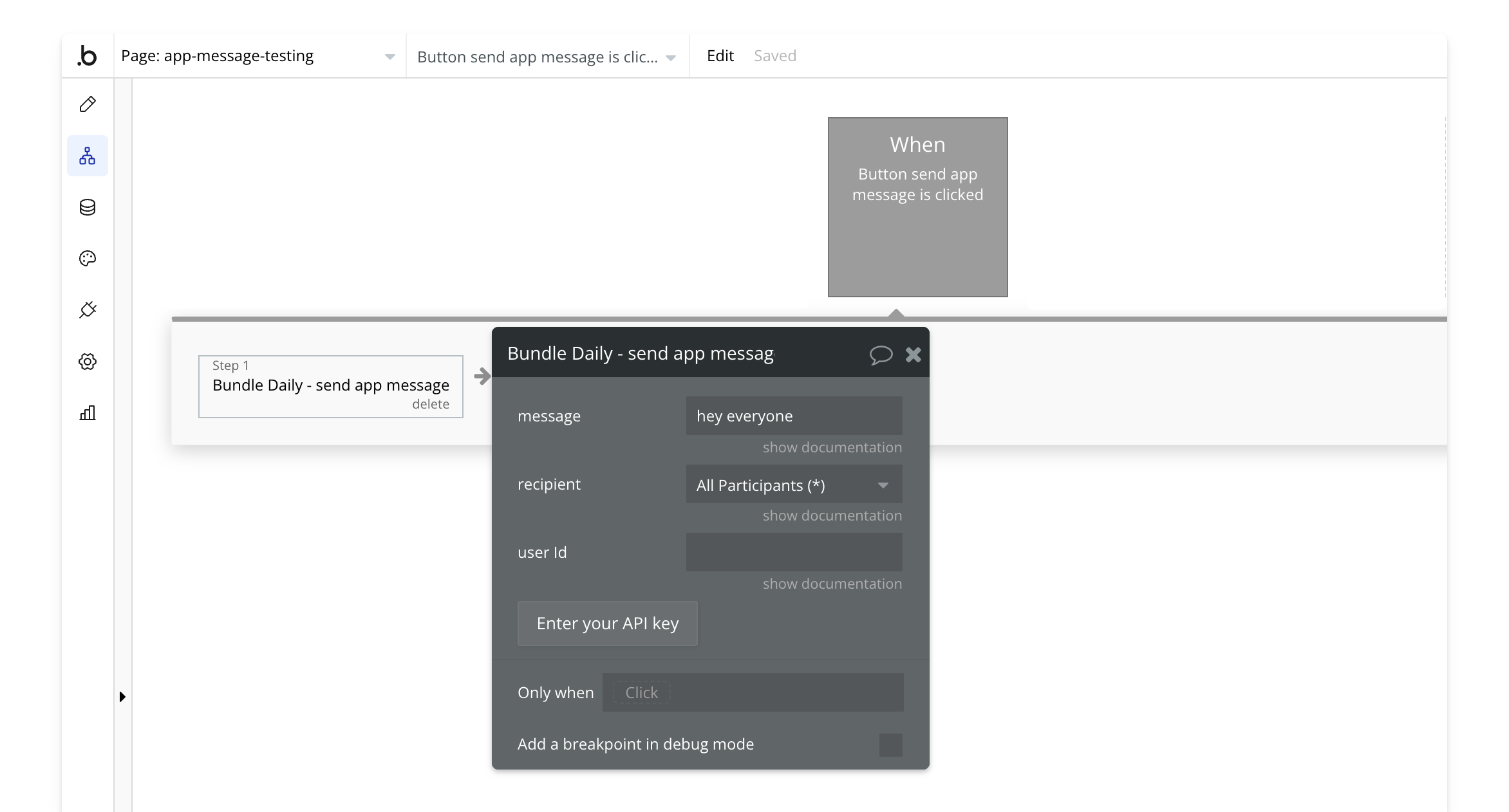
### 3. Send app message
Use the [send app message](/bubble/daily/plugin-reference/actions/send-app-message) action anywhere in your workflow to transmit a message.
### 4. Handle the app message event
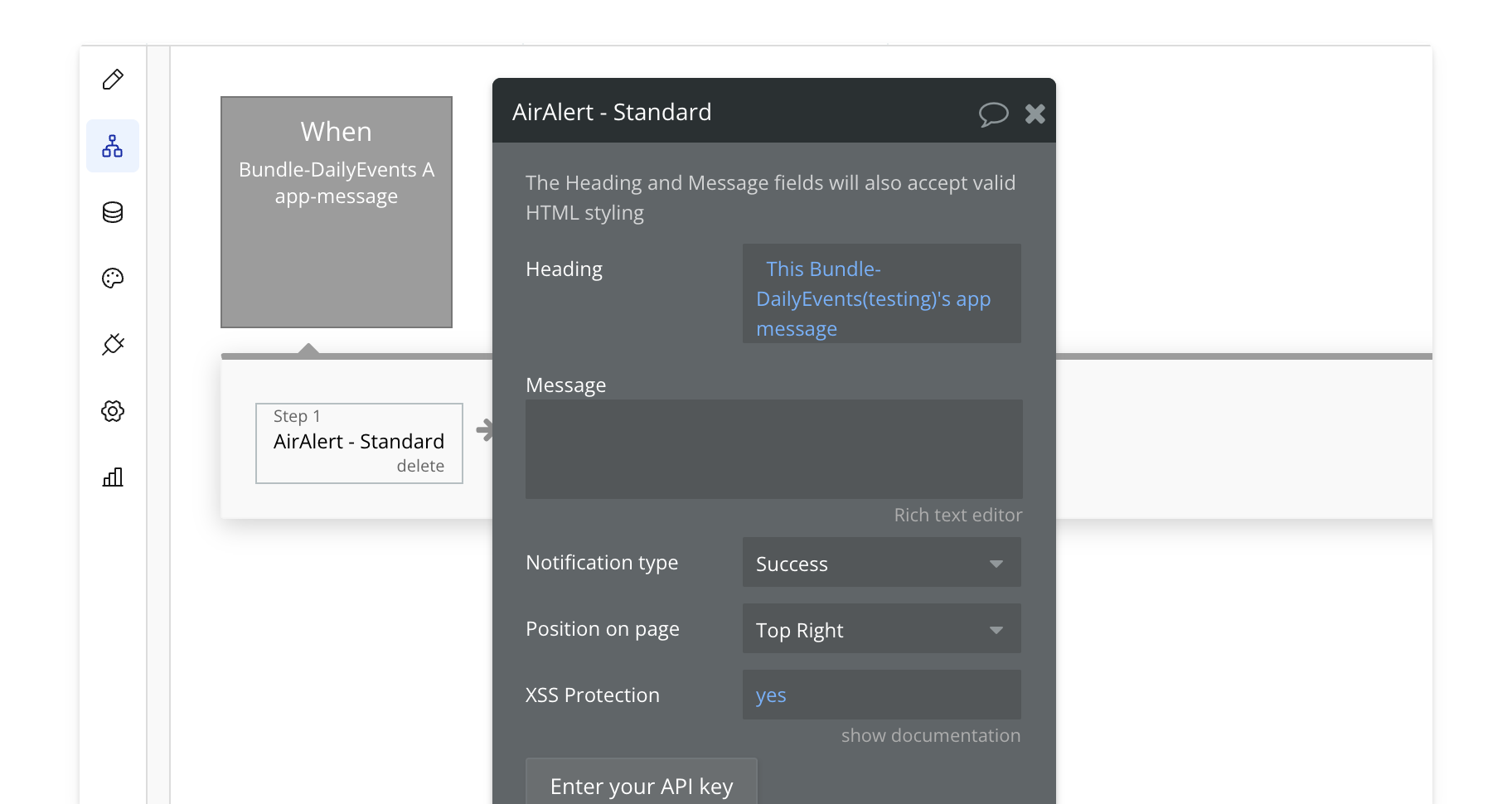
When an app message event is triggered, take action in your app. This could be displaying a popup, showing a notification, or any other custom action you define.
Note: App messages do not trigger for the sender (broadcaster). In this example, we send a notification with the value of the message, but the possibilities are endless.
> **[Need Help?](/support/plans)**
>
> View our options for free community and priority support.
> **[Have a feature request?](https://lunchpaillabs.canny.io/feature-requests?selectedCategory=daily-video-plugin-for-bubble)**
>
> Post your feature request on our
>
> [idea board.](https://lunchpaillabs.canny.io/feature-requests?selectedCategory=daily-video-plugin-for-bubble)
# Set time limits for calls
Source: https://tools.lunchpaillabs.com/bubble/daily/how-tos/set-time-limits
This guide will walk you through how to set time limits for your Daily video calls in your Bubble app. You'll learn two different approaches: setting specific start/end times and setting duration limits for individual participants.
## Two Approaches to Time Limits
There are two main ways to control the duration of your Daily video calls:
1. **Fixed Start and End Times**: Set specific times when the room becomes available and when it expires. This is useful for scheduled meetings or events with defined time slots.
2. **Elapsed Time Limit**: Set a maximum duration for how long each participant can stay in the call, counting from when they join. This is helpful for scenarios like consultation sessions or time-limited meetings.
## Setting Fixed Start and End Times
### 1. Calculate Your Timestamps
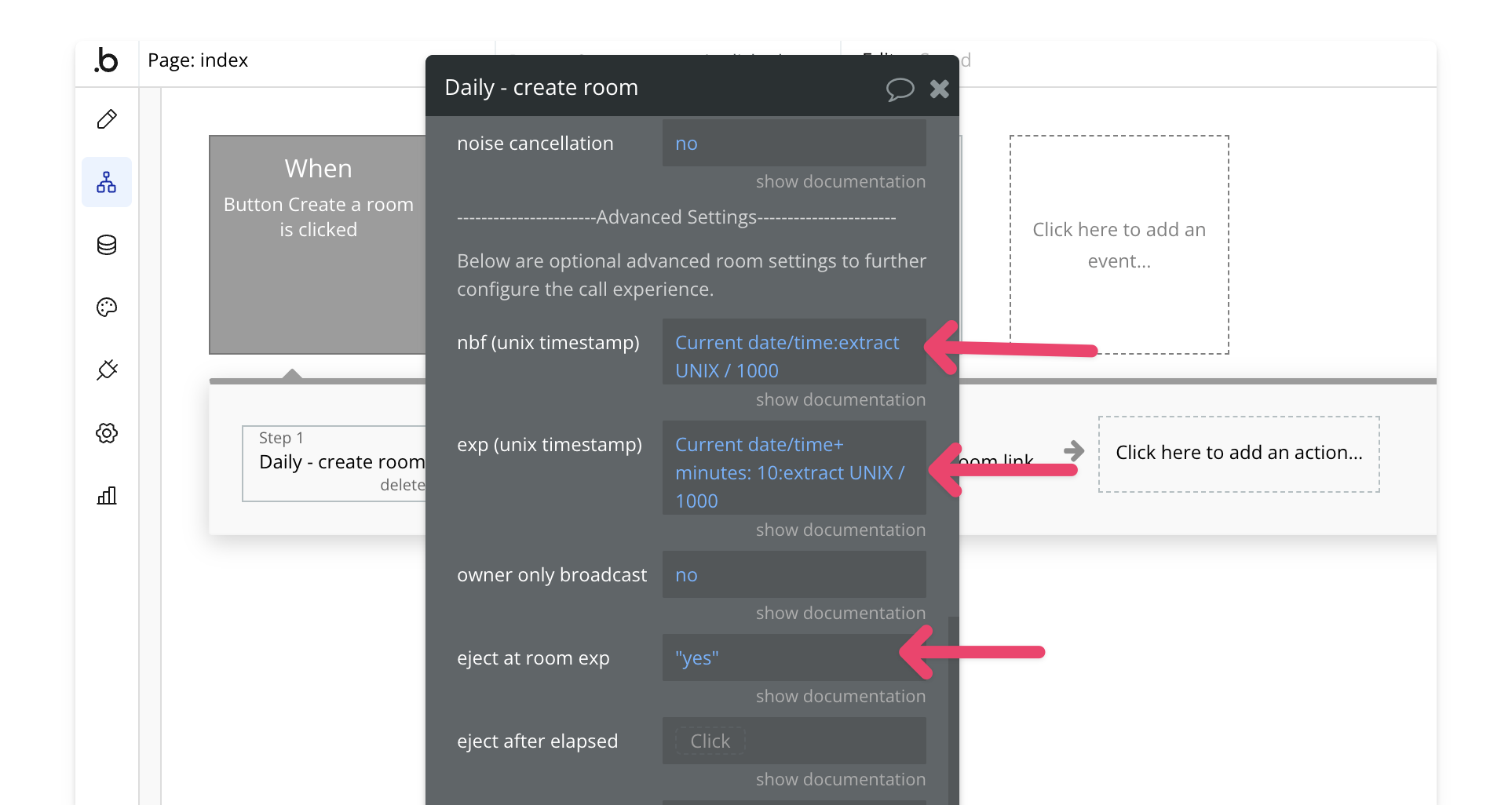
First, you'll need to convert your desired start and end times to UNIX timestamps. In Bubble, you can do this using:
`Date/Time: Extract UNIX timestamp/1000`
### 2. Create or Update the Room
When [creating a room](/bubble/daily/plugin-reference/actions/create-room) or [updating an existing room](/bubble/daily/plugin-reference/actions/update-room), set these parameters:
* Set `not before` to your start time timestamp
* Set `expires` to your end time timestamp
* Set `eject at exp` to `yes` to automatically remove participants when the room expires
## Setting an Elapsed Time Limit
### 1. Create or Update the Room
When [creating](/bubble/daily/plugin-reference/actions/create-room) or [updating](/bubble/daily/plugin-reference/actions/update-room) your room:
* Set `eject after elapsed time` to the number of seconds you want participants to be able to stay in the call
* For example, for a 30-minute limit, set it to `1800` (30 minutes × 60 seconds)

When the time limit is reached, participants will be automatically removed from the call.
> **[Need Help?](/support/plans)**
>
> View our options for free community and priority support.
> **[Have a feature request?](https://lunchpaillabs.canny.io/feature-requests?selectedCategory=daily-video-plugin-for-bubble)**
>
> Post your feature request on our
>
> [idea board.](https://lunchpaillabs.canny.io/feature-requests?selectedCategory=daily-video-plugin-for-bubble)
# Set up live streams
Source: https://tools.lunchpaillabs.com/bubble/daily/how-tos/set-up-livestream
> [!NOTE]
>
> Live streams are pay-as-you-go. You'll need to add your [credit card details
> to your Daily account](https://dashboard.daily.co/billing) to enable it.
This guide will walk you through the steps to set up live streaming in your Bubble app using the Daily plugin. Live streaming allows real-time video transmission to a large audience through platforms like YouTube, Twitch, and Facebook Live.
***
## Difference Between a Broadcast and a Live Stream
A **broadcast** allows only the owner to share their audio and video, while other participants can view the content without interaction. This is a closed environment where the stream is accessible to participants who are part of the room.
A **live stream**, on the other hand, transmits video content to an external platform like YouTube or Twitch. Anyone with access to the stream link can view the content in real time, regardless of whether they are part of the room. Live streaming is typically used to reach a larger audience, while broadcasts are more controlled and limited to specific participants.
If you want to create a broadcast, check out our guide on [how to set up an owner only broadcast](/bubble/daily/how-tos/owner-only-broadcast).
***
## Steps
### 1. Obtain an RTMP URL and Stream Key
To start a live stream, you'll need an RTMP URL and stream key, which are provided by the streaming service you're using (e.g., YouTube, Twitch, Facebook Live). This URL and key enable the stream to be transmitted to the platform.
For example, if you're using YouTube, you can follow [this guide](https://support.google.com/youtube/topic/9257891?hl=en\&ref_topic=9257610) to get set up with live streaming on YouTube.
### 2. Start the Live Stream
You can start a live stream using the [**start livestream**](/bubble/daily/plugin-reference/actions/start-live-stream) action in the plugin. This action will initiate a full-screen live stream for the selected user. To enable this, ensure that:
* You have created a **meeting owner token** for the person who is live streaming. This can be done using the [**create meeting token**](/bubble/daily/plugin-reference/actions/create-meeting-token) action.
* You have the **RTMP URL** and **stream key** from your chosen streaming service.
Other users who are not live streaming can join the room and view the stream using the [**join room**](/bubble/daily/plugin-reference/actions/join-room) action.
> **[Need Help?](/support/plans)**
>
> View our options for free community and priority support.
> **[Have a feature request?](https://lunchpaillabs.canny.io/feature-requests?selectedCategory=daily-video-plugin-for-bubble)**
>
> Post your feature request on our
>
> [idea board.](https://lunchpaillabs.canny.io/feature-requests?selectedCategory=daily-video-plugin-for-bubble)
# Transcribe a meeting
Source: https://tools.lunchpaillabs.com/bubble/daily/how-tos/transcribe-a-meeting
> [!WARNING]
>
> 🔐 Bundle plugin only: This action is exclusive to the [Video, Audio & Live
> Bundle](/bubble/video-audio-live-bundle/getting-started). Get the bundle
> plugin
> [here](https://bubble.io/plugin/video-audio--live-bundle-1727441795463x240182085842370560).
Learn how to transcribe your meetings with this guide. This guide covers the auto-transcribe method, but you can also manually start transcription with the [**start transcription**](/bubble/daily/plugin-reference/actions/start-transcription) action while in a call.
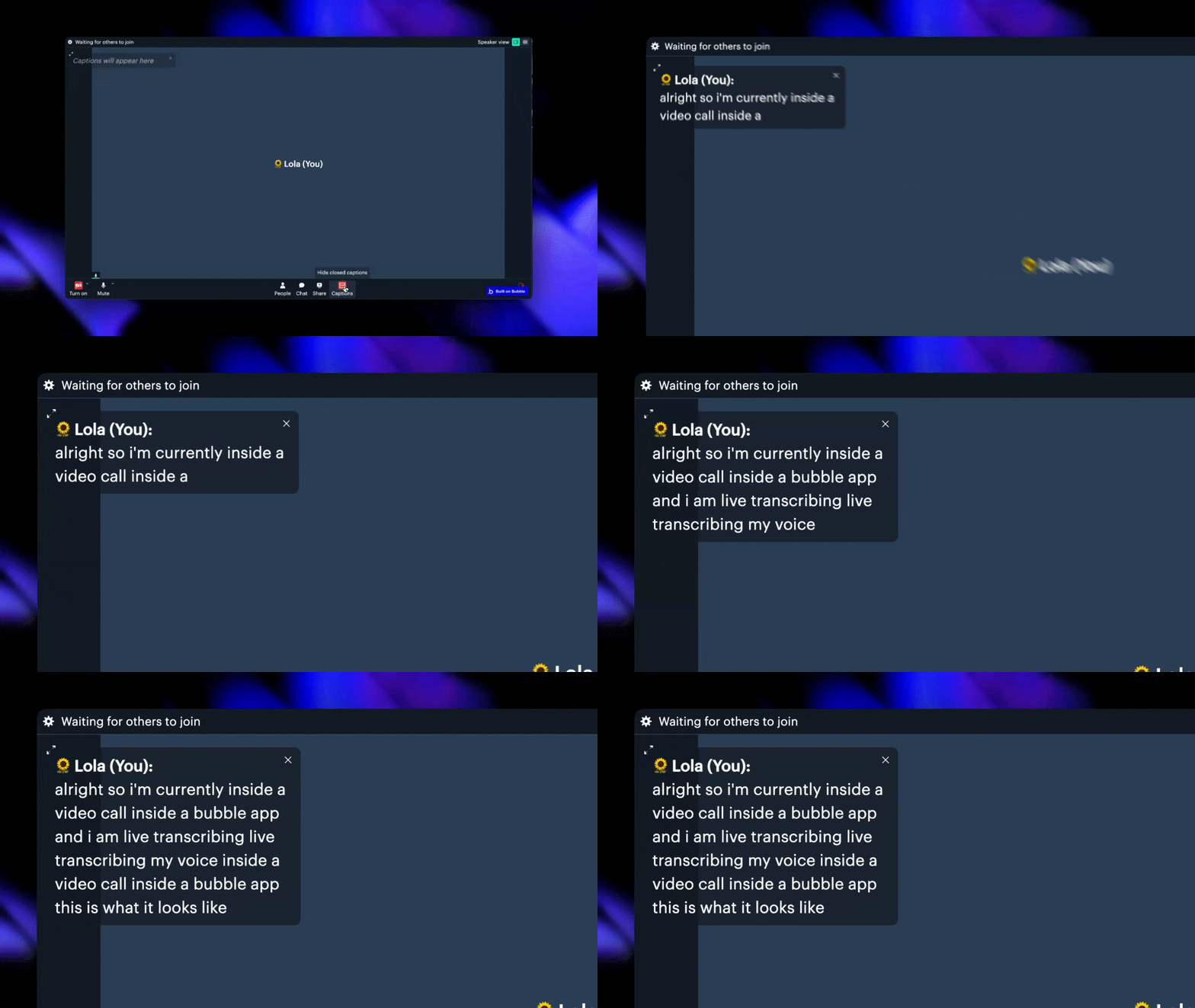
If you prefer a video walkthrough, check out our step-by-step tutorial below. Otherwise, keep reading for the written guide:
[YouTube video player](https://www.youtube.com/embed/ncEGeVex1Ww)
## Steps
### 1. Add the Daily Events Element (Optional)
Place the [**events element**](/bubble/daily/plugin-reference/elements/daily-events) element on your page. It’s common to put it inside a hidden popup so it stays offscreen but can still listen for events like `transcription-started`, `transcription-stopped`, or `transcription-error`.

### 2. Enable Transcription in Your Room
Next, [create](/bubble/daily/plugin-reference/actions/create-room) or [update](/bubble/daily/plugin-reference/actions/update-room) a room and enable transcription. Be sure to set the `auto transcription` field to `yes`. For a full list of transcription fields, check the [documentation](/bubble/daily/plugin-reference/actions/create-room#transcription).
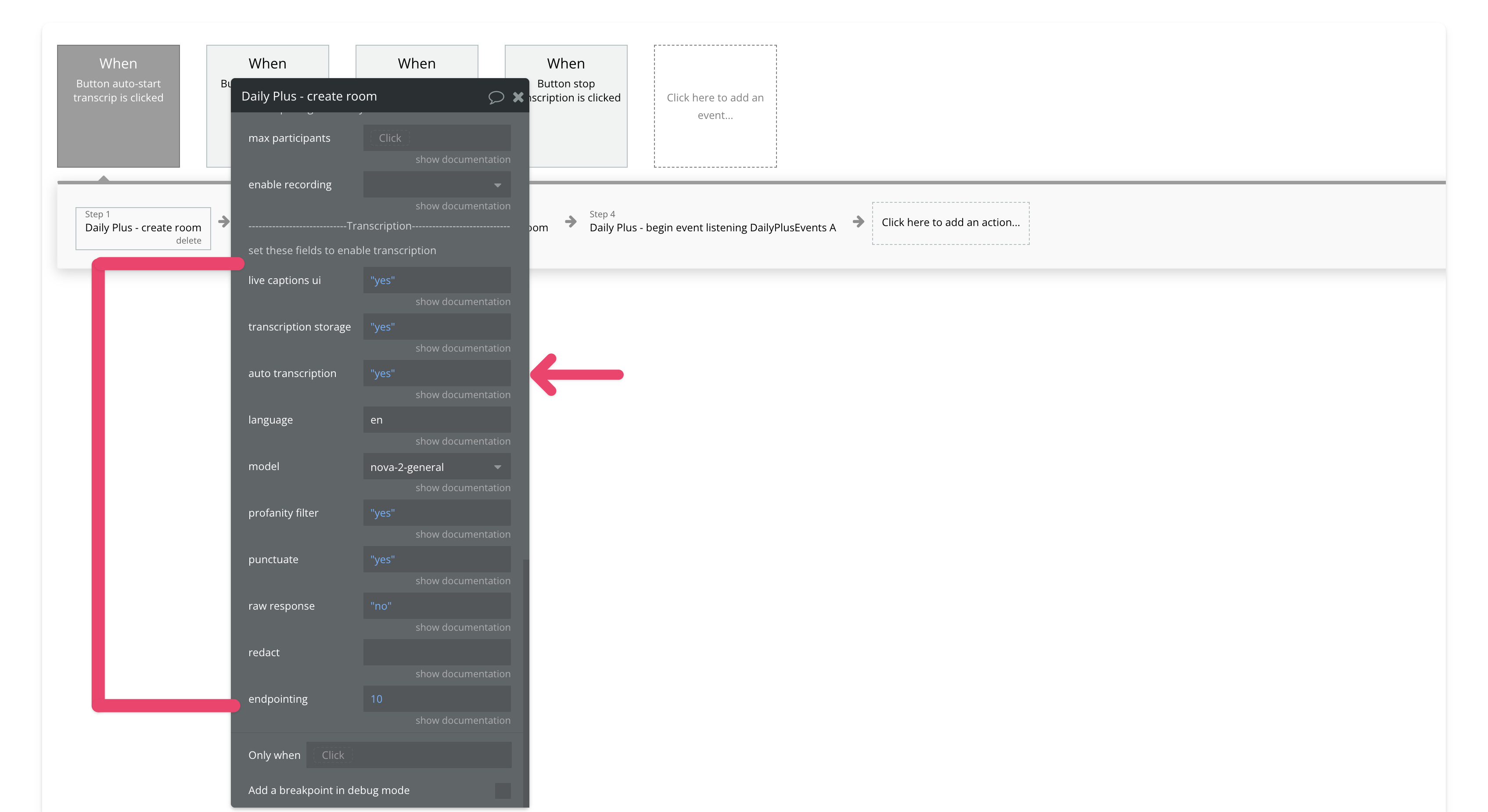
### 3. Create a Meeting Token for the Transcription Owner
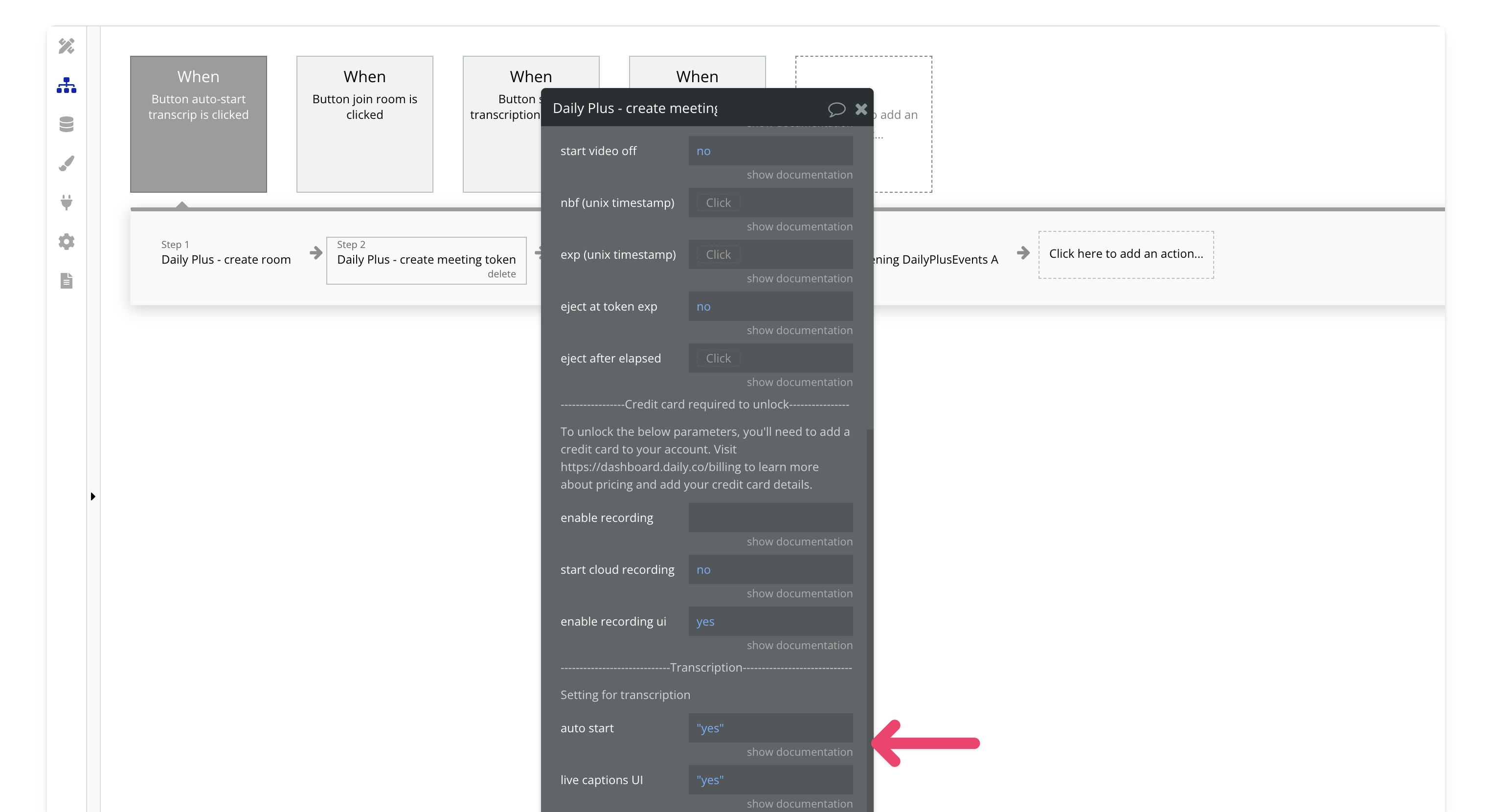
Create a [meeting token](/bubble/daily/plugin-reference/actions/create-meeting-token) with the `is owner` field set to `yes` and `auto-start transcription` set to `yes`. If you want live captions, make sure to enable them too. Only meeting owners can start transcriptions in this plugin.
### 4. Join the Meeting
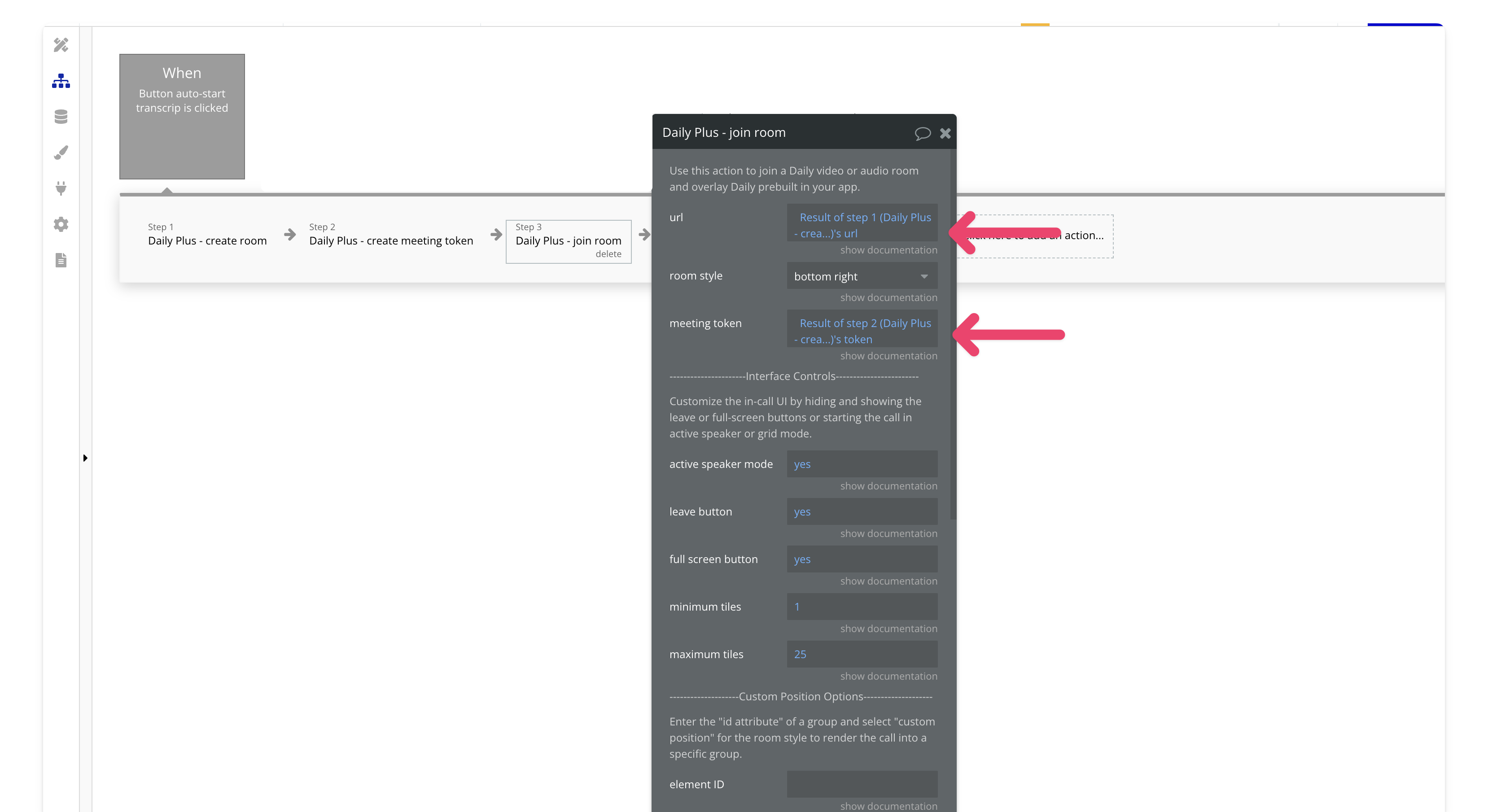
[**Join**](/bubble/daily/plugin-reference/actions/join-room) a room . Make sure to input the room URL from [Step 2](/bubble/daily/how-tos/transcribe-a-meeting#2-enable-transcription-in-your-room) and the meeting token from [Step 3](/bubble/daily/how-tos/transcribe-a-meeting#3-create-a-meeting-token-for-the-transcription-owner).
### 5. Begin Listening for Events (Optional)
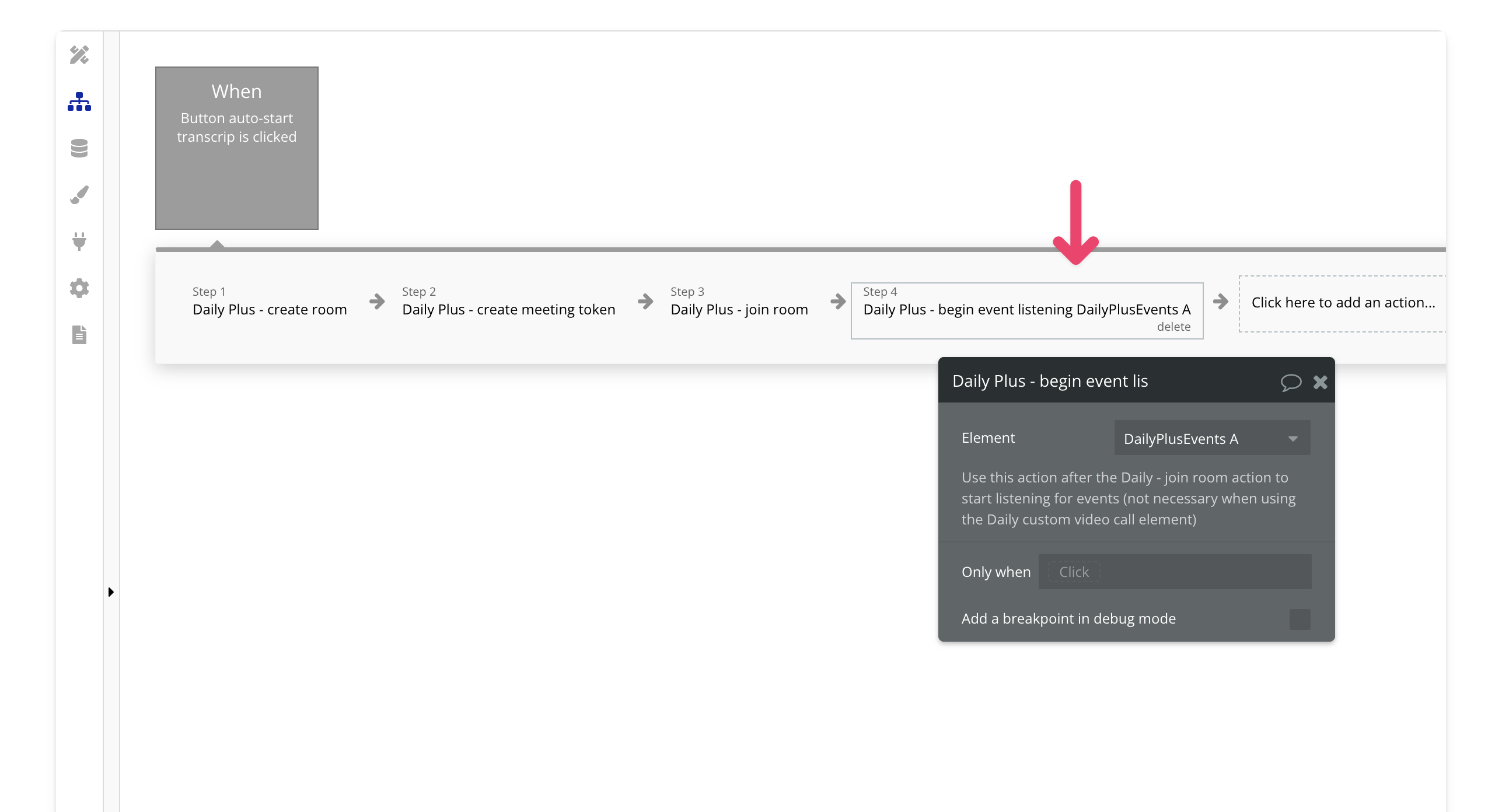
If you want to listen to transcription events, add the [**begin event listening action**](/bubble/daily/plugin-reference/elements/daily-events#element-actions) after joining the room.
> **[Need Help?](/support/plans)**
>
> View our options for free community and priority support.
> **[Have a feature request?](https://lunchpaillabs.canny.io/feature-requests?selectedCategory=daily-video-plugin-for-bubble)**
>
> Post your feature request on our
>
> [idea board.](https://lunchpaillabs.canny.io/feature-requests?selectedCategory=daily-video-plugin-for-bubble)
# Use daily events
Source: https://tools.lunchpaillabs.com/bubble/daily/how-tos/use-daily-events
This guide will walk you through how to use the Daily events element in your Bubble app. Daily events allow you to customize the user experience when specific actions occur during a call.If you prefer a video walkthrough, check out our step-by-step tutorial below. Otherwise, keep reading for the written guide:
[YouTube video player](https://www.youtube.com/embed/Nmh36hHqMho)
## Steps
### 1. Add the Daily Events Element
Place the Daily events element somewhere on the page. A common approach is to place it inside a hidden popup that never triggers, keeping it out of view while it listens for events.

### 2. Understand Key Events
The plugin includes several key events that trigger actions when users interact with the call:
* [Joined - meeting](https://docs.daily.co/reference/daily-js/events/meeting-events#joined-meeting): Fires when the local participant has joined the call, marking the connection.
* [Left - meeting](https://docs.daily.co/reference/daily-js/events/meeting-events#left-meeting): Fires when the local participant has left the call, marking disconnection.
* [Participant - joined](https://docs.daily.co/reference/daily-js/events/participant-events#participant-joined): Fires when a new remote participant joins the call.
* [Participant - left](https://docs.daily.co/reference/daily-js/events/participant-events#participant-left): Fires when a remote participant leaves the call.
* [Recording started](https://docs.daily.co/reference/daily-js/events/recording-events#recording-started): Fires when a recording starts.
* [Recording stopped](https://docs.daily.co/reference/daily-js/events/recording-events#recording-stopped): Fires when a recording stops.
* [Recording error](https://docs.daily.co/reference/daily-js/events/recording-events#recording-error): Fires when a recording has an error.
* [Active speaker change](https://docs.daily.co/reference/daily-js/events/meeting-events#active-speaker-change): Fires when the active speaker changes, useful for updating the UI during audio-only calls.
* [Transcription - started](/bubble/daily/plugin-reference/elements/daily-events#plus-events): Fires for all participants when transcription starts.
* [Transcription - stopped](bubble/daily/plugin-reference/elements/daily-events#plus-events): Fires for all participants when transcription stops.
* [Transcription - error](bubble/daily/plugin-reference/elements/daily-events#plus-events): Emitted for all participants when there has been a transcription error.
### 3. Start Listening to Events
Make sure to add the "begin listening" action after you join a room. This is essential for Bubble to start capturing and processing the events.

### 4. Trigger Actions Based on Events
Use the events to trigger specific actions in your app.
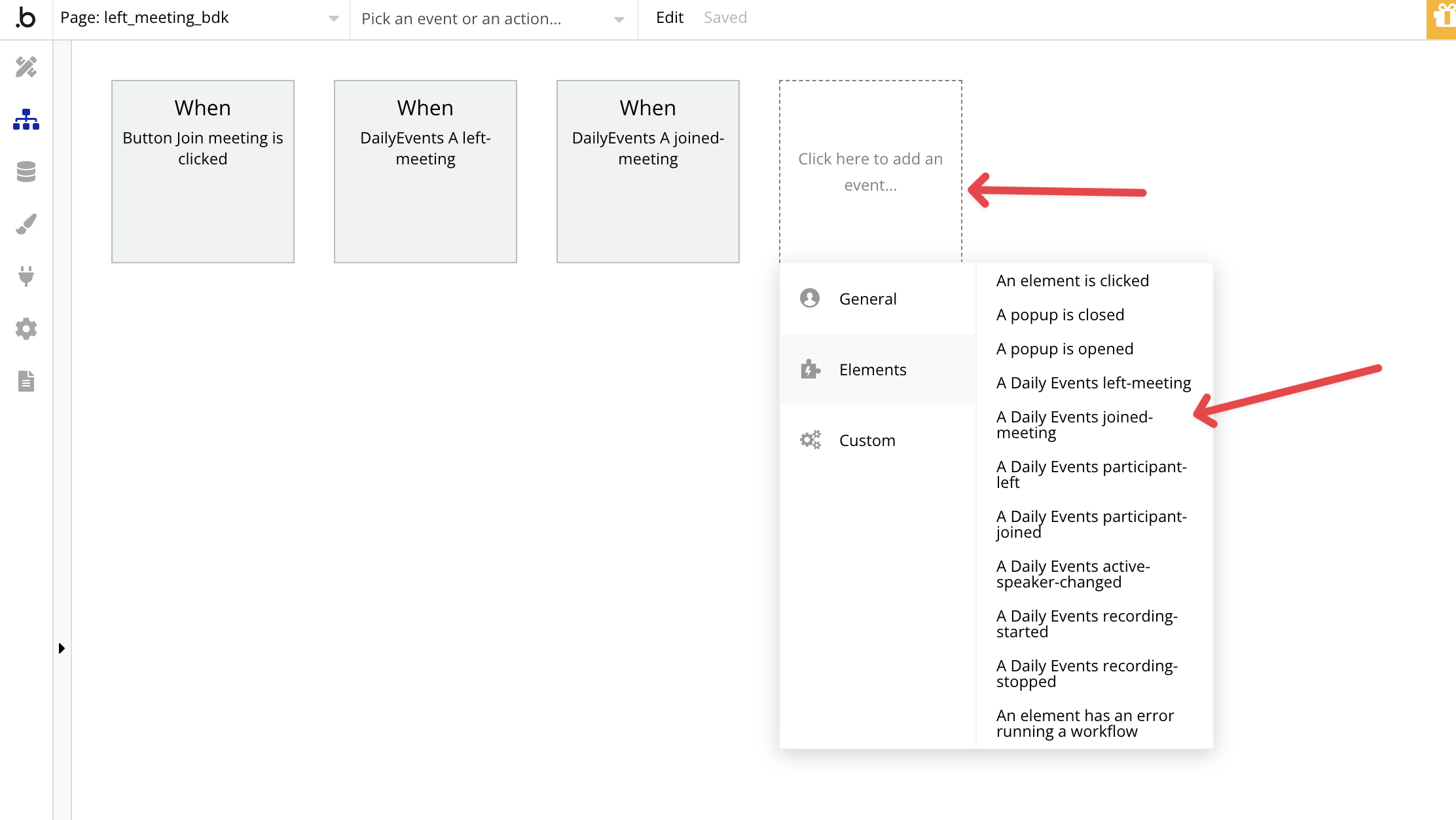
For example, you could:
* Redirect users to a different page once they leave the call.
* Execute actions only after the user has joined the call.
You can check out a [demo editor](https://bubble.io/page?type=page\&name=left_meeting_bdk\&id=nocodevideodemos\&tab=tabs-2) that showcases how these events function within a Bubble app.
> **[Need Help?](/support/plans)**
>
> View our options for free community and priority support.
> **[Have a feature request?](https://lunchpaillabs.canny.io/feature-requests?selectedCategory=daily-video-plugin-for-bubble)**
>
> Post your feature request on our
>
> [idea board.](https://lunchpaillabs.canny.io/feature-requests?selectedCategory=daily-video-plugin-for-bubble)
# Batch set custom integrations
Source: https://tools.lunchpaillabs.com/bubble/daily/plugin-reference/actions/batch-set-custom-integrations
Use this action to set multiple custom integrations for your Daily Prebuilt call by providing a correctly formatted JSON object.
> [!WARNING]
>
> 🔐 Bundle plugin only: This action is exclusive to the [Video, Audio & Live
> Bundle](/bubble/video-audio-live-bundle/getting-started). Get the bundle
> plugin
> [here](https://bubble.io/plugin/video-audio--live-bundle-1727441795463x240182085842370560).
### Fields
| **Field** | **Type** | **Description** |
| - | - | - |
| **JSON** | Text | Provide a correctly formatted JSON object. |
### Example of a Correctly Formatted JSON Object
Here’s an example of a properly formatted JSON object for setting multiple custom integrations. Each key represents a specific integration (like `miroEmbed`), and the fields inside the object define the behavior and settings for that integration. Note that the keys and the values have double quotes around them. This is required otherwise it won't work.
```json theme={null}
{
"miroEmbed": {
"controlledBy": "owners",
"iconURL": "https://files.readme.io/17d4a23-miro-logo-color-square.png",
"label": "Miro",
"location": "main",
"name": "miro",
"shared": true,
"allow": "fullscreen; clipboard-read; clipboard-write",
"src": "https://miro.com/board/boardid"
},
"googleDocEmbed": {
"controlledBy": "owners",
"iconURL": "https://some-google-doc-url/logo.png",
"label": "Google Docs",
"location": "sidebar",
"name": "googleDoc",
"shared": true,
"allow": "fullscreen",
"src": "https://docs.google.com/document/d/..."
}
}
```
### Returned Values
No values are returned by this action
# Buy phone number
Source: https://tools.lunchpaillabs.com/bubble/daily/plugin-reference/actions/buy-phone-number
Use this action to purchase a phone number. Learn more in [Daily's documentation](https://docs.daily.co/reference/rest-api/phone-numbers/buy-phonr-number). Phone numbers are pay-as-you-go, so be sure to [add your credit card](https://dashboard.daily.co/billing) to your Daily account to enable this feature.
> [!WARNING]
>
> 🔐 Bundle plugin only: This action is exclusive to the [Video, Audio & Live
> Bundle](/bubble/video-audio-live-bundle/getting-started). Get the bundle
> plugin
> [here](https://bubble.io/plugin/video-audio--live-bundle-1727441795463x240182085842370560).
### Fields
| **Field** | **Type** | **Description** |
| - | - | - |
| **phone number** | Text | The phone number to purchase. If not specified, a random California (CA) number will be purchased. |
⚠️ Important Note:
* If a specific number is requested but unavailable, the action will fail.
* When no number is specified, the action will automatically purchase an available California (CA) number.
### Returned Values
| **Field** | **Type** | **Description** |
| - | - | - |
| **id** | Text | Unique identifier for the purchased phone number. |
| **number** | Text | The purchased phone number. |
| **error** | Boolean | Indicates if an error occurred during the request. |
| **error message** | Text | Description of any error that occurred. |
| **error status** | Number | Numeric error status code. |
> **[Need Help?](/support/plans)**
>
> View our options for free community and priority support.
> **[Have a feature request?](https://lunchpaillabs.canny.io/feature-requests?selectedCategory=daily-video-plugin-for-bubble)**
>
> Post your feature request on our
>
> [idea board.](https://lunchpaillabs.canny.io/feature-requests?selectedCategory=daily-video-plugin-for-bubble)
# Create meeting token
Source: https://tools.lunchpaillabs.com/bubble/daily/plugin-reference/actions/create-meeting-token
Use this action to create 'Meeting tokens' through Daily's API. Meeting tokens control room access and session configuration on a per-user basis. A participant can join a non-public room with a valid meeting token. Learn more about this API call at [Daily's API reference](https://docs.daily.co/reference#create-meeting-token).
# Fields
### General
| **Field** | **Type** | **Description** |
| - | - | - |
| **Room Name** | Text | The room for which this token is valid. |
| **Username** | Text | The user's name in the meeting. Displays in the UI when the user is muted or has the camera off, and in the chat window. Optional. |
| **Is Owner** | Boolean | Determines if the user has meeting owner privileges. If the room is configured for owner-only broadcast, this user can send video, audio, and screen share. Default is false. |
| **User ID** | Text | The user's ID for this meeting session. Can be used to map between your user database and meeting events. Optional, max length is 36 characters. |
| **Language** | Text | The default language for this user. Supported options: en (English), es (Spanish), fr (French), and more. Optional. |
### Recording
⚠️ **Credit Card Required**: To unlock these parameters, you'll need to add a credit card to your account. Visit [Daily's billing page](https://dashboard.daily.co/billing) to learn more about pricing and add your credit card details.
| **Field** | **Type** | **Description** |
| - | - | - |
| **Start Cloud Recording** | Boolean | Determines whether to automatically start cloud recording when the user with this token joins the room. Default is false. |
| **Enable Recording** | Text | Determines whether recording is enabled for this token. Options: cloud, local, rtp-tracks, output-byte-stream. For Daily Scale Plan users only. Optional. |
| **Enable Recording UI** | Boolean | Controls visibility of the Recording button in Daily Prebuilt's UI tray. If false, the button will not be shown. Default is true. |
### Advanced Settings
| **Field** | **Type** | **Description** |
| - | - | - |
| **Start Video Off** | Boolean | When a participant first joins the meeting, keep their camera off. Default is false. |
| **Start Audio Off** | Boolean | When a participant first joins the meeting, keep their microphone muted. Default is false. |
| **Eject at Token Expiry** | Boolean | Kicks the user out of the meeting when the meeting token expires. If this or eject\_after\_elapsed is set, the room's eject properties are overridden. Optional. |
| **Eject After Elapsed** | Number | Kicks the user out of the meeting this many seconds after they join. If this or eject\_at\_token\_exp is set, the room's eject properties are overridden. Optional. |
| **Not Before (Unix Timestamp)** | Number | Users cannot join the room before this time. A Unix timestamp (seconds since epoch). To convert from Bubble date, extract unix timestamp and divide by 1000. |
| **Expires (Unix Timestamp)** | Number | Users cannot join the room after this time. A Unix timestamp (seconds since epoch). To convert from Bubble date, extract unix timestamp and divide by 1000. |
### Transcription
> [!WARNING]
>
> 🔐 Bundle plugin only: This feature is exclusive to the [Video, Audio & Live
> Bundle](/bubble/video-audio-live-bundle/getting-started). Get the bundle
> plugin
> [here](https://bubble.io/plugin/video-audio--live-bundle-1727441795463x240182085842370560).
| **Field** | **Type** | **Description** |
| - | - | - |
| **Auto start** | Boolean | Start transcription when an owner joins the room. This property can be used to always transcribe meetings once an owner joins. |
| **Live captions UI** | Boolean | Sets whether the participant sees a closed captions button in their Daily Prebuilt call tray. When the closed caption button is clicked, closed captions are displayed locally. When set to `yes`, a closed captions button appears in the call tray. |
# Returned Values
| **Value** | **Type** | **Description** |
| - | - | - |
| **Token** | Text | The generated token |
> **[Need Help?](/support/plans)**
>
> View our options for free community and priority support.
> **[Have a feature request?](https://lunchpaillabs.canny.io/feature-requests?selectedCategory=daily-video-plugin-for-bubble)**
>
> Post your feature request on our
>
> [idea board.](https://lunchpaillabs.canny.io/feature-requests?selectedCategory=daily-video-plugin-for-bubble)
# Create room
Source: https://tools.lunchpaillabs.com/bubble/daily/plugin-reference/actions/create-room
Use this action to create a new room through Daily's API. Learn more about this API call at [Daily API Reference](https://docs.daily.co/reference#create-room).
# Fields
### General
The following fields are available in this action:
| **Field** | **Type** | **Description** |
| - | - | - |
| **Privacy** | Text | Determines room access. Options: public or private. Default is public. |
| **Enable Knocking** | Boolean | Turns on a lobby experience for private rooms. Users without meeting tokens can request access by "knocking." Options: Yes or No. Default is true. |
| **Language** | Text | Default language for the room. Options: en (English), es (Spanish), etc. Default is en. |
| **Enable Screen Share** | Boolean | Determines whether screen share is enabled. Options: Yes or No. Default is true. |
| **Enable Chat** | Boolean | Determines whether chat is enabled. Options: Yes or No. Default is true. |
| **Enable People UI** | Boolean | Determines whether to display People UI. Default is true. |
| **Enable Prejoin UI** | Boolean | Determines whether participants enter a waiting room with camera, mic, and browser checks before joining. Default is true. |
| **Video Processing UI** | Boolean | Enables background blur controls for participants. Default is false. |
| **Enable PiP UI** | Boolean | Sets whether Picture in Picture controls are enabled in Daily Prebuilt. Default is false. |
| **Emoji Reactions** | Boolean | Enables emoji reactions in the call. Default is false. |
| **Hand Raising** | Boolean | Allows participants to raise hands in Daily Prebuilt. Default is false. |
| **Noise Cancellation** | Boolean | Enables microphone noise cancellation during calls. Default is false. |
### Advanced Settings
The following fields are advanced room settings:
| **Field** | **Type** | **Description** |
| - | - | - |
| **Not Before (Unix Timestamp)** | Number | Users cannot join the room before this time. A Unix timestamp (seconds since epoch). Optional. |
| **Expires (Unix Timestamp)** | Number | Users cannot join the room after this time. A Unix timestamp (seconds since epoch). |
| **Owner Only Broadcast** | Boolean | If set to yes, only meeting owners can turn on camera, unmute mic, and share screen. Configure meeting owner token using Daily - create meeting token action. Default is false. |
| **Eject at Room Expiration** | Boolean | If a meeting is ongoing at room expiration time, this setting ejects all participants. Optional. |
| **Eject After Elapsed Time** | Number | Ejects participants after a set number of seconds. Optional. |
| **Meeting Join Hook** | Text | Optional URL to receive a webhook when a user joins a room. |
| **Advanced Chat** | Boolean | Provides enhanced chat options like emoji reactions and Giphy messages. Default is false. |
| **Breakout Rooms** | Boolean | Sets whether Daily Prebuilt’s breakout rooms feature is enabled. When set to true, an owner in a Prebuilt call can create breakout rooms to divide participants into smaller, private groups. |
| **Shared Chat History** | Boolean | When enabled, newly joined participants in Prebuilt calls will request chat history from remote peers, in order to view chat messages from before they joined. |
### Credit Card Required to Unlock
The following fields are only available after adding a credit card to your account. Visit [Daily Billing](https://dashboard.daily.co/billing) to learn more about pricing and unlock these features:
| **Field** | **Type** | **Description** |
| - | - | - |
| **Max Participants** | Number | Maximum participants allowed in a room at the same time. Default is 200. Optional. |
| **Enable Recording** | Dropdown | Determines whether recording is enabled. Options: cloud, local, rtp-tracks, output-byte-stream, cloud-beta. Optional. |
### Transcription
> [!WARNING]
>
> 🔐 Bundle plugin only: This feature is exclusive to the [Video, Audio & Live
> Bundle](/bubble/video-audio-live-bundle/getting-started). Get the bundle
> plugin
> [here](https://bubble.io/plugin/video-audio--live-bundle-1727441795463x240182085842370560).
| **Field** | **Type** | **Description** |
| - | - | - |
| **Live Captions UI** | Boolean | Sets whether participants can see a closed captions button in the call tray. When set to `yes`, the button appears, and participants can toggle captions locally. When set to `no`, the button is hidden. |
| **Transcription Storage** | Boolean | Controls whether live transcriptions started with `startTranscription()` are saved as WebVTT files. |
| **Auto Transcription** | Boolean | Set to `yes` to enable automatic transcription. Requires additional settings in the [create meeting token](/bubble/daily/plugin-reference/actions/create-meeting-token#transcription) action and to set the following fields. |
| **Language** | Text | Specifies the transcription language. See available options in [Deepgram's documentation](https://developers.deepgram.com/docs/models-languages-overview). |
| **Model** | Dropdown | Selects the model for transcription. View available models in [Deepgram's documentation](https://developers.deepgram.com/docs/model). |
| **Profanity Filter** | Boolean | Filters out recognized profanity, replacing it with a non-profane word or removing it entirely from the transcript. Learn more [here](https://developers.deepgram.com/docs/profanity-filter). |
| **Punctuate** | Boolean | Adds punctuation and capitalization to the transcript. Learn more [here](https://developers.deepgram.com/docs/punctuation). |
| **Endpointing** | Number | Controls the delay (in milliseconds) for returning transcripts when pauses in speech are detected. The default is 10 milliseconds. Learn more [here](https://developers.deepgram.com/docs/endpointing). |
| **Redact** | Text | Removes sensitive information from transcripts. Provide a comma-separated list of entities to redact. Learn more [here](https://developers.deepgram.com/docs/redaction). |
| **Raw Response** | Boolean | Includes Deepgram's raw response in the transcription data. |
# Returned Values
The following values are returned by the action:
| **Value** | **Type** | **Description** |
| - | - | - |
| **Privacy** | Text | Defines room privacy setting (public or private). |
| **URL** | Text | The room URL created. |
| **Created At** | Date | The date and time when the room was created. |
| **Expiration (Unix Time)** | Number | The expiration time for the room in Unix timestamp format. |
| **Enable Chat** | Boolean | Indicates if chat is enabled. |
| **Room ID** | Text | The ID of the created room. |
| **Room Name** | Text | The name of the created room. |
| **Owner Only Broadcast** | Boolean | Indicates if only the owner can broadcast in the room. |
| **Not Before (Unix Time)** | Number | The time before which no one can join the room. Optional. |
> **[Need Help?](/support/plans)**
>
> View our options for free community and priority support.
> **[Have a feature request?](https://lunchpaillabs.canny.io/feature-requests?selectedCategory=daily-video-plugin-for-bubble)**
>
> Post your feature request on our
>
> [idea board.](https://lunchpaillabs.canny.io/feature-requests?selectedCategory=daily-video-plugin-for-bubble)
# Create webhook
Source: https://tools.lunchpaillabs.com/bubble/daily/plugin-reference/actions/create-webhook
Use this action to create a webhook. You must add a credit card to your Daily account to use this action. Learn more in [Daily's documentation](https://docs.daily.co/reference/rest-api/webhooks/create)
> [!WARNING]
>
> 🔐 Bundle plugin only: This action is exclusive to the [Video, Audio & Live
> Bundle](/bubble/video-audio-live-bundle/getting-started). Get the bundle
> plugin
> [here](https://bubble.io/plugin/video-audio--live-bundle-1727441795463x240182085842370560).
### Fields
| **Field** | **Type** | **Description** |
| - | - | - |
| **url** | Text | The webhook server endpoint that was provided. |
| **Basic auth** | Text | The basic auth credentials that will be used to POST to the webhook URL. |
| **Retry type** | Text | The retry configuration for this webhook. Options: `"circuit-breaker"`, `"exponential"`. |
| **Event Types** | Text | A comma-separated list of event types the webhook is subscribed to, with each event wrapped in quotes (e.g., `"meeting.started", "meeting.ended"`) |
### Returned Values
| **Field** | **Type** | **Description** |
| - | - | - |
| **uuid** | Text | The unique identifier for this webhook. |
| **url** | Text | The webhook server endpoint that was provided. |
| **hmac** | Text | A secret that can be used to verify the signature of the webhook. |
| **basicAuth** | Text | The basic auth credentials that will be used to POST to the webhook URL. |
| **retryType** | Text | The retry configuration for this webhook endpoint. |
| **eventTypes** | Array | The set of event types this webhook is subscribed to. |
| **state** | Text | The current state of the webhook. Options: `"FAILED"`, `"INACTIVE"`. |
| **failedCount** | Number | The number of consecutive failures this webhook has made. |
| **lastMomentPushed** | Text | The ISO 8601 time of the last moment an event was pushed to the webhook server. |
| **domainId** | Text | The domain ID this webhook is associated with. |
| **createdAt** | Text | The ISO 8601 time of when this webhook was created. |
| **updatedAt** | Text | The ISO 8601 time of when this webhook was last updated. |
| **error.status\_code** | Number | The HTTP status code returned by the API (e.g., `200` for success). |
| **error.status\_message** | Text | The HTTP status message returned by the API (e.g., `"OK"`). |
| **error.body** | Text | The raw error body message as a string. |
| **returned\_an\_error** | Boolean | A flag indicating whether the API returned an error. `false` means no error occurred. |
> **[Need Help?](/support/plans)**
>
> View our options for free community and priority support.
> **[Have a feature request?](https://lunchpaillabs.canny.io/feature-requests?selectedCategory=daily-video-plugin-for-bubble)**
>
> Post your feature request on our
>
> [idea board.](https://lunchpaillabs.canny.io/feature-requests?selectedCategory=daily-video-plugin-for-bubble)
# Delete room
Source: https://tools.lunchpaillabs.com/bubble/daily/plugin-reference/actions/delete-room
Use this action to delete a room through Daily's API. Learn more about this API call at [Daily's API Reference](https://docs.daily.co/reference#delete-room).
### Fields
The following fields are available in this action:
| **Field** | **Type** | **Description** |
| - | - | - |
| **Room Name** | Text | The name of the room to delete |
### Returned Values
This action does not return any values.
> **[Need Help?](/support/plans)**
>
> View our options for free community and priority support.
> **[Have a feature request?](https://lunchpaillabs.canny.io/feature-requests?selectedCategory=daily-video-plugin-for-bubble)**
>
> Post your feature request on our
>
> [idea board.](https://lunchpaillabs.canny.io/feature-requests?selectedCategory=daily-video-plugin-for-bubble)
# Delete transcript
Source: https://tools.lunchpaillabs.com/bubble/daily/plugin-reference/actions/delete-transcript
Use this action to delete a transcript. Learn more in [Daily's documentation](https://docs.daily.co/reference/rest-api/transcript/delete-transcript).
> [!WARNING]
>
> 🔐 Bundle plugin only: This action is exclusive to the [Video, Audio & Live
> Bundle](/bubble/video-audio-live-bundle/getting-started). Get the bundle
> plugin
> [here](https://bubble.io/plugin/video-audio--live-bundle-1727441795463x240182085842370560).
### Fields
| **Field** | **Type** | **Description** |
| - | - | - |
| **transcriptId** | Text | The ID of the transcript you would like to delete |
### Returned Values
| **Field** | **Type** | **Description** |
| - | - | - |
| **transcriptId** | Text | The unique ID of the transcription session that was deleted. |
| **domainId** | Text | The ID of the domain where the transcription occurred. |
| **roomId** | Text | The ID of the room where the transcription took place. |
| **mtgSessionId** | Text | The meeting session ID associated with the transcription. |
| **duration** | Number | The length of the transcription in seconds. |
| **participantMinutes** | Number | The total number of participant minutes recorded during the transcription session. |
| **status** | Text | The status of the transcription (e.g., `t_finished`, `t_deleted`). |
| **error** | Text | Contains details of any errors that occurred during the transcription. If no errors occurred, this will be `null`. |
> **[Need Help?](/support/plans)**
>
> View our options for free community and priority support.
> **[Have a feature request?](https://lunchpaillabs.canny.io/feature-requests?selectedCategory=daily-video-plugin-for-bubble)**
>
> Post your feature request on our
>
> [idea board.](https://lunchpaillabs.canny.io/feature-requests?selectedCategory=daily-video-plugin-for-bubble)
# Delete webhook
Source: https://tools.lunchpaillabs.com/bubble/daily/plugin-reference/actions/delete-webhook
Use this action to delete a webhook. You must add a credit card to your Daily account to use this action. Learn more in [Daily's documentation](https://docs.daily.co/reference/rest-api/webhooks/delete)
> [!WARNING]
>
> 🔐 Bundle plugin only: This action is exclusive to the [Video, Audio & Live
> Bundle](/bubble/video-audio-live-bundle/getting-started). Get the bundle
> plugin
> [here](https://bubble.io/plugin/video-audio--live-bundle-1727441795463x240182085842370560).
### Fields
| **Field** | **Type** | **Description** |
| - | - | - |
| **uuid** | Text | The webhook server endpoint that was provided. |
| **error.status\_code** | Number | The HTTP status code returned by the API (e.g., `200` for success). |
| **error.status\_message** | Text | The HTTP status message returned by the API (e.g., `"OK"`). |
| **error.body** | Text | The raw error body message as a string. |
| **returned\_an\_error** | Boolean | A flag indicating whether the API returned an error. `false` means no error occurred. |
### Returned Values
This action returns no values
> **[Need Help?](/support/plans)**
>
> View our options for free community and priority support.
> **[Have a feature request?](https://lunchpaillabs.canny.io/feature-requests?selectedCategory=daily-video-plugin-for-bubble)**
>
> Post your feature request on our
>
> [idea board.](https://lunchpaillabs.canny.io/feature-requests?selectedCategory=daily-video-plugin-for-bubble)
# Enable PIN dial-in
Source: https://tools.lunchpaillabs.com/bubble/daily/plugin-reference/actions/enable-pin-dialin
Use this action to enable PIN-based dial-in for an existing room. Phone numbers are pay-as-you-go, so be sure to [add your credit card](https://dashboard.daily.co/billing) to your Daily account to enable this feature.
> [!WARNING]
>
> 🔐 Bundle plugin only: This action is exclusive to the [Video, Audio & Live
> Bundle](/bubble/video-audio-live-bundle/getting-started). Get the bundle
> plugin
> [here](https://bubble.io/plugin/video-audio--live-bundle-1727441795463x240182085842370560).
## Fields
**room name** `text` *required*
The name of the room where dial-in settings will be applied.
**display name** `text` *required*
Set the display name for PSTN participants when they join the room.
**wait for meeting start** `boolean`
If a PSTN participant joins before the room starts, choose whether they wait
in the conference with hold music or get disconnected.
**room number** `text`
Assign a purchased phone number to PIN dial-in. If no number is specified, the
default (earliest purchased) number is used.
**exp** `number`
Set a custom exp otherwise the number will expire in 364 days, an exp is
mandatory.
⚠️ Important Notes:
* Must have an expiration. If no exp is set, the room will automatically expire in 364 days
* Expiration must be a UNIX timestamp
* If using an owner token, consider enabling eject\_at\_exp for better session control
## Return Values
**id** `text`
Unique identifier for the room
**name** `text`
Name of the room
**privacy** `text`
Privacy setting of the room
**url** `text`
URL of the room
**created at** `date`
When the room was created
**dial-in code** `number`
PIN code for dial-in access
**phone number** `text`
Phone number assigned for dial-in if specified when making the request
**dial-in number** `text`
Dial-in number. Empty if phone number is specified, otherwise returns the
earliest purchased number on the domain
**dial-in with pin** `text`
Formatted dial-in number with number and PIN code. If no dial-in number or
phone number is present, will use [Daily global
numbers](https://docs.daily.co/guides/products/dial-in-dial-out#global-dial-in-phone-numbers)
**error** `boolean`
Whether an error occurred
**error message** `text`
Error message if an error occurred
**error status** `number`
Error status code if an error occurred
> **[Need Help?](/support/plans)**
>
> View our options for free community and priority support.
> **[Have a feature request?](https://lunchpaillabs.canny.io/feature-requests?selectedCategory=daily-video-plugin-for-bubble)**
>
> Post your feature request on our
>
> [idea board.](https://lunchpaillabs.canny.io/feature-requests?selectedCategory=daily-video-plugin-for-bubble)
# Get output from job
Source: https://tools.lunchpaillabs.com/bubble/daily/plugin-reference/actions/get-output-from-job
Use this action to retrieve outputs from a job submitted via [submit job](/bubble/daily/plugin-reference/actions/submit-job).
> [!WARNING]
>
> 🔐 Bundle plugin only: This action is exclusive to the [Video, Audio & Live
> Bundle](/bubble/video-audio-live-bundle/getting-started). Get the bundle
> plugin
> [here](https://bubble.io/plugin/video-audio--live-bundle-1727441795463x240182085842370560).
## Fields
**id** `text` *required*
ID of the job to retrieve the access link.
## Return Values
**id** `text`
The ID of the job
**preset** `text`
The preset given when submitting the job
**status** `text`
The status of the job. One of: \["submitted", "processing", "finished",
"error"]
**transcription link -VTT** `text`
Access link to download the transcript in VTT format
**transcription link -text** `text`
Access link to download the transcript in text format
**transcription link -SRT** `text`
Access link to download the transcript in SRT format
**transcription link -JSON** `text`
Access link to download the transcript in JSON format
**transcript raw text** `text`
Raw text content of the transcript
**soap link - JSON** `text`
Access link to download the SOAP note in JSON format
**soap raw text** `text`
Raw text content of the SOAP note
**summary link - text** `text`
Access link to download the summary in text format
**summary raw text** `text`
Raw text content of the summary
**error** `text`
Whether an error occurred
**error message** `text`
Error message if an error occurred
**error status** `text`
Error status code if an error occurred
> **[Need Help?](/support/plans)**
>
> View our options for free community and priority support.
> **[Have a feature request?](https://lunchpaillabs.canny.io/feature-requests?selectedCategory=daily-video-plugin-for-bubble)**
>
> Post your feature request on our
>
> [idea board.](https://lunchpaillabs.canny.io/feature-requests?selectedCategory=daily-video-plugin-for-bubble)
# Get presence
Source: https://tools.lunchpaillabs.com/bubble/daily/plugin-reference/actions/get-presence
This action provides participant presence data. It should be called no more frequently than once every 15 seconds.
### Fields
The following fields are available in this action:
| **Field** | **Type** | **Description** |
| - | - | - |
| **Room Name** | Text | The name of the room to retrieve participant count information. |
### Returned Values
The following values are returned by the action:
| **Value** | **Type** | **Description** |
| - | - | - |
| **Participant Count** | Number | The number of participants in the room. |
| **User IDs** | Text (List) | A list of user IDs present in the room. |
> **[Need Help?](/support/plans)**
>
> View our options for free community and priority support.
> **[Have a feature request?](https://lunchpaillabs.canny.io/feature-requests?selectedCategory=daily-video-plugin-for-bubble)**
>
> Post your feature request on our
>
> [idea board.](https://lunchpaillabs.canny.io/feature-requests?selectedCategory=daily-video-plugin-for-bubble)
# Get purchased phone numbers
Source: https://tools.lunchpaillabs.com/bubble/daily/plugin-reference/actions/get-purchased-phone-numbers
Use this action to list all phone numbers purchased for your Daily domain. Learn more in [Daily's documentation](https://docs.daily.co/reference/rest-api/phone-numbers/purchased-phone-numbers). Phone numbers are pay-as-you-go, so be sure to [add your credit card](https://dashboard.daily.co/billing) to your Daily account to enable this feature.
> [!WARNING]
>
> 🔐 Bundle plugin only: This action is exclusive to the [Video, Audio & Live
> Bundle](/bubble/video-audio-live-bundle/getting-started). Get the bundle
> plugin
> [here](https://bubble.io/plugin/video-audio--live-bundle-1727441795463x240182085842370560).
### Returned Values
| **Field** | **Type** | **Description** |
| - | - | - |
| **total count** | Number | Total number of phone numbers purchased. |
| **ids** | Text (list) | List of unique identifiers for purchased numbers. |
| **phone numbers** | Text (list) | List of all purchased phone numbers. |
| **error** | Boolean | Indicates if an error occurred during the request. |
| **error message** | Text | Description of any error that occurred. |
| **error status** | Number | Numeric error status code. |
> **[Need Help?](/support/plans)**
>
> View our options for free community and priority support.
> **[Have a feature request?](https://lunchpaillabs.canny.io/feature-requests?selectedCategory=daily-video-plugin-for-bubble)**
>
> Post your feature request on our
>
> [idea board.](https://lunchpaillabs.canny.io/feature-requests?selectedCategory=daily-video-plugin-for-bubble)
# Get recording link
Source: https://tools.lunchpaillabs.com/bubble/daily/plugin-reference/actions/get-recording-link
Use this action to get the link to a Daily room's recording. Learn more about this action in [Daily's API reference](https://docs.daily.co/reference/rest-api/recordings/get-recording-link).
### Fields
| **Field** | **Type** | **Description** |
| - | - | - |
| **Recording ID** | Text | Enter the recording ID for which you would like a download link. Use the [Daily - Get Recordings](/bubble/daily/plugin-reference/actions/get-recordings) action first if you need to retrieve the recording ID. |
### Returned Values
| **Value** | **Type** | **Description** |
| - | - | - |
| **Download Link** | Text | A cryptographically signed, time-limited direct link to a .mp4 file stored on Amazon S3. |
| **Expires** | Number | The expiration time of the link as a Unix timestamp, after which the download link will no longer work. |
> **[Need Help?](/support/plans)**
>
> View our options for free community and priority support.
> **[Have a feature request?](https://lunchpaillabs.canny.io/feature-requests?selectedCategory=daily-video-plugin-for-bubble)**
>
> Post your feature request on our
>
> [idea board.](https://lunchpaillabs.canny.io/feature-requests?selectedCategory=daily-video-plugin-for-bubble)
# Get recordings
Source: https://tools.lunchpaillabs.com/bubble/daily/plugin-reference/actions/get-recordings
Use this action to retrieve a list of cloud recordings for a specific room on your domain.
### Fields
The following fields are available in this action:
| **Field** | **Type** | **Description** |
| - | - | - |
| **Room Name** | Text | Enter the name of the room that you would like to get recordings from. |
### Returned Values
The following values are returned by the action:
| **Value** | **Type** | **Description** |
| - | - | - |
| **Total Count** | Number | The total number of recordings for the room. |
| **Data** | List | A list of recordings. Each item contains the following fields: |
| **Data → ID** | Text | The unique ID of the recording. |
| **Data → Room Name** | Text | The name of the room where the recording was made. |
| **Data → Start Timestamp** | Number | The Unix timestamp of when the recording started. |
| **Data → Status** | Text | The status of the recording (e.g., "finished"). |
| **Data → Duration** | Number | The duration of the recording in seconds. |
| **Data → Share Token** | Text | A token to access the shareable link for the recording. |
| **Data → Max Participants** | Number | The maximum number of participants present during the recording. |
| **error.status\_code** | Number | The HTTP status code returned by the API (e.g., `200` for success). |
| **error.status\_message** | Text | The HTTP status message returned by the API (e.g., `"OK"`). |
| **error.body** | Text | The raw error body message as a string. |
| **returned\_an\_error** | Boolean | A flag indicating whether the API returned an error. `false` means no error occurred. |
> **[Need Help?](/support/plans)**
>
> View our options for free community and priority support.
> **[Have a feature request?](https://lunchpaillabs.canny.io/feature-requests?selectedCategory=daily-video-plugin-for-bubble)**
>
> Post your feature request on our
>
> [idea board.](https://lunchpaillabs.canny.io/feature-requests?selectedCategory=daily-video-plugin-for-bubble)
# Get transcript
Source: https://tools.lunchpaillabs.com/bubble/daily/plugin-reference/actions/get-transcript
Use this action to retrieve a transcript. Learn more in [Daily's documentation](https://docs.daily.co/reference/rest-api/transcript/get-transcript-information)
> [!WARNING]
>
> 🔐 Bundle plugin only: This action is exclusive to the [Video, Audio & Live
> Bundle](/bubble/video-audio-live-bundle/getting-started). Get the bundle
> plugin
> [here](https://bubble.io/plugin/video-audio--live-bundle-1727441795463x240182085842370560).
### Fields
| **Field** | **Type** | **Description** |
| - | - | - |
| **transcriptId** | Text | The ID of the transcript you would like to retrieve |
### Returned Values
| **Field** | **Type** | **Description** |
| - | - | - |
| **transcriptId** | Text | The unique ID of the transcription session. |
| **domainId** | Text | The ID of the domain where the transcription occurred. |
| **roomId** | Text | The ID of the room where the transcription took place. |
| **mtgSessionId** | Text | The meeting session ID associated with the transcription. |
| **duration** | Number | The length of the transcription in seconds. |
| **participantMinutes** | Number | The total number of participant minutes recorded during the transcription session. |
| **status** | Text | The status of the transcription. |
| **error** | Text | Contains details of any errors that occurred during the transcription. If no errors occurred, this will be `null`. |
| **error.status\_code** | Number | The HTTP status code returned by the API (e.g., `200` for success). |
| **error.status\_message** | Text | The HTTP status message returned by the API (e.g., `"OK"`). |
| **error.body** | Text | The raw error body message as a string. |
| **returned\_an\_error** | Boolean | A flag indicating whether the API returned an error. `false` means no error occurred. |
> **[Need Help?](/support/plans)**
>
> View our options for free community and priority support.
> **[Have a feature request?](https://lunchpaillabs.canny.io/feature-requests?selectedCategory=daily-video-plugin-for-bubble)**
>
> Post your feature request on our
>
> [idea board.](https://lunchpaillabs.canny.io/feature-requests?selectedCategory=daily-video-plugin-for-bubble)
# Get transcript link
Source: https://tools.lunchpaillabs.com/bubble/daily/plugin-reference/actions/get-transcript-link
Use this action to create and return a transcript link. Learn more in [Daily's documentation](https://docs.daily.co/reference/rest-api/transcript/get-transcript-link).
> [!WARNING]
>
> 🔐 Bundle plugin only: This action is exclusive to the [Video, Audio & Live
> Bundle](/bubble/video-audio-live-bundle/getting-started). Get the bundle
> plugin
> [here](https://bubble.io/plugin/video-audio--live-bundle-1727441795463x240182085842370560).
### Fields
| **Field** | **Type** | **Description** |
| - | - | - |
| **transcriptId** | Text | The ID of the transcript you would like to retrieve |
### Returned Values
| **Field** | **Type** | **Description** |
| - | - | - |
| **transcriptId** | Text | The unique ID of the transcription session. |
| **link** | Text | The direct link to the transcript file in VTT format. |
| **outParams** | Object | Contains additional parameters related to the transcription storage. |
| **outParams → key** | Text | The storage key for the transcript file. |
| **outParams → bucket** | Text | The S3 bucket where the transcript is stored. |
| **outParams → region** | Text | The region where the transcript file is stored (e.g., `us-west-2`). |
| **error.status\_code** | Number | The HTTP status code returned by the API (e.g., `200` for success). |
| **error.status\_message** | Text | The HTTP status message returned by the API (e.g., `"OK"`). |
| **error.body** | Text | The raw error body message as a string. |
| **returned\_an\_error** | Boolean | A flag indicating whether the API returned an error. `false` means no error occurred. |
> **[Need Help?](/support/plans)**
>
> View our options for free community and priority support.
> **[Have a feature request?](https://lunchpaillabs.canny.io/feature-requests?selectedCategory=daily-video-plugin-for-bubble)**
>
> Post your feature request on our
>
> [idea board.](https://lunchpaillabs.canny.io/feature-requests?selectedCategory=daily-video-plugin-for-bubble)
# Get webhook
Source: https://tools.lunchpaillabs.com/bubble/daily/plugin-reference/actions/get-webhook
Use this action to get a webhook. You must add a credit card to your Daily account to use this action. Learn more in [Daily's documentation](https://docs.daily.co/reference/rest-api/webhooks/get-webhook)
> [!WARNING]
>
> 🔐 Bundle plugin only: This action is exclusive to the [Video, Audio & Live
> Bundle](/bubble/video-audio-live-bundle/getting-started). Get the bundle
> plugin
> [here](https://bubble.io/plugin/video-audio--live-bundle-1727441795463x240182085842370560).
### Fields
| **Field** | **Type** | **Description** |
| - | - | - |
| **uuid** | Text | The webhook server endpoint that was provided. |
### Returned Values
| **Field** | **Type** | **Description** |
| - | - | - |
| **uuid** | Text | The unique identifier for this webhook. |
| **url** | Text | The webhook server endpoint that was provided. |
| **hmac** | Text | A secret that can be used to verify the signature of the webhook. |
| **basicAuth** | Text | The basic auth credentials that will be used to POST to the webhook URL. |
| **retryType** | Text | The retry configuration for this webhook endpoint. |
| **eventTypes** | Array | The set of event types this webhook is subscribed to. |
| **state** | Text | The current state of the webhook. Options: `"FAILED"`, `"INACTIVE"`. |
| **failedCount** | Number | The number of consecutive failures this webhook has made. |
| **lastMomentPushed** | Text | The ISO 8601 time of the last moment an event was pushed to the webhook server. |
| **domainId** | Text | The domain ID this webhook is associated with. |
| **createdAt** | Text | The ISO 8601 time of when this webhook was created. |
| **updatedAt** | Text | The ISO 8601 time of when this webhook was last updated. |
| **error.status\_code** | Number | The HTTP status code returned by the API (e.g., `200` for success). |
| **error.status\_message** | Text | The HTTP status message returned by the API (e.g., `"OK"`). |
| **error.body** | Text | The raw error body message as a string. |
| **returned\_an\_error** | Boolean | A flag indicating whether the API returned an error. `false` means no error occurred. |
> **[Need Help?](/support/plans)**
>
> View our options for free community and priority support.
> **[Have a feature request?](https://lunchpaillabs.canny.io/feature-requests?selectedCategory=daily-video-plugin-for-bubble)**
>
> Post your feature request on our
>
> [idea board.](https://lunchpaillabs.canny.io/feature-requests?selectedCategory=daily-video-plugin-for-bubble)
# Get webhooks
Source: https://tools.lunchpaillabs.com/bubble/daily/plugin-reference/actions/get-webhooks
Use this action to get webhooks. You must add a credit card to your Daily account to use this action. Learn more in [Daily's documentation](https://docs.daily.co/reference/rest-api/webhooks/get)
> [!WARNING]
>
> 🔐 Bundle plugin only: This action is exclusive to the [Video, Audio & Live
> Bundle](/bubble/video-audio-live-bundle/getting-started). Get the bundle
> plugin
> [here](https://bubble.io/plugin/video-audio--live-bundle-1727441795463x240182085842370560).
### Fields
This action takes no fields
### Returned Values
This action returns an **array** of webhook objects. Each object in the array contains the following fields:
| **Field** | **Type** | **Description** |
| - | - | - |
| **uuid** | Text | The unique identifier for this webhook. |
| **url** | Text | The webhook server endpoint that was provided. |
| **hmac** | Text | A secret that can be used to verify the signature of the webhook. |
| **basicAuth** | Text | The basic auth credentials that will be used to POST to the webhook URL. |
| **retryType** | Text | The retry configuration for this webhook endpoint. |
| **eventTypes** | Array | The set of event types this webhook is subscribed to. |
| **state** | Text | The current state of the webhook. Options: `"FAILED"`, `"INACTIVE"`. |
| **failedCount** | Number | The number of consecutive failures this webhook has made. |
| **lastMomentPushed** | Text | The ISO 8601 time of the last moment an event was pushed to the webhook server. |
| **domainId** | Text | The domain ID this webhook is associated with. |
| **createdAt** | Text | The ISO 8601 time of when this webhook was created. |
| **updatedAt** | Text | The ISO 8601 time of when this webhook was last updated. |
| **error.status\_code** | Number | The HTTP status code returned by the API (e.g., `200` for success). |
| **error.status\_message** | Text | The HTTP status message returned by the API (e.g., `"OK"`). |
| **error.body** | Text | The raw error body message as a string. |
| **returned\_an\_error** | Boolean | A flag indicating whether the API returned an error. `false` means no error occurred. |
> **[Need Help?](/support/plans)**
>
> View our options for free community and priority support.
> **[Have a feature request?](https://lunchpaillabs.canny.io/feature-requests?selectedCategory=daily-video-plugin-for-bubble)**
>
> Post your feature request on our
>
> [idea board.](https://lunchpaillabs.canny.io/feature-requests?selectedCategory=daily-video-plugin-for-bubble)
# Join room
Source: https://tools.lunchpaillabs.com/bubble/daily/plugin-reference/actions/join-room
Use this action to join a Daily video or audio room and overlay Daily prebuilt in your app. Learn more about Daily prebuilt [here](https://www.daily.co/prebuilt).
### Fields
| **Field** | **Type** | **Description** |
| - | - | - |
| **URL** | Text | Enter the full Daily URL for the room the user should join. If you don't have a URL yet, you can add one with the Daily - Create room action. The URL should be in the format: [https://your-daily-domain.daily.co/room-name](https://your-daily-domain.daily.co/room-name) |
| **Room Style** | Dropdown | Choose the room style. Options: fullscreen, bottom right, top right, custom position, audio only. Fullscreen will occupy the entire screen. Custom position allows the call to display in a specific group. Default is bottom right. |
| **Meeting Token** | Text | Optionally enter a meeting token to configure the video session on a per-user basis. To create a meeting token, use the Daily - Create meeting token action. Optional. |
| **Active Speaker Mode** | Boolean | Specifies whether to start the Daily Prebuilt call in active speaker mode. Defaults to yes but can be set to no to start the call in grid mode instead. |
| **Leave Button** | Boolean | Determines whether the leave button is visible. Default is true. |
| **Full Screen Button** | Boolean | Determines whether the full-screen button is visible. Default is true. |
| **Minimum Tiles** | Number | Specifies the minimum video tiles in grid mode when the browser is resized. Default is 1. |
| **Maximum Tiles** | Number | Specifies the maximum video tiles in grid mode when the browser is resized. Default is 25, maximum allowed is 49. |
| **Element ID** | Text | For a video call in a custom position, enter the ID attribute of the group you want the call to render in and choose "custom position" as the room style. Optional. |
| **Accent** | Color | Main theme color used for primary actions and keyboard focus. Default is rgba(27, 235, 185, 1). |
| **Accent Text** | Color | Text color rendered on accent. Default is rgba(18, 26, 36, 1). |
| **Background** | Color | Background color. Default is rgba(18, 26, 36, 1). |
| **Background Accent** | Color | Background color for highlighted elements. Default is rgba(31, 45, 61, 1). |
| **Base Text** | Color | Default text and icon color, rendered on the background or background accent. Default is rgba(255, 255, 255, 1). |
| **Border** | Color | Default border color for bordered elements. Default is rgba(43, 63, 86, 1). |
| **Main Area Background** | Color | Background color for the main call area. Default is rgba(18, 26, 36, 1). |
| **Main Area Background Accent** | Color | Background color for video tiles. Default is rgba(43, 63, 86, 1). |
| **Main Area Text** | Color | Text color for text rendered inside the main call area (e.g., names). Default is rgba(255, 255, 255, 1). |
| **Supportive Text** | Color | Text color for less emphasized, supportive text. Default is rgba(200, 209, 220, 1). |
### Virtual background
> [!WARNING]
>
> 🔐 Bundle plugin only: This feature is exclusive to the [Video, Audio & Live
> Bundle](/bubble/video-audio-live-bundle/getting-started). Get the bundle
> plugin
> [here](https://bubble.io/plugin/video-audio--live-bundle-1727441795463x240182085842370560).
| **Field** | **Type** | **Description** |
| - | - | - |
| **User background** | Text | Set a custom virtual background image for this participant. This applies only to their outgoing video stream. Enter a publicly accessible image URL. |
> **[Need Help?](/support/plans)**
>
> View our options for free community and priority support.
> **[Have a feature request?](https://lunchpaillabs.canny.io/feature-requests?selectedCategory=daily-video-plugin-for-bubble)**
>
> Post your feature request on our
>
> [idea board.](https://lunchpaillabs.canny.io/feature-requests?selectedCategory=daily-video-plugin-for-bubble)
# Leave room
Source: https://tools.lunchpaillabs.com/bubble/daily/plugin-reference/actions/leave-room
Use this action to leave an existing video or audio call.
This action takes no fields and returns no values.
> **[Need Help?](/support/plans)**
>
> View our options for free community and priority support.
> **[Have a feature request?](https://lunchpaillabs.canny.io/feature-requests?selectedCategory=daily-video-plugin-for-bubble)**
>
> Post your feature request on our
>
> [idea board.](https://lunchpaillabs.canny.io/feature-requests?selectedCategory=daily-video-plugin-for-bubble)
# List phone numbers
Source: https://tools.lunchpaillabs.com/bubble/daily/plugin-reference/actions/list-phone-numbers
Use this action to view available phone numbers. Learn more in [Daily's documentation](https://docs.daily.co/reference/rest-api/phone-numbers/list-available-numbers). Phone numbers are pay-as-you-go, so be sure to [add your credit card](https://dashboard.daily.co/billing) to your Daily account to enable this feature.
> [!WARNING]
>
> 🔐 Bundle plugin only: This action is exclusive to the [Video, Audio & Live
> Bundle](/bubble/video-audio-live-bundle/getting-started). Get the bundle
> plugin
> [here](https://bubble.io/plugin/video-audio--live-bundle-1727441795463x240182085842370560).
### Fields
| **Field** | **Type** | **Description** |
| - | - | - |
| **area code** | Text | An areacode to search within. |
| **region** | Text | A region or state to search within. Must be an ISO 3166-2 alpha-2 code, i.e. CA for California. Cannot be used in combination with areacode. |
| **city** | Text | A specific City to search within. Example, New York. Must be used in combination with region. Cannot be used with areacode, starts\_with, contains, or ends\_with. |
| **contains** | Text | A string of 3 to 7 digits that should appear somewhere in the number. |
| **start with** | Text | A string of 3 to 7 digits that should be used as the start of a number. Cannot be used in combination with contains or ends\_with. |
| **ends with** | Text | A string of 3 to 7 digits that should be used as the end of a number. Cannot be used in combination with starts\_with or contains. |
⚠️ Important Notes:
* Enter either an area code or a region—using both will result in an error.
* To use the city field, you must also enter a region.
* Pick one field: contains, starts with, or ends with—using more than one will cause an error.
### Returned Values
| **Field** | **Type** | **Description** |
| - | - | - |
| **phone numbers** | Text (list) | List of available phone numbers matching the criteria. |
| **error** | Boolean | Indicates if an error occurred during the request. |
| **error message** | Text | Description of any error that occurred. |
| **error status** | Number | Numeric error status code. |
> **[Need Help?](/support/plans)**
>
> View our options for free community and priority support.
> **[Have a feature request?](https://lunchpaillabs.canny.io/feature-requests?selectedCategory=daily-video-plugin-for-bubble)**
>
> Post your feature request on our
>
> [idea board.](https://lunchpaillabs.canny.io/feature-requests?selectedCategory=daily-video-plugin-for-bubble)
# Release phone number
Source: https://tools.lunchpaillabs.com/bubble/daily/plugin-reference/actions/release-phone-number
Use this action to release a purchased phone number. Learn more in [Daily's documentation](https://docs.daily.co/reference/rest-api/phone-numbers/release-phone-number). Note that numbers cannot be released within 14 days of purchase.
> [!WARNING]
>
> 🔐 Bundle plugin only: This action is exclusive to the [Video, Audio & Live
> Bundle](/bubble/video-audio-live-bundle/getting-started). Get the bundle
> plugin
> [here](https://bubble.io/plugin/video-audio--live-bundle-1727441795463x240182085842370560).
### Fields
| **Field** | **Type** | **Description** |
| - | - | - |
| **id** | Text | The ID of the phone number you want to release. |
⚠️ Important Note:
* Phone numbers cannot be released within 14 days of purchase
* Attempting to release a number before this period expires will result in an error
### Returned Values
| **Field** | **Type** | **Description** |
| - | - | - |
| **error** | Boolean | Indicates if an error occurred during the request. |
| **error message** | Text | Description of any error that occurred. |
| **error status** | Number | Numeric error status code. |
> **[Need Help?](/support/plans)**
>
> View our options for free community and priority support.
> **[Have a feature request?](https://lunchpaillabs.canny.io/feature-requests?selectedCategory=daily-video-plugin-for-bubble)**
>
> Post your feature request on our
>
> [idea board.](https://lunchpaillabs.canny.io/feature-requests?selectedCategory=daily-video-plugin-for-bubble)
# Send app message
Source: https://tools.lunchpaillabs.com/bubble/daily/plugin-reference/actions/send-app-message
Use this action to send an app message. Learn more in [Daily's documentation](https://docs.daily.co/reference/daily-js/instance-methods/send-app-message)
> [!WARNING]
>
> 🔐 Bundle plugin only: This action is exclusive to the [Video, Audio & Live
> Bundle](/bubble/video-audio-live-bundle/getting-started). Get the bundle
> plugin
> [here](https://bubble.io/plugin/video-audio--live-bundle-1727441795463x240182085842370560).
### Fields
| **Field** | **Type** | **Description** |
| - | - | - |
| **message** | Text | The message to send to participants. |
| **recipient** | Text | Specifies who should receive the message. The default is \*, which sends to all participants except the broadcaster. |
| **user id** | Text | Set this field to send the message to a specific participant by their User ID. |
### Returned Values
This action returns no values.
> **[Need Help?](/support/plans)**
>
> View our options for free community and priority support.
> **[Have a feature request?](https://lunchpaillabs.canny.io/feature-requests?selectedCategory=daily-video-plugin-for-bubble)**
>
> Post your feature request on our
>
> [idea board.](https://lunchpaillabs.canny.io/feature-requests?selectedCategory=daily-video-plugin-for-bubble)
# Set custom integration
Source: https://tools.lunchpaillabs.com/bubble/daily/plugin-reference/actions/set-custom-integration
Configures Daily Prebuilt so that an Internet hosted website can be embedded into Prebuilt as an iframe. Learn more about this method in [Daily's documentation](https://docs.daily.co/reference/daily-js/instance-methods/set-custom-integrations).
> [!WARNING]
>
> 🔐 Bundle plugin only: This action is exclusive to the [Video, Audio & Live
> Bundle](/bubble/video-audio-live-bundle/getting-started). Get the bundle
> plugin
> [here](https://bubble.io/plugin/video-audio--live-bundle-1727441795463x240182085842370560).
### General Fields
| **Field** | **Type** | **Description** |
| - | - | - |
| **Integration ID** | Text | The ID for the integration. You can select the ID. To use the start custom integrations and stop custom integration actions you will set the integration |
| **Clear Existing** | Boolean | Set to `no` to clear existing integrations. Set to `yes` to keep existing integrations and add new ones. Useful when adding multiple integrations. |
| **src** | Text | The iframe's source URL. For more info see [https://developer.mozilla.org/en-US/docs/Web/HTML/Element/iframe#src](https://developer.mozilla.org/en-US/docs/Web/HTML/Element/iframe#src). Either provide a src or a srcdoc |
| **src doc** | Text | Usage: srcdoc: HTMLIFrameElement\['srcdoc']; Allows you to integrate inline HTML in an iframe. For more info see [https://developer.mozilla.org/en-US/docs/Web/HTML/Element/iframe#srcdoc](https://developer.mozilla.org/en-US/docs/Web/HTML/Element/iframe#srcdoc) To see if your browser supports this, read here [https://caniuse.com/iframe-srcdoc](https://caniuse.com/iframe-srcdoc). Either provide a src or a src doc |
| **Controlled By** | dropdown | Specifies who in the call is able to start and stop this integration. '\*' means all participants can start and stop this integration. 'owners' means only meeting owners can start and stop. |
| **icon URI** | text | Specifies a publicly available URL to an icon image file associated with the integration. |
| **label** | dropdown | Used to render the integration's name in Prebuilt. |
| **loading** | dropdown | Options are `eager` and `lazy`. By default integrations will be loaded lazily. |
| **location** | dropdown | Daily supports two different types of custom integrations: 1. Main call area integrations 2. Sidebar integrations |
| **shared** | dropdown | When configured, it shares the integration's state with other participants in the call: `true` will share with all other participants `false` won't share `owners` will share with owners only. |
| | | |
### Advanced Settings
Below are optional advanced recording settings to further configure a custom integration with policies
| **Field** | **Type** | **Description** |
| - | - | - |
| **csp** | text | Specifies the Content Security Policy for the iframe. Please check browser support before using this property. |
| **Referrer Policy** | text | Usage: referrerPolicy: HTMLIFrameElement\['referrerPolicy']; Indicates which referrer to send when fetching the frame's resource. |
| **allow** | text | Usage: allow: HTMLIFrameElement\['allow']; Specifies the feature policy for the iframe. |
| **sandbox** | text | Usage: sandbox: string A unique policy for the iframe. Applies extra restrictions to the content in the frame. For more info see [https://developer.mozilla.org/en-US/docs/Web/HTML/Element/iframe#sandbox](https://developer.mozilla.org/en-US/docs/Web/HTML/Element/iframe#sandbox). |
### Returned Values
No values are returned by this action
> **[Need Help?](/support/plans)**
>
> View our options for free community and priority support.
> **[Have a feature request?](https://lunchpaillabs.canny.io/feature-requests?selectedCategory=daily-video-plugin-for-bubble)**
>
> Post your feature request on our
>
> [idea board.](https://lunchpaillabs.canny.io/feature-requests?selectedCategory=daily-video-plugin-for-bubble)
# Set sidebar view
Source: https://tools.lunchpaillabs.com/bubble/daily/plugin-reference/actions/set-sidebar-view
Use this action to set the sidebar view. This feature works exclusively with Daily Prebuilt. Learn more about this action in [Daily's documentation](https://docs.daily.co/reference/daily-js/instance-methods/set-sidebar-view)
> [!WARNING]
>
> 🔐 Bundle plugin only: This action is exclusive to the [Video, Audio & Live
> Bundle](/bubble/video-audio-live-bundle/getting-started). Get the bundle
> plugin
> [here](https://bubble.io/plugin/video-audio--live-bundle-1727441795463x240182085842370560).
### General Fields
| **Field** | **Type** | **Description** |
| - | - | - |
| **Sidebar View** | dropdown | Options: `null`, `people`, `chat`, `network`, `breakout`, `custom`. To use a custom view, select **custom** and input the **integration ID**. To close the sidebar, set this field to `null`. |
| **Integration ID** | text | Required if you select **custom** for the sidebar view. Enter the ID of the integration you want to display. |
### Returned Values
This action does not return any values.
> **[Need Help?](/support/plans)**
>
> View our options for free community and priority support.
> **[Have a feature request?](https://lunchpaillabs.canny.io/feature-requests?selectedCategory=daily-video-plugin-for-bubble)**
>
> Post your feature request on our
>
> [idea board.](https://lunchpaillabs.canny.io/feature-requests?selectedCategory=daily-video-plugin-for-bubble)
# Start custom integrations
Source: https://tools.lunchpaillabs.com/bubble/daily/plugin-reference/actions/start-custom-integrations
Use this action to start one or more integrations configured through the set custom integrations action. This feature works exclusively with Daily Prebuilt. Learn more about this action in [Daily's documentation](https://docs.daily.co/reference/daily-js/instance-methods/start-custom-integrations#main)
> [!WARNING]
>
> 🔐 Bundle plugin only: This action is exclusive to the [Video, Audio & Live
> Bundle](/bubble/video-audio-live-bundle/getting-started). Get the bundle
> plugin
> [here](https://bubble.io/plugin/video-audio--live-bundle-1727441795463x240182085842370560).
### Fields
| **Field** | **Type** | **Description** |
| - | - | - |
| **Integration IDs** | Text | A list of integration IDs configured using the set custom integrations action. |
### Returned Values
No values are returned by this action
> **[Need Help?](/support/plans)**
>
> View our options for free community and priority support.
> **[Have a feature request?](https://lunchpaillabs.canny.io/feature-requests?selectedCategory=daily-video-plugin-for-bubble)**
>
> Post your feature request on our
>
> [idea board.](https://lunchpaillabs.canny.io/feature-requests?selectedCategory=daily-video-plugin-for-bubble)
# Join and start a live stream
Source: https://tools.lunchpaillabs.com/bubble/daily/plugin-reference/actions/start-join-live-stream
Use this action to join a call and start a live stream simultaneously in full-screen mode. A credit card is required to unlock this feature. You can add your credit card [here](https://dashboard.daily.co/billing).
> [!NOTE]
>
> Live streams are pay-as-you-go. You'll need to add your [credit card details
> to your Daily account](https://dashboard.daily.co/billing) to enable it.
### Fields
| **Field** | **Type** | **Description** |
| - | - | - |
| **Room URL** | Text | Enter the full Daily room url for the room a user would like to stream. This should be in the format [https://your-daily-domain.daily.co/room-name](https://your-daily-domain.daily.co/room-name) |
| **RTMP URL** | Dropdown | Retrieve this from your streaming provider (ie youtube, twitch etc) This should be in the format rtmp\://RTMP\_ENDPOINT/STREAM\_KEY or rtmps\://RTMP\_ENDPOINT/STREAM\_KEY |
| **Meeting Token** | Text | Enter a meeting owner token to livestream. You can use the Daily - create a meeting token action to create a meeting owner token. |
### Returned Values
## This action does not return any values.
> **[Need Help?](/support/plans)**
>
> View our options for free community and priority support.
> **[Have a feature request?](https://lunchpaillabs.canny.io/feature-requests?selectedCategory=daily-video-plugin-for-bubble)**
>
> Post your feature request on our
>
> [idea board.](https://lunchpaillabs.canny.io/feature-requests?selectedCategory=daily-video-plugin-for-bubble)
# Start live stream
Source: https://tools.lunchpaillabs.com/bubble/daily/plugin-reference/actions/start-live-stream
Use this action to start a livestream. This action requires a credit card to unlock. You can add a credit card [here](https://dashboard.daily.co/billing).
> [!NOTE]
>
> Live streams are pay-as-you-go. You'll need to add your [credit card details
> to your Daily account](https://dashboard.daily.co/billing) to enable it.
### Fields
| **Field** | **Type** | **Description** |
| - | - | - |
| **RTMP URL** | Dropdown | Retrieve this from your streaming provider (ie youtube, twitch etc) This should be in the format rtmp\://RTMP\_ENDPOINT/STREAM\_KEY or rtmps\://RTMP\_ENDPOINT/STREAM\_KEY |
| **Layout** | Dropdown | Specifies the layout for participants’ videos in the live stream. Options: default, single-participant, active-participant, portrait. Default is **default**. |
| **User ID** | Text | If using the single-participant layout, specify the user ID of the participant to focus on. You can set a user ID with the Daily - Create Meeting Token action. Optional. |
| **Max Streams** | Number | Specify the number of maximum streams in the recording (from 1-9). The default value is 9. |
| **Variant** | Dropdown | If using the portrait layout, specify the variant. Options: vertical (default), inset. |
| **Width** | Number | Controls the width (resolution) of the live stream. Must be an even number. |
| **Background Color** | Color | Specifies the background color of the live stream. |
| **Video Bitrate** | Number | Specifies the video bitrate in kilobits per second (kbps) to use for video output. Range: 10 to 10000. |
| **Audio Bitrate** | Number | Specifies the audio bitrate in kilobits per second (kbps) to use for audio output. Range: 10 to 320. |
| **Min Idle Time Out** | Number | Specifies the amount of idle time (in seconds) before ending the live stream when the room is idle (e.g., all users have muted video/audio). |
| **Max Duration** | Number | Maximum duration (in seconds) after which the live stream is forcefully stopped. Defaults to 86400 seconds (24 hours) for live streams. |
### Returned Values
## This action does not return any values.
> **[Need Help?](/support/plans)**
>
> View our options for free community and priority support.
> **[Have a feature request?](https://lunchpaillabs.canny.io/feature-requests?selectedCategory=daily-video-plugin-for-bubble)**
>
> Post your feature request on our
>
> [idea board.](https://lunchpaillabs.canny.io/feature-requests?selectedCategory=daily-video-plugin-for-bubble)
# Start recording
Source: https://tools.lunchpaillabs.com/bubble/daily/plugin-reference/actions/start-recording
Use this action to start a recording in a Daily room. You can configure various settings such as layout, resolution, bitrate, and more. Learn more about starting recording in [Daily's documentation](https://docs.daily.co/reference/daily-js/instance-methods/start-recording#main)
> [!NOTE]
>
> Live streams are pay-as-you-go. You'll need to add your [credit card details
> to your Daily account](https://dashboard.daily.co/billing) to enable it.
> Customizations only apply to rooms with `cloud` recordings enabled.
### Fields
The following fields are available in this action:
| **Field** | **Type** | **Description** |
| - | - | - |
| **Layout** | Dropdown | Specifies the layout for participants’ videos in the recording. Options: default, single-participant, active-participant, portrait, audio-only. Default is **default**. |
| **User ID** | Text | If using the single-participant layout, specify the user ID of the participant to focus on. You can set a user ID with the Daily - Create Meeting Token action. Optional. |
| **Max Streams** | Number | Specify the number of maximum streams in the recording (from 1-9). The default value is 9. |
| **Variant** | Dropdown | If using the portrait layout, specify the variant. Options: vertical (default), inset. |
| **Height** | Number | Controls the height (resolution) of the recording. Must be an even number. |
| **Width** | Number | Controls the width (resolution) of the recording. Must be an even number. |
| **Background Color** | Color | Specifies the background color of the recording. |
| **Video Bitrate** | Number | Specifies the video bitrate in kilobits per second (kbps) to use for video output. Range: 10 to 10000. |
| **Audio Bitrate** | Number | Specifies the audio bitrate in kilobits per second (kbps) to use for audio output. Range: 10 to 320. |
| **Min Idle Time Out** | Number | Specifies the amount of idle time (in seconds) before ending the recording when the room is idle (e.g., all users have muted video/audio). |
| **Max Duration** | Number | Maximum duration (in seconds) after which the recording is forcefully stopped. Defaults to 10800 seconds (3 hours) for recordings. |
### Returned Values
This action does not return any values.
> **[Need Help?](/support/plans)**
>
> View our options for free community and priority support.
> **[Have a feature request?](https://lunchpaillabs.canny.io/feature-requests?selectedCategory=daily-video-plugin-for-bubble)**
>
> Post your feature request on our
>
> [idea board.](https://lunchpaillabs.canny.io/feature-requests?selectedCategory=daily-video-plugin-for-bubble)
# Start transcription
Source: https://tools.lunchpaillabs.com/bubble/daily/plugin-reference/actions/start-transcription
Use this action to [start transcribing](https://docs.daily.co/reference/daily-js/instance-methods/start-transcription#main) all participants in the room. This feature is pay-as-you-go. Add your [credit card details to your Daily account](https://dashboard.daily.co/billing) to enable it.
> [!WARNING]
>
> 🔐 Bundle plugin only: This action is exclusive to the [Video, Audio & Live
> Bundle](/bubble/video-audio-live-bundle/getting-started). Get the bundle
> plugin
> [here](https://bubble.io/plugin/video-audio--live-bundle-1727441795463x240182085842370560).
### Fields
| **Field** | **Type** | **Description** |
| - | - | - |
| **Language** | Text | See available languages in [Deepgram's documentation](https://developers.deepgram.com/docs/models-languages-overview). |
| **Model** | Dropdown | The model for transcription. View available models in [Deepgram's documentation](https://developers.deepgram.com/docs/model). |
| **Profanity Filter** | Boolean | Identifies recognized profanity and replaces it with the nearest non-profane word or removes it entirely from the transcript. Learn more [here](https://developers.deepgram.com/docs/profanity-filter). |
| **Punctuate** | Boolean | Adds punctuation and capitalization to the transcript. Learn more [here](https://developers.deepgram.com/docs/punctuation). |
| **Endpointing** | Number | Returns transcripts when pauses in speech are detected. The default is 10 milliseconds. Specify the duration in milliseconds. Learn more [here](https://developers.deepgram.com/docs/endpointing). |
| **Redact** | Text | Removes sensitive information from your transcripts. Provide a comma-separated list of entities you want to redact. Learn more [here](https://developers.deepgram.com/docs/redaction). |
| **Raw Response** | Boolean | Includes Deepgram's raw response in the transcription. |
### Returned Values
This action does not return any values.
> **[Need Help?](/support/plans)**
>
> View our options for free community and priority support.
> **[Have a feature request?](https://lunchpaillabs.canny.io/feature-requests?selectedCategory=daily-video-plugin-for-bubble)**
>
> Post your feature request on our
>
> [idea board.](https://lunchpaillabs.canny.io/feature-requests?selectedCategory=daily-video-plugin-for-bubble)
# Stop custom integrations
Source: https://tools.lunchpaillabs.com/bubble/daily/plugin-reference/actions/stop-custom-integrations
Use this action to stop one or more integrations configured through the set custom integrations action. This feature works exclusively with Daily Prebuilt. Learn more about this action in [Daily's documentation](https://docs.daily.co/reference/daily-js/instance-methods/stop-custom-integrations#main)
> [!WARNING]
>
> 🔐 Bundle plugin only: This action is exclusive to the [Video, Audio & Live
> Bundle](/bubble/video-audio-live-bundle/getting-started). Get the bundle
> plugin
> [here](https://bubble.io/plugin/video-audio--live-bundle-1727441795463x240182085842370560).
### General Fields
| **Field** | **Type** | **Description** |
| - | - | - |
| **Integration IDs** | Text | A list of integration IDs configured using the set custom integrations action. |
### Returned Values
No values are returned by this action
> **[Need Help?](/support/plans)**
>
> View our options for free community and priority support.
> **[Have a feature request?](https://lunchpaillabs.canny.io/feature-requests?selectedCategory=daily-video-plugin-for-bubble)**
>
> Post your feature request on our
>
> [idea board.](https://lunchpaillabs.canny.io/feature-requests?selectedCategory=daily-video-plugin-for-bubble)
# Stop livestream
Source: https://tools.lunchpaillabs.com/bubble/daily/plugin-reference/actions/stop-live-stream
Use this action to stop a livestream
> [!NOTE]
>
> Live streams are pay-as-you-go. You'll need to add your [credit card details
> to your Daily account](https://dashboard.daily.co/billing) to enable it.
This action takes no fields and returns no values.
> **[Need Help?](/support/plans)**
>
> View our options for free community and priority support.
> **[Have a feature request?](https://lunchpaillabs.canny.io/feature-requests?selectedCategory=daily-video-plugin-for-bubble)**
>
> Post your feature request on our
>
> [idea board.](https://lunchpaillabs.canny.io/feature-requests?selectedCategory=daily-video-plugin-for-bubble)
# Stop recording
Source: https://tools.lunchpaillabs.com/bubble/daily/plugin-reference/actions/stop-recording
Use this action to stop a recording.
> [!NOTE]
>
> Recording is pay-as-you-go. You'll need to add your [credit card details to
> your Daily account](https://dashboard.daily.co/billing) to enable it.
This action takes no fields and returns no values.
> **[Need Help?](/support/plans)**
>
> View our options for free community and priority support.
> **[Have a feature request?](https://lunchpaillabs.canny.io/feature-requests?selectedCategory=daily-video-plugin-for-bubble)**
>
> Post your feature request on our
>
> [idea board.](https://lunchpaillabs.canny.io/feature-requests?selectedCategory=daily-video-plugin-for-bubble)
# Stop transcription
Source: https://tools.lunchpaillabs.com/bubble/daily/plugin-reference/actions/stop-transcription
Use this action to stop a transcription. Only room owners can stop a transcription with the plugin. [Learn more](https://docs.daily.co/reference/daily-js/instance-methods/stop-transcription#main).
> [!WARNING]
>
> 🔐 Bundle plugin only: This action is exclusive to the [Video, Audio & Live
> Bundle](/bubble/video-audio-live-bundle/getting-started). Get the bundle
> plugin
> [here](https://bubble.io/plugin/video-audio--live-bundle-1727441795463x240182085842370560).
This action does not require any fields and does not return any values.
> **[Need Help?](/support/plans)**
>
> View our options for free community and priority support.
> **[Have a feature request?](https://lunchpaillabs.canny.io/feature-requests?selectedCategory=daily-video-plugin-for-bubble)**
>
> Post your feature request on our
>
> [idea board.](https://lunchpaillabs.canny.io/feature-requests?selectedCategory=daily-video-plugin-for-bubble)
# Submit job
Source: https://tools.lunchpaillabs.com/bubble/daily/plugin-reference/actions/submit-job
Use this action to submit jobs to the batch processor for generating transcripts, SOAP notes, and summaries. Learn more in [Daily's documentation](https://docs.daily.co/reference/rest-api/batch-processor).
> [!WARNING]
>
> 🔐 Bundle plugin only: This action is exclusive to the [Video, Audio & Live
> Bundle](/bubble/video-audio-live-bundle/getting-started). Get the bundle
> plugin
> [here](https://bubble.io/plugin/video-audio--live-bundle-1727441795463x240182085842370560).
## Fields
**preset** `dropdown`
The type of job to run. Options: transcript, soap-notes, summarize. Default:
transcript
**source type** `dropdown`
The type of the input media. Options: uri, recordingId. Default: recordingId
**uri** `text`
The actual URL when using "uri" as sourceType. Required if source type is uri.
**recording id** `text`
The recording ID when using recordingId as sourceType. Required if source type
is recordingId.
**language** `text`
The BCP-47 language tag of the spoken audio for transcription. Default: en
**s3 key template** `text`
The filename of the output (e.g., "my-soap-note"). Default: my-daily-job
**use replacement** `boolean`
Whether to use template replacement in s3KeyTemplate. Default: true
⚠️ Important Notes:
* If using uri as the source type, you must fill out the URI field
* If using recordingId as the source type, you must fill out the Recording ID field
* Missing required fields will result in an error
## Return Values
**id** `text`
Unique identifier for the submitted job.
**error** `boolean`
Indicates if an error occurred during the request.
**error message** `text`
Description of any error that occurred.
**error status** `number`
Numeric error status code.
> **[Need Help?](/support/plans)**
>
> View our options for free community and priority support.
> **[Have a feature request?](https://lunchpaillabs.canny.io/feature-requests?selectedCategory=daily-video-plugin-for-bubble)**
>
> Post your feature request on our
>
> [idea board.](https://lunchpaillabs.canny.io/feature-requests?selectedCategory=daily-video-plugin-for-bubble)
# Toggle mic
Source: https://tools.lunchpaillabs.com/bubble/daily/plugin-reference/actions/toggle-mic
Use this action alongside the audio-only call option to toggle the microphone on or off.
This action takes no fields and returns no values.
> **[Need Help?](/support/plans)**
>
> View our options for free community and priority support.
> **[Have a feature request?](https://lunchpaillabs.canny.io/feature-requests?selectedCategory=daily-video-plugin-for-bubble)**
>
> Post your feature request on our
>
> [idea board.](https://lunchpaillabs.canny.io/feature-requests?selectedCategory=daily-video-plugin-for-bubble)
# Update custom tray buttons
Source: https://tools.lunchpaillabs.com/bubble/daily/plugin-reference/actions/update-custom-tray-buttons
Sets custom tray buttons in a Daily Prebuilt call. [Learn more](https://docs.daily.co/reference/daily-js/instance-methods/update-custom-tray-buttons#main)
> [!WARNING]
>
> 🔐 Bundle plugin only: This action is exclusive to the [Video, Audio & Live
> Bundle](/bubble/video-audio-live-bundle/getting-started). Get the bundle
> plugin
> [here](https://bubble.io/plugin/video-audio--live-bundle-1727441795463x240182085842370560).
### Fields
| **Field** | **Type** | **Description** |
| - | - | - |
| **Clear existing** | Text | Set to `no` to clear existing buttons. Set to `yes` to keep existing buttons and add new ones. Useful for adding multiple buttons. |
| **Button ID** | Text | The ID of the button. Use Daily events to trigger actions when the button is clicked. |
| **Icon** | Text | The URL path of the button's icon. |
| **Icon (dark mode)** | Text | The URL path of the button's icon for dark mode. |
| **Label** | Text | The label displayed on the button. |
| **Tooltip** | Text | The tooltip text that appears when hovering over the button. |
### Returned Values
This action does not return any values.
> **[Need Help?](/support/plans)**
>
> View our options for free community and priority support.
> **[Have a feature request?](https://lunchpaillabs.canny.io/feature-requests?selectedCategory=daily-video-plugin-for-bubble)**
>
> Post your feature request on our
>
> [idea board.](https://lunchpaillabs.canny.io/feature-requests?selectedCategory=daily-video-plugin-for-bubble)
# Update participant audio
Source: https://tools.lunchpaillabs.com/bubble/daily/plugin-reference/actions/update-participant-audio
Use this action to modify a participant's audio settings for audio-only calls. Only a meeting owner can modify a participant. You can create a meeting owner token with the [Daily - Create Meeting Token](/bubble/daily/plugin-reference/actions/create-meeting-token) action.
### Fields
| **Field** | **Type** | **Description** |
| - | - | - |
| **User ID** | Text | The user's ID of the participant that the action should update. You can use the Daily - Create Meeting Token action to create a user ID, used in conjunction with the Daily - Join Room action when the user joins. |
| **Set Audio** | Boolean | Set to true to enable the participant's audio, or false to disable the participant's audio. |
### Returned Values
This action does not return any values.
> **[Need Help?](/support/plans)**
>
> View our options for free community and priority support.
> **[Have a feature request?](https://lunchpaillabs.canny.io/feature-requests?selectedCategory=daily-video-plugin-for-bubble)**
>
> Post your feature request on our
>
> [idea board.](https://lunchpaillabs.canny.io/feature-requests?selectedCategory=daily-video-plugin-for-bubble)
# Update recording
Source: https://tools.lunchpaillabs.com/bubble/daily/plugin-reference/actions/update-recording
Use this action to update a recording in a Daily room. You can configure various settings such as layout, resolution, bitrate, and more. Learn more about starting recording in [Daily's documentation](https://docs.daily.co/reference/daily-js/instance-methods/update-recording#main)
> [!NOTE]
>
> Live streams are pay-as-you-go. You'll need to add your [credit card details
> to your Daily account](https://dashboard.daily.co/billing) to enable it.
> Customizations only apply to rooms with `cloud` recordings enabled.
### Fields
The following fields are available in this action:
| **Field** | **Type** | **Description** |
| - | - | - |
| **Layout** | Dropdown | Specifies the layout for participants’ videos in the recording. Options: default, single-participant, active-participant, portrait, audio-only. Default is **default**. |
| **User ID** | Text | If using the single-participant layout, specify the user ID of the participant to focus on. You can set a user ID with the Daily - Create Meeting Token action. Optional. |
| **Max Streams** | Number | Specify the number of maximum streams in the recording (from 1-9). The default value is 9. |
| **Variant** | Dropdown | If using the portrait layout, specify the variant. Options: vertical (default), inset. |
| **Height** | Number | Controls the height (resolution) of the recording. Must be an even number. |
| **Width** | Number | Controls the width (resolution) of the recording. Must be an even number. |
| **Background Color** | Color | Specifies the background color of the recording. |
| **Video Bitrate** | Number | Specifies the video bitrate in kilobits per second (kbps) to use for video output. Range: 10 to 10000. |
| **Audio Bitrate** | Number | Specifies the audio bitrate in kilobits per second (kbps) to use for audio output. Range: 10 to 320. |
| **Min Idle Time Out** | Number | Specifies the amount of idle time (in seconds) before ending the recording when the room is idle (e.g., all users have muted video/audio). |
| **Max Duration** | Number | Maximum duration (in seconds) after which the recording is forcefully stopped. Defaults to 10800 seconds (3 hours) for recordings. |
### Returned Values
This action does not return any values.
> **[Need Help?](/support/plans)**
>
> View our options for free community and priority support.
> **[Have a feature request?](https://lunchpaillabs.canny.io/feature-requests?selectedCategory=daily-video-plugin-for-bubble)**
>
> Post your feature request on our
>
> [idea board.](https://lunchpaillabs.canny.io/feature-requests?selectedCategory=daily-video-plugin-for-bubble)
# Update room
Source: https://tools.lunchpaillabs.com/bubble/daily/plugin-reference/actions/update-room
Use this action to set a room's privacy and config properties through Daily's API. Learn more about this API call at [Daily API Reference](https://docs.daily.co/reference#set-room-configuration)
# Fields
### General
| **Field** | **Type** | **Description** |
| - | - | - |
| **Room** | Text | Name of the room that you would like to configure. |
| **Privacy** | Text | Determines room access. Options: public or private. Default is public. |
| **Enable Knocking** | Boolean | Turns on a lobby experience for private rooms. Users without meeting tokens can request access by "knocking." Options: Yes or No. Default is true. |
| **Language** | Text | Default language for the room. Options: en (English), es (Spanish), etc. Default is en. |
| **Enable Screen Share** | Boolean | Determines whether screen share is enabled. Options: Yes or No. Default is true. |
| **Enable Chat** | Boolean | Determines whether chat is enabled. Options: Yes or No. Default is true. |
| **Enable People UI** | Boolean | Determines whether to display People UI. Default is true. |
| **Enable Prejoin UI** | Boolean | Determines whether participants enter a waiting room with camera, mic, and browser checks before joining. Default is true. |
| **Video Processing UI** | Boolean | Enables background blur controls for participants. Default is false. |
| **Enable PiP UI** | Boolean | Sets whether Picture in Picture controls are enabled in Daily Prebuilt. Default is false. |
| **Emoji Reactions** | Boolean | Enables emoji reactions in the call. Default is false. |
| **Hand Raising** | Boolean | Allows participants to raise hands in Daily Prebuilt. Default is false. |
| **Noise Cancellation** | Boolean | Enables microphone noise cancellation during calls. Default is false. |
### Advanced Settings
The following fields are optional advanced settings:
| **Field** | **Type** | **Description** |
| - | - | - |
| **Not Before (Unix Timestamp)** | Number | Users cannot join the room before this time. A Unix timestamp (seconds since epoch). Optional. |
| **Expires (Unix Timestamp)** | Number | Users cannot join the room after this time. A Unix timestamp (seconds since epoch). |
| **Owner Only Broadcast** | Boolean | If set to yes, only meeting owners can turn on camera, unmute mic, and share screen. Configure meeting owner token using Daily - create meeting token action. Default is false. |
| **Eject at Room Expiration** | Boolean | If a meeting is ongoing at room expiration time, this setting ejects all participants. Optional. |
| **Eject After Elapsed Time** | Number | Ejects participants after a set number of seconds. Optional. |
| **Meeting Join Hook** | Text | Optional URL to receive a webhook when a user joins a room. |
| **Advanced Chat** | Boolean | Provides enhanced chat options like emoji reactions and Giphy messages. Default is false. |
| **Breakout Rooms** | Boolean | Sets whether Daily Prebuilt’s breakout rooms feature is enabled. When set to true, an owner in a Prebuilt call can create breakout rooms to divide participants into smaller, private groups. |
| **Shared Chat History** | Boolean | When enabled, newly joined participants in Prebuilt calls will request chat history from remote peers, in order to view chat messages from before they joined. |
### Credit Card Required to Unlock
The following fields are only available after adding a credit card to your account. Visit [Daily Billing](https://dashboard.daily.co/billing) to learn more about pricing and unlock these features:
| **Field** | **Type** | **Description** |
| - | - | - |
| **Max Participants** | Number | Maximum participants allowed in a room at the same time. Default is 200. Optional. |
| **Enable Recording** | Dropdown | Determines whether recording is enabled. Options: cloud, local, rtp-tracks, output-byte-stream, cloud-beta. Optional. |
### Transcription
> [!WARNING]
>
> 🔐 Bundle plugin only: This feature is exclusive to the [Video, Audio & Live
> Bundle](/bubble/video-audio-live-bundle/getting-started). Get the bundle
> plugin
> [here](https://bubble.io/plugin/video-audio--live-bundle-1727441795463x240182085842370560).
| **Field** | **Type** | **Description** |
| - | - | - |
| **Live Captions UI** | Boolean | Sets whether participants can see a closed captions button in the call tray. When set to `yes`, the button appears, and participants can toggle captions locally. When set to `no`, the button is hidden. |
| **Transcription Storage** | Boolean | Controls whether live transcriptions started with `startTranscription()` are saved as WebVTT files. |
| **Auto Transcription** | Boolean | Set to `yes` to enable automatic transcription. Requires additional settings in the [create meeting token](/bubble/daily/plugin-reference/actions/create-meeting-token#transcription) action and to set the following fields. |
| **Language** | Text | Specifies the transcription language. See available options in [Deepgram's documentation](https://developers.deepgram.com/docs/models-languages-overview). |
| **Model** | Dropdown | Selects the model for transcription. View available models in [Deepgram's documentation](https://developers.deepgram.com/docs/model). |
| **Profanity Filter** | Boolean | Filters out recognized profanity, replacing it with a non-profane word or removing it entirely from the transcript. Learn more [here](https://developers.deepgram.com/docs/profanity-filter). |
| **Punctuate** | Boolean | Adds punctuation and capitalization to the transcript. Learn more [here](https://developers.deepgram.com/docs/punctuation). |
| **Endpointing** | Number | Controls the delay (in milliseconds) for returning transcripts when pauses in speech are detected. The default is 10 milliseconds. Learn more [here](https://developers.deepgram.com/docs/endpointing). |
| **Redact** | Text | Removes sensitive information from transcripts. Provide a comma-separated list of entities to redact. Learn more [here](https://developers.deepgram.com/docs/redaction). |
| **Raw Response** | Boolean | Includes Deepgram's raw response in the transcription data. |
# Returned Values
The following values are returned by the action:
| **Value** | **Type** | **Description** |
| - | - | - |
| **Privacy** | Text | Defines room privacy setting (public or private). |
| **URL** | Text | The room URL created. |
| **Created At** | Date | The date and time when the room was created. |
| **Expiration (Unix Time)** | Number | The expiration time for the room in Unix timestamp format. |
| **Enable Chat** | Boolean | Indicates if chat is enabled. |
| **Room ID** | Text | The ID of the created room. |
| **Room Name** | Text | The name of the created room. |
| **Owner Only Broadcast** | Boolean | Indicates if only the owner can broadcast in the room. |
| **Not Before (Unix Time)** | Number | The time before which no one can join the room. Optional. |
> **[Need Help?](/support/plans)**
>
> View our options for free community and priority support.
> **[Have a feature request?](https://lunchpaillabs.canny.io/feature-requests?selectedCategory=daily-video-plugin-for-bubble)**
>
> Post your feature request on our
>
> [idea board.](https://lunchpaillabs.canny.io/feature-requests?selectedCategory=daily-video-plugin-for-bubble)
# Update webhook
Source: https://tools.lunchpaillabs.com/bubble/daily/plugin-reference/actions/update-webhook
Use this action to update a webhook. You must add a credit card to your Daily account to use this action. Learn more in [Daily's documentation](https://docs.daily.co/reference/rest-api/webhooks/update)
> [!WARNING]
>
> 🔐 Bundle plugin only: This action is exclusive to the [Video, Audio & Live
> Bundle](/bubble/video-audio-live-bundle/getting-started). Get the bundle
> plugin
> [here](https://bubble.io/plugin/video-audio--live-bundle-1727441795463x240182085842370560).
### Fields
| **Field** | **Type** | **Description** |
| - | - | - |
| **uuid** | Text | The webhook server endpoint that was provided. |
| **url** | Text | The webhook server endpoint that was provided. |
| **Basic auth** | Text | The basic auth credentials that will be used to POST to the webhook URL. |
| **Retry type** | Text | The retry configuration for this webhook. Options: `"circuit-breaker"`, `"exponential"`. |
| **Event Types** | Text | A comma-separated list of event types the webhook is subscribed to, with each event wrapped in quotes (e.g., `"meeting.started", "meeting.ended"`) |
### Returned Values
| **Field** | **Type** | **Description** |
| - | - | - |
| **uuid** | Text | The unique identifier for this webhook. |
| **url** | Text | The webhook server endpoint that was provided. |
| **hmac** | Text | A secret that can be used to verify the signature of the webhook. |
| **basicAuth** | Text | The basic auth credentials that will be used to POST to the webhook URL. |
| **retryType** | Text | The retry configuration for this webhook endpoint. |
| **eventTypes** | Array | The set of event types this webhook is subscribed to. |
| **state** | Text | The current state of the webhook. Options: `"FAILED"`, `"INACTIVE"`. |
| **failedCount** | Number | The number of consecutive failures this webhook has made. |
| **lastMomentPushed** | Text | The ISO 8601 time of the last moment an event was pushed to the webhook server. |
| **domainId** | Text | The domain ID this webhook is associated with. |
| **createdAt** | Text | The ISO 8601 time of when this webhook was created. |
| **updatedAt** | Text | The ISO 8601 time of when this webhook was last updated. |
| **error.status\_code** | Number | The HTTP status code returned by the API (e.g., `200` for success). |
| **error.status\_message** | Text | The HTTP status message returned by the API (e.g., `"OK"`). |
| **error.body** | Text | The raw error body message as a string. |
| **returned\_an\_error** | Boolean | A flag indicating whether the API returned an error. `false` means no error occurred. |
> **[Need Help?](/support/plans)**
>
> View our options for free community and priority support.
> **[Have a feature request?](https://lunchpaillabs.canny.io/feature-requests?selectedCategory=daily-video-plugin-for-bubble)**
>
> Post your feature request on our
>
> [idea board.](https://lunchpaillabs.canny.io/feature-requests?selectedCategory=daily-video-plugin-for-bubble)
# Get recordings
Source: https://tools.lunchpaillabs.com/bubble/daily/plugin-reference/data-sources/get-recordings
Use this action to retrieve a list of cloud recordings for a specific room on your domain.
### Fields
The following fields are available in this action:
| **Field** | **Type** | **Description** |
| - | - | - |
| **Room Name** | Text | Enter the name of the room that you would like to get recordings from. |
### Returned Values
The following values are returned by the action:
| **Value** | **Type** | **Description** |
| - | - | - |
| **Total Count** | Number | The total number of recordings for the room. |
| **Data** | List | A list of recordings. Each item contains the following fields: |
| **Data → ID** | Text | The unique ID of the recording. |
| **Data → Room Name** | Text | The name of the room where the recording was made. |
| **Data → Start Timestamp** | Number | The Unix timestamp of when the recording started. |
| **Data → Status** | Text | The status of the recording (e.g., "finished"). |
| **Data → Duration** | Number | The duration of the recording in seconds. |
| **Data → Share Token** | Text | A token to access the shareable link for the recording. |
| **Data → Max Participants** | Number | The maximum number of participants present during the recording. |
| **error.status\_code** | Number | The HTTP status code returned by the API (e.g., `200` for success). |
| **error.status\_message** | Text | The HTTP status message returned by the API (e.g., `"OK"`). |
| **error.body** | Text | The raw error body message as a string. |
| **returned\_an\_error** | Boolean | A flag indicating whether the API returned an error. `false` means no error occurred. |
> **[Need Help?](/support/plans)**
>
> View our options for free community and priority support.
> **[Have a feature request?](https://lunchpaillabs.canny.io/feature-requests?selectedCategory=daily-video-plugin-for-bubble)**
>
> Post your feature request on our
>
> [idea board.](https://lunchpaillabs.canny.io/feature-requests?selectedCategory=daily-video-plugin-for-bubble)
# List rooms
Source: https://tools.lunchpaillabs.com/bubble/daily/plugin-reference/data-sources/list-rooms
Use this action to retrieve a list of rooms from your Daily domain. This action does not require any parameters. Rooms are returned sorted by creation time in reverse chronological order (most recent room first). Learn more in Daily's API reference [here](https://docs.daily.co/reference/rest-api/rooms/list-rooms).
### Fields
This action takes no fields.
### Returned Values
The following values are returned by the action:
| **Value** | **Type** | **Description** |
| - | - | - |
| **Total Count** | Number | The total number of rooms available on your domain. |
| **Data** | List | A list of rooms. Each item contains the following fields: |
| **Data → ID** | Text | The unique ID of the room. |
| **Data → Name** | Text | The name of the room. |
| **Data → API Created** | Boolean | Indicates whether the room was created via the API. |
| **Data → Privacy** | Text | The privacy setting of the room (e.g., public or private). |
| **Data → URL** | Text | The URL of the room. |
| **Data → Created At** | DateTime | The timestamp of when the room was created. |
| **Data → Config** | Object | Configuration options for the room, such as autojoin, enable\_chat, enable\_knocking, and more. |
| **error.status\_code** | Number | The HTTP status code returned by the API (e.g., `200` for success). |
| **error.status\_message** | Text | The HTTP status message returned by the API (e.g., `"OK"`). |
| **error.body** | Text | The raw error body message as a string. |
| **returned\_an\_error** | Boolean | A flag indicating whether the API returned an error. `false` means no error occurred. |
> **[Need Help?](/support/plans)**
>
> View our options for free community and priority support.
> **[Have a feature request?](https://lunchpaillabs.canny.io/feature-requests?selectedCategory=daily-video-plugin-for-bubble)**
>
> Post your feature request on our
>
> [idea board.](https://lunchpaillabs.canny.io/feature-requests?selectedCategory=daily-video-plugin-for-bubble)
# List transcripts
Source: https://tools.lunchpaillabs.com/bubble/daily/plugin-reference/data-sources/list-transcripts
Use this action to retrieve all transcripts on the domain. Learn more in [Daily's documentation](https://docs.daily.co/reference/rest-api/transcript/list-transcripts).
> [!WARNING]
>
> 🔐 Bundle plugin only: This action is exclusive to the [Video, Audio & Live
> Bundle](/bubble/video-audio-live-bundle/getting-started). Get the bundle
> plugin
> [here](https://bubble.io/plugin/video-audio--live-bundle-1727441795463x240182085842370560).
### Fields
This action takes no fields.
### Returned Values
| **Value** | **Type** | **Description** |
| - | - | - |
| **Total Count** | Number | The total number of transcripts available on your domain. |
| **Data** | List | A list of transcripts. Each item contains the following fields: |
| **Data → transcriptId** | Text | The unique ID of the transcription session. |
| **Data → domainId** | Text | The ID of the domain where the transcription occurred. |
| **Data → roomId** | Text | The ID of the room where the transcription took place. |
| **Data → mtgSessionId** | Text | The meeting session ID associated with the transcription. |
| **Data → duration** | Number | The length of the transcription in seconds. |
| **Data → participantMinutes** | Number | The total number of participant minutes recorded during the transcription session. |
| **Data → status** | Text | The status of the transcription. Example values could include `t_in_progress`, `t_finished`, or `t_error`. |
| **error.status\_code** | Number | The HTTP status code returned by the API (e.g., `200` for success). |
| **error.status\_message** | Text | The HTTP status message returned by the API (e.g., `"OK"`). |
| **error.body** | Text | The raw error body message as a string. |
| **returned\_an\_error** | Boolean | A flag indicating whether the API returned an error. `false` means no error occurred. |
> **[Need Help?](/support/plans)**
>
> View our options for free community and priority support.
> **[Have a feature request?](https://lunchpaillabs.canny.io/feature-requests?selectedCategory=daily-video-plugin-for-bubble)**
>
> Post your feature request on our
>
> [idea board.](https://lunchpaillabs.canny.io/feature-requests?selectedCategory=daily-video-plugin-for-bubble)
# Get Meeting Information
Source: https://tools.lunchpaillabs.com/bubble/daily/plugin-reference/data-sources/meeting-information
Use this action to retrieve information about meetings, including room details, participants, and meeting duration. Learn more about this API call at [Daily's API Reference](https://docs.daily.co/reference#get-meetings-information).
### Fields
The following fields are available in this action:
| **Field** | **Type** | **Description** |
| - | - | - |
| **Refresh** | DateTime | Optional. Fetch new data based on the current date/time. Can be used in combination with the 'Do every x seconds' workflow to display updated data. |
| **Room** | Text | Optional. Specify the room name to fetch meeting information for the specified room. |
### Returned Values
The following values are returned by the action:
| **Value** | **Type** | **Description** |
| - | - | - |
| **Total Count** | Number | The total number of meetings. |
| **Data** | List | A list of meeting information. Each item contains the following fields: |
| **Data → ID** | Text | The unique ID of the meeting. |
| **Data → Room** | Text | The name of the room in which the meeting took place. |
| **Data → Start Time** | Number | The Unix timestamp representing when the meeting started. |
| **Data → Duration** | Number | The duration of the meeting in seconds. |
| **Data → Ongoing** | Boolean | Indicates whether the meeting is still ongoing. |
| **Data → Participants** | List | A list of participants in the meeting. Each participant contains the following fields: |
| **Participants → User ID** | Text (Null) | The user ID of the participant, if available. |
| **Participants → Participant ID** | Text | The unique ID of the participant. |
| **Participants → User Name** | Text | The name of the participant. |
| **Participants → Join Time** | Number | The Unix timestamp representing when the participant joined the meeting. |
| **Participants → Duration** | Number | The total time the participant spent in the meeting (in seconds). |
| **error.status\_code** | Number | The HTTP status code returned by the API (e.g., `200` for success). |
| **error.status\_message** | Text | The HTTP status message returned by the API (e.g., `"OK"`). |
| **error.body** | Text | The raw error body message as a string. |
| **returned\_an\_error** | Boolean | A flag indicating whether the API returned an error. `false` means no error occurred. |
> **[Need Help?](/support/plans)**
>
> View our options for free community and priority support.
> **[Have a feature request?](https://lunchpaillabs.canny.io/feature-requests?selectedCategory=daily-video-plugin-for-bubble)**
>
> Post your feature request on our
>
> [idea board.](https://lunchpaillabs.canny.io/feature-requests?selectedCategory=daily-video-plugin-for-bubble)
# Room details
Source: https://tools.lunchpaillabs.com/bubble/daily/plugin-reference/data-sources/room-details
Use this action to retrieve the configuration details of a specific room on your Daily domain. Learn more about this API call at [Daily's API Reference](https://docs.daily.co/reference#get-room-configuration).
### Fields
The following fields are available in this action:
| **Field** | **Type** | **Description** |
| - | - | - |
| **Room Name** | Text | The name of the room to retrieve configuration from. |
### Returned Values
The following values are returned by the action:
| **Value** | **Type** | **Description** |
| - | - | - |
| **ID** | Text | The unique ID of the room. |
| **Name** | Text | The name of the room. |
| **API Created** | Boolean | Indicates whether the room was created via the API. |
| **Privacy** | Text | The privacy setting of the room (e.g., public or private). |
| **URL** | Text | The URL of the room. |
| **Created At** | DateTime | The timestamp of when the room was created. |
| **Config** | Object | Configuration options for the room, such as enable\_chat, enable\_knocking, and more. |
| **error.status\_code** | Number | The HTTP status code returned by the API (e.g., `200` for success). |
| **error.status\_message** | Text | The HTTP status message returned by the API (e.g., `"OK"`). |
| **error.body** | Text | The raw error body message as a string. |
| **returned\_an\_error** | Boolean | A flag indicating whether the API returned an error. `false` means no error occurred. |
> **[Need Help?](/support/plans)**
>
> View our options for free community and priority support.
> **[Have a feature request?](https://lunchpaillabs.canny.io/feature-requests?selectedCategory=daily-video-plugin-for-bubble)**
>
> Post your feature request on our
>
> [idea board.](https://lunchpaillabs.canny.io/feature-requests?selectedCategory=daily-video-plugin-for-bubble)
# Daily Events
Source: https://tools.lunchpaillabs.com/bubble/daily/plugin-reference/elements/daily-events
Use this element to enable Daily events in your app. Learn how to use this element in the [how to guide](/bubble/daily/how-tos/use-daily-events).
# Element Actions
| **Action** | **Description** |
| - | - |
| **Begin Event Listening** | Use this action after the Daily - join room action to start listening for events. Not required when using the Daily custom video call element. |
# Events
### General
The following events can be emitted during a Daily call:
| **Event** | **Description** |
| - | - |
| **left-meeting** | Emitted when the local participant has left the call. The call is considered disconnected. |
| **joined-meeting** | Emitted when the local participant has joined the call. The call is considered connected. |
| **participant-left** | Emitted when a remote participant leaves the call. |
| **participant-joined** | Emitted when a remote participant joins the call. |
| **active-speaker-changed** | Emitted when the active speaker changes during the call. |
| **recording-started** | Emitted for all participants when a recording starts. |
| **recording-stopped** | Emitted for all participants when a recording stops. |
| **recording-error** | Emitted when a recording error occurs. |
### Bundle Events
> [!WARNING]
>
> 🔐 Bundle plugin only: This feature is exclusive to the [Video, Audio & Live
> Bundle](/bubble/video-audio-live-bundle/getting-started). Get the bundle
> plugin
> [here](https://bubble.io/plugin/video-audio--live-bundle-1727441795463x240182085842370560).
| **Event** | **Description** |
| - | - |
| **transcription-started** | Emitted for all participants when transcription starts. |
| **transcription-error** | Emitted for all participants when there has been a transcription error. |
| **transcription-message** | Emitted for all participants when a new transcription snippet is available |
| **transcription-stopped** | Emitted for all participants when transcription stops. |
| **live-streaming-started** | Emitted for all participants when live streaming starts. |
| **live-streaming-stopped** | Emitted for all participants when live streaming stops. |
| **live-streaming-error** | Emitted for all participants when there has been a live streaming error. |
| **live-streaming-updated** | Emitted for all participants when live streaming is updated. |
# Exposed States
The following states are available to access information about participants and events in a Daily call:
| **State** | **Type** | **Description** |
| - | - | - |
| **event participant user id** | Text | The participant user ID associated with the current event. |
| **current participant user ids** | List | A list of user IDs for all current participants in the call. |
| **active speaker** | Text | The user ID of the active speaker in the call. |
| **recording instance id** | Text | Displays the instance ID whenever the instance is started or stopped. |
| **recording id** | Text | Shows the recording ID when the recording begins. Useful for grabbing the recording URL. |
### Bundle States
> [!WARNING]
>
> 🔐 Bundle plugin only: This feature is exclusive to the [Video, Audio & Live
> Bundle](/bubble/video-audio-live-bundle/getting-started). Get the bundle
> plugin
> [here](https://bubble.io/plugin/video-audio--live-bundle-1727441795463x240182085842370560).
| **State** | **Type** | **Description** |
| - | - | - |
| **transcription id** | Text | The unique ID assigned to the transcription session when it starts. |
| **transcript message participant id** | Text | Participant ID for the user who spoke the transcription snippet |
| **transcript message text** | Text | The text of the transcription snippet |
| **transcript message timestamp** | Text | The timestamp of the transcription snippet |
| **custom button id** | Text | The ID of the custom button that was clicked. |
| **live streaming instance id** | Text | Shows the live streaming instance ID when the live streaming starts. |
| **live streaming error message** | Text | Shows the live streaming error message when there is an error. |
| **app message** | Text | The message sent using the [send app message](/bubble/daily/plugin-reference/actions/send-app-message) action. |
> **[Need Help?](/support/plans)**
>
> View our options for free community and priority support.
> **[Have a feature request?](https://lunchpaillabs.canny.io/feature-requests?selectedCategory=daily-video-plugin-for-bubble)**
>
> Post your feature request on our
>
> [idea board.](https://lunchpaillabs.canny.io/feature-requests?selectedCategory=daily-video-plugin-for-bubble)
# Getting started
Source: https://tools.lunchpaillabs.com/bubble/liveblocks/getting-started
This guide will help you get started with building real-time collaborative features like presence and live cursors in your Bubble app.
## What is Liveblocks?
[Liveblocks](https://liveblocks.io/) is a platform that allows users to add collaborative features to their products, such as comments, notifications, and real-time APIs. This [free Liveblocks plugin](https://bubble.io/plugin/liveblocks-by-lunch-pail-labs-1717457909317x496158240134922200) is maintained by [Lunch Pail Labs](https://www.lunchpaillabs.com), this plugin integrates a small portion of what’s possible with Liveblocks.
## Feature Overview
The [**free version**](https://bubble.io/plugin/liveblocks-by-lunch-pail-labs-1717457909317x496158240134922200) provides everything you need for core video and audio calls, while the [**PLUS version**](https://bubble.io/plugin/liveblocks-plus-by-lunch-pail-labs-1728311660139x836404352649003000) unlocks more advanced features.
| **Feature** | **Free Version** | **PLUS Version** |
| - | :-: | :-: |
| **Know who's online with presence** | ✅ | ✅ |
| **Create live cursors and avatars** | ✅ | ✅ |
| **Create and Liveblock rooms** | ✅ | ✅ |
| **Broadcast custom events** | ❌ | ✅ |
| **Create and organize threads** | ❌ | ✅ |
| **Create and organize thread comments** | ❌ | ✅ |
| **Add and remove comment reactions** | ❌ | ✅ |
| **Manage inbox notifications** | ❌ | ✅ |
| **Storage** | ❌ | *coming soon* |
## Installation and Setup
You can install the free Liveblocks plugin from the [Bubble Marketplace](https://bubble.io/plugin/liveblocks-by-lunch-pail-labs-1717457909317x496158240134922200). The plus version is still in private beta [send a note](mailto:help@lunchpaillabs.com) to gain access and early bird pricing. For detailed instructions on how to install and configure the Liveblocks plugin, check out the [setup guide](/bubble/liveblocks/how-tos/set-up-plugin).
## What Can You Build?
Here’s a quick overview of the core features you can build using Liveblocks in your Bubble app:
> **[Real-Time Presence Tracker with Avatars](/bubble/liveblocks/how-tos/presence)**
>
> Allow users to see who is online, track when they join or leave, and display
> avatars in real-time.
> **[Live Cursors](/bubble/liveblocks/how-tos/live-cursors)**
>
> Show real-time cursor movements of users as they navigate the page,
> providing a collaborative visual experience.
## Next Steps
Now that you're set up, explore the [plugin reference](/bubble/liveblocks/plugin-reference/elements/liveblocks-presence) or get started with the [how tos](/bubble/liveblocks/how-tos/set-up-plugin).
> **[Need Help?](/support/plans)**
>
> View our options for free community and priority support.
> **[Have a feature request?](https://lunchpaillabs.canny.io/feature-requests?selectedCategory=liveblocks-plugin-for-bubble)**
>
> Post your feature request on our
>
> [idea board.](https://lunchpaillabs.canny.io/feature-requests?selectedCategory=liveblocks-plugin-for-bubble)
# Add live cursors
Source: https://tools.lunchpaillabs.com/bubble/liveblocks/how-tos/live-cursors
After setting up a [presence tracker](/bubble/liveblocks/how-tos/presence) with the Liveblocks plugin, you might want to take things further and show where users are on the page in real time. That’s where live cursors come in.
With live cursors, you can:
* **Track user movement**: See where each user’s cursor is as they navigate the page.
* **Show collaborative editing positions**: Visualize where users are making edits in real-time.
* **Enhance collaborative experiences**: Provide real-time visual feedback for multiple users working on the same document.
If you prefer a video walkthrough, check out our step-by-step tutorial below. Otherwise, keep reading for the written guide:
[YouTube video player](https://www.youtube.com/embed/SnChHasU6Hg)
## What We'll Build
This tutorial covers how we set up live cursors in the demo app. You can check out the full setup in the [tutorial demo editor](https://bubble.io/page?id=lpl-liveblocks\&tab=tabs-1\&name=live-cursor-tutorial\&type=page), or try it yourself in the [live demo](https://lpl-liveblocks.bubbleapps.io/version-test/live-cursors).

## 1. Set up Your App and Plugin for Presence
First, you’ll need to complete the [presence tracker tutorial](/bubble/liveblocks/how-tos/presence) to set up the Liveblocks plugin and database.
Once that’s done, copy the page and prepare it for adding live cursors.

## 2. Expose HTML Elements in Bubble
To track cursor positions, we need to expose HTML elements in Bubble. Go to the **Settings** tab, under the **General** section, and check the option to `Expose the option to add an ID attribute to HTML elements`.

## 3. Add an ID to `Group User`
In the designer, go to the `Group User` element and add an ID attribute. Choose any prefix (e.g., `cursor`), and append it with `Current cell's text`. This will allow the plugin to track each user’s cursor uniquely. We’ll use this prefix later in the `Liveblocks - enter room` action.

## 4. Modify the Workflow to Track Cursors
Now, head to the **Workflows** tab. In the `Liveblocks - enter room` action, update the following settings:
* Set `Enable position` to `yes`.
* Set `HTML ID prefix` to the prefix you chose in [step 3](#3-add-an-id-to-group-user) (e.g., `cursor`).
You can leave `Hide default cursors` as is.

## 5. Test It Out
Preview the page and open it in multiple tabs. You’ll notice that as users move their cursors around the page, their avatars will follow the cursor movements.

***
## Next Steps
Now that live cursors are up and running, explore the [plugin reference](/bubble/liveblocks/plugin-reference/elements/liveblocks-presence) to discover additional customization options.
> **[Need Help?](/support/plans)**
>
> View our options for free community and priority support.
> **[Have a feature request?](https://lunchpaillabs.canny.io/feature-requests?selectedCategory=liveblocks-plugin-for-bubble)**
>
> Post your feature request on our
>
> [idea board.](https://lunchpaillabs.canny.io/feature-requests?selectedCategory=liveblocks-plugin-for-bubble)
# Build a real-time presence tracker with avatars
Source: https://tools.lunchpaillabs.com/bubble/liveblocks/how-tos/presence
One of the first features you’ll likely want to use after setting up Liveblocks in your app is the [presence element](/bubble/liveblocks/plugin-reference/elements/liveblocks-presence). Presence lets you track who’s on a page and can be used to create features like:
* **Activity indicators**: Show which users are currently active or idle.
* **Online statuses**: Display whether users are online, offline, or away.
* **Collaborative editing indicators**: Highlight when multiple users are viewing or editing the same document or page.
If you prefer a video walkthrough, check out our step-by-step tutorial below. Otherwise, keep reading for the written guide:
[YouTube video player](https://www.youtube.com/embed/JLPscT0_Upc)
## What we'll build
This tutorial covers how we set up presence in the demo app. For the exact setup from this tutorial, visit the [tutorial demo editor](https://bubble.io/page?id=lpl-liveblocks\&tab=tabs-2\&name=presence-tutorial\&type=page), or [try the live demo](https://lpl-liveblocks.bubbleapps.io/version-test/presence).
## Prerequisites
### 1. Install and set up the plugin:
If you haven’t already installed the Liveblocks plugin, you can find a step-by-step guide [here](/bubble/liveblocks/how-tos/set-up-plugin).
## Database
### 2. Set up the database
In this demo, we’ll display users that visit the page. To do this, we need to update the `User` data type in the database by adding a `name` and a `profile image`.
Go to the **Data** tab and create two new fields:
* `name` of type `text`
* `profile image` of type `image`

### 3. Update the privacy settings
For this demo, we’ll make the user data public to avoid setting up a login system. Go to the **Privacy** tab and check `View all fields` and `Find in searches` for everyone.
⚠️ In a production app, be more careful with privacy settings to protect user data.

### 4. Add Sample Data
Finally, add some user data. You can copy the [CSV file](https://drive.google.com/file/d/1xd2Dz6gGAWNcrIb_wGV4Y_vAr_8jDHDF/view?usp=sharing) and upload it into **Bubble** if you have a paid plan or trial, or manually add at least three users for this demo.
For convenience, here is a [folder with the photos](https://drive.google.com/drive/folders/18eG0YAkKcNOR2pBuT4jbilDLUH0-GESF?usp=sharing) if you are manually adding users.
## Design
Next is a simple design for the page. While not essential for using presence, it’s needed for the demonstration. If you want to skip ahead to the element setup, jump to the [section on adding the presence element](#5-adding-the-liveblocks-presence-element).
### 3. Create a New Page
In your Bubble app, create a new page.

Give the page a name. For this tutorial, I’m calling it `presence-tutorial`.

### 4. Setting up the page
Change the layout of the page. Click on the page until the property editor opens, then go to the **Layout** tab and select `column` instead of `fixed`.
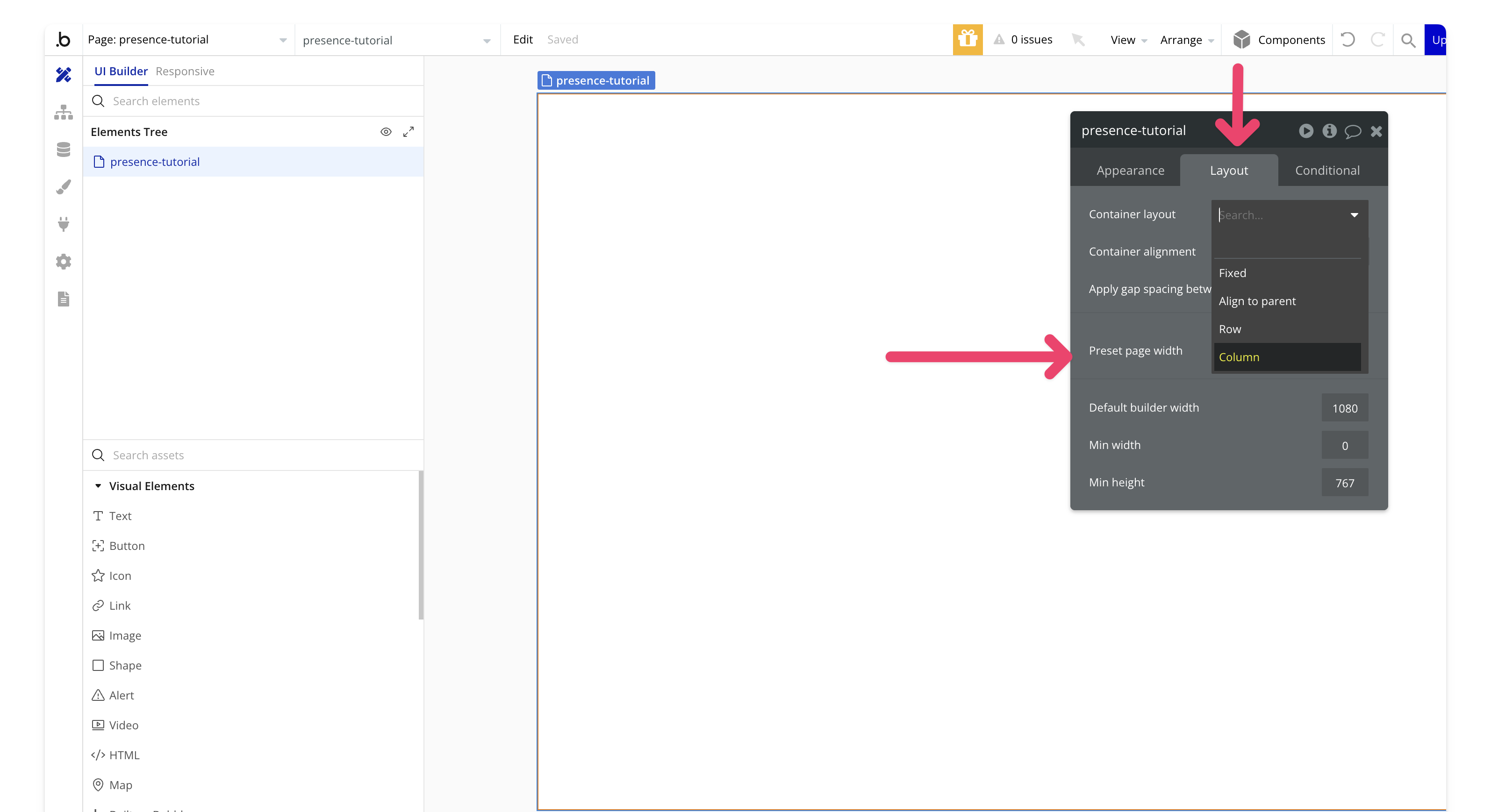
### 5. Adding the Liveblocks presence element
Add a hidden popup to house the presence element. This keeps it organized and out of the way.
Drag a popup onto your page and rename it `hidden popup`.

Search for `liveblocks-presence` and drag it into the popup to track who’s online.

### 6. Add a floating group
Create a `floating group` that will later house our repeating group for avatars.
Search for `floating group` in your assets and drag it onto the page. In the **Appearance** tab, set the following:
* Vertically float relative to: `top`
* Horizontally float relative to: `left`
* Floating z-index: `above elements`
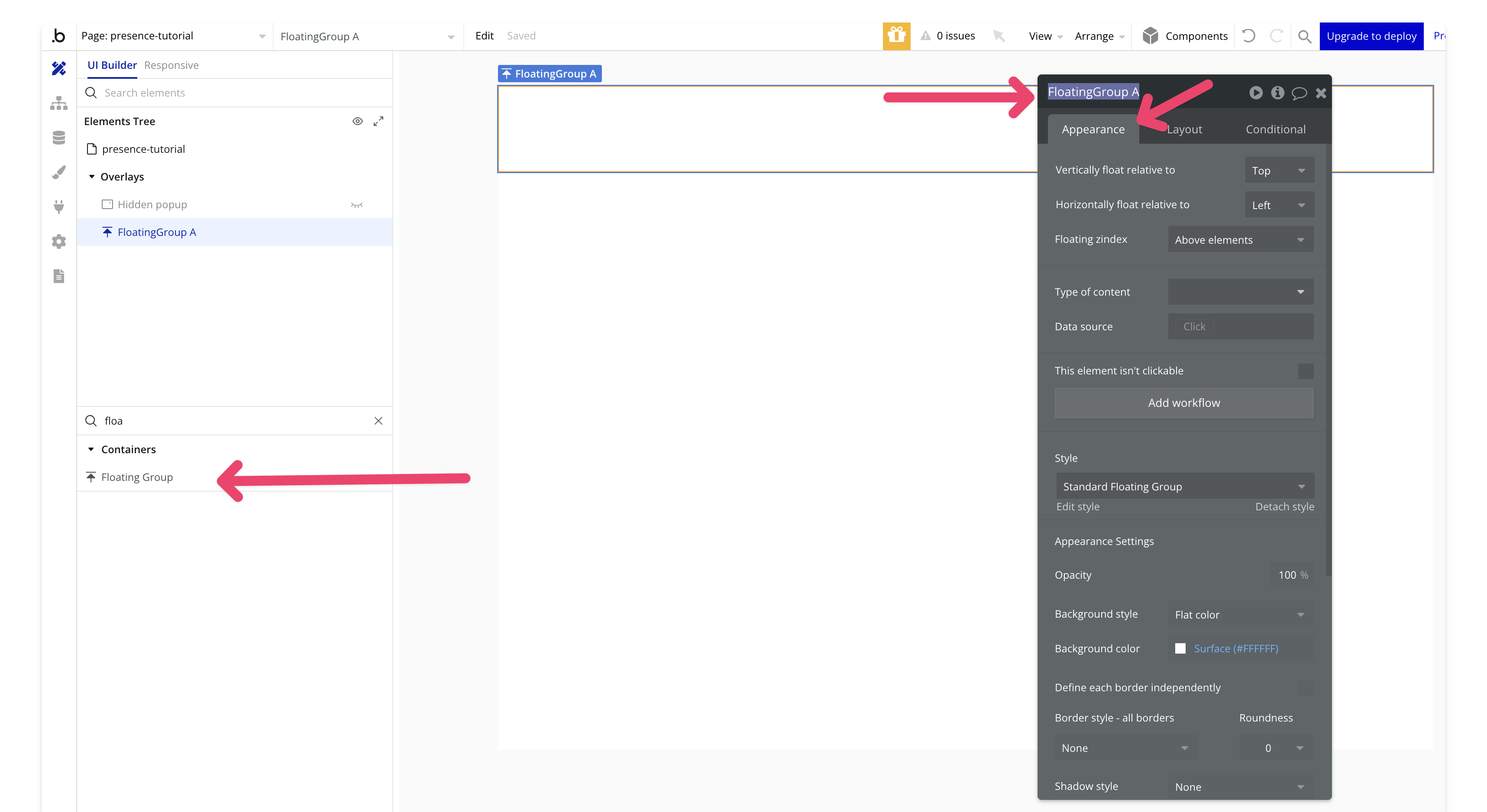
In the **Layout** tab, uncheck `make this element fixed-width` and `fixed-height`. Set the `min-width` to 100% and `min-height` to 100px, then check `fit height to content`.

### 7. Add a repeating group
Add a `repeating group` from the assets to the `floating group`. Set the **type of content** to `text` and the **data source** to `Liveblocks-presence (testing) A's everyone`. This data source holds all users in the room, including the local user.
In the **Appearance** tab, set the following:
* Check `set fixed number of rows`
* Set `rows` to 1
* Uncheck `set fixed number of columns`
* Set `minimum width of the column` to 20%
* Set `separators` to `none`
* Set `border` to `none`

In the **Layout** tab, set the following:
* Set `cell's container layout` to `column`
* Set `container alignment` to `top`
* Check `element is visible on page load`
* Uncheck `make this element fixed-width`
* Uncheck `make this element fixed-height`
* Set `min height` to 0
* Check `fit height to content`
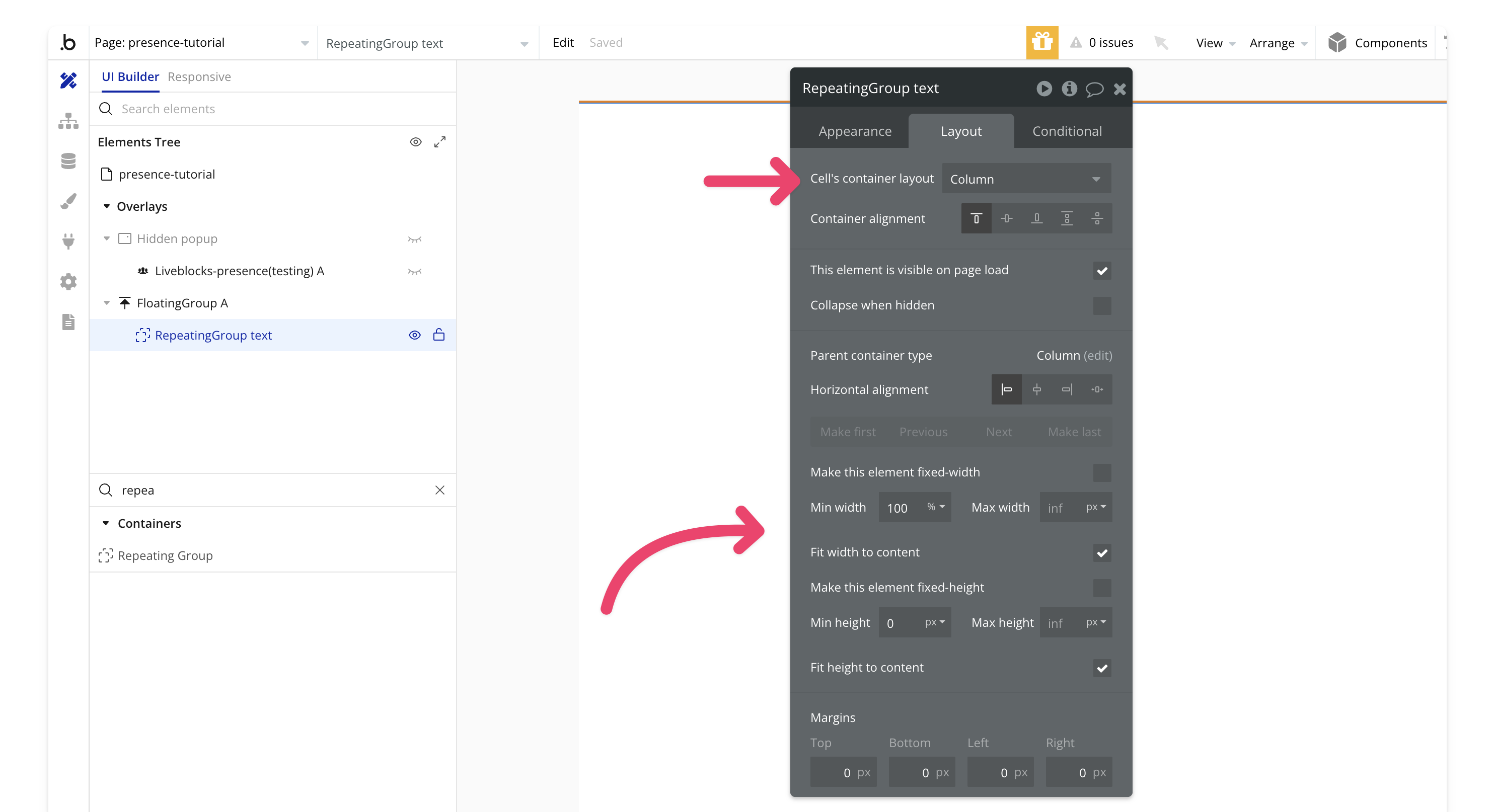
### 8. Create the avatar
Create a `group user` that will display the profile image of users when they are on the page.
Add a group to the repeating group, name it `group user`, and set the **type of content** to `user`.

Set the data source to `do a search for`, make the **type** `user`, and set the unique id to `current cell's text`. This data source is a list of user IDs (which we'll set later), matching Bubble's unique IDs.

Add an `image` element to the `group user` and set the image to `Parent group's user's profile image`. Enable **Imgix** and the following settings:
* Check `auto enhance the image`
* Set `quality` to 100
* Check `resize to fit dimensions by cropping`
* Check `apply a circle/ellipse mask`
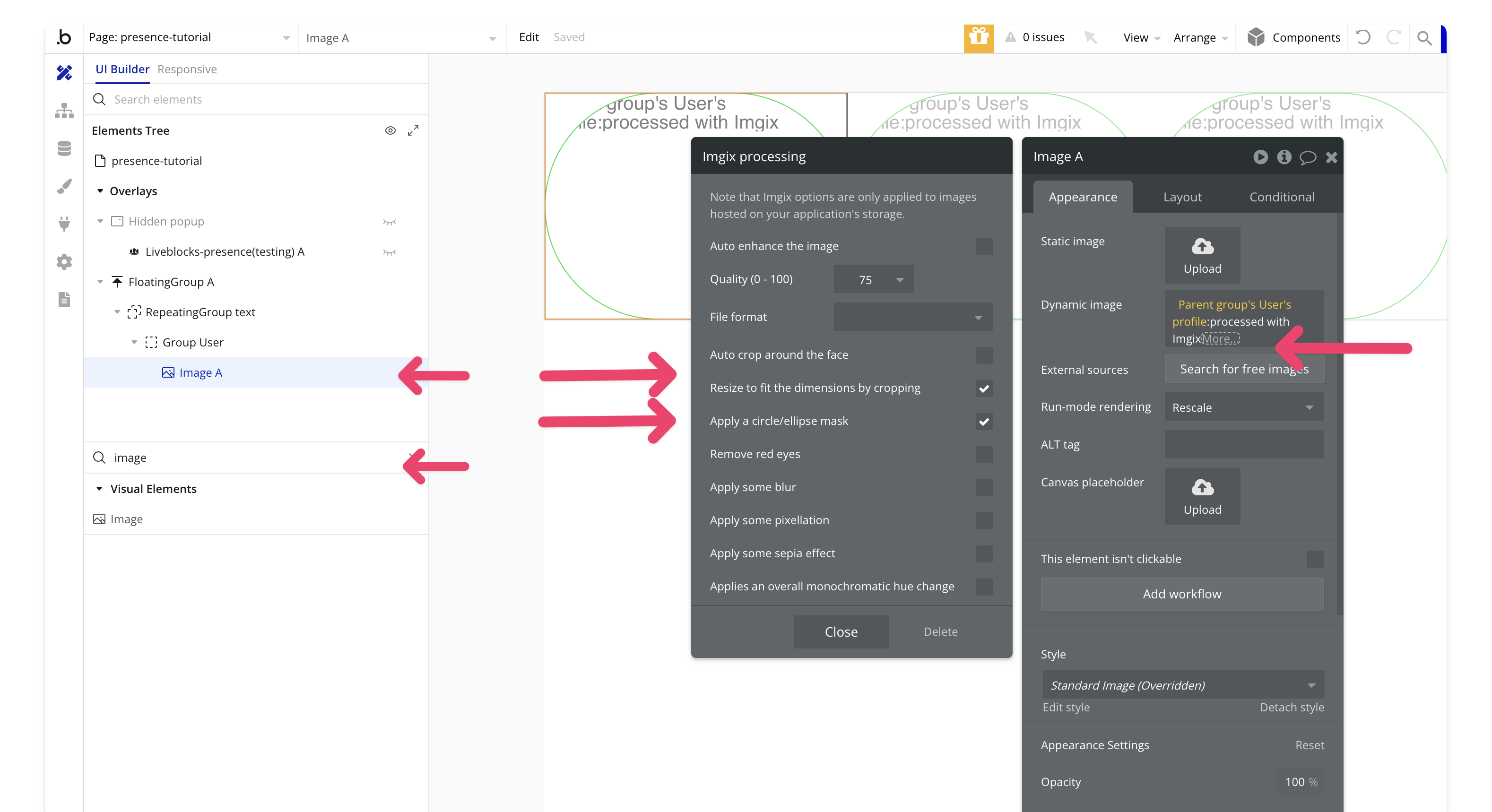
Add a border with `solid color #177db4e` and set a tooltip to display the `parent group's user's name`.

In the **Layout** tab, set the **width** to 50px, check `keep element aspect ratio fixed`, and set the aspect ratio to `1x1`.

That's it for setting up the design!
## Workflows
Workflows are where most of the interaction with Liveblocks will happen.
### 9. Create a room
Create a workflow that runs on page load to create a room for the demo.
On page load, add the `Liveblocks - create room` action. Set the `Room ID` to `tutorial` and the `Default Access` to `public`.
Add a new event: `When page is loaded`.
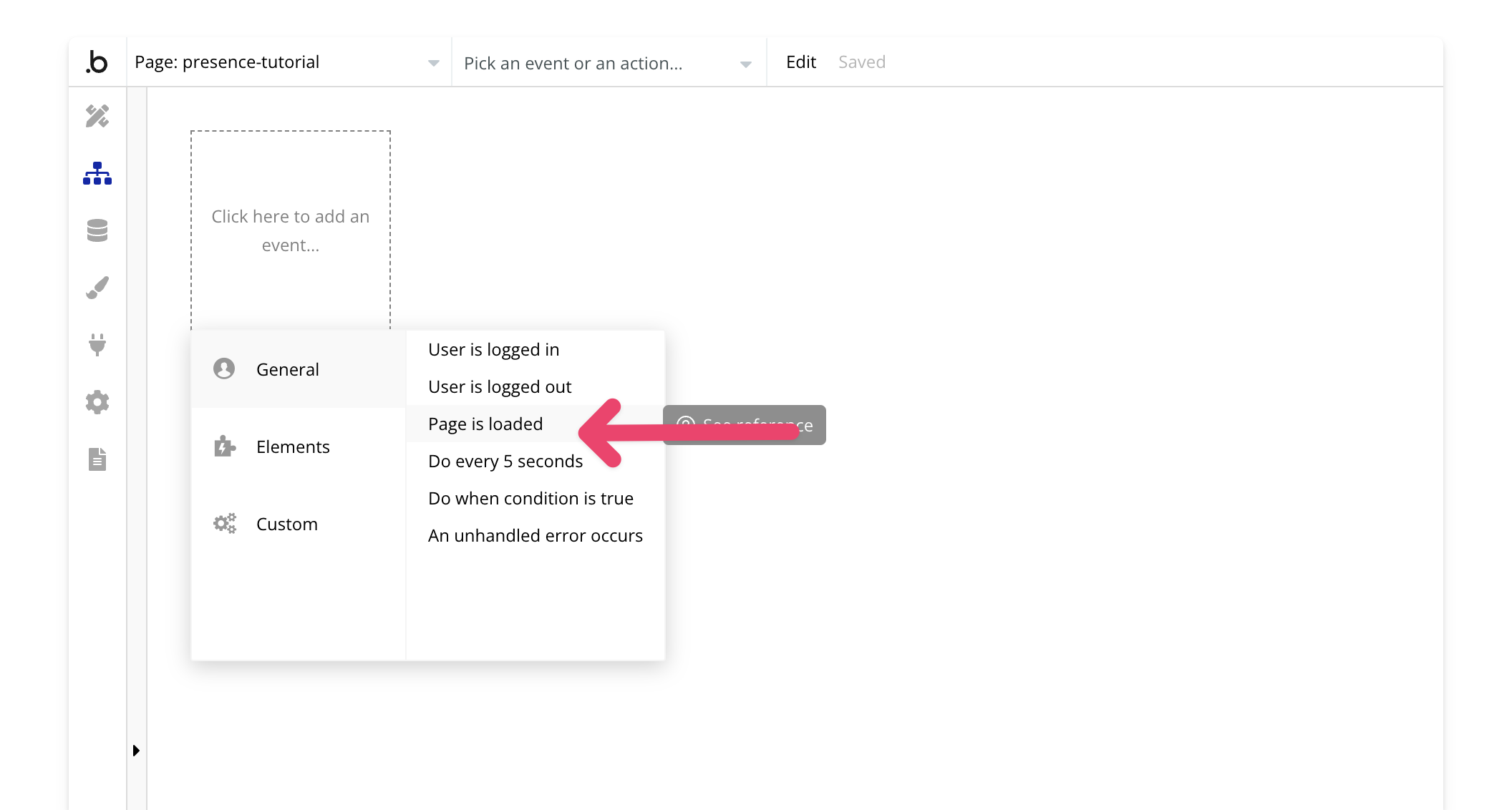
Then add the `Liveblocks - create room` action.

Add the [Air Alert plugin](https://bubble.io/plugin/airalert-1515787032525x876315403042684900) for confirmation. We'll use it to show an alert with the room name after the room is created.

Preview the page to confirm that the room was created successfully.
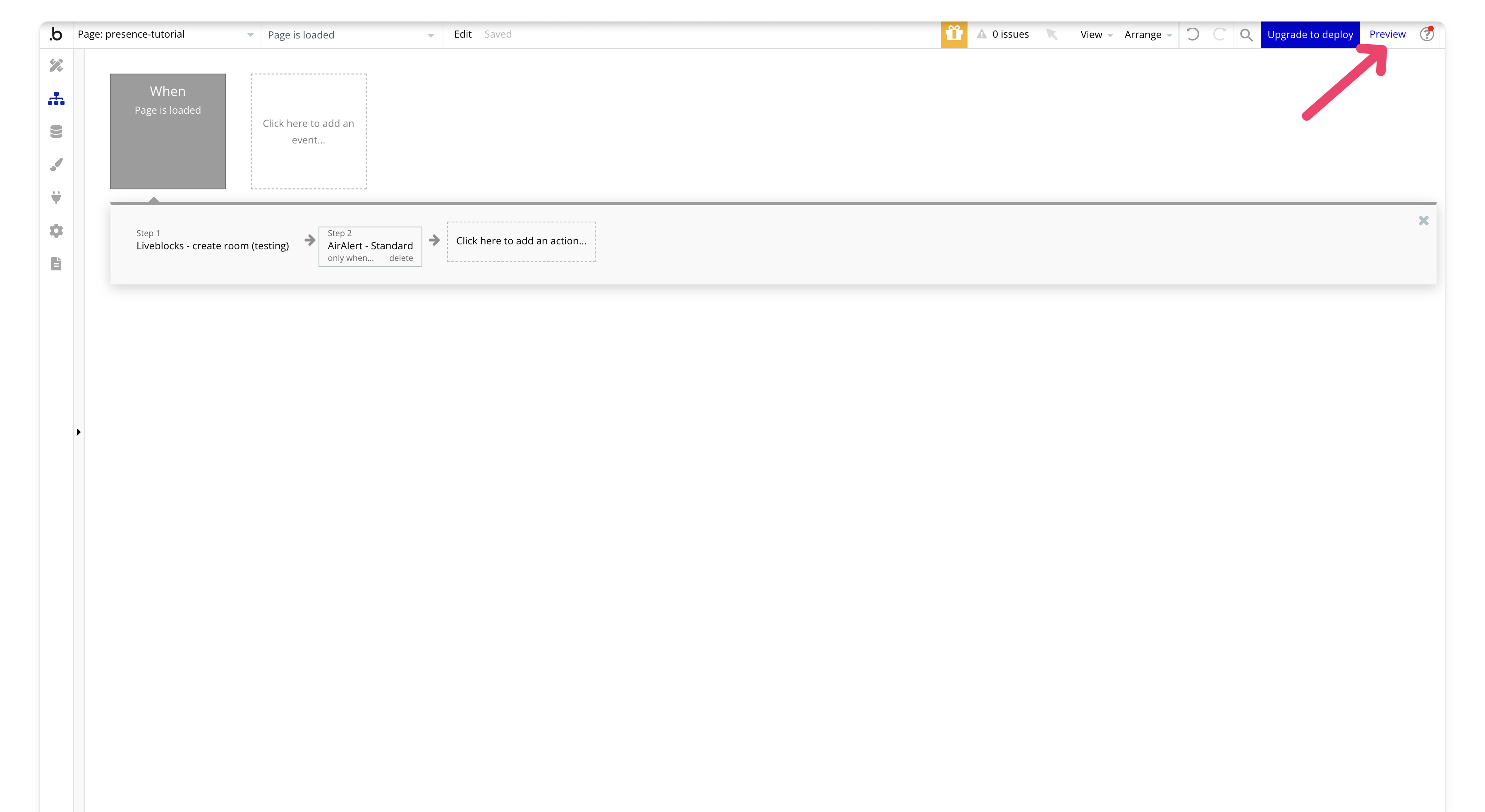
Great! Now that the room is created, we can move on to entering the room.
### 10. Workflow to enter a room
You can now disable the `on page load` workflow—we won't need it anymore since our room is created.
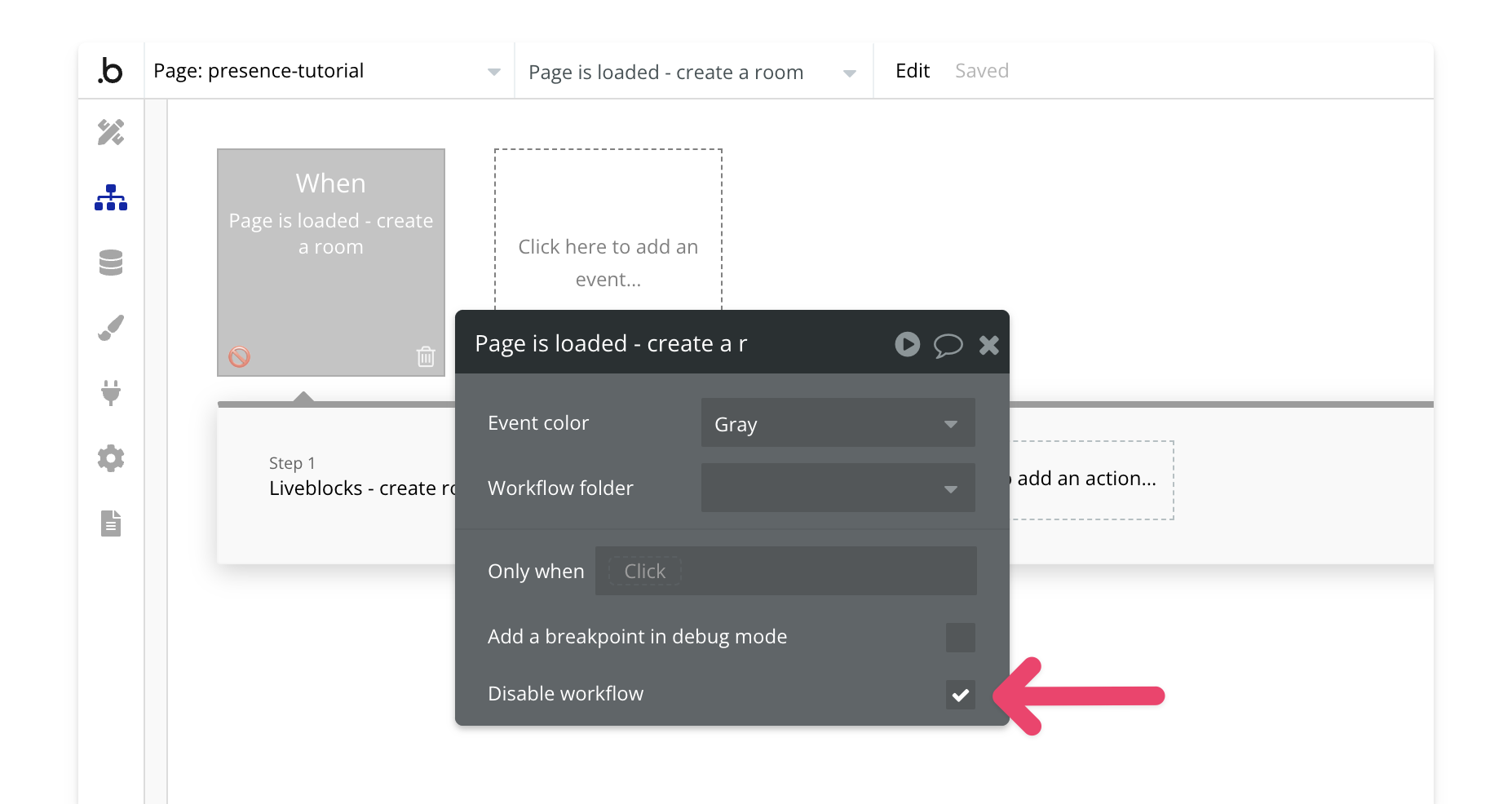
Create a new `page is loaded` workflow. We will add an action to set the state of an element. In Bubble, states allow you to store information within elements. For this demo, we'll use states to store a random user ID from our database to simulate a random user. In a real production app, you'd use the current user's unique ID, but we're avoiding login for this tutorial.
Add a new action to set the state of an element:
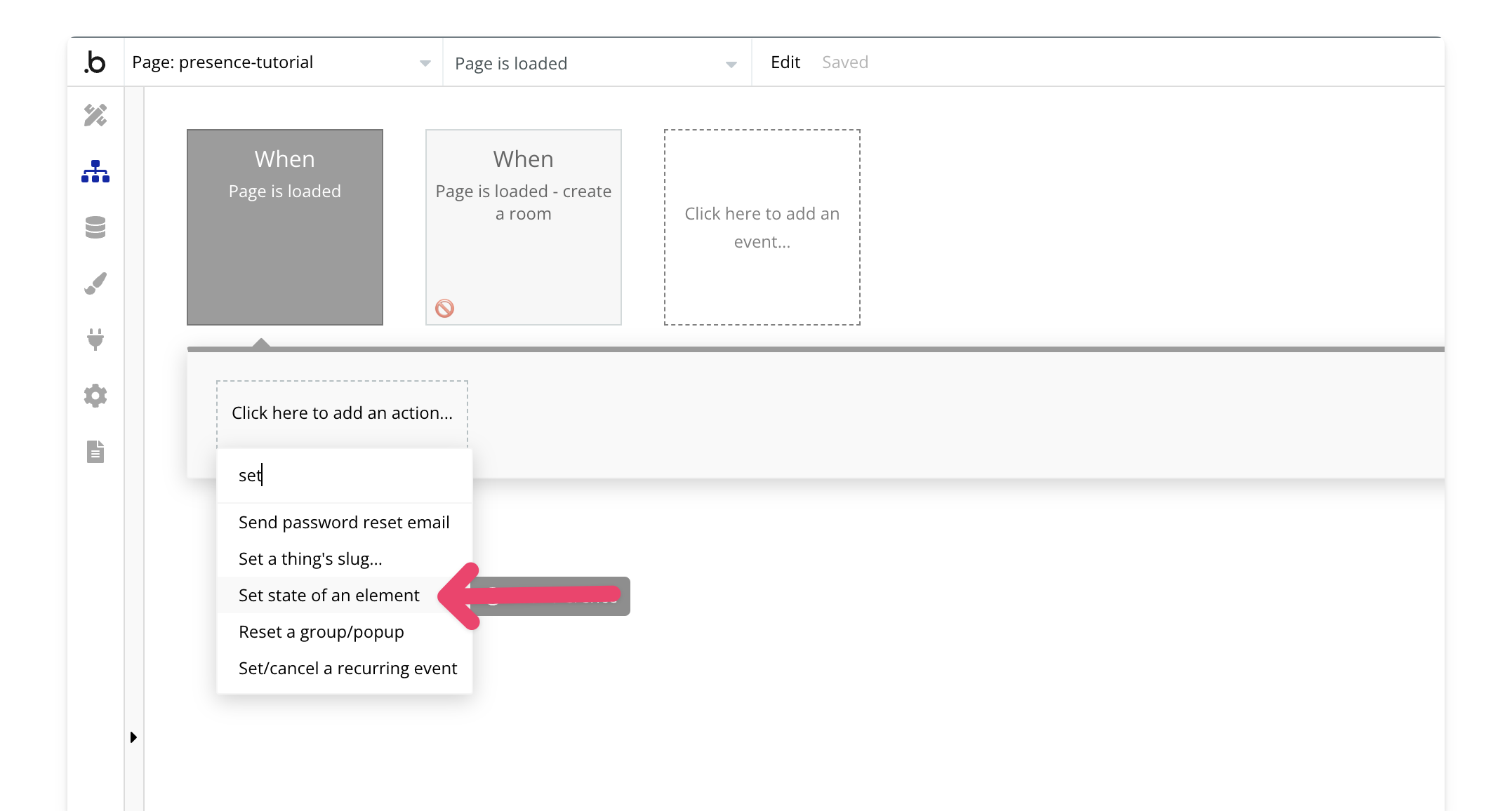
Set the element in the action's property editor to `presence-tutorial`, then create a new custom state:

Call the state `User ID` and make it of type `text`.
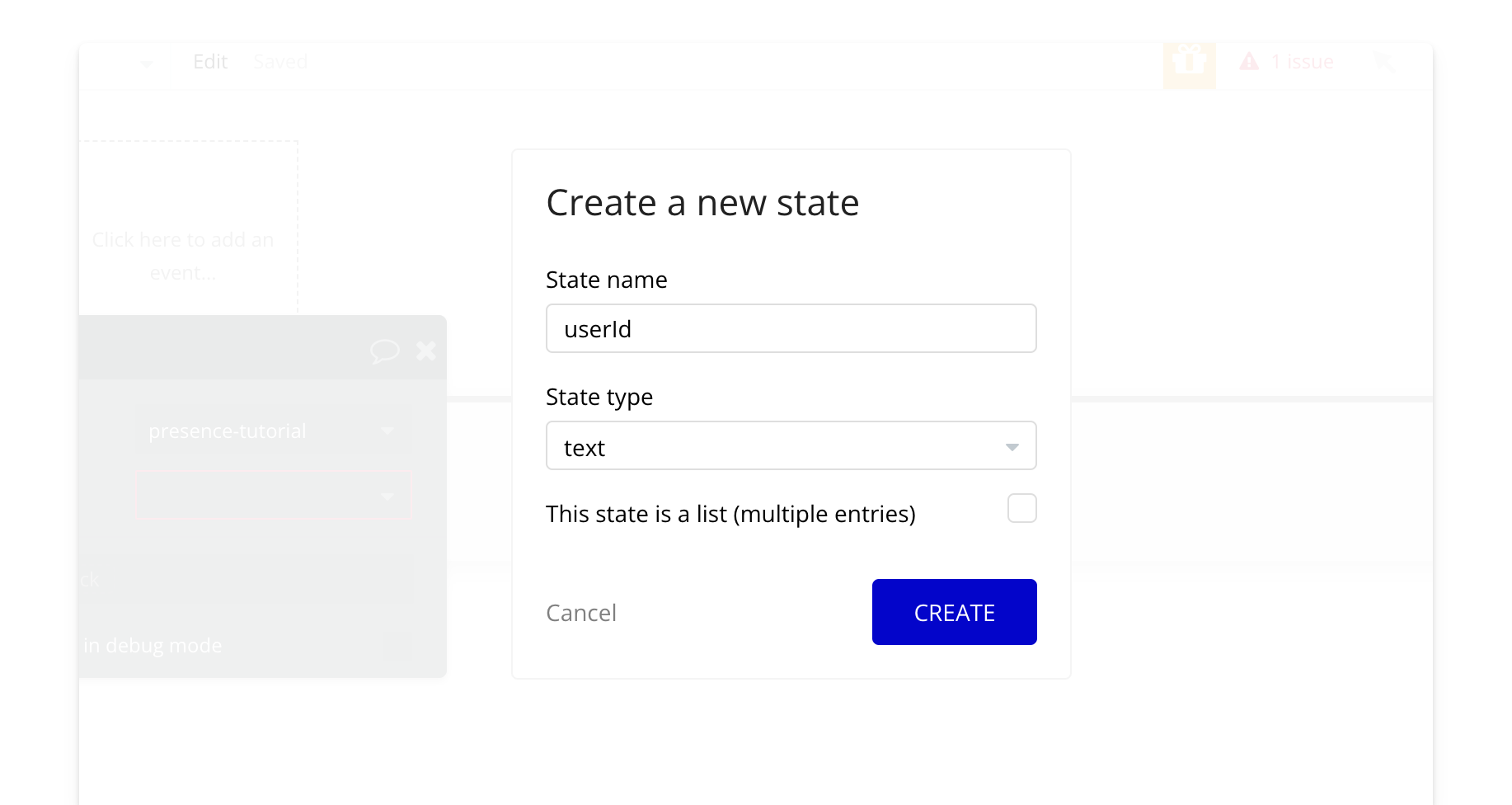
Add an action to set the state of the element to a random user ID.

Add the `authorize user` action—this authorizes users in Bubble with Liveblocks.
* For the `user ID` field, use the `User ID` state we just created.
* For the `Room ID`, use the `tutorial` room you created.
* Set `permissions` to `FULL_ACCESS`.

Add the `create client` action—this creates an instance of Liveblocks in Bubble. The `ID token` is the result of the user you just authorized. You can leave `throttle` and `lost connection time` as is. Learn more about the parameters of the `create client` action [here](/bubble/liveblocks/plugin-reference/elements/liveblocks-presence#create-client).

Add the `enter room` action. This is what joins the user in the room. Enter the `Room ID` and `User ID`, and keep the rest as default. Learn more about the advanced settings (e.g., live cursors) in [this tutorial](/bubble/liveblocks/how-tos/live-cursors).

## Demo
### 11. Trying it out
Select `preview` and you should see the page load with your avatar at the top. Open several tabs to see the users on the page update in real time!
***
## Next Steps
Now that you've got presence running, kick it up a notch with [live cursors](/bubble/liveblocks/how-tos/live-cursors).
> **[Need Help?](/support/plans)**
>
> View our options for free community and priority support.
> **[Have a feature request?](https://lunchpaillabs.canny.io/feature-requests?selectedCategory=liveblocks-plugin-for-bubble)**
>
> Post your feature request on our
>
> [idea board.](https://lunchpaillabs.canny.io/feature-requests?selectedCategory=liveblocks-plugin-for-bubble)
# Set up the plugin
Source: https://tools.lunchpaillabs.com/bubble/liveblocks/how-tos/set-up-plugin
This guide walks you through how to set up the Liveblocks plugin in your Bubble app and find your keys. If you prefer a video walkthrough, check out our step-by-step tutorial below. Otherwise, keep reading for the written guide:
[YouTube video player](https://www.youtube.com/embed/LAs3olSKgqw)
## Steps
### **Prerequisites**:
Ensure you have a [Liveblocks account](https://liveblocks.io/signup) and a [Bubble account](https://bubble.io/login?mode=signup). The free accounts for both services are more than enough to get started.
### 1. **Create a new app**
First, you'll need to create a new app in Bubble. Sign into Bubble, head to the [apps tab](https://bubble.io/home/apps) in your Bubble account, and click on the "Create new app" button.

You won't need a template.

You can start with the basic features and skip the application assistant.
### 2. **Head to the plugins tab**
Now that you're in the app editor, head to the plugins tab.

Select "Add plugins."
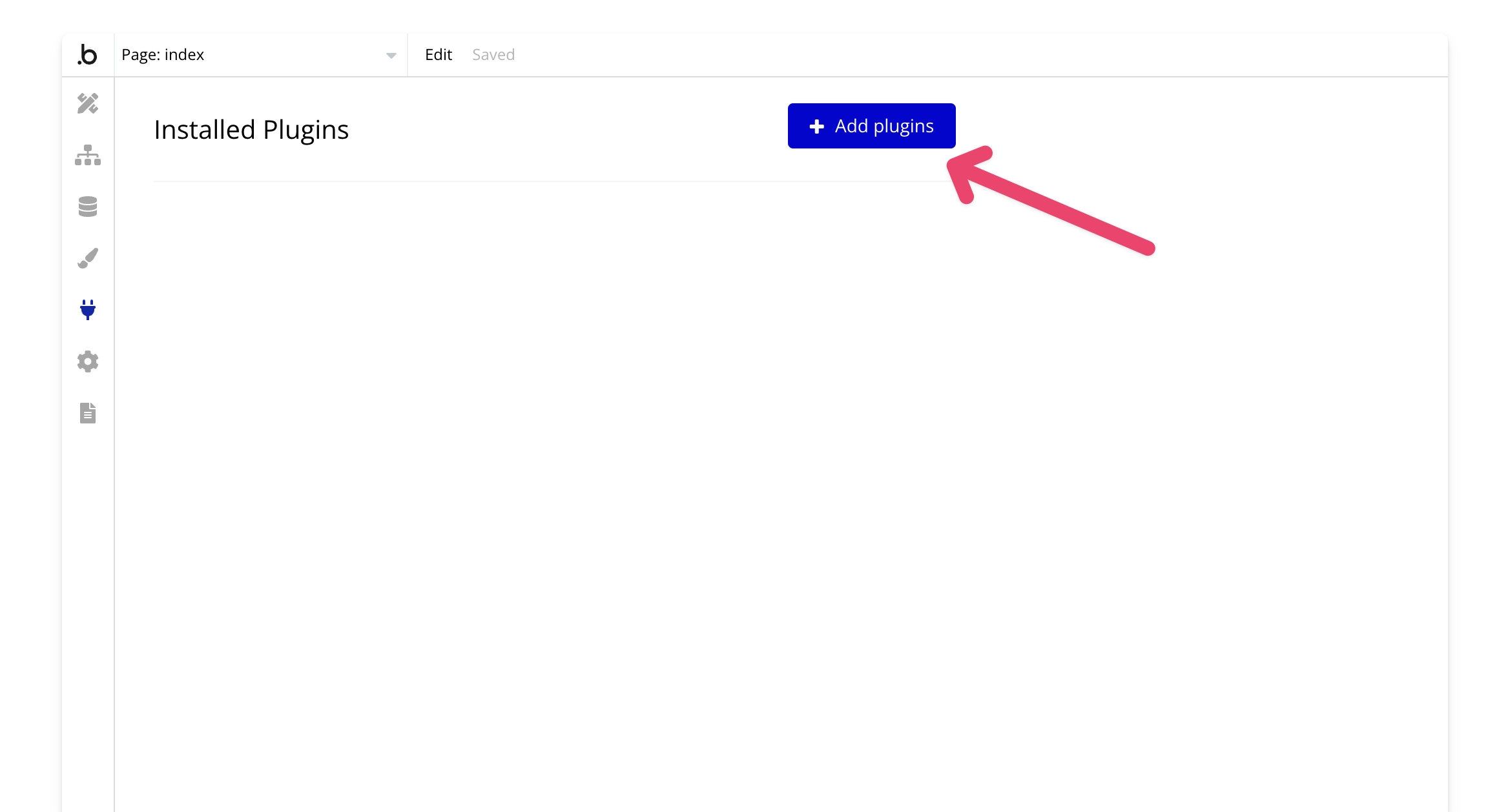
Search for "Liveblocks by Lunch Pail Labs" and click install.
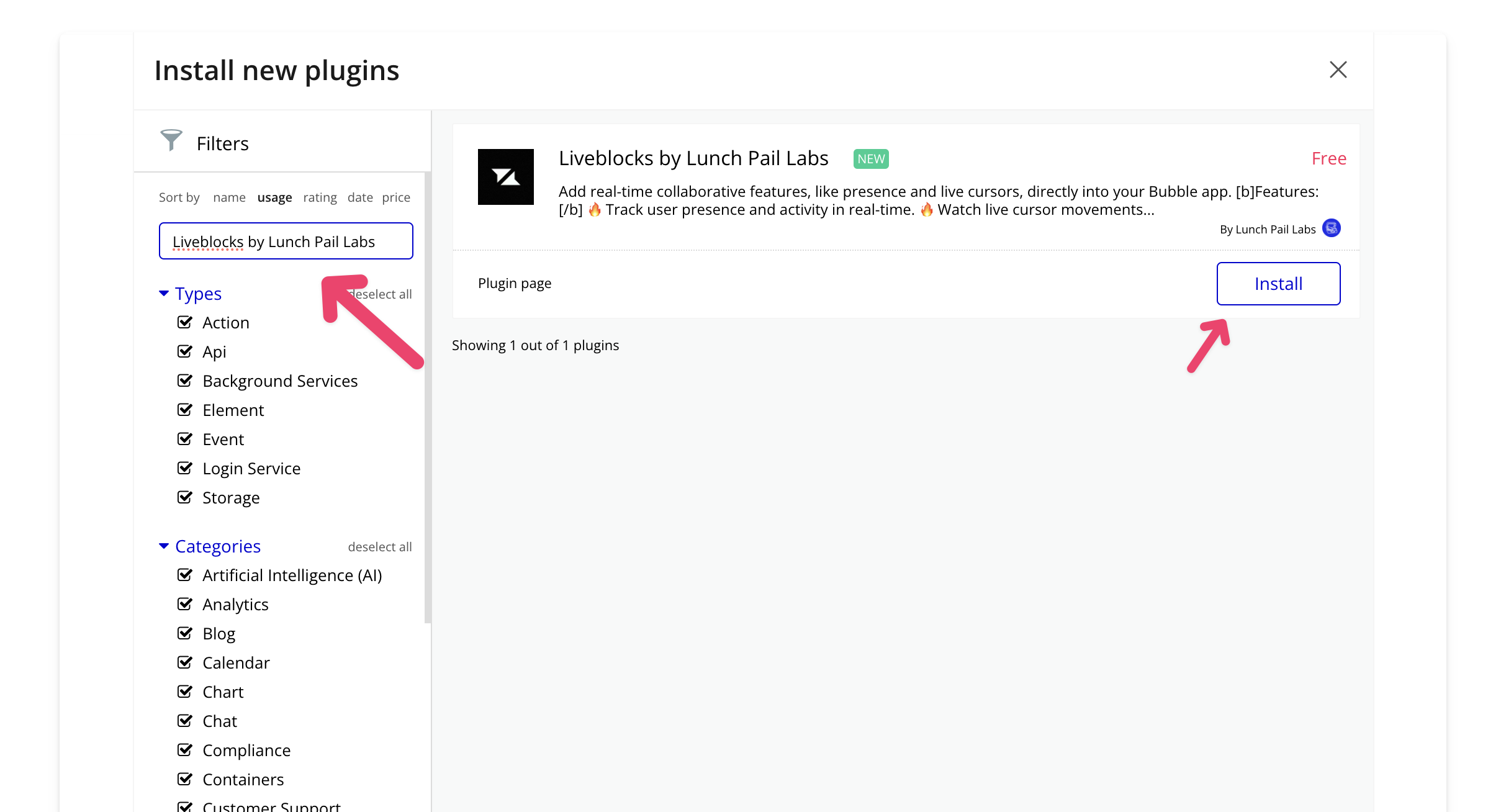
### 3. **Create a Liveblocks project**
Now you should see the Liveblocks plugin in the plugins tab.
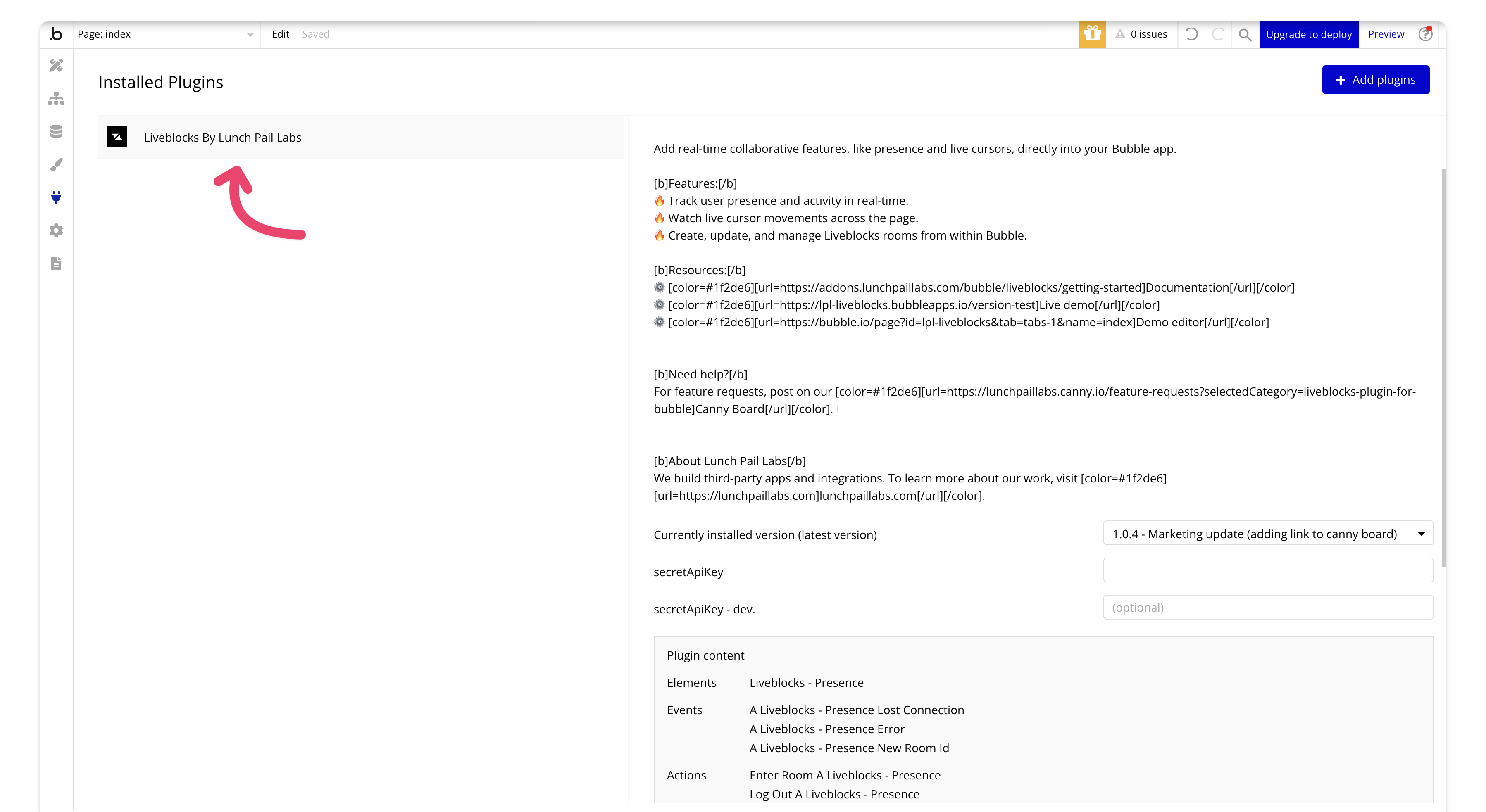
You'll need to add your secret key to your app, so go to your [Liveblocks dashboard](https://liveblocks.io/dashboard/settings/api-keys).
Add a project if you don't already have one.

For this demo, we'll set up a development project, but in a live production environment, you'll want to create a production environment as well.
### 4. **Add your secret key to the Liveblocks plugin**
Go to the API Keys tab and reveal your key and copy it,

Next, paste the key into the dev field of the Liveblocks plugin. When you move to production, be sure to create a production project and use the production key.
In the PLUS version of the plugin, make sure to add your key to the authorization field, and remember to prepend Bearer before your API key.
⚠️ Remember, keys are sensitive—keep them secure to avoid unauthorized access and potential charges on your account.
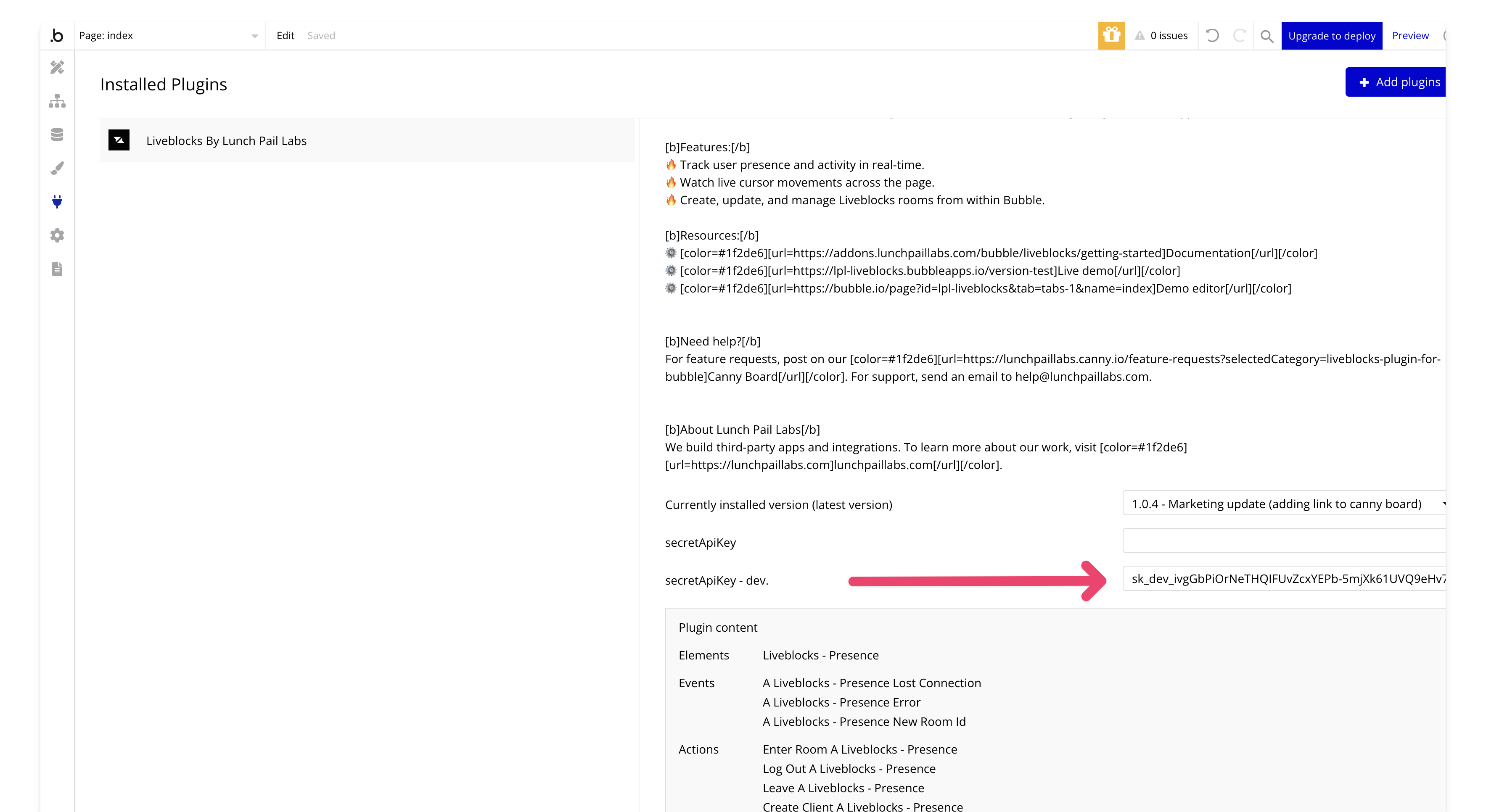
## Next Steps
That's it for setting up the plugin! You now have it installed and ready to go.
> **[Need Help?](/support/plans)**
>
> View our options for free community and priority support.
> **[Have a feature request?](https://lunchpaillabs.canny.io/feature-requests?selectedCategory=liveblocks-plugin-for-bubble)**
>
> Post your feature request on our
>
> [idea board.](https://lunchpaillabs.canny.io/feature-requests?selectedCategory=liveblocks-plugin-for-bubble)
# Add comment reaction
Source: https://tools.lunchpaillabs.com/bubble/liveblocks/plugin-reference/actions/add-comment-reaction
Use this action to add a reaction to a comment in a thread.
> [!WARNING]
>
> 🔐 Plus Plugin Only: This action is only available in the Plus version of
> the plugin. Get the Plus plugin [here](mailto:help@lunchpaillabs.com).
### Fields
The following fields are available in this action:
| **Field** | **Type** | **Description** |
| - | - | - |
| **Room ID** | Text | The unique identifier of the room. |
| **Thread ID** | Text | The unique identifier of the thread. |
| **Comment ID** | Text | The unique identifier of the comment. |
| **Emoji** | Text | The emoji used for the reaction. |
| **User ID** | Text | The unique identifier for the user adding the reaction. |
### Returned Values
The following values are returned by the action: `[]` indicates an array of objects.
| **Key** | **Type** | **Description** |
| - | - | - |
| **body.createdAt** | Date/Time | The timestamp of when the reaction was added. |
| **body.emoji** | Text | The emoji reaction that was added. |
| **body.userId** | Text | The ID of the user who added the reaction. |
| **error.status\_code** | Number | The HTTP status code returned by the API (e.g., `200` for success). |
| **error.status\_message** | Text | The HTTP status message returned by the API (e.g., `"OK"`). |
| **error.body** | Text | The raw error body message as a string. |
| **returned\_an\_error** | Boolean | A flag indicating whether the API returned an error. `false` means no error occurred. |
***
> **[Need Help?](/support/plans)**
>
> View our options for free community and priority support.
> **[Have a feature request?](https://lunchpaillabs.canny.io/feature-requests?selectedCategory=liveblocks-plugin-for-bubble)**
>
> Post your feature request on our
>
> [idea board.](https://lunchpaillabs.canny.io/feature-requests?selectedCategory=liveblocks-plugin-for-bubble)
# Authorize user
Source: https://tools.lunchpaillabs.com/bubble/liveblocks/plugin-reference/actions/authorize-user
Use this action to authorize your users with Liveblocks. It returns an ID token that you'll use for future actions with the plugin.
### Fields
The following fields are available in this action:
| **Field** | **Type** | **Description** |
| - | - | - |
| **User ID** | Text | The user's ID, which can be any unique string. You can use Bubble's unique ID for this parameter. |
| **Room ID** | Text | The room for which the user should be authorized. |
| **Permissions** | Dropdown | Defines the permission type for the room. Options: **FULL\_ACCESS** (view/edit) or **READ\_ACCESS** (view only). |
### Returned Values
The following values are returned by the action:
| **Value** | **Type** | **Description** |
| - | - | - |
| **ID Token** | Text | The ID token returned after authorizing the user. |
| **Error** | Yes/No | Indicates whether an error occurred during authorization. |
| **Message** | Text | Displays the error message if an error occurs. |
| **Status** | Number | The status code returned from the authorization action. |
***
> **[Need Help?](/support/plans)**
>
> View our options for free community and priority support.
> **[Have a feature request?](https://lunchpaillabs.canny.io/feature-requests?selectedCategory=liveblocks-plugin-for-bubble)**
>
> Post your feature request on our
>
> [idea board.](https://lunchpaillabs.canny.io/feature-requests?selectedCategory=liveblocks-plugin-for-bubble)
# Broadcast event
Source: https://tools.lunchpaillabs.com/bubble/liveblocks/plugin-reference/actions/broadcast-event
Use this action to broadcast an event to a room. This is a server-side action that can be called outside of a specific Liveblocks room.
> [!WARNING]
>
> 🔐 Plus Plugin Only: This action is only available in the Plus version of
> the plugin. Get the Plus plugin [here](mailto:help@lunchpaillabs.com).
### Fields
The following fields are available in this action:
| **Field** | **Type** | **Description** |
| - | - | - |
| **Room ID** | Text | The ID of the room where the event will be broadcasted. |
| **Type** | Text | The type of event being broadcasted. |
| **Message** | Text | The message payload that accompanies the event. |
### Returned Values
The following values are returned by the action:
| **Value** | **Type** | **Description** |
| - | - | - |
| **Error** | Boolean | Indicates whether an error occurred during the action. |
| **Message** | Text | Displays an error message if one occurred. |
| **Status** | Number | The error code if the action failed. |
***
> **[Need Help?](/support/plans)**
>
> View our options for free community and priority support.
> **[Have a feature request?](https://lunchpaillabs.canny.io/feature-requests?selectedCategory=liveblocks-plugin-for-bubble)**
>
> Post your feature request on our
>
> [idea board.](https://lunchpaillabs.canny.io/feature-requests?selectedCategory=liveblocks-plugin-for-bubble)
# Create comment
Source: https://tools.lunchpaillabs.com/bubble/liveblocks/plugin-reference/actions/create-comment
Use this action to create a comment in a thread.
> [!WARNING]
>
> 🔐 Plus Plugin Only: This action is only available in the Plus version of
> the plugin. Get the Plus plugin [here](mailto:help@lunchpaillabs.com).
### Fields
The following fields are available in this action:
| **Field** | **Type** | **Description** |
| - | - | - |
| **Room ID** | Text | The ID of the room where the comment will be created. |
| **Thread ID** | Text | The ID of the thread where the comment will be added. |
| **User ID** | Text | The unique identifier of the user creating the comment. |
| **Text** | Text | The content of the comment to be added to the thread. |
### Returned Values
The following values are returned by the action: `[]` indicates an array of objects.
| **Key** | **Type** | **Description** |
| - | - | - |
| **body.type** | Text | The type of the created object, typically `"comment"`. |
| **body.threadId** | Text | The unique identifier for the thread to which the comment belongs. |
| **body.roomId** | Text | The unique identifier for the room where the comment was created. |
| **body.id** | Text | The unique identifier for the created comment. |
| **body.userId** | Text | The user ID of the person who created the comment. |
| **body.createdAt** | Date/Time | The timestamp of when the comment was created. |
| **body.body** | Object | The content body of the comment. This is an object that includes `version` and `content`. |
| **body.body.version** | Number | The version number of the comment content. |
| **body.body.content** | Array | An array of content blocks in the comment. Each block contains further nested data, such as paragraph text. |
| **body.body.content\[].type** | Text | The type of the content block (e.g., `"paragraph"`). |
| **body.body.content\[].children** | Array | An array containing the children of the content block. Typically contains text objects for each paragraph. |
| **body.body.content\[].children\[].text** | Text | The actual text content of the comment, such as `"hi"`. |
| **error.status\_code** | Number | The HTTP status code returned by the API (e.g., `200` for success). |
| **error.status\_message** | Text | The HTTP status message returned by the API (e.g., `"OK"`). |
| **error.body** | Text | The raw error body message as a string. |
| **returned\_an\_error** | Boolean | A flag indicating whether the API returned an error. `false` means no error occurred. |
***
> **[Need Help?](/support/plans)**
>
> View our options for free community and priority support.
> **[Have a feature request?](https://lunchpaillabs.canny.io/feature-requests?selectedCategory=liveblocks-plugin-for-bubble)**
>
> Post your feature request on our
>
> [idea board.](https://lunchpaillabs.canny.io/feature-requests?selectedCategory=liveblocks-plugin-for-bubble)
# Create room
Source: https://tools.lunchpaillabs.com/bubble/liveblocks/plugin-reference/actions/create-room
Use this action to create a new room in Liveblocks.
### Fields
The following fields are available in this action:
| **Field** | **Type** | **Description** |
| - | - | - |
| **Room ID** | Text | The ID of the room to be created. It must be a unique string. |
| **Default Accesses** | Dropdown | The default access level for the room. Options: **private** or **public**. |
### Returned Values
The following values are returned by the action:
| **Value** | **Type** | **Description** |
| - | - | - |
| **Type** | Text | The type of object. |
| **ID** | Text | The ID of the room. |
| **Last Connection At** | Date | The timestamp of the last connection to the room. |
| **Created At** | Date | The timestamp when the room was created. |
| **Default Accesses** | Text | The default access level of the created room. |
| **Error** | Yes/No | Indicates if there was an error during the action. |
| **Message** | Text | Displays the error message if an error occurred. |
| **Status** | Number | The error code if the action failed |
***
> **[Need Help?](/support/plans)**
>
> View our options for free community and priority support.
> **[Have a feature request?](https://lunchpaillabs.canny.io/feature-requests?selectedCategory=liveblocks-plugin-for-bubble)**
>
> Post your feature request on our
>
> [idea board.](https://lunchpaillabs.canny.io/feature-requests?selectedCategory=liveblocks-plugin-for-bubble)
# Create thread
Source: https://tools.lunchpaillabs.com/bubble/liveblocks/plugin-reference/actions/create-thread
Use this action to create a thread.
> [!WARNING]
>
> 🔐 Plus Plugin Only: This action is only available in the Plus version of
> the plugin. Get the Plus plugin [here](mailto:help@lunchpaillabs.com).
### Fields
The following fields are available in this action:
| **Field** | **Type** | **Description** |
| - | - | - |
| **Room ID** | Text | The ID of the room where the thread will be created. |
| **User ID** | Text | The unique identifier of the user creating the thread. |
| **Text** | Text | The comment content to be added to the thread. |
### Returned Values
The following values are returned by the action:
### Returned Values
The following values are returned by the action: `[]` indicates an array of objects.
| **Key** | **Type** | **Description** |
| - | - | - |
| **body.type** | Text | The type of the created object, typically `"thread"`. |
| **body.id** | Text | The unique identifier for the created thread. |
| **body.roomId** | Text | The unique identifier for the room where the thread was created. |
| **body.comments** | Array | An array of comments associated with the thread. |
| **body.comments\[].type** | Text | The type of the object, typically `"comment"`. |
| **body.comments\[].threadId** | Text | The unique identifier for the thread that the comment belongs to. |
| **body.comments\[].roomId** | Text | The unique identifier for the room where the comment was created. |
| **body.comments\[].id** | Text | The unique identifier for the comment within the thread. |
| **body.comments\[].userId** | Text | The user ID of the person who created the comment. |
| **body.comments\[].createdAt** | Date/Time | The timestamp of when the comment was created. |
| **body.comments\[].body** | Object | The content body of the comment. This is an object that includes `version` and `content`. |
| **body.comments\[].body.version** | Number | The version number of the comment content. |
| **body.comments\[].body.content** | Array | An array of content blocks in the comment. Each block contains further nested data, such as paragraph text. |
| **body.comments\[].body.content\[].type** | Text | The type of the content block (e.g., `"paragraph"`). |
| **body.comments\[].body.content\[].children** | Array | An array containing the children of the content block. Typically contains text objects for each paragraph. |
| **body.comments\[].body.content\[].children\[].text** | Text | The actual text content of the comment, such as `"Hey there"`. |
| **body.createdAt** | Date/Time | The timestamp of when the thread was created. |
| **body.updatedAt** | Date/Time | The timestamp of when the thread was last updated. |
| **body.resolved** | Boolean | A flag indicating whether the thread has been resolved. |
| **error.status\_code** | Number | The HTTP status code returned by the API (e.g., `200` for success). |
| **error.status\_message** | Text | The HTTP status message returned by the API (e.g., `"OK"`). |
| **error.body** | Text | The raw error body message as a string. |
| **returned\_an\_error** | Boolean | A flag indicating whether the API returned an error. `false` means no error occurred. |
***
> **[Need Help?](/support/plans)**
>
> View our options for free community and priority support.
> **[Have a feature request?](https://lunchpaillabs.canny.io/feature-requests?selectedCategory=liveblocks-plugin-for-bubble)**
>
> Post your feature request on our
>
> [idea board.](https://lunchpaillabs.canny.io/feature-requests?selectedCategory=liveblocks-plugin-for-bubble)
# Delete all inbox notifications
Source: https://tools.lunchpaillabs.com/bubble/liveblocks/plugin-reference/actions/delete-all-inbox-notifications
Use this action to delete all inbox notification.
> [!WARNING]
>
> 🔐 Plus Plugin Only: This action is only available in the Plus version of
> the plugin. Get the Plus plugin [here](mailto:help@lunchpaillabs.com).
### Fields
The following fields are available in this action:
| **Field** | **Type** | **Description** |
| - | - | - |
| **User ID** | Text | The unique identifier of the user. |
### Returned Values
The following values are returned by the action:
| **Key** | **Type** | **Description** |
| - | - | - |
| **error.status\_code** | Number | The HTTP status code returned by the API (e.g., `200` for success). |
| **error.status\_message** | Text | The HTTP status message returned by the API (e.g., `"OK"`). |
| **error.body** | Text | The raw error body message as a string. |
| **returned\_an\_error** | Boolean | A flag indicating whether the API returned an error. `false` means no error occurred. |
***
> **[Need Help?](/support/plans)**
>
> View our options for free community and priority support.
> **[Have a feature request?](https://lunchpaillabs.canny.io/feature-requests?selectedCategory=liveblocks-plugin-for-bubble)**
>
> Post your feature request on our
>
> [idea board.](https://lunchpaillabs.canny.io/feature-requests?selectedCategory=liveblocks-plugin-for-bubble)
# Delete comment
Source: https://tools.lunchpaillabs.com/bubble/liveblocks/plugin-reference/actions/delete-comment
Use this action to delete a comment.
> [!WARNING]
>
> 🔐 Plus Plugin Only: This action is only available in the Plus version of
> the plugin. Get the Plus plugin [here](mailto:help@lunchpaillabs.com).
### Fields
The following fields are available in this action:
| **Field** | **Type** | **Description** |
| - | - | - |
| **Room ID** | Text | The room ID. |
| **Thread ID** | Text | The thread ID. |
| **Comment ID** | Text | The comment ID. |
### Returned Values
The following values are returned by the action: `[]` indicates an array of objects.
| **Key** | **Type** | **Description** |
| - | - | - |
| **error.status\_code** | Number | The HTTP status code returned by the API (e.g., `200` for success). |
| **error.status\_message** | Text | The HTTP status message returned by the API (e.g., `"OK"`). |
| **error.body** | Text | The raw error body message as a string. |
| **returned\_an\_error** | Boolean | A flag indicating whether the API returned an error. `false` means no error occurred. |
***
> **[Need Help?](/support/plans)**
>
> View our options for free community and priority support.
> **[Have a feature request?](https://lunchpaillabs.canny.io/feature-requests?selectedCategory=liveblocks-plugin-for-bubble)**
>
> Post your feature request on our
>
> [idea board.](https://lunchpaillabs.canny.io/feature-requests?selectedCategory=liveblocks-plugin-for-bubble)
# Delete inbox notification
Source: https://tools.lunchpaillabs.com/bubble/liveblocks/plugin-reference/actions/delete-inbox-notification
Use this action to delete an inbox notification.
> [!WARNING]
>
> 🔐 Plus Plugin Only: This action is only available in the Plus version of
> the plugin. Get the Plus plugin [here](mailto:help@lunchpaillabs.com).
### Fields
The following fields are available in this action:
| **Field** | **Type** | **Description** |
| - | - | - |
| **User ID** | Text | The unique identifier of the user. |
| **Inbox Notification ID** | Text | The unique identifier of the inbox notification |
### Returned Values
The following values are returned by the action:
| **Key** | **Type** | **Description** |
| - | - | - |
| **error.status\_code** | Number | The HTTP status code returned by the API (e.g., `200` for success). |
| **error.status\_message** | Text | The HTTP status message returned by the API (e.g., `"OK"`). |
| **error.body** | Text | The raw error body message as a string. |
| **returned\_an\_error** | Boolean | A flag indicating whether the API returned an error. `false` means no error occurred. |
***
> **[Need Help?](/support/plans)**
>
> View our options for free community and priority support.
> **[Have a feature request?](https://lunchpaillabs.canny.io/feature-requests?selectedCategory=liveblocks-plugin-for-bubble)**
>
> Post your feature request on our
>
> [idea board.](https://lunchpaillabs.canny.io/feature-requests?selectedCategory=liveblocks-plugin-for-bubble)
# Delete room
Source: https://tools.lunchpaillabs.com/bubble/liveblocks/plugin-reference/actions/delete-room
Use this action to delete an existing room.
### Fields
The following fields are available in this action:
| **Field** | **Type** | **Description** |
| - | - | - |
| **Room ID** | Text | The ID of the room to delete |
### Returned Values
The following values are returned by the action:
| **Value** | **Type** | **Description** |
| - | - | - |
| **Error** | Yes/No | Indicates if there was an error during the action. |
| **Message** | Text | Displays the error message if an error occurred. |
| **Status** | Number | The error code if the action failed |
***
> **[Need Help?](/support/plans)**
>
> View our options for free community and priority support.
> **[Have a feature request?](https://lunchpaillabs.canny.io/feature-requests?selectedCategory=liveblocks-plugin-for-bubble)**
>
> Post your feature request on our
>
> [idea board.](https://lunchpaillabs.canny.io/feature-requests?selectedCategory=liveblocks-plugin-for-bubble)
# Delete thread
Source: https://tools.lunchpaillabs.com/bubble/liveblocks/plugin-reference/actions/delete-thread
Use this action to delete a thread and all its associated comments.
> [!WARNING]
>
> 🔐 Plus Plugin Only: This action is only available in the Plus version of
> the plugin. Get the Plus plugin [here](mailto:help@lunchpaillabs.com).
### Fields
The following fields are available in this action:
| **Field** | **Type** | **Description** |
| - | - | - |
| **Room ID** | Text | The unique identifier of the room. |
| **Thread ID** | Text | The unique identifier of the thread. |
### Returned Values
The following values are returned by the action: `[]` indicates an array of objects.
| **Key** | **Type** | **Description** |
| - | - | - |
| **error.status\_code** | Number | The HTTP status code returned by the API (e.g., `200` for success). |
| **error.status\_message** | Text | The HTTP status message returned by the API (e.g., `"OK"`). |
| **error.body** | Text | The raw error body message as a string. |
| **returned\_an\_error** | Boolean | A flag indicating whether the API returned an error. `false` means no error occurred. |
***
> **[Need Help?](/support/plans)**
>
> View our options for free community and priority support.
> **[Have a feature request?](https://lunchpaillabs.canny.io/feature-requests?selectedCategory=liveblocks-plugin-for-bubble)**
>
> Post your feature request on our
>
> [idea board.](https://lunchpaillabs.canny.io/feature-requests?selectedCategory=liveblocks-plugin-for-bubble)
# Edit comment
Source: https://tools.lunchpaillabs.com/bubble/liveblocks/plugin-reference/actions/edit-comment
Use this action to edit a comment in a thread.
> [!WARNING]
>
> 🔐 Plus Plugin Only: This action is only available in the Plus version of
> the plugin. Get the Plus plugin [here](mailto:help@lunchpaillabs.com).
### Fields
The following fields are available in this action:
| **Field** | **Type** | **Description** |
| - | - | - |
| **Room ID** | Text | The room ID. |
| **Thread ID** | Text | The thread ID. |
| **Comment ID** | Text | The comment ID. |
| **Text** | Text | The content of the comment. |
### Returned Values
The following values are returned by the action: `[]` indicates an array of objects.
| **Key** | **Type** | **Description** |
| - | - | - |
| **body.type** | Text | The type of the created object, typically `"comment"`. |
| **body.threadId** | Text | The unique identifier for the thread to which the comment belongs. |
| **body.roomId** | Text | The unique identifier for the room where the comment was created. |
| **body.id** | Text | The unique identifier for the created comment. |
| **body.userId** | Text | The user ID of the person who created the comment. |
| **body.createdAt** | Date/Time | The timestamp of when the comment was created. |
| **body.editedAt** | Date/Time | The timestamp of when the comment was edited. |
| **body.body** | Object | The content body of the comment. This is an object that includes `version` and `content`. |
| **body.body.version** | Number | The version number of the comment content. |
| **body.body.content** | Array | An array of content blocks in the comment. Each block contains further nested data, such as paragraph text. |
| **body.body.content\[].type** | Text | The type of the content block (e.g., `"paragraph"`). |
| **body.body.content\[].children** | Array | An array containing the children of the content block. Typically contains text objects for each paragraph. |
| **body.body.content\[].children\[].text** | Text | The actual text content of the comment, such as `"hi"`. |
| **error.status\_code** | Number | The HTTP status code returned by the API (e.g., `200` for success). |
| **error.status\_message** | Text | The HTTP status message returned by the API (e.g., `"OK"`). |
| **error.body** | Text | The raw error body message as a string. |
| **returned\_an\_error** | Boolean | A flag indicating whether the API returned an error. `false` means no error occurred. |
***
> **[Need Help?](/support/plans)**
>
> View our options for free community and priority support.
> **[Have a feature request?](https://lunchpaillabs.canny.io/feature-requests?selectedCategory=liveblocks-plugin-for-bubble)**
>
> Post your feature request on our
>
> [idea board.](https://lunchpaillabs.canny.io/feature-requests?selectedCategory=liveblocks-plugin-for-bubble)
# Get active users
Source: https://tools.lunchpaillabs.com/bubble/liveblocks/plugin-reference/actions/get-active-users
Use this action to retrieve a list of users currently present in the specified room.
### Fields
The following fields are available in this action:
| **Field** | **Type** | **Description** |
| - | - | - |
| **Room ID** | Text | The ID of the room to retrieve active users from. |
### Returned Values
The following values are returned by the action:
| **Value** | **Type** | **Description** |
| - | - | - |
| **Active Users** | Text (list) | A list of user IDs for all active users in the room. |
| **Error** | Yes/No | Indicates if there was an error during the action. |
| **Message** | Text | Displays the error message if an error occurred. |
| **Status** | Number | The error code if the action failed. |
***
> **[Need Help?](/support/plans)**
>
> View our options for free community and priority support.
> **[Have a feature request?](https://lunchpaillabs.canny.io/feature-requests?selectedCategory=liveblocks-plugin-for-bubble)**
>
> Post your feature request on our
>
> [idea board.](https://lunchpaillabs.canny.io/feature-requests?selectedCategory=liveblocks-plugin-for-bubble)
# Get all inbox notifications
Source: https://tools.lunchpaillabs.com/bubble/liveblocks/plugin-reference/actions/get-all-inbox-notifications
Use this action to retrieve all inbox notifications.
> [!WARNING]
>
> 🔐 Plus Plugin Only: This action is only available in the Plus version of
> the plugin. Get the Plus plugin [here](mailto:help@lunchpaillabs.com).
### Fields
The following fields are available in this action:
| **Field** | **Type** | **Description** |
| - | - | - |
| **User ID** | Text | The unique identifier of the user to retrieve notifications for. |
### Returned Values
The following values are returned by the action: `[]` indicates an array of objects.
| **Key** | **Type** | **Description** |
| - | - | - |
| **body.data\[]** | Array | An array of notification objects related to the threads. |
| **body.data\[].kind** | Text | The kind of notification, typically `"thread"`. |
| **body.data\[].id** | Text | The unique identifier of the notification. |
| **body.data\[].threadId** | Text | The unique identifier of the thread related to the notification. |
| **body.data\[].roomId** | Text | The unique identifier of the room where the thread exists. |
| **body.data\[].notifiedAt** | Date/Time | The timestamp when the notification was generated. |
| **body.data\[].readAt** | Date/Time | The timestamp when the notification was read. This will be `null` if it hasn't been read yet. |
| **error.status\_code** | Number | The HTTP status code returned by the API (e.g., `200` for success). |
| **error.status\_message** | Text | The HTTP status message returned by the API (e.g., `"OK"`). |
| **error.body** | Text | The raw error body message as a string. |
| **returned\_an\_error** | Boolean | A flag indicating whether the API returned an error. `false` means no error occurred. |
***
> **[Need Help?](/support/plans)**
>
> View our options for free community and priority support.
> **[Have a feature request?](https://lunchpaillabs.canny.io/feature-requests?selectedCategory=liveblocks-plugin-for-bubble)**
>
> Post your feature request on our
>
> [idea board.](https://lunchpaillabs.canny.io/feature-requests?selectedCategory=liveblocks-plugin-for-bubble)
# Get comment
Source: https://tools.lunchpaillabs.com/bubble/liveblocks/plugin-reference/actions/get-comment
Use this action to retrieve a comment.
> [!WARNING]
>
> 🔐 Plus Plugin Only: This action is only available in the Plus version of
> the plugin. Get the Plus plugin [here](mailto:help@lunchpaillabs.com).
### Fields
The following fields are available in this action:
| **Field** | **Type** | **Description** |
| - | - | - |
| **Room ID** | Text | The ID of the room |
| **Thread ID** | Text | The ID of the thread |
| **Comment ID** | Text | The ID of the comment. |
### Returned Values
The following values are returned by the action: `[]` indicates an array of objects.
| **Key** | **Type** | **Description** |
| - | - | - |
| **body.type** | Text | The type of the created object, typically `"comment"`. |
| **body.threadId** | Text | The unique identifier for the thread to which the comment belongs. |
| **body.roomId** | Text | The unique identifier for the room where the comment was created. |
| **body.id** | Text | The unique identifier for the created comment. |
| **body.userId** | Text | The user ID of the person who created the comment. |
| **body.createdAt** | Date/Time | The timestamp of when the comment was created. |
| **body.body** | Object | The content body of the comment. This is an object that includes `version` and `content`. |
| **body.body.version** | Number | The version number of the comment content. |
| **body.body.content** | Array | An array of content blocks in the comment. Each block contains further nested data, such as paragraph text. |
| **body.body.content\[].type** | Text | The type of the content block (e.g., `"paragraph"`). |
| **body.body.content\[].children** | Array | An array containing the children of the content block. Typically contains text objects for each paragraph. |
| **body.body.content\[].children\[].text** | Text | The actual text content of the comment, such as `"hi"`. |
| **error.status\_code** | Number | The HTTP status code returned by the API (e.g., `200` for success). |
| **error.status\_message** | Text | The HTTP status message returned by the API (e.g., `"OK"`). |
| **error.body** | Text | The raw error body message as a string. |
| **returned\_an\_error** | Boolean | A flag indicating whether the API returned an error. `false` means no error occurred. |
***
> **[Need Help?](/support/plans)**
>
> View our options for free community and priority support.
> **[Have a feature request?](https://lunchpaillabs.canny.io/feature-requests?selectedCategory=liveblocks-plugin-for-bubble)**
>
> Post your feature request on our
>
> [idea board.](https://lunchpaillabs.canny.io/feature-requests?selectedCategory=liveblocks-plugin-for-bubble)
# Get inbox notification
Source: https://tools.lunchpaillabs.com/bubble/liveblocks/plugin-reference/actions/get-inbox-notification
Use this action to retrieve an inbox notification.
> [!WARNING]
>
> 🔐 Plus Plugin Only: This action is only available in the Plus version of
> the plugin. Get the Plus plugin [here](mailto:help@lunchpaillabs.com).
### Fields
The following fields are available in this action:
| **Field** | **Type** | **Description** |
| - | - | - |
| **User ID** | Text | The unique identifier of the user. |
| **Inbox Notification ID** | Text | The unique identifier of the inbox notification |
### Returned Values
The following values are returned by the action:
| **Key** | **Type** | **Description** |
| - | - | - |
| **body.kind** | Text | The kind of notification, typically `"thread"`. |
| **body.id** | Text | The unique identifier of the notification. |
| **body.threadId** | Text | The unique identifier of the thread related to the notification. |
| **body.roomId** | Text | The unique identifier of the room where the thread exists. |
| **body.notifiedAt** | Date/Time | The timestamp when the notification was generated. |
| **body.readAt** | Date/Time | The timestamp when the notification was read. This will be `null` if it hasn't been read yet. |
| **error.status\_code** | Number | The HTTP status code returned by the API (e.g., `200` for success). |
| **error.status\_message** | Text | The HTTP status message returned by the API (e.g., `"OK"`). |
| **error.body** | Text | The raw error body message as a string. |
| **returned\_an\_error** | Boolean | A flag indicating whether the API returned an error. `false` means no error occurred. |
***
> **[Need Help?](/support/plans)**
>
> View our options for free community and priority support.
> **[Have a feature request?](https://lunchpaillabs.canny.io/feature-requests?selectedCategory=liveblocks-plugin-for-bubble)**
>
> Post your feature request on our
>
> [idea board.](https://lunchpaillabs.canny.io/feature-requests?selectedCategory=liveblocks-plugin-for-bubble)
# Get room
Source: https://tools.lunchpaillabs.com/bubble/liveblocks/plugin-reference/actions/get-room
Use this action to return a room by its ID.
### Fields
The following fields are available in this action:
| **Field** | **Type** | **Description** |
| - | - | - |
| **Room ID** | Text | The ID of the room to retrieve. |
### Returned Values
The following values are returned by the action:
| **Value** | **Type** | **Description** |
| - | - | - |
| **Type** | Text | The type of object. |
| **ID** | Text | The ID of the room. |
| **Last Connection At** | Date | The timestamp of the last connection to the room. |
| **Created At** | Date | The timestamp when the room was created. |
| **Default Accesses** | Text | The default access level of the created room. |
| **Error** | Yes/No | Indicates if there was an error during the action. |
| **Message** | Text | Displays the error message if an error occurred. |
| **Status** | Number | The error code if the action failed |
***
> **[Need Help?](/support/plans)**
>
> View our options for free community and priority support.
> **[Have a feature request?](https://lunchpaillabs.canny.io/feature-requests?selectedCategory=liveblocks-plugin-for-bubble)**
>
> Post your feature request on our
>
> [idea board.](https://lunchpaillabs.canny.io/feature-requests?selectedCategory=liveblocks-plugin-for-bubble)
# Get thread
Source: https://tools.lunchpaillabs.com/bubble/liveblocks/plugin-reference/actions/get-thread
Use this action to retrieve a thread and its comments.
> [!WARNING]
>
> 🔐 Plus Plugin Only: This action is only available in the Plus version of
> the plugin. Get the Plus plugin [here](mailto:help@lunchpaillabs.com).
### Fields
The following fields are available in this action:
| **Field** | **Type** | **Description** |
| - | - | - |
| **Room ID** | Text | The unique identifier of the room. |
| **Thread ID** | Text | The unique identifier of the thread. |
### Returned Values
The following values are returned by the action: `[]` indicates an array of objects.
| **Key** | **Type** | **Description** |
| - | - | - |
| **body.type** | Text | The type of the object, typically `"thread"`. |
| **body.id** | Text | The unique identifier of the retrieved thread. |
| **body.roomId** | Text | The unique identifier for the room where the thread exists. |
| **body.comments** | Array | An array of comments associated with the thread. |
| **body.comments\[].type** | Text | The type of the object, typically `"comment"`. |
| **body.comments\[].threadId** | Text | The unique identifier for the thread to which the comment belongs. |
| **body.comments\[].roomId** | Text | The unique identifier for the room where the comment exists. |
| **body.comments\[].id** | Text | The unique identifier for the comment within the thread. |
| **body.comments\[].userId** | Text | The user ID of the person who created the comment. |
| **body.comments\[].createdAt** | Date/Time | The timestamp of when the comment was created. |
| **body.comments\[].body** | Object | The content body of the comment. This is an object that includes `version` and `content`. |
| **body.comments\[].body.version** | Number | The version number of the comment content. |
| **body.comments\[].body.content** | Array | An array of content blocks in the comment. Each block contains further nested data, such as paragraph text. |
| **body.comments\[].body.content\[].type** | Text | The type of the content block (e.g., `"paragraph"`). |
| **body.comments\[].body.content\[].children** | Array | An array containing the children of the content block, typically containing text objects. |
| **body.comments\[].body.content\[].children\[].text** | Text | The actual text content of the comment, such as `"hey this is athread"`. |
| **body.createdAt** | Date/Time | The timestamp of when the thread was created. |
| **body.updatedAt** | Date/Time | The timestamp of when the thread was last updated. |
| **body.resolved** | Boolean | A flag indicating whether the thread has been resolved. |
| **error.status\_code** | Number | The HTTP status code returned by the API (e.g., `200` for success). |
| **error.status\_message** | Text | The HTTP status message returned by the API (e.g., `"OK"`). |
| **error.body** | Text | The raw error body message as a string. |
| **returned\_an\_error** | Boolean | A flag indicating whether the API returned an error. `false` means no error occurred. |
***
> **[Need Help?](/support/plans)**
>
> View our options for free community and priority support.
> **[Have a feature request?](https://lunchpaillabs.canny.io/feature-requests?selectedCategory=liveblocks-plugin-for-bubble)**
>
> Post your feature request on our
>
> [idea board.](https://lunchpaillabs.canny.io/feature-requests?selectedCategory=liveblocks-plugin-for-bubble)
# Get thread participants
Source: https://tools.lunchpaillabs.com/bubble/liveblocks/plugin-reference/actions/get-thread-participants
Use this action to retrieve all participants in a thread.
> [!WARNING]
>
> 🔐 Plus Plugin Only: This action is only available in the Plus version of
> the plugin. Get the Plus plugin [here](mailto:help@lunchpaillabs.com).
### Fields
The following fields are available in this action:
| **Field** | **Type** | **Description** |
| - | - | - |
| **Room ID** | Text | The unique identifier of the room. |
| **Thread ID** | Text | The unique identifier of the thread. |
### Returned Values
The following values are returned by the action: `[]` indicates an array of objects.
| **Key** | **Type** | **Description** |
| - | - | - |
| **body.participantIds\[]** | Array | An array of participant IDs who are involved in the thread. |
| **error.status\_code** | Number | The HTTP status code returned by the API (e.g., `200` for success). |
| **error.status\_message** | Text | The HTTP status message returned by the API (e.g., `"OK"`). |
| **error.body** | Text | The raw error body message as a string. |
| **returned\_an\_error** | Boolean | A flag indicating whether the API returned an error. `false` means no error occurred. |
***
> **[Need Help?](/support/plans)**
>
> View our options for free community and priority support.
> **[Have a feature request?](https://lunchpaillabs.canny.io/feature-requests?selectedCategory=liveblocks-plugin-for-bubble)**
>
> Post your feature request on our
>
> [idea board.](https://lunchpaillabs.canny.io/feature-requests?selectedCategory=liveblocks-plugin-for-bubble)
# Get room threads
Source: https://tools.lunchpaillabs.com/bubble/liveblocks/plugin-reference/actions/get-threads
Use this action to return a list of threads and their associated details inside a room.
> [!WARNING]
>
> 🔐 Plus Plugin Only: This action is only available in the Plus version of
> the plugin. Get the Plus plugin [here](mailto:help@lunchpaillabs.com).
### Fields
The following fields are available in this action:
| **Field** | **Type** | **Description** |
| - | - | - |
| **Room ID** | Text | The unique identifier of the room to retrieve threads from. |
### Returned Values
The following values are returned by the action: `[]` indicates an array of objects.
| **Key** | **Type** | **Description** |
| - | - | - |
| **body.data\[]** | Array | An array of thread objects found inside the room. |
| **body.data\[].type** | Text | The type of the object, typically `"thread"`. |
| **body.data\[].id** | Text | The unique identifier of the thread. |
| **body.data\[].roomId** | Text | The unique identifier of the room where the thread exists. |
| **body.data\[].comments** | Array | An array of comments associated with the thread. |
| **body.data\[].comments\[].type** | Text | The type of the object, typically `"comment"`. |
| **body.data\[].comments\[].threadId** | Text | The unique identifier of the thread to which the comment belongs. |
| **body.data\[].comments\[].roomId** | Text | The unique identifier of the room where the comment exists. |
| **body.data\[].comments\[].id** | Text | The unique identifier of the comment within the thread. |
| **body.data\[].comments\[].userId** | Text | The user ID of the person who created the comment. |
| **body.data\[].comments\[].createdAt** | Date/Time | The timestamp of when the comment was created. |
| **body.data\[].comments\[].body** | Object | The content body of the comment. This is an object that includes `version` and `content`. |
| **body.data\[].comments\[].body.version** | Number | The version number of the comment content. |
| **body.data\[].comments\[].body.content** | Array | An array of content blocks in the comment. Each block contains further nested data, such as paragraph text. |
| **body.data\[].comments\[].body.content\[].type** | Text | The type of the content block (e.g., `"paragraph"`). |
| **body.data\[].comments\[].body.content\[].children** | Array | An array containing the children of the content block, typically containing text objects. |
| **body.data\[].comments\[].body.content\[].children\[].text** | Text | The actual text content of the comment, such as `"hey this is athread"`. |
| **body.data\[].createdAt** | Date/Time | The timestamp of when the thread was created. |
| **body.data\[].updatedAt** | Date/Time | The timestamp of when the thread was last updated. |
| **body.data\[].resolved** | Boolean | A flag indicating whether the thread has been resolved. |
| **error.status\_code** | Number | The HTTP status code returned by the API (e.g., `200` for success). |
| **error.status\_message** | Text | The HTTP status message returned by the API (e.g., `"OK"`). |
| **error.body** | Text | The raw error body message as a string. |
| **returned\_an\_error** | Boolean | A flag indicating whether the API returned an error. `false` means no error occurred. |
***
> **[Need Help?](/support/plans)**
>
> View our options for free community and priority support.
> **[Have a feature request?](https://lunchpaillabs.canny.io/feature-requests?selectedCategory=liveblocks-plugin-for-bubble)**
>
> Post your feature request on our
>
> [idea board.](https://lunchpaillabs.canny.io/feature-requests?selectedCategory=liveblocks-plugin-for-bubble)
# Remove comment reaction
Source: https://tools.lunchpaillabs.com/bubble/liveblocks/plugin-reference/actions/remove-comment-reaction
Use this action to remove a reaction to a comment in a thread.
> [!WARNING]
>
> 🔐 Plus Plugin Only: This action is only available in the Plus version of
> the plugin. Get the Plus plugin [here](mailto:help@lunchpaillabs.com).
### Fields
The following fields are available in this action:
| **Field** | **Type** | **Description** |
| - | - | - |
| **Room ID** | Text | The unique identifier of the room. |
| **Thread ID** | Text | The unique identifier of the thread. |
| **Comment ID** | Text | The unique identifier of the comment. |
| **Emoji** | Text | The emoji used for the reaction. |
| **User ID** | Text | The unique identifier for the user removing the reaction. |
### Returned Values
The following values are returned by the action: `[]` indicates an array of objects.
| **Key** | **Type** | **Description** |
| - | - | - |
| **error.status\_code** | Number | The HTTP status code returned by the API (e.g., `200` for success). |
| **error.status\_message** | Text | The HTTP status message returned by the API (e.g., `"OK"`). |
| **error.body** | Text | The raw error body message as a string. |
| **returned\_an\_error** | Boolean | A flag indicating whether the API returned an error. `false` means no error occurred. |
***
> **[Need Help?](/support/plans)**
>
> View our options for free community and priority support.
> **[Have a feature request?](https://lunchpaillabs.canny.io/feature-requests?selectedCategory=liveblocks-plugin-for-bubble)**
>
> Post your feature request on our
>
> [idea board.](https://lunchpaillabs.canny.io/feature-requests?selectedCategory=liveblocks-plugin-for-bubble)
# Update Room
Source: https://tools.lunchpaillabs.com/bubble/liveblocks/plugin-reference/actions/update-room
Use this action to update properties of an existing room
### Fields
The following fields are available in this action:
| **Field** | **Type** | **Description** |
| - | - | - |
| **Room ID** | Text | The ID of the room to update |
| **Default Accesses** | Dropdown | The default access level for the room. Options: **private** or **public**. |
### Returned Values
The following values are returned by the action:
| **Value** | **Type** | **Description** |
| - | - | - |
| **Type** | Text | The type of object. |
| **ID** | Text | The ID of the room. |
| **Last Connection At** | Date | The timestamp of the last connection to the room. |
| **Created At** | Date | The timestamp when the room was created. |
| **Default Accesses** | Text | The default access level of the created room. |
| **Error** | Yes/No | Indicates if there was an error during the action. |
| **Message** | Text | Displays the error message if an error occurred. |
| **Status** | Number | The error code if the action failed |
***
> **[Need Help?](/support/plans)**
>
> View our options for free community and priority support.
> **[Have a feature request?](https://lunchpaillabs.canny.io/feature-requests?selectedCategory=liveblocks-plugin-for-bubble)**
>
> Post your feature request on our
>
> [idea board.](https://lunchpaillabs.canny.io/feature-requests?selectedCategory=liveblocks-plugin-for-bubble)
# Update Room ID
Source: https://tools.lunchpaillabs.com/bubble/liveblocks/plugin-reference/actions/update-room-id
Use this action to update the ID of an existing room.
### Fields
The following fields are available in this action:
| **Field** | **Type** | **Description** |
| - | - | - |
| **Room ID** | Text | The ID of the room to update |
| **New Room ID** | Dropdown | The new ID for the room |
### Returned Values
The following values are returned by the action:
| **Value** | **Type** | **Description** |
| - | - | - |
| **Type** | Text | The type of object. |
| **ID** | Text | The ID of the room. |
| **Last Connection At** | Date | The timestamp of the last connection to the room. |
| **Created At** | Date | The timestamp when the room was created. |
| **Default Accesses** | Text | The default access level of the created room. |
| **Error** | Yes/No | Indicates if there was an error during the action. |
| **Message** | Text | Displays the error message if an error occurred. |
| **Status** | Number | The error code if the action failed |
***
> **[Need Help?](/support/plans)**
>
> View our options for free community and priority support.
> **[Have a feature request?](https://lunchpaillabs.canny.io/feature-requests?selectedCategory=liveblocks-plugin-for-bubble)**
>
> Post your feature request on our
>
> [idea board.](https://lunchpaillabs.canny.io/feature-requests?selectedCategory=liveblocks-plugin-for-bubble)
# Liveblocks Presence
Source: https://tools.lunchpaillabs.com/bubble/liveblocks/plugin-reference/elements/liveblocks-presence
Use this element to enable real-time presence tracking in your Bubble app.
### Exposed States
These states hold real-time data from the Liveblocks-Presence element in the Bubble Editor. They help track users in a room, manage errors, and more.
| **State** | **Type** | **Description** |
| - | - | - |
| **others** | Text (list) | Other users in the room. Empty when no room is currently synced. |
| **Room ID** | Text | The room where this element is currently monitoring presence. |
| **Everyone** | Text (list) | All users currently in the room, including the local user. |
| **User ID** | Text | The Liveblocks user ID for the current user. |
| **Lost Connection** | Text | A special event that triggers when a previously connected Liveblocks client loses connection. The possible statuses are: lost, restored, and failed. |
| **Error** | Yes/No | Displays the error message if the room is currently experiencing an error. |
| **Error Message** | Text | Displays the error message if an error occurs in the room. |
| **Error Code** | Number | Displays the error status code if the room is currently experiencing an error. |
### Events
The following events are triggered by changes in connection status, room updates, or errors in the Liveblocks Presence element. These events can initiate workflows in your app.
| **Event** | **Description** |
| - | - |
| **Lost Connection** | Triggers when a lost connection event occurs. |
| **error** | Triggers when an error occurs in the element. |
| **New Room ID** | Triggers when the room ID changes while in the room. |
> [!WARNING]
>
> 🔐 Plus Plugin Only: This event is only available in the Plus version of
> the plugin. Get the Plus plugin [here](mailto:help@lunchpaillabs.com).
| **Event** | **Description** |
| - | - |
| **Broadcast event** | Triggers when a new broadcast event occurs. |
### Actions
Here are the actions available for the **Liveblocks Presence** plugin element. These actions allow you to control user presence and leave and join a room.
#### Create client
**Description:** Create the [Liveblocks client](https://liveblocks.io/docs/api-reference/liveblocks-client#createClient).
| **Parameter** | **Type** | **Description** |
| - | - | - |
| **ID Token** | Text | The user's ID token. Ensure the user is authorized first using the 'Liveblocks - Authorize User' action. |
| **Throttle** | Number | A number between 16 and 1000 milliseconds that determines how frequently presence updates are sent. |
| **Lost Connection Timeout** | Number | After a user disconnects, the time in milliseconds before a "lost-connection" event is fired. [Learn more](https://liveblocks.io/docs/api-reference/liveblocks-client#createClientLostConnectionTimeout) |
#### **Enter Room**
**Description:** Use this action to join a Liveblocks room. Ensure you’ve created a client with the [Create Client action](#create-client) before proceeding.
| **Parameter** | **Type** | **Description** |
| - | - | - |
| **roomId** | Text | The ID of the room to be joined. |
| **userId** | Text | The unique ID of the local user joining the room. |
| **Enable position** | Yes/No | An optional advanced parameter.Enable this parameter to allow live movement tracking of the user on the page. |
| **HTML ID prefix** | Text | An optional advanced parameter. Add an HTML ID prefix so the plugin knows which elements to track. |
| **hideDefaultCursor** | Yes/NO | Enable this option to hide the default browser cursor |
#### **Log Out**
**Description:** Clears any authentication tokens from the client’s memory. Forces reauthorization of connected rooms. Use this action if you need to log out and reauthenticate the user.
#### **Leave**
**Description:** leave a room and unsubscribe from events
#### Broadcast Event
**Description:** Broadcast an event client-side, which requires being in an active room.
> [!WARNING]
>
> 🔐 Plus Plugin Only: This action is only available in the Plus version of
> the plugin. Get the Plus plugin [here](mailto:help@lunchpaillabs.com).
| **Field** | **Type** | **Description** |
| - | - | - |
| **Type** | Text | The type of event being broadcasted. |
| **Message** | Text | The message payload that accompanies the event. |
***
> **[Need Help?](/support/plans)**
>
> View our options for free community and priority support.
> **[Have a feature request?](https://lunchpaillabs.canny.io/feature-requests?selectedCategory=liveblocks-plugin-for-bubble)**
>
> Post your feature request on our
>
> [idea board.](https://lunchpaillabs.canny.io/feature-requests?selectedCategory=liveblocks-plugin-for-bubble)
# Getting started
Source: https://tools.lunchpaillabs.com/bubble/mux/getting-started
The plugin is part of the [Video, Audio & Live Streaming Bundle](/bubble/video-audio-live-bundle/getting-started) and allows you to create live streams through Mux.

## Installation
**1. Install the plugin**
Go to the [Bubble Plugin
Marketplace](https://bubble.io/plugin/video-audio--live-bundle-1727441795463x240182085842370560)
and install the plugin into your app.
**2. Verify installation**
After installation, verify that the plugin appears in your list of installed
plugins.
**3. Add your Mux credentials**
In your Mux account, go to **Settings** and select **Access Tokens**.
Generate a new token with **Mux Video** permissions. Save the **Access Token
ID** and **Secret Key** provided.
**4. Configure the plugin in Bubble**
In your Bubble app, go to **Plugins** and find the **Video, Audio & Live
Streaming Bundle** plugin. Enter the **Access Token ID** and **Secret Key**
from the previous step into the **Mux Token ID** and **Mux Token Secret**
fields.
> **[Need Help?](/support/plans)**
>
> View our options for free community and priority support.
> **[Have a feature request?](https://lunchpaillabs.canny.io/feature-requests?selectedCategory=bubble-video-audio-live)**
>
> Post your feature request on our
>
> [idea board.](https://lunchpaillabs.canny.io/feature-requests?selectedCategory=bubble-video-audio-live)
*Image background patterns are from [Raycast Wallpapers](https://www.raycast.com/wallpapers).*
# Create a Live Stream
Source: https://tools.lunchpaillabs.com/bubble/mux/plugin-reference/actions/create-a-live-stream
Use this action to create a live stream. [Learn more in Mux's documentation](https://docs.mux.com/api-reference#video/operation/create-live-stream)
### Fields
| **Field** | **Type** | **Description** |
| - | - | - |
| **playback policy** | Dropdown | Specifies playback options: **public**, **signed**, or **drm**. |
| **audio only** | Boolean | When set to true, processes only the audio track; Mux will drop the video track if broadcasted. |
| **latency mode** | Dropdown | Sets the time from transmission to display in the player. Options: **low**, **reduced**, **standard**. |
| **test** | Boolean | Marks the stream as a test. Test streams allow API evaluation without incurring costs. |
### Returned Values
| **Field** | **Type** | **Description** |
| - | - | - |
| **stream key** | Text | Unique key for streaming to a Mux RTMP endpoint. Treat this as sensitive information; anyone with this key can begin streaming. |
| **status** | Text | Status of the stream. Possible values: **active**, **idle**, **disabled**. |
| **reconnect window** | Text | Duration (in seconds) that Mux will wait for reconnection before ending the stream. |
| **playback ids** | Text (list) | List of Playback IDs, used to generate HLS playback URLs. |
| **playback policies** | Text | Lists the playback policies: **public**, **signed**, **drm**. |
| **id** | Text | Unique identifier for the live stream. Maximum of 255 characters. |
| **created at** | Text | Creation timestamp for the live stream, given as a Unix timestamp (seconds since epoch). |
> **[Need Help?](/support/plans)**
>
> View our options for free community and priority support.
> **[Have a feature request?](https://lunchpaillabs.canny.io/feature-requests?selectedCategory=bubble-video-audio-live)**
>
> Post your feature request on our
>
> [idea board.](https://lunchpaillabs.canny.io/feature-requests?selectedCategory=bubble-video-audio-live)
# Create a new direct upload
Source: https://tools.lunchpaillabs.com/bubble/mux/plugin-reference/actions/create-a-new-direct-upload
Use this action to create a new direct upload. [Learn more in Mux's documentation](https://www.mux.com/docs/api-reference#video/operation/create-direct-upload)
### Fields
| **Field** | **Type** | **Description** |
| - | - | - |
| **timeout** | Text | Max time in seconds for the signed upload URL to be valid. Default: 3600, minimum: 60, maximum: 604800. If upload not completed before timeout, marked as timed\_out. |
| **cors origin** | Text | Required for browser uploads to ensure correct CORS headers. |
| **test** | Checkbox | Indicates if this is a test Direct Upload. The resulting Asset will be marked as a test Asset. |
| **playback policy** | Dropdown | Sets playback options: **public** or **signed**. |
| **passthrough** | Text | User-supplied metadata (max 255 characters) included in asset details and webhooks. |
| **mp4 support** | Dropdown | Options: **none**, **capped-1080p**, **audio-only**. Controls MP4 file generation and format. |
| **normalize audio** | Boolean | Enable audio track loudness normalization (only for on-demand assets). |
| **master access** | Dropdown | Support for master access: **none** or **temporary**. |
| **max resolution tier** | Dropdown | Maximum resolution for encoding: **1080p**, **1440p**, **2160p**. Defaults to 1080p. |
| **video quality** | Dropdown | Sets quality tier: **basic**, **plus**, **premium**. Affects cost and available features. |
| **language code** | Dropdown | Language for subtitle generation (e.g., en, es, fr). |
| **generated subtitles name** | Text | Name for the subtitle track. |
### Returned Values
| **Field** | **Type** | **Description** |
| - | - | - |
| **status** | Text | Current status of the upload. |
| **timeout** | Number | The timeout value in seconds for the upload URL. |
| **url** | Text | The upload URL. |
| **test** | Boolean | Indicates if this is a test upload. |
| **playback policies** | Text (list) | List of applied playback policies. |
| **mp4 support** | Text | The selected MP4 support option. |
| **id** | Text | Unique identifier for the upload. |
| **master access** | Text | Selected master access level. |
| **passthrough** | Text | User-supplied metadata. |
| **video quality** | Text | Selected video quality tier. |
| **cors origin** | Text | Specified CORS origin. |
| **error** | Boolean | Indicates if an error occurred. |
| **error message** | Text | Description of any error that occurred. |
| **error status** | Number | Numeric error status code. |
> **[Need Help?](/support/plans)**
>
> View our options for free community and priority support.
> **[Have a feature request?](https://lunchpaillabs.canny.io/feature-requests?selectedCategory=bubble-video-audio-live)**
>
> Post your feature request on our
>
> [idea board.](https://lunchpaillabs.canny.io/feature-requests?selectedCategory=bubble-video-audio-live)
# Retrieve a Live Stream
Source: https://tools.lunchpaillabs.com/bubble/mux/plugin-reference/actions/retrieve-a-live-stream
Use this action to retrieve a live stream. [Learn more in Mux's documentation](https://docs.mux.com/api-reference#video/operation/get-live-stream)
### Fields
| **Field** | **Type** | **Description** |
| - | - | - |
| **Live stream id** | Text | The live stream id |
### Returned Values
| **Field** | **Type** | **Description** |
| - | - | - |
| **stream key** | Text | Unique key for streaming to a Mux RTMP endpoint. Treat this as sensitive information; anyone with this key can begin streaming. |
| **status** | Text | Status of the stream. Possible values: **active**, **idle**, **disabled**. |
| **reconnect window** | Text | Duration (in seconds) that Mux will wait for reconnection before ending the stream. |
| **playback ids** | Text (list) | List of Playback IDs, used to generate HLS playback URLs. |
| **playback policies** | Text | Lists the playback policies: **public**, **signed**, **drm**. |
| **id** | Text | Unique identifier for the live stream. Maximum of 255 characters. |
| **created at** | Text | Creation timestamp for the live stream, given as a Unix timestamp (seconds since epoch). |
> **[Need Help?](/support/plans)**
>
> View our options for free community and priority support.
> **[Have a feature request?](https://lunchpaillabs.canny.io/feature-requests?selectedCategory=bubble-video-audio-live)**
>
> Post your feature request on our
>
> [idea board.](https://lunchpaillabs.canny.io/feature-requests?selectedCategory=bubble-video-audio-live)
# Overview
Source: https://tools.lunchpaillabs.com/bubble/overview
Enhance your Bubble apps with plugins developed and maintained by Lunch Pail Labs.
### For Bubble
[Bubble](https://bubble.io) is a visual programming platform that enables you to build web applications without needing to code. Our plugins are designed to extend the functionality of your Bubble projects, making it easier to integrate advanced features like video conferencing, data management, and more.
> **[Video, Audio & Live Streaming Bundle](/bubble/video-audio-live-bundle/getting-started)**
>
> Everything you need to build media rich applications in Bubble including video & audio calls, live streaming and media playback.
> **[Daily Video Conferencing](/bubble/daily/getting-started)**
>
> Integrate video and audio calls into your Bubble app with the Daily Video
> Plugin.
> **[Tavus](/bubble/tavus/getting-started)**
>
> Empower users to engage in real-time conversations with AI avatars.
> **[VAPI](/bubble/vapi/getting-started)**
>
> Create AI voice assistants that handle phone calls and conversations.
> **[Liveblocks](/bubble/liveblocks/getting-started)**
>
> Build collaborative apps like Figma, Pitch and Spline in Bubble.
> **[Twilio SMS](/bubble/twilio-sms/getting-started)**
>
> Send SMS messages using this free and lightweight plugin.
> **[Player style video](/bubble/player-style-video/getting-started)**
>
> Embed customizable video players with 10 unique themes developed by the [Mux
> team](https://www.mux.com/).
> **[Player style audio](/bubble/player-style-audio/getting-started)**
>
> Embed customizable audio players developed by the [Mux
> team](https://www.mux.com/).
> **[SmartSuite](/bubble/smartsuite/getting-started)**
>
> Perform CRUD operations on your SmartSuite solutions from within your Bubble
> app with this plugin.
> **[Mux](/bubble/mux/getting-started)**
>
> Create HLS live streams in Bubble through Mux.
# Getting Started
Source: https://tools.lunchpaillabs.com/bubble/pailflow/getting-started
Add PailFlow AI meeting bots to your Bubble apps with the Video, Audio & Live Streaming bundle.
The [PailFlow](https://usepipa.com) integration ships as part of the [Video, Audio & Live Streaming Bundle](/bubble/video-audio-live-bundle/getting-started). Use it to invite AI assistants into Daily-powered calls so they can take notes, summarize meetings, and deliver structured follow-ups directly from your Bubble workflows.
## Installation
**1. Install the bundle**
Go to the [Bubble Plugin Marketplace](https://bubble.io/plugin/video-audio--live-bundle-1727441795463x240182085842370560)
and install the **Video, Audio & Live Streaming Bundle**.
**2. Confirm availability**
Verify the bundle appears in your Bubble app under **Plugins** so that the PailFlow actions and elements are available.
**3. Add your PailFlow API key**
In the bundle settings, locate the **PailFlow API Key** field and paste the key retrieved from your
[PailFlow dashboard](https://usepipa.com).
## Prepare your PailFlow account
### 1. Sign up
Create an account at [usepipa.com](https://usepipa.com) if you have not already done so.
### 2. Generate an API key
From your account settings, create an API key. You will use this key in Bubble when configuring the bundle and for any direct API calls.
### 3. Add credits
Each bot run consumes credits (0.15 per minute of bot time). Add funds from your account dashboard before launching bots.
> [!NOTE]
>
> Requests fail with a 402 error if your account does not have enough credits.
## Next steps
Use the how-tos and reference content from the bundle to orchestrate Daily rooms, livestreams, and recordings alongside your new PailFlow automations.
> **[Need Help?](/support/plans)**
>
> View our options for free community and priority support.
> **[Have a feature request?](https://lunchpaillabs.canny.io/feature-requests?selectedCategory=bubble-video-audio-live)**
>
> Post your feature request on our
>
> [idea board.](https://lunchpaillabs.canny.io/feature-requests?selectedCategory=bubble-video-audio-live)
# Start bot
Source: https://tools.lunchpaillabs.com/bubble/pailflow/reference/start-bot
Start a PailFlow AI bot inside a Daily room using the Video, Audio & Live Streaming bundle.
## Fields
Use the **Bundle PailFlow - Start bot** action in your Bubble workflow and configure the fields below.
| Field | Type | Required | Description |
| - | - | - | - |
| room url | Text | Yes | The complete meeting room link you want the bot to join. |
| bot prompt | Text | Yes | Main instruction the bot should follow when joining the room. |
| bot greeting | Text | Optional | Custom greeting message appended to the default introduction. If not provided, only the default introduction is used. |
| stop phrase | Text | Optional | Triggers force-leave when the assistant says it (case-insensitive). For best results, use phrases without punctuation like "have a nice day" or "goodbye friend". Punctuation (especially apostrophes) may cause inconsistent detection. Does not trigger on user speech. |
| name | Text | Optional | Friendly identifier shown wherever the bot appears. |
| token | Text | Optional | Meeting token for private rooms that require an access token. |
| provider | Dropdown | Yes | Video provider name. Defaults to `daily`. |
| voice | Dropdown | Optional | Voice for the bot's TTS (text-to-speech). Uses OpenAI's realtime API. Options: alloy, ash, ballad, coral, echo, fable, onyx, nova, sage, shimmer, verse. Defaults to `echo`. |
| bot image | Text | Optional | URL to a custom background image for the bot's video feed. Supports PNG and JPG/JPEG formats. Transparent PNGs are automatically converted to RGB with a white background. When set, forces static mode regardless of video\_mode. Must be an absolute HTTPS URL. Recommended: 16:9 aspect ratio (1280x720 pixels). Maximum file size: 5 MB. |
| webhook callback url | Text | Optional | Webhook endpoint that receives the bot's summaries and results. See [PailFlow webhooks](/pailflow/webhooks) for payload details. |
## Returned values
| Output | Type | Description |
| - | - | - |
| error | Boolean | Indicates whether the API call failed. |
| error message | Text | Details returned when an error occurs. |
| error status | Number | HTTP status code for failed requests. |
| status | Text | Overall request status reported by the API. |
| bot\_id | Text | Identifier for the bot that joined the room. |
| room\_url | Text | Echo of the room URL used for the request. |
> **[Need Help?](/support/plans)**
>
> View our options for free community and priority support.
> **[Have a feature request?](https://lunchpaillabs.canny.io/feature-requests?selectedCategory=bubble-video-audio-live)**
>
> Post your feature request on our
>
> [idea board.](https://lunchpaillabs.canny.io/feature-requests?selectedCategory=bubble-video-audio-live)
# Audio element
Source: https://tools.lunchpaillabs.com/bubble/player-style-audio/audio-element
Use this element to embed the Player Style audio player in your Bubble app.
### Fields
The following fields are available for the Player Style audio element:
| **Field** | **Type** | **Description** |
| - | - | - |
| **Audio style** | Text | The theme/style of the audio player |
| **Audio source** | File | The URL of the audio file that will be embedded in the player. |
| **Media title** | Text | The title of the audio content to be displayed. |
| **Poster source** | Image | Poster source Text The URL of the image file to be used as a visual poster for the audio player. |
| **By line** | Text | A short description or subtitle for the audio, often used for the creator's name or credits. |
| **Primary color** | Color | The primary color of the player controls and elements. |
| **Secondary color** | Color | The secondary color used in the player’s design |
| **Accent color** | Color | An accent color used to highlight key player elements |
> **[Need Help?](/support/plans)**
>
> View our options for free community and priority support.
> **[Have a feature request?](https://lunchpaillabs.canny.io/feature-requests?selectedCategory=player-style-audio-for-bubble)**
>
> Post your feature request on our
>
> [idea board.](https://lunchpaillabs.canny.io/feature-requests?selectedCategory=player-style-audio-for-bubble)
# Getting started
Source: https://tools.lunchpaillabs.com/bubble/player-style-audio/getting-started
The plugin allows you to embed customizable audio players into your Bubble app. This plugin offers [Player Style](https://player.style/) themes developed by the [Mux](https://www.mux.com/) team.
To view all the themes in action, visit the [demo page](https://integration-demos.bubbleapps.io/version-test/player-style-audio).
## Installation
**1. Install the plugin**
Go to the [Bubble Plugin
Marketplace](https://bubble.io/plugin/player-style-audio-player-1728655235988x628822266832486400)
and install the plugin into your app.
**2. Verify installation**
After installation, verify that the plugin appears in your list of installed
plugins.
**3. Set Up the Audio Player**
Once installed, embed the audio element, pick a style, input your audio
source, and you’re ready to go!
> **[Need Help?](/support/plans)**
>
> View our options for free community and priority support.
> **[Have a feature request?](https://lunchpaillabs.canny.io/feature-requests?selectedCategory=player-style-audio-for-bubble)**
>
> Post your feature request on our
>
> [idea board.](https://lunchpaillabs.canny.io/feature-requests?selectedCategory=player-style-audio-for-bubble)
# Changelog
Source: https://tools.lunchpaillabs.com/bubble/player-style-video/changelog
Track updates and changes made to the [player style video plugin](https://bubble.io/plugin/player-style-video-player-1728853909716x170236397512556540).
***
**v1.3**
November 11, 2024
Added support for HLS media types in the video player, along with automatic reloading of the player when the video source or other properties are updated.
**v1.2**
October 29, 2024
Added support for YouTube videos as a source for the video element, available
across all 11 player styles. Here's how to use it:
**1. Set Media Type to YouTube**
In the settings, switch the media type to `YouTube` 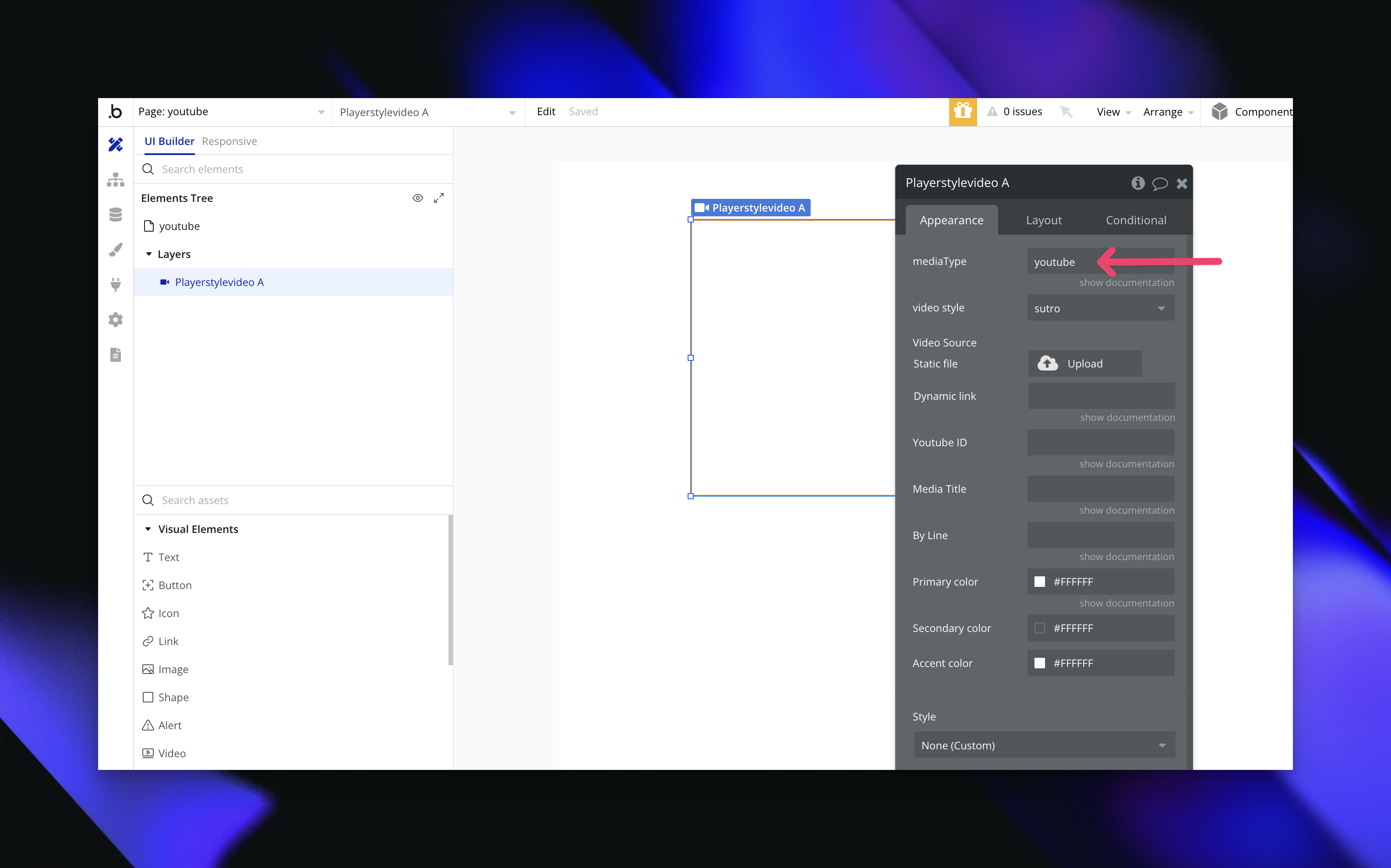
**2. Add the YouTube Video ID**
Add the YouTube Video ID – Enter the video ID, and your YouTube video will
load directly in the player. 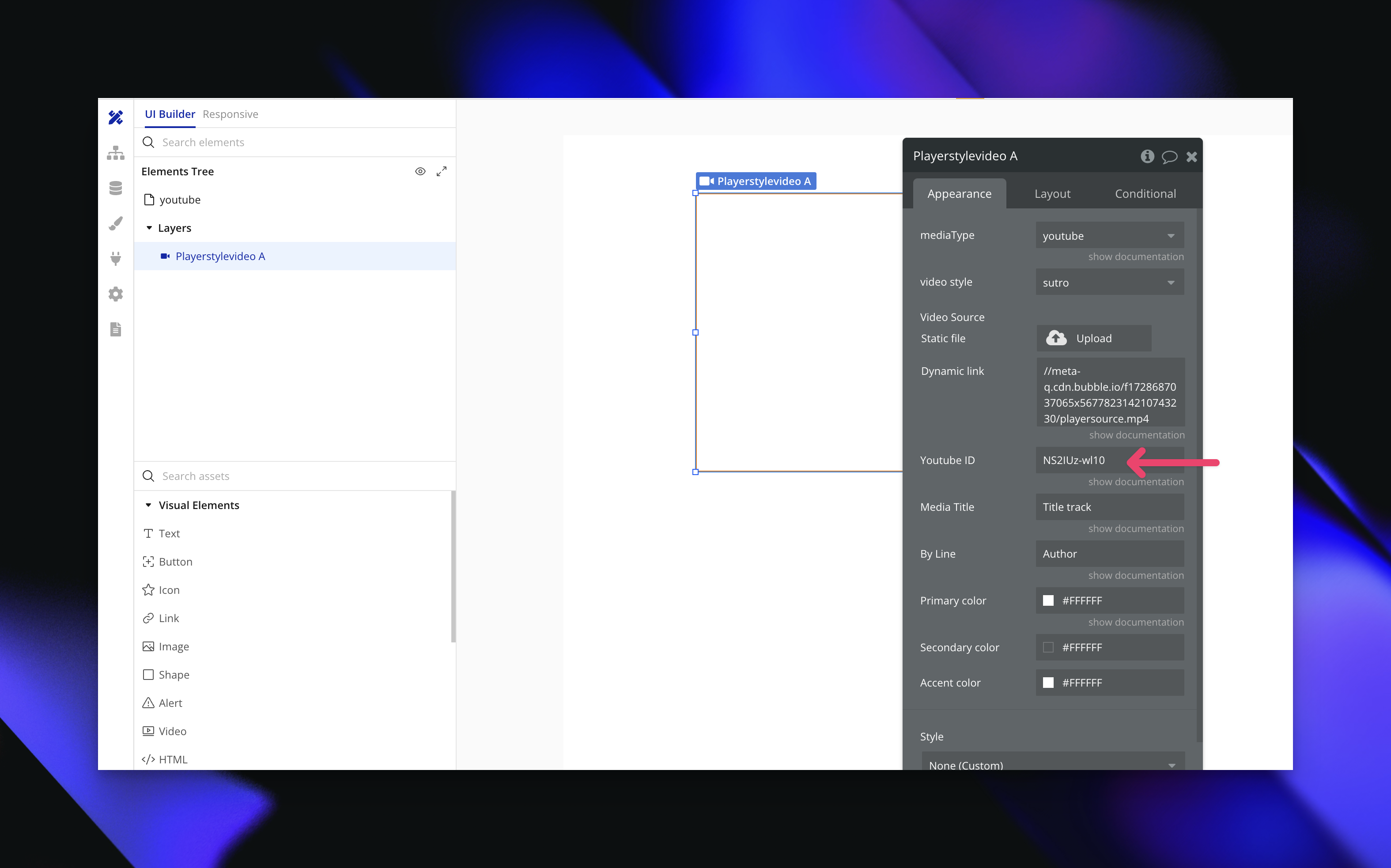
**v1.1**
October 29, 2024
Added a halloween theme to the video player. 
**v1.0**
October 13, 2024
Initial release of the plugin. 
***
> **[Need Help?](/support/plans)**
>
> View our options for free community and priority support.
> **[Have a feature request?](https://lunchpaillabs.canny.io/feature-requests?selectedCategory=player-style-video-for-bubble)**
>
> Post your feature request on our
>
> [idea board.](https://lunchpaillabs.canny.io/feature-requests?selectedCategory=player-style-video-for-bubble)
# Getting started
Source: https://tools.lunchpaillabs.com/bubble/player-style-video/getting-started
The plugin allows you to embed video customizable video players into your Bubble app. This plugin offers **11 [player style](https://player.style/) themes** developed by the [Mux](https://www.mux.com/) team.

To view all the themes in action, visit the [demo page](https://integration-demos.bubbleapps.io/version-test/player-style-video).
## Installation
**1. Install the plugin**
Go to the [Bubble Plugin
Marketplace](https://bubble.io/plugin/player-style-video-player-1728853909716x170236397512556540)
and install the plugin.
**2. Verify installation**
After installation, verify that the plugin appears in your list of installed
plugins.
**3. Set Up the Video Player**
Once installed! Embed the video element, pick a style, input your video
field, and you’re ready to go!
> **[Need Help?](/support/plans)**
>
> View our options for free community and priority support.
> **[Have a feature request?](https://lunchpaillabs.canny.io/feature-requests?selectedCategory=player-style-video-for-bubble)**
>
> Post your feature request on our
>
> [idea board.](https://lunchpaillabs.canny.io/feature-requests?selectedCategory=player-style-video-for-bubble)
# Add youtube videos
Source: https://tools.lunchpaillabs.com/bubble/player-style-video/how-tos/add-youtube-videos
Enhance your Bubble app by embedding YouTube videos directly into the Player Style Video Plugin. Whether you’re sharing tutorials, demos, or multimedia content, this guide will walk you through setting up YouTube videos in just a few steps. Here’s how to make your app’s player more dynamic.
## Video tutorial
If you prefer a video walkthrough, check out our step-by-step tutorial below. Otherwise, keep reading for the written guide:
[YouTube video player](https://www.youtube.com/embed/NHdEMALJMFg)
## Steps
**1. Set Media Type to YouTube**
Go to the settings, and change the media type to `YouTube` to enable YouTube as the video source.

**2. Find and Add the YouTube Video ID**
The YouTube video ID is the unique set of characters at the end of a YouTube URL. For example, in this URL:
```
https://www.youtube.com/watch?v=dQw4w9WgXcQ
```
The video ID is `dQw4w9WgXcQ`. Copy this ID and paste it into the Video ID field in the plugin settings.

**3. Customize Your Player Style**
Choose from 11 unique player styles to match your app’s look and feel. Experiment with different styles to find the one that best fits your app’s design and video content.
With these settings, you’re ready to add dynamic video content from YouTube directly into your Bubble app. From product demos to user tutorials, integrating YouTube into your player setup opens up a world of possibilities.
> **[Need Help?](/support/plans)**
>
> View our options for free community and priority support.
> **[Have a feature request?](https://lunchpaillabs.canny.io/feature-requests?selectedCategory=player-style-video-for-bubble)**
>
> Post your feature request on our
>
> [idea board.](https://lunchpaillabs.canny.io/feature-requests?selectedCategory=player-style-video-for-bubble)
# Video element
Source: https://tools.lunchpaillabs.com/bubble/player-style-video/video-element
Use this element to embed the Player Style video player in your Bubble app.
### Fields
The following fields are available for the Player Style video element:
| **Field** | **Type** | **Description** |
| - | - | - |
| **Media type** | Text | The type of media options are `video file` or `Youtube` |
| **Video style** | Text | The theme/style of the video player, such as Sutro, Notflix, YT, Winamp, and more. |
| **Video source** | File | The URL of the video file that will be embedded in the player if using `video file` or `hls` for the media type. |
| **Youtube ID** | Text | The unique ID of the YouTube video (e.g., dQw4w9WgXcQ for [https://www.youtube.com/watch?v=dQw4w9WgXcQ](https://www.youtube.com/watch?v=dQw4w9WgXcQ)). |
| **Media title** | Text | The title of the video content to be displayed. |
| **By line** | Text | A short description or subtitle for the video, often used for the creator's name or credits. |
| **Primary color** | Color | The primary color of the player controls and elements. |
| **Secondary color** | Color | The secondary color used in the player’s design |
| **Accent color** | Color | An accent color used to highlight key player elements |
## Styles
> [!NOTE]
>
> Most themes are optimized for **16x9 video**, but vertical **9x16 video**
> works best in the **Instaplay** theme. The **Winamp** theme is fixed at
> **275px x 264px**.
| **Theme** | **Description** |
| - | - |
| **Sutro** | A sleek and modern theme lovingly named after Mux's favorite SF TV antenna. |
| **Notflix** | Everything but the big red N and long bus rides to Los Gatos. |
| **Reelplay** | A nostalgic media player inspired by media players of a bygone era. |
| **Vimeonova** | A fresh take on the classic Vimeo player design. |
| **YT** | A homage to the modern YouTube player. |
| **Demuxed 2022** | A special theme created for Demuxed 2022. |
| **Microvideo** | Perfect for short content, with minimal controls. |
| **Minimal** | Strips the player down to the bare essentials for a simple viewing experience. |
| **Winamp** | A retro theme inspired by the classic Winamp media player. |
| **Instaplay** | A mobile-first theme inspired by social media playback experiences. |
| **Halloween** | A spooky theme for the Halloween season. |
> **[Need Help?](/support/plans)**
>
> View our options for free community and priority support.
> **[Have a feature request?](https://lunchpaillabs.canny.io/feature-requests?selectedCategory=player-style-video-for-bubble)**
>
> Post your feature request on our
>
> [idea board.](https://lunchpaillabs.canny.io/feature-requests?selectedCategory=player-style-video-for-bubble)
# Changelog
Source: https://tools.lunchpaillabs.com/bubble/smartsuite/changelog
Track updates and changes made to the SmartSuite Plugin.
## SmartSuite Plugin
### **August 23, 2024 - Version 1.0.0**
Official public release. [Install it from the marketplace](https://bubble.io/plugin/smartsuite-by-lunch-pail-labs-1720811282326x849108788759232500).
### **August 16, 2024 - Version 0.0.1**
Pre-release beta version: Featuring core CRUD operations and SmartSuite integration.
***
> **[Need Help?](/support/plans)**
>
> Access community or premium support.
> **[Have a feature request?](https://lunchpaillabs.canny.io/feature-requests?selectedCategory=smartsuite-plugin-for-bubble)**
>
> Post your feature request on our
>
> [idea board.](https://lunchpaillabs.canny.io/feature-requests?selectedCategory=smartsuite-plugin-for-bubble)
# Getting started
Source: https://tools.lunchpaillabs.com/bubble/smartsuite/getting-started
This guide will help you get started with installation, setup, and your first integration.
## What's the plugin?
The SmartSuite plugin allows you to integrate and automate your workflows within the SmartSuite platform. This guide provides the essential steps to get you up and running in no time.
## Installation
**1. Sign up for accounts**
Ensure you have a [SmartSuite
account](https://app.smartsuite.com/authenticate/signup) and a [Bubble
account](https://bubble.io/login?mode=signup).
**2. Install the plugin**
Navigate to the [Bubble Plugin
Marketplace](https://bubble.io/plugin/smartsuite-by-lunch-pail-labs-1720811282326x849108788759232500)
and install the SmartSuite plugin by Lunch Pail Labs into your desired
Bubble app.
**3. Verify installation**
Confirm that the plugin appears in your list of installed plugins.
**4. Input plugin keys**
Go to the SmartSuite plugin settings from your Bubble dashboard and add your
SmartSuite API Key and Workspace ID in the plugin settings. You can check
[here](https://help.smartsuite.com/en/articles/6096587-retrieving-your-api-key-and-workspace-id)
to find the API keys.
## Next Steps
Now that you're set up, explore the [How-tos](/bubble/smartsuite/how-tos/get-record-structure) for information on available API endpoints and actions.
***
> **[Need Help?](/support/plans)**
>
> Access community or premium support.
> **[Have a feature request?](https://lunchpaillabs.canny.io/feature-requests?selectedCategory=smartsuite-plugin-for-bubble)**
>
> Post your feature request on our
>
> [idea board.](https://lunchpaillabs.canny.io/feature-requests?selectedCategory=smartsuite-plugin-for-bubble)
# Display records
Source: https://tools.lunchpaillabs.com/bubble/smartsuite/how-tos/display-records
Once you have the record structure set up, you can display SmartSuite records in your Bubble app. This guide will walk you through the process.
## Steps
### 1. **Create a New Page**
Add a repeating group to the page for listing the records.
Refer to the [demo setup for an example](https://bubble.io/page?id=smartsuite\&tab=tabs-1\&name=display-records\&type=page).
### 2. **Set the Data Type**
Set the data type to the one you defined (if you haven’t imported the data format yet, refer back to the [Get the Record Structure](/bubble/smartsuite/how-tos/get-record-structure) guide).

### 3. **Display the Data**
Add an action to display the fetched data in the repeating group.

### 4. **Add Content to Repeating Group**
Add a text element to the repeating group and set the content to the data type’s title.
Refer to the [demo setup for an example](https://bubble.io/page?id=smartsuite\&tab=tabs-1\&name=display-records\&type=page).
### 5. **Preview the Results**
Hit preview to see the records display.

***
### Next Steps
Now that you've successfully displayed records, explore more advanced features of the SmartSuite plugin through our [Plugin Reference](/bubble/smartsuite/plugin-reference).
> **[Need Help?](/support/plans)**
>
> Access community or premium support.
> **[Have a feature request?](https://lunchpaillabs.canny.io/feature-requests?selectedCategory=smartsuite-plugin-for-bubble)**
>
> Post your feature request on our
>
> [idea board.](https://lunchpaillabs.canny.io/feature-requests?selectedCategory=smartsuite-plugin-for-bubble)
# Get the Record Structure
Source: https://tools.lunchpaillabs.com/bubble/smartsuite/how-tos/get-record-structure
SmartSuite is a flexible and powerful tool, and SmartSuite tables have various data structures. To display a group of records in your Bubble app, you need to ensure Bubble knows the structure of the data it should expect. This is where the action to get the record structure for your table comes into play. This short how-to demonstrates how to do it.
## Steps
1. **Create a Display Page**
* Create a page specifically for fetching the structure. This page isn’t user-facing; it’s just for you to grab the data structure needed to format your API call correctly. For an example setup, check out this [demo editor](https://bubble.io/page?id=smartsuite\&tab=tabs-1\&name=fetch-record-structure\&type=page)
2. **Set Up the Workflow**
* Create a workflow with two actions on page load: 1. 'SmartSuite - Fetch Table' 2. Display the data

* Refer to the demo workflow for an example setup : [here](https://prod-files-secure.s3.us-west-2.amazonaws.com/480f0932-72ea-496f-a70d-3632da8d6e99/6be7b0ab-7ba6-44cb-a7a4-9a87a1ed476c/Untitled.mp4).
3. **Import the Data Format**
* Copy the data format and add it to the API Connector. Refer to demo editor to see the setup [here](https://bubble.io/page?id=smartsuite\&tab=tabs-2\&name=fetch-record-structure\&type=page)
[YouTube video player](https://www.youtube.com/embed/b3lfskyNiFM)
***
### Next Steps
Now that you've obtained the record structure, the next step is to display SmartSuite records in your Bubble app. Continue by following our [guide on displaying records](/bubble/smartsuite/how-tos/display-records).
> **[Need Help?](/support/plans)**
>
> Access community or premium support.
> **[Have a feature request?](https://lunchpaillabs.canny.io/feature-requests?selectedCategory=smartsuite-plugin-for-bubble)**
>
> Post your feature request on our
>
> [idea board.](https://lunchpaillabs.canny.io/feature-requests?selectedCategory=smartsuite-plugin-for-bubble)
# Reference
Source: https://tools.lunchpaillabs.com/bubble/smartsuite/plugin-reference
Reference for all actions available in the SmartSuite Plugin.
### Plugin Actions
The SmartSuite plugin offers actions to help you manage records within your Bubble app. Here’s a breakdown of what you can do:
#### **Fetch Record Structure**
**Description:** Capture the data structure of records to properly display them in your app.
| **Parameter** | **Description** |
| - | - |
| **Table ID** | The unique identifier for the SmartSuite table. |
#### **List Records**
**Description:** Retrieve and list records from a SmartSuite table directly within Bubble.
| **Parameter** | **Description** |
| - | - |
| **Table ID** | The unique identifier for the SmartSuite table. |
#### **Create a Record**
**Description:** Automate the creation of new records in a specific table (app).
| **Parameter** | **Description** |
| - | - |
| **Table ID** | The unique identifier for the SmartSuite table. |
| **Record Data** | A JSON object containing the data for the new record. |
#### **Retrieve a Record**
**Description:** Fetch a specific record by its ID from any table (app).
| **Parameter** | **Description** |
| - | - |
| **Table ID** | The unique identifier for the SmartSuite table. |
| **Record ID** | The unique identifier of the record to retrieve. |
#### **Update a Record**
**Description:** Modify an existing record with updated information in a specific table (app).
| **Parameter** | **Description** |
| - | - |
| **Table ID** | The unique identifier for the SmartSuite table. |
| **Record ID** | The unique identifier of the record to update. |
| **Update Data** | A JSON object containing the updated data. |
#### **Delete a Record**
**Description:** Remove a specific record from any table (app) with ease.
| **Parameter** | **Description** |
| - | - |
| **Table ID** | The unique identifier for the SmartSuite table. |
| **Record ID** | The unique identifier of the record to delete. |
***
> **[Need Help?](/support/plans)**
>
> Access community or premium support.
> **[Have a feature request?](https://lunchpaillabs.canny.io/feature-requests?selectedCategory=smartsuite-plugin-for-bubble)**
>
> Post your feature request on our
>
> [idea board.](https://lunchpaillabs.canny.io/feature-requests?selectedCategory=smartsuite-plugin-for-bubble)
# Getting started
Source: https://tools.lunchpaillabs.com/bubble/tavus/getting-started
The plugin is part of the [Video, Audio & Live Streaming Bundle](/bubble/video-audio-live-bundle/getting-started) and enables replicas and AI bots within Daily video calls.
## Installation
**1. Install the plugin**
Go to the [Bubble Plugin
Marketplace](https://bubble.io/plugin/video-audio--live-bundle-1727441795463x240182085842370560)
and install the plugin into your app.
**2. Verify installation**
After installation, verify that the plugin appears in your list of installed
plugins.
**3. Add your Tavus credentials**
In the [api keys tab of your Tavus
account](https://platform.tavus.io/api-keys) **create new key**
**4. Configure the plugin in Bubble**
In your Bubble app, go to **Plugins** and find the **Video, Audio & Live
Streaming Bundle** plugin. Enter the API key in the **Tavus API Key** field.
> **[Need Help?](/support/plans)**
>
> View our options for free community and priority support.
> **[Have a feature request?](https://lunchpaillabs.canny.io/feature-requests?selectedCategory=bubble-video-audio-live)**
>
> Post your feature request on our
>
> [idea board.](https://lunchpaillabs.canny.io/feature-requests?selectedCategory=bubble-video-audio-live)
*Image background patterns are from [Raycast Wallpapers](https://www.raycast.com/wallpapers).*
# Chat with a Tavus AI bot
Source: https://tools.lunchpaillabs.com/bubble/tavus/how-tos/create-conversation
Learn how to start a conversation with Tavus and talk to a Tavus AI bot.
If you prefer a video walkthrough, check out our step-by-step tutorial below. Otherwise, keep reading for the written guide:
[YouTube video player](https://www.youtube.com/embed/LwGwRNyGIhU)
## Steps
**1. Install the Video, Audio & Live Bundle Plugin**
Go to the [Bubble Plugin
Marketplace](https://bubble.io/plugin/video-audio--live-bundle-1727441795463x240182085842370560)
and install the plugin into your app.
**2. Get Your Tavus API Key**
Go to the [API Keys tab](https://platform.tavus.io/api-keys) in your Tavus
account and click **Create New Key** to generate your Tavus API key.
**3. Configure the Plugin in Bubble**
In your Bubble app, go to **Plugins** and find the **Video, Audio & Live
Streaming Bundle** plugin. Enter your Tavus API key into the **Tavus API
Key** field.
**4. Create a Workflow to Start a Conversation**
Use the [Create
Conversation](/bubble/tavus/plugin-reference/create-conversation) action to
start a conversation. You’ll need a **persona ID** and **replica ID**.
Depending on your Tavus plan, you can create your own personas or use [stock
replicas](https://docs.tavus.io/sections/replicas/stock-replicas) and [stock
personas](https://docs.tavus.io/sections/personas/stock-personas). 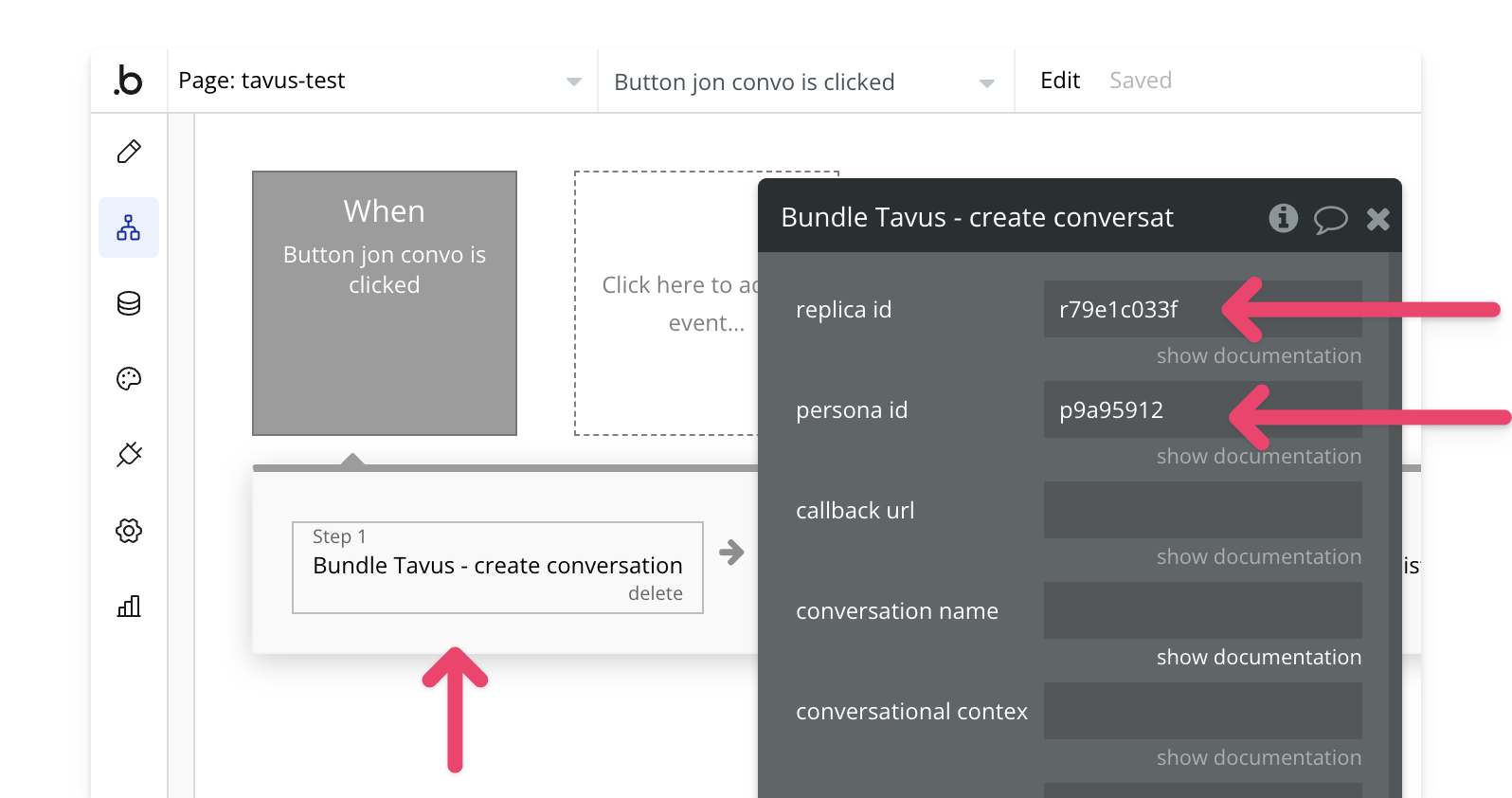
**5. Join the Conversation**
This will create a Daily call. Use the [Join
Conversation](/bubble/daily/plugin-reference/actions/join-room) action to
join the call. 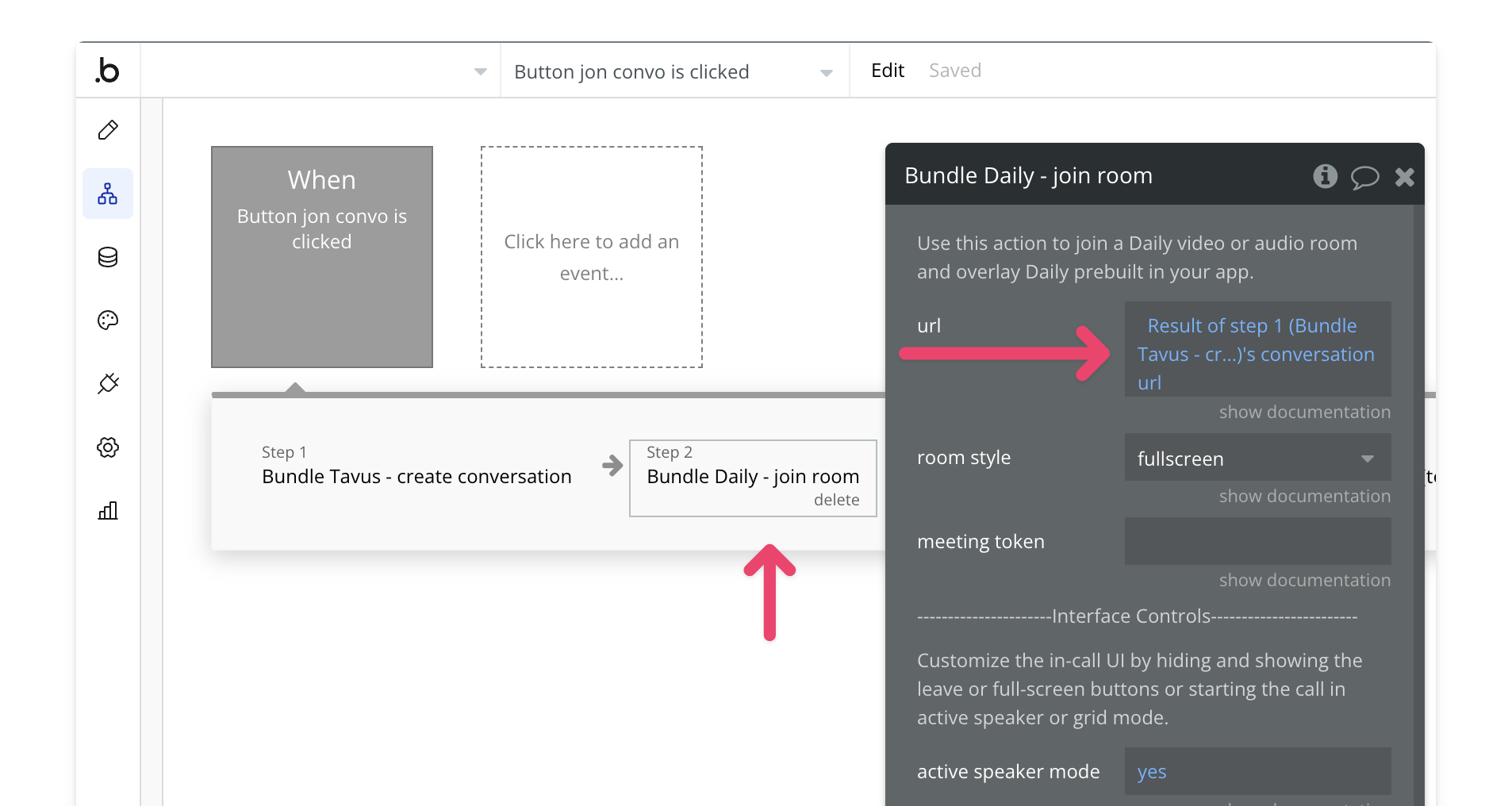
**6. Preview and Test**
Once everything is configured, preview your app to test the conversation
workflow. 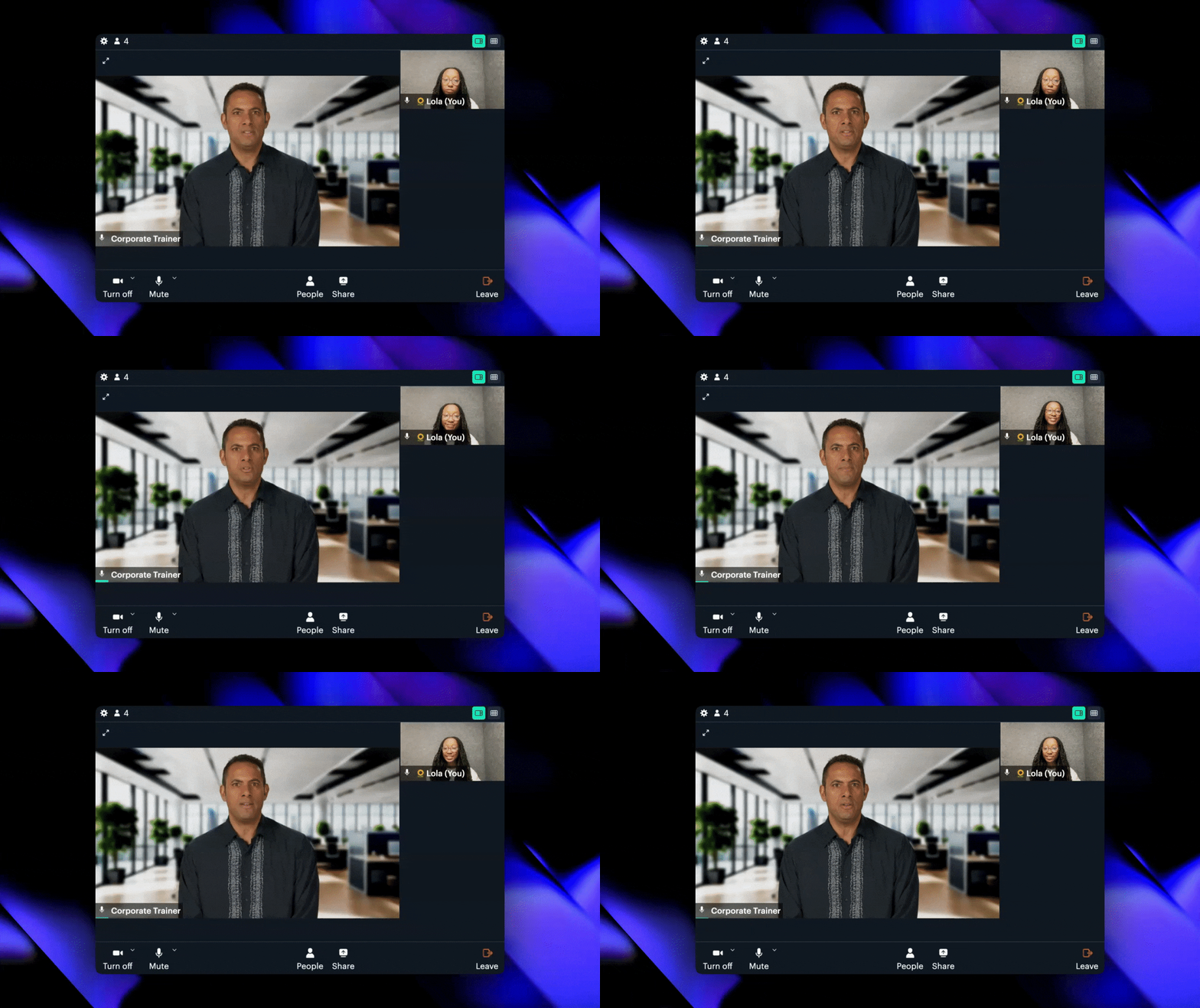
> **[Need Help?](/support/plans)**
>
> View our options for free community and priority support.
> **[Have a feature request?](https://lunchpaillabs.canny.io/feature-requests?selectedCategory=bubble-video-audio-live)**
>
> Post your feature request on our
>
> [idea board.](https://lunchpaillabs.canny.io/feature-requests?selectedCategory=bubble-video-audio-live)
# Create a conversation
Source: https://tools.lunchpaillabs.com/bubble/tavus/plugin-reference/create-conversation
Use this action to create a conversation. The replica will immediately join the call and billing will start. [Learn more in Tavus's documentation](https://docs.tavus.io/api-reference/conversations/create-conversation)
> [!NOTE]
>
> Please be aware that usage of this action as soon as the conversation is
> created will incur costs. To safeguard against API usage, consider setting
> values for `max call duration`, `participant leave timeout`, and `participant
> absent timeout`.
### Fields
| **Field** | **Type** | **Description** |
| - | - | - |
| **replica id** | String | The unique identifier for the replica that will join the conversation. |
| **persona id** | String | The unique identifier for the persona that the replica will use in the conversation. |
| **callback url** | String | A URL that will receive webhooks with updates regarding the conversation state. |
| **conversation name** | String | A name for the conversation. |
| **conversational context** | String | Optional context that will be appended to any context provided in the persona, if one is provided. |
| **custom greeting** | String | An optional custom greeting that the replica will give once a participant joins the conversation. |
| **max call duration** | Number | The maximum duration of the conversation in seconds. Default is 3600 seconds (1 hour). |
| **participant leave timeout** | Number | The duration in seconds after which the call will automatically end once the last participant leaves. |
| **participant absent timeout** | Number | The duration in seconds after which the call will automatically end if no participant joins. Default is 300 seconds (5 minutes). |
| **enable recording** | Boolean | If true, enables the user to record the conversation. See instructions on recording for more details. |
| **enable transcription** | Boolean | If true, enables the user to transcribe the conversation. |
| **apply greenscreen** | Boolean | If true, replaces the background with a greenscreen (RGB: \[0, 255, 155]). Can be adjusted using WebGL. |
| **language** | String | The language of the conversation. Use the FULL language name (e.g., "English"). Refer to supported languages for Cartesia, ElevenLabs, or PlayHT. |
| **recording s3 bucket name** | String | The name of the S3 bucket where the recording will be stored. |
| **recording s3 bucket region** | String | The region of the S3 bucket where the recording will be stored. |
| **aws assume role arn** | String | The ARN of the role that will be assumed to access the S3 bucket. |
### Returned Values
| **Field** | **Type** | **Description** |
| - | - | - |
| **conversation id** | Text | A unique identifier for the conversation. |
| **conversation name** | Text | The name of the conversation. |
| **status** | Text | The status of the conversation. Possible values: `active`, `ended`. |
| **conversation url** | Text | A direct link to join the conversation. This link can also be embedded in a website. |
| **replica id** | Text | A unique identifier for the replica used to create the conversation. |
| **persona id** | Text | A unique identifier for the persona used to create the conversation. |
| **created at** | Date | The date and time the conversation was created. |
> **[Need Help?](/support/plans)**
>
> View our options for free community and priority support.
> **[Have a feature request?](https://lunchpaillabs.canny.io/feature-requests?selectedCategory=bubble-video-audio-live)**
>
> Post your feature request on our
>
> [idea board.](https://lunchpaillabs.canny.io/feature-requests?selectedCategory=bubble-video-audio-live)
# Events
Source: https://tools.lunchpaillabs.com/bubble/tavus/plugin-reference/events
Use this element to enable events in your app. Tavus leverages Daily's app messages to send events. The [Daily Events Element](/bubble/daily/plugin-reference/elements/daily-events) in the bundle includes the following Tavus-related events. Learn how to use this element in the [How-To Guide](/bubble/daily/how-tos/use-daily-events).
## Exposed States
The following states are available:
| **State** | **Type** | **Description** |
| - | - | - |
| **Tavus message type** | Text | Indicates the product associated with the event. For this use case, the message type is `conversation`. |
| **Tavus event type** | Text | Specifies the type of event being sent. This field is present in all events and helps distinguish between different event types. |
| **Tavus conversation id** | Text | The unique identifier for the conversation. |
| **Tavus speech** | Text | Contains the content of the utterance. |
| **Tavus role** | Text | Identifies who spoke the utterance. Possible values: `user`, `replica`. |
| **Tavus visual context** | Text | If VQA (Visual Question Answering) is enabled, this field contains the description of the user frame. |
> **[Need Help?](/support/plans)**
>
> View our options for free community and priority support.
> **[Have a feature request?](https://lunchpaillabs.canny.io/feature-requests?selectedCategory=bubble-video-audio-live)**
>
> Post your feature request on our
>
> [idea board.](https://lunchpaillabs.canny.io/feature-requests?selectedCategory=bubble-video-audio-live)
# Send app message
Source: https://tools.lunchpaillabs.com/bubble/tavus/plugin-reference/send-app-message
Use this action to send app messages as part of Tavus's interaction protocol. [Learn more in Tavus documentation](https://docs.tavus.io/sections/conversational-video-interface/live-interactions).
### Fields
| **Field** | **Type** | **Description** |
| - | - | - |
| **message type** | String | Indicates the product this event is associated with. For this use case, the `message_type` will be set to `conversation`. |
| **conversation id** | String | The unique identifier for the conversation. |
| **event type** | String | Specifies the type of event being sent. This field is included in all events and helps distinguish between different event types. |
| **modality** | String | Indicates the input type for this event. Possible values: `audio`, `text`. |
| **text** | String | If `modality` is set to `text`, this field contains the text that the replica will speak out loud. |
| **audio** | String | If `modality` is set to `audio`, this field contains the base64-encoded audio that the replica will speak out loud. The encoded audio must be in 16-bit PCM 16000 format. |
| **inference id** | String | A unique identifier for a given utterance. Multiple messages with the same `inference_id` indicate they belong to the same utterance. |
| **done** | Boolean | Indicates if all audio chunks for an utterance have been sent. If `done` is not set to `True`, audio chunks will continue to stream until a final event with `done` set to `True` is received. |
| **context** | String | Specifies the new conversational context that will be used by the LLM (Language Model). |
### Returned Values
This action does not return any fields.
> **[Need Help?](/support/plans)**
>
> View our options for free community and priority support.
> **[Have a feature request?](https://lunchpaillabs.canny.io/feature-requests?selectedCategory=bubble-video-audio-live)**
>
> Post your feature request on our
>
> [idea board.](https://lunchpaillabs.canny.io/feature-requests?selectedCategory=bubble-video-audio-live)
# Getting started
Source: https://tools.lunchpaillabs.com/bubble/twilio-sms/getting-started
This guide will help you get started with installation, setup, and your first SMS integration.
## What's the plugin?
The Twilio SMS plugin by Lunch Pail Labs allows you to send SMS messages from your Bubble app using Twilio's powerful API. This guide will walk you through the installation, setup, and sending your first SMS message.

## Installation
**1. Get accounts**
Ensure you have a [Twilio account](https://www.twilio.com/try-twilio) with
SMS capabilities. Ensure you have a [Bubble
account](https://bubble.io/login?mode=signup).
**2. Install the plugin**
Navigate to the [Bubble Plugin
Marketplace](https://bubble.io/plugin/twilio-sms-1698800395153x819526937459294200)
and install the Twilio SMS plugin by Lunch Pail Labs into your desired
Bubble app.
**3. Verify installation**
Confirm that the plugin appears in your list of installed plugins.
**4. Input plugin keys**
Go to the Twilio SMS plugin settings from your Bubble dashboard.Add your
Twilio Auth Token and Twilio Account SID, which you can find in your [Twilio
Console](https://www.twilio.com/console).
## Next Steps
This plugin offers a single action to send an SMS message. Learn more about this action in the [plugin reference](/bubble/twilio-sms/send-sms).
> **[Need Help?](/support/plans)**
>
> View our options for free community and priority support.
> **[Have a feature request?](https://lunchpaillabs.canny.io/feature-requests?selectedCategory=twilio-sms-plugin-for-bubble)**
>
> Post your feature request on our
>
> [idea board.](https://lunchpaillabs.canny.io/feature-requests?selectedCategory=twilio-sms-plugin-for-bubble)
# Send SMS
Source: https://tools.lunchpaillabs.com/bubble/twilio-sms/send-sms
Use this action to send SMS messages.
### Fields
The following fields are available in this action:
| **Field** | **Type** | **Description** |
| - | - | - |
| **From** | Text | The phone number you're sending the message from (must be a Twilio number). |
| **To** | Text | The phone number you're sending the message to. |
| **Body** | Text | The content of the SMS message you're sending. |
| **Message Service Sid** | Text | (Optional) The Twilio Messaging Service SID if using a Messaging Service. |
### Returned Values
The following values are returned by the action:
| **Key** | **Type** | **Description** |
| - | - | - |
| **Error** | Boolean | `true` if there was an error, `false` if successful. |
| **Error Code** | Number | The Twilio error code (if any) for the failed message. |
| **Error Message** | Text | The error message returned by Twilio (if any). |
***
> **[Need Help?](/support/plans)**
>
> View our options for free community and priority support.
> **[Have a feature request?](https://lunchpaillabs.canny.io/feature-requests?selectedCategory=twilio-sms-plugin-for-bubble)**
>
> Post your feature request on our
>
> [idea board.](https://lunchpaillabs.canny.io/feature-requests?selectedCategory=twilio-sms-plugin-for-bubble)
# Getting Started
Source: https://tools.lunchpaillabs.com/bubble/vapi/getting-started
Learn how to use VAPI to create AI voice assistants in your Bubble app
The [VAPI](https://vapi.ai) plugin is part of the [Video, Audio & Live Streaming Bundle](/bubble/video-audio-live-bundle/getting-started) and allows you to create AI voice assistants that can handle phone calls in your application.
## Installation
**1. Install the plugin**
Go to the [Bubble Plugin
Marketplace](https://bubble.io/plugin/video-audio--live-bundle-1727441795463x240182085842370560)
and install the plugin into your app.
**2. Verify installation**
After installation, verify that the plugin appears in your list of installed
plugins.
**3. Add your VAPI credentials**
In your [VAPI account](https://dashboard.vapi.ai), get your API key from the
dashboard. Save this key as you'll need it in the next step.
**4. Configure the plugin in Bubble**
In your Bubble app, go to **Plugins** and find the **Video, Audio & Live
Bundle** plugin. Enter your VAPI API key into the **VAPI API Key**
field.
> **[Need Help?](/support/plans)**
>
> View our options for free community and priority support.
> **[Have a feature request?](https://lunchpaillabs.canny.io/feature-requests?selectedCategory=bubble-video-audio-live)**
>
> Post your feature request on our
>
> [idea board.](https://lunchpaillabs.canny.io/feature-requests?selectedCategory=bubble-video-audio-live)
*Image background patterns are from [Ray-cast Wallpapers](https://www.raycast.com/wallpapers).*
# Create assistant
Source: https://tools.lunchpaillabs.com/bubble/vapi/plugin-reference/create-assistant
Use this action to create an assistant using VAPI.
## Fields
**provider** `dropdown` *required* (default: openai)
The provider of the assistant's LLM. Options: openai, anthropic, google,
deep-seek, perplexity-ai, vapi, anyscale, together-ai, inflection-ai, groq,
xai, deepinfra
**model** `text` *required* (default: gpt-4o-mini)
The model name (e.g., gpt-4o-mini, deepseek-chat, gemini-1.5-flash,
claude-3-haiku-20240307) must match the provider and allowed values in [Vapi's
API](https://docs.vapi.ai/api-reference/assistants/create#request.body.model.anthropic.model).
**role** `dropdown` *required* (default: assistant)
The role of the assistant. Options: assistant, function, user, system, tool
**content** `text` (default: You are a helpful, knowledgeable, and friendly AI assistant. Answer questions clearly and concisely while adapting your tone to the user's needs. Provide thoughtful insights, step-by-step guidance when necessary, and ask clarifying questions if needed. Prioritize accuracy and relevance, and cite sources when applicable. Avoid making assumptions or offering incorrect information.)
The prompt for the assistant
**name** `text`
The name of the assistant
**silence timeout seconds** `number` (default: 30)
How many seconds of silence to wait before ending the call. Must be between 10
and 3600 seconds
**max duration seconds** `number` (default: 600)
Maximum number of seconds that the call will last. Must be between 10 and
43200 seconds
**recording enabled** `boolean` (default: false)
Enable recording for the call
**transcript enabled** `boolean` (default: false)
Determines whether the transcript is stored
**assistant name** `text` (default: AI)
The name of the assistant in the transcript
**transcript user name** `text` (default: user)
The name of the user in the transcript
**background denoising enabled** `boolean` (default: false)
Enables filtering of noise and background speech while the user is talking
**background sound** `dropdown` (default: off)
Background sound in the call. Options: off, office
**voicemail detection** `boolean` (default: false)
Settings to configure or disable voicemail detection
**voicemail message** `text`
Message that the assistant will say if the call is forwarded to voicemail. If
unspecified, it will hang up
**end call message** `text`
Message that the assistant will say if it ends the call (max 1000 characters).
If unspecified, it will hang up without saying anything
**end call phrases** `text`
List of phrases that, if spoken by the assistant, will trigger the call to be
hung up. Case insensitive
**first message mode** `dropdown` (default: assistant-speaks-first)
Options: assistant-speaks-first,
assistant-speaks-first-with-model-generated-message, assistant-waits-for-user
**first message** `text`
First message that the assistant will say. If unspecified, assistant will wait
for user to speak and use the model to respond
**enable summary plan** `boolean` (default: false)
Enable the plan to customize the plan for the summary
**summary plan message** `text` (default: You are an expert note-taker. You will be given a transcript of a call. Summarize the call in 2-3 sentences. DO NOT return anything except the summary.)
The messages used to generate the summary
## Return Values
**id** `text`
Unique identifier for the assistant
**org id** `text`
Organization identifier
**created at** `date`
When the assistant was created
**updated at** `date`
When the assistant was last updated
**error** `boolean`
Whether an error occurred
**error message** `text`
Error message if an error occurred
**error status** `number`
Error status code if an error occurred
> **[Need Help?](/support/plans)**
>
> View our options for free community and priority support.
> **[Have a feature request?](https://lunchpaillabs.canny.io/feature-requests?selectedCategory=bubble-video-audio-live)**
>
> Post your feature request on our
>
> [idea board.](https://lunchpaillabs.canny.io/feature-requests?selectedCategory=bubble-video-audio-live)
# Create call
Source: https://tools.lunchpaillabs.com/bubble/vapi/plugin-reference/create-call
Use this action to create a call with VAPI. This allows you to initiate calls using a previously created assistant.
## Fields
**assistant ID** `text` *required*
This is the assistant that will be used for the call. You can create an
assistant with Bundle VAPI - create assistant
**phone number ID** `text`
This is the phone number ID that will be used for the call. Configure or
purchase phone numbers through VAPI's dashboard.
**name** `text`
The name of the assistant
**number** `text` *required*
The number of the customer. Should be more than 3 characters and less than 40
characters
**extension** `text`
This is the extension that will be dialed after the call is answered
**customer name** `text`
This is the name of the customer. This is just for your own reference
## Return Values
**id** `text`
Unique identifier for the call
**org id** `text`
Organization identifier
**type** `text`
Type of the call
**created at** `date`
When the call was created
**updated at** `date`
When the call was last updated
**summary** `text`
Summary of the call
**recording URL** `text`
URL to access the call recording
**video recording URL** `text`
URL to access the video recording
**transcript** `text`
Transcript of the call
**error** `boolean`
Whether an error occurred
**error message** `text`
Error message if an error occurred
**error status** `number`
Error status code if an error occurred
> **[Need Help?](/support/plans)**
>
> View our options for free community and priority support.
> **[Have a feature request?](https://lunchpaillabs.canny.io/feature-requests?selectedCategory=bubble-video-audio-live)**
>
> Post your feature request on our
>
> [idea board.](https://lunchpaillabs.canny.io/feature-requests?selectedCategory=bubble-video-audio-live)
# Changelog
Source: https://tools.lunchpaillabs.com/bubble/video-audio-live-bundle/changelog
Track updates and changes made to the Video, Audio & Live Bundle.
**v1.29.0**
Oct 19, 2026
Improve Android reliability for **Bundle - Daily Mobile Call**:
* Fix missing saved room URLs and caller names on Android by turning off **Resizable**. **Responsive** stays enabled.
* Use the existing embedded call at a fixed size of **390×720**. Center the element using Bubble's page layout settings.
* Remove the **Auto** button. Tap a pinned participant again to unpin them and return to automatic speaker selection.
This replaces v1.28.0's resizable layout with a fixed-size embedded call.
**v1.28.0**
Oct 19, 2026
Improve the **Bundle - Daily Mobile Call** screen:
* Resize the call screen to fit the space available in your mobile layout.
* Return automatically to preview after leaving a call, keeping the caller's name and microphone/camera choices.
* Show name-based initials when the camera is off and identify the caller with a **Name (You)** label during calls.
See the [native video-call guide](/bubble/video-audio-live-bundle/how-tos/add-native-video-calls) for setup.
**v1.27.0**
Oct 16, 2026
Add Daily video calls to your Bubble mobile app with **Bundle - Daily Mobile Call**.
* Connect a Daily room and set the caller’s name.
* Join and leave calls from the call screen.
* Turn the microphone and camera on or off.
* Set the background, Join button and button text colors.
* Follow the [native video-call guide](/bubble/video-audio-live-bundle/how-tos/add-native-video-calls) for setup and screenshots.
Also fixes the **Create room** action’s returned **Not Before** value to use the room’s start time instead of its expiry time.
**v1.26**
Jan 19, 2026
Added **bot image** parameter to the [start bot](/bubble/pailflow/reference/start-bot) action. You can now provide a custom background image URL for the bot's video feed. Supports PNG and JPG/JPEG formats with automatic alpha-to-RGB conversion for transparent images. Forces static mode when set. Recommended: 1280x720 pixels (16:9 aspect ratio), max 5 MB.
**v1.25**
Jan 16, 2026
Added the ability to customize the voice for PailFlow bots in the [start bot](/bubble/pailflow/reference/start-bot) action. You can now configure the bot's TTS voice from 11 options: alloy, ash, ballad, coral, echo, fable, onyx, nova, sage, shimmer, and verse.
**v1.24**
Jan 8, 2026
Added [stop phrase](/bubble/pailflow/reference/start-bot) support to the PailFlow integration. You can now configure a phrase that triggers the bot to automatically leave when the assistant says it.
**v1.23**
Dec 31, 2025
Added the [PailFlow integration](/bubble/pailflow/getting-started) so you can invite AI bots into Daily rooms directly from the bundle.
**v1.22**
Nov 21, 2025
Add support for per participant virtual background image in [join
room](/bubble/daily/plugin-reference/actions/join-room) action
**v1.21**
May 30, 2025
Added nova-3-general to transcript model options in the [create room](/bubble/daily/plugin-reference/actions/create-room) and [start transcript](/bubble/daily/plugin-reference/actions/start-transcription) actions
**v1.20**
March 17, 2025
Added real-time transcription event
"[transcription-message](/bubble/daily/plugin-reference/elements/daily-events)"
that provide live speech-to-text output during calls. Each event includes the
speaker's participant ID, transcribed text, and timestamp.
**v1.19**
February 5, 2025
Added support for selecting LLM providers in the [VAPI create
assistant](/bubble/vapi/plugin-reference/create-assistant) action
**v1.18**
February 5, 2025
Added support for outbound calls using VAPI. You can now use an [AI
assistant](/bubble/vapi/plugin-reference/create-assistant) to dial existing
numbers with the [create
call](/bubble/vapi/plugin-reference/create-call) action.
**v1.17**
February 4, 2025
Added VAPI plugin for creating AI voice assistants. Includes the [create
assistant](/bubble/vapi/plugin-reference/create-assistant) action to set up
customizable voice assistants with features like call management,
transcription, and voicemail handling.
**v1.16**
February 2, 2025
Added a new action to [enable PIN
dial-in](/bubble/daily/plugin-reference/actions/enable-pin-dialin) for setting
up phone-based access to Daily rooms with PIN codes.
**v1.15**
January 30, 2025
Added a new action to [get output from
jobs](/bubble/daily/plugin-reference/actions/get-output-from-job) for
retrieving transcripts, SOAP notes, and summaries from Daily's batch
processor.
**v1.14**
January 30, 2025
Added a new action to [submit
jobs](/bubble/daily/plugin-reference/actions/submit-job) for generating
transcripts, SOAP notes, and summaries using Daily's batch processor.
**v1.13**
January 29, 2025
Added a new action to [release phone
numbers](/bubble/daily/plugin-reference/actions/release-phone-number) to
remove purchased phone numbers from your account after the required holding
period.
**v1.12**
January 28, 2025
Added a new action to [get purchased phone
numbers](/bubble/daily/plugin-reference/actions/get-purchased-phone-numbers)
to view your purchased phone numbers.
**v1.11**
January 27, 2025
Added a new action to [buy phone
numbers](/bubble/daily/plugin-reference/actions/buy-phone-number) to purchase
available phone numbers, with an option to specify a number or get a random
California number.
**v1.10**
January 27, 2025
Added a new action to [list available phone
numbers](/bubble/daily/plugin-reference/actions/list-phone-numbers) for
searching and filtering phone numbers by area code, region, or custom
patterns.
**v1.9**
January 10, 2025
Added a new action to [create a new direct
upload](/bubble/mux/plugin-reference/actions/create-a-new-direct-upload).
**v1.8**
November 23, 2024
Added a new action to [retrieve a live
stream](/bubble/mux/plugin-reference/actions/retrieve-a-live-stream).
**v1.7**
November 20, 2024
Initial release of the [Tavus](/bubble/tavus/getting-started) plugin in the
bundle.
**v1.6**
November 18, 2024
Introduced a new action to [send app messages with
Daily](/bubble/daily/plugin-reference/actions/send-app-message) and added
support for [receiving app message
events](/bubble/daily/plugin-reference/elements/daily-events).
**v1.5**
November 15, 2024
Initial release of the bundle which adds a [Mux
plugin](/bubble/mux/getting-started) for HLS live streaming, and a
[customizable video player
plugin](/bubble/player-style-video/getting-started). Also added live streaming
events to the version of the [Daily plugin](/bubble/daily/getting-started)
included in this bundle.
**v1.4**
October 17, 2024
Added the ability to customize live streams in the Daily - Start Live Stream
action, and introduced new states for Daily events—Recording Instance ID and
Recording ID Published—to enhance tracking and management of recording
sessions.
**v1.3**
October 10, 2024
Removed duplicate **create webhooks** action and created a new action to [set
sidebar view](/bubble/daily/plugin-reference/actions/set-sidebar-view)
**v1.2**
October 04, 2024
Added support for
[webhooks](/bubble/daily/plugin-reference/actions/create-webhook) and fixed
the [start](/bubble/daily/plugin-reference/actions/set-custom-integration) and
[stop](/bubble/daily/plugin-reference/actions/stop-custom-integrations) custom
integration actions to allow starting and stopping multiple integrations
**v1.1**
October 03, 2024
Added support for [custom tray
buttons](/bubble/daily/plugin-reference/actions/update-custom-tray-buttons).
You can now customize buttons in the video call interface. Check out the
[guide](/bubble/daily/how-tos/add-custom-buttons) to learn how to enable this
feature. A new field was also introduced to the [set custom
integration](/bubble/daily/plugin-reference/actions/set-custom-integration)
action, allowing you to clear existing integrations before adding new ones.
**v1.0**
October 01, 2024
The initial release of the [Bundle
version](https://bubble.io/plugin/video-audio--live-bundle-1727441795463x240182085842370560)
introduced advanced features such as [custom
integrations](/bubble/daily/how-tos/add-custom-integrations) for Miro, Google
Docs, and Spotify, [meeting
transcriptions](/bubble/daily/how-tos/transcribe-a-meeting), and real-time
captions.
> **[Need Help?](/support/plans)**
>
> View our options for free community and priority support.
> **[Have a feature request?](https://lunchpaillabs.canny.io/feature-requests?selectedCategory=bubble-video-audio-live)**
>
> Post your feature request on our
>
> [idea board.](https://lunchpaillabs.canny.io/feature-requests?selectedCategory=bubble-video-audio-live)
# Getting started
Source: https://tools.lunchpaillabs.com/bubble/video-audio-live-bundle/getting-started
Get started with the Video, Audio & Live Bundle for Bubble by Lunch Pail Labs.
## What’s the Bundle?

The **Video, Audio & Live Streaming Bundle** is a complete toolkit for adding advanced media capabilities to your Bubble apps. This bundle integrates tools for video conferencing, live streaming, and customizable media players, empowering you to create interactive and media-rich applications.
Included in this bundle are:
| **Feature** | **Description** |
| - | - |
| **[Daily Video Conferencing Plugin](/bubble/daily/getting-started)** | An advanced version of the free Daily plugin for managing video and audio calls. |
| **[MUX Live Streaming](/bubble/mux/getting-started)** | Real-time live streaming integration with MUX. |
| **[Customizable Video Player](/bubble/player-style-video/getting-started)** | Embed and customize video files, live streams, and YouTube videos directly in your app. |
| **[Tavus](/bubble/tavus/getting-started)** | Empower users to engage in real-time video conversations with AI avatars. |
| **[VAPI](/bubble/vapi/getting-started)** | Create AI phone assistants that handle inbound and outbound phone calls. |
| **[PailFlow](/pailflow/getting-started)** | Bring AI agents into calls for note-taking, summaries, and automations. |
## Using the bundle
Download the plugin from the [Bubble marketplace](https://bubble.io/plugin/video-audio--live-bundle-1727441795463x240182085842370560). All actions and elements in the bundle are prefixed with "Bundle" for easy identification alongside other plugins. This bundle includes all features available in the free versions of our plugins.
To learn more about each plugin in the bundle, see the following:
* [Daily Video Conferencing Plugin](/bubble/daily/getting-started)
* [MUX Live Streaming](/bubble/mux/getting-started)
* [Customizable Video Player](/bubble/player-style-video/getting-started)
* [Tavus Conversational Video Interface ](/bubble/tavus/getting-started)
* [VAPI phone agents](/bubble/vapi/getting-started)
* [PailFlow](/pailflow/getting-started)
## What Can You Build?
Here’s a quick overview of what you can build with the plugin:
> **[Video calls](https://www.daily.co/blog/integrate-daily-video-chat-in-your-bubble-app-in-less-than-30-minutes)**
>
> Create and manage high-quality video calls.
> **[Live streams](/bubble/daily/how-tos/set-up-livestream)**
>
> Stream video calls live to platforms like YouTube or Twitch.
> **[Broadcasts](/bubble/daily/how-tos/owner-only-broadcast)**
>
> Allow only the call owner to share their screen.
> **[Real-Time Transcriptions](/bubble/daily/how-tos/transcribe-a-meeting)**
>
> Generate live meeting transcripts for note-taking or accessibility.
> **[Collaborative Apps](/bubble/daily/how-tos/add-custom-integrations)**
>
> Embed apps like Miro, Figma or Google Docs in your calls and collaborate in
> real-time.
## Next Steps
Explore the how-tos and the plugin reference to dive deeper.
> **[Need Help?](/support/plans)**
>
> View our options for free community and priority support.
> **[Have a feature request?](https://lunchpaillabs.canny.io/feature-requests?selectedCategory=bubble-video-audio-live)**
>
> Post your feature request on our
>
> [idea board.](https://lunchpaillabs.canny.io/feature-requests?selectedCategory=bubble-video-audio-live)
# Add video calls to your Bubble mobile app
Source: https://tools.lunchpaillabs.com/bubble/video-audio-live-bundle/how-tos/add-native-video-calls
Add a video call screen, connect a Daily room, and test a call in your Bubble mobile app.
Add video calls to your Bubble mobile app with **Bundle - Daily Mobile Call**. You'll create a call screen, add a Home button to open it, and test a call with a second person.
## Video walkthrough
[How to add video calls to your Bubble mobile app](https://www.youtube.com/embed/XtXxtehbtLQ)
## Demo app and editor
* [No Code Video Chat Plus demo app](https://nocodevideochatplus.bubbleapps.io/version-test)
* [Tutorial view in the Bubble editor](https://bubble.io/page?name=native_video_call_tutorial_v3\&id=nocodevideochatplus\&tab=Design\&type=page)
The demo link opens the web app. Use the mobile editor's simulator to try the call screen.
## Before you start
You need:
* A Bubble account and mobile app.
* The [Video, Audio & Live Bundle](https://bubble.io/plugin/video-audio--live-bundle-1727441795463x240182085842370560).
* A [Daily account](https://dashboard.daily.co/). You'll create a public room below.
In Bubble, open **Plugins → Add plugins**. Search for **Video, Audio & Live Bundle** and install it.
Any native build you use must include the bundle's libraries and camera and microphone permissions. See [phone testing](#try-it-on-your-phone) for Dev build access and installation.
### Enable camera and microphone permissions
Before testing, configure permissions in Bubble:
1. Open **Settings → Native mobile → Device permissions**.
2. Turn on **Camera access**.
3. Turn on **Microphone access**. Bubble requires microphone access when camera access is enabled.
4. Use **Edit permissions language** for both permissions to explain why your app needs access. For example: “Use your camera to share video during a call” and “Use your microphone to speak during a call.”

Open Device permissions and enable Camera access and Microphone access. Click the image to enlarge it.
If you already have a simulator or Dev build, rebuild it after changing native permissions or adding/updating the bundle's native libraries. In the simulator, use **Rebuild** when prompted; on your phone, create and install a new Dev build. Refreshing the app alone does not apply these native changes.
> [!NOTE]
>
> These settings let the native app request access; they do not grant permission on the device. Allow camera and microphone access when the installed app asks. The element's **Start with microphone on** and **Start with camera on** switches control the initial call state, not device permissions.
If you previously denied access, enable it in the device's settings, then reopen the app:
* **Android:** open **Settings → Apps → your app → Permissions** and allow **Camera** and **Microphone**. Labels vary by device. Also check that Android's device-wide camera and microphone access controls are enabled.
* **iOS:** open **Settings → Privacy & Security → Camera** and **Microphone**, then enable your app in each list. If the app is missing, check the Bubble settings and build above, then open the call screen to request access.
For Google Play uploads, also add a privacy policy URL to your app's Google Play Console listing, as Bubble's warning in the screenshot notes. See [Bubble's rebuild guidance](https://manual.bubble.io/help-guides/previewing-your-app/previewing-a-mobile-app#when-you-need-a-new-dev-build).
### Create a public Daily room
1. Open [Rooms in your Daily dashboard](https://dashboard.daily.co/rooms).
2. Choose **Create room** and enter a room name, such as `native-video-tutorial`.
3. Leave **Public: anyone with the link can join** selected.
4. Choose **Create room**. Check the name and public access in the confirmation, then choose **Create room** again.
5. Open the new room in the rooms list. Choose **Copy room link** and keep the full HTTPS URL.
Use this same URL in Bubble and for the second caller. A room URL is **not** a Daily API key. This public room does not need a meeting token.

Copy the full room URL from Daily.
For more help, see [Daily's room setup guide](https://docs.daily.co/guides/products/prebuilt#step-by-step-guide-embed-daily-prebuilt) or our [Daily getting-started guide](/bubble/daily/getting-started).
## Build the native call screen
### 1. Add a mobile view and call element
1. In Bubble's mobile Design editor, open **App Manager → Add New Interface → Mobile view**.
2. Name the view `native_video_call_tutorial_v3`.
3. Choose **Not Scrollable**, then **Create**.
4. In **Visual Elements**, choose **Bundle - Daily Mobile Call**. Click the new view to place it.
5. Select the element to open its properties.
You can use another view name. Choose that same view when you set up the Home button below.
The video uses a testing copy of the bundle. Install the public bundle linked above in your own app.

Select the call element to open its properties. The editor preview is not a live call.
### 2. Set the element’s properties
Paste the URL you copied from Daily into **Daily room URL**. Use these settings for the public room:
| Property | Example |
| - | - |
| **Daily room URL** | The full HTTPS URL of your Daily room |
| **Meeting token** | Empty for this public-room example |
| **Display name** | `Demo guest` |
| **Call title** | `Video call` |
| **Start with microphone on** | On |
| **Start with camera on** | On |
The microphone and camera switches set the starting state. People can change them during a call.
You can also set **Background color**, **Join button color** and **Join button text color**. These are optional.

Paste the room URL you copied from Daily. Leave Meeting token empty for this public-room example.
### 3. Add a Home button to open the call screen
1. Open **Home** in App Manager.
2. In **Visual Elements**, choose **Button**. Click the Home view to place it.
3. Set the button's label to **Open tutorial video call**.
4. Select the button's **Interaction** tab and click **Add workflow**.
5. Bubble creates **This element is tapped** and opens the action menu. Choose **Navigation → Go to view**.
6. Keep **Navigation type** set to **Stack**. Set **Target view** to `native_video_call_tutorial_v3`, or the view you created above.
7. Leave **Reset navigation stack** off. Wait for Bubble to show **Saved**.
You should now have one button, one tap event and one **Go to view** action. The action must point to your call screen.

The Home button opens the call screen with Stack navigation.
## Test a call in the simulator
### 1. Open the call screen
1. With **Home** open in the mobile editor, click **Preview**.
2. Select **Simulated device** and wait for it to load.
3. In the demo, tap **Tap to Start**. Sign in to Bubble if asked, then select the **test** branch.
4. On Home, tap **Open tutorial video call**. Check that your call screen opens.
Test the Home button you just built so you know its navigation works.
### 2. Check the pre-join screen
1. Allow camera and microphone access if asked. Wait for **Ready to join**.
2. Under **Your name**, replace `Demo guest` with `Alex`.
3. Dismiss the keyboard so you can see **Join call**.
The local camera preview is black in this simulator setup, even with the camera on. The other caller's video can still appear. A black simulator preview alone does not mean permissions are missing: use a Dev build on a physical phone to verify the camera. If access was denied, follow the [permission recovery steps](#enable-camera-and-microphone-permissions) above.

The pre-join screen with Demo guest as the starting name.
### 3. Join the call
Tap **Join call**. Check that you see **1 person in call** and a red **Leave** button.

One person has joined. The simulator shows a black area when the camera is on.
### 4. Add a second caller
1. Keep the first caller in the call. Open the same Daily room URL in another browser or on another device.
2. Allow camera and microphone access. Enter a different name, such as `Test`.
3. Choose **Join** or **Join meeting**, as shown by that client.
4. On the native call screen, check for **2 people in call** and the other caller's video.
The simulator's small **You** tile may stay black. It shows your local preview, not the other caller's video.
### 5. Use the controls and leave
The microphone and camera controls sit below the video. They control **your** microphone and camera. Turning your camera off does not hide the other caller's video.
Tap **Leave** when you're done. If you see **You left the call**, tap **Restart preview** to try again. Some builds return straight to **Ready to join**.

After leaving, you can join again from the call screen.
To test audio, speak and listen from both devices. A participant count alone does not confirm that audio works.
## Try it on your phone
You need a Bubble plan with Dev build access, such as a paid mobile plan or an eligible Agency plan. Check your account's build access first.
1. In the simulator preview, open **Preview on your phone → Create a dev build**.
2. Follow Bubble's build and installation steps. First complete the [camera and microphone setup](#enable-camera-and-microphone-permissions) above so the build includes the bundle's native libraries and permissions.
3. Install the Dev build on your phone. Sign in if asked and select your development branch.
4. Open the call screen and allow camera and microphone access.
5. Join from another device. Test video and audio in both directions, then leave.
Use a Dev build for this check. A browser preview or BubbleGo alone cannot test the bundle's native libraries.
See [Bubble's mobile preview and Dev build guide](https://manual.bubble.io/help-guides/previewing-your-app/previewing-a-mobile-app#dev-build) for store connections and build delivery.
## Optional: create rooms from Bubble workflows
Use a workflow if each call needs its own room.
1. In the plugin's **API Key** setting, enter `Bearer ` followed by your Daily API key. Keep this key on the server.
2. Run the bundle's **Create room** action on the server. Choose **public** or **private** access.
3. Save the returned **URL** on your session or appointment record.
4. Pass that URL to the call screen and use it as **Daily room URL**. Create the room before the preview starts.
If the mobile workflow does not list **Create room**, use a backend workflow. Check the user's access before creating the room. Never send the Daily API key to the app or put it in an element field.
See the [Create room action reference](/bubble/daily/plugin-reference/actions/create-room) and [Daily room API reference](https://docs.daily.co/reference/rest-api/rooms/create-room).
## Optional: use a private room
The video uses a public room without a token. For a private room:
1. Create a private Daily room. Save its name and full URL.
2. Check that the user can access the call. Create a meeting token on the server for that **Room Name**.
3. Set **Expires (Unix Timestamp)**. Turn **Is Owner** on only for users who need owner access.
4. Pass the returned **Token** to the element's **Meeting token** field. Use the same room's URL in **Daily room URL**.
5. Test a valid token, an expired token and a token for a different room.
Keep the token separate from the room URL. Never use your Daily API key as a meeting token.
If the mobile workflow does not list **Create meeting token**, use a backend workflow that checks the user's access.
See the [Create meeting token action reference](/bubble/daily/plugin-reference/actions/create-meeting-token) and [Daily meeting-token API reference](https://docs.daily.co/reference/rest-api/meeting-tokens/create-meeting-token).
> **[Need Help?](/support/plans)**
>
> View our options for free community and priority support.
> **[Have a feature request?](https://lunchpaillabs.canny.io/feature-requests?selectedCategory=bubble-video-audio-live)**
>
> Post your feature request on our
>
> [idea board.](https://lunchpaillabs.canny.io/feature-requests?selectedCategory=bubble-video-audio-live)
# Live stream template
Source: https://tools.lunchpaillabs.com/bubble/video-audio-live-bundle/resources/live-stream-template
Build a live streaming app with the Live Stream Template from the Video, Audio & Live Bundle by Lunch Pail Labs.
The **Live Stream Template** is a pre-built app that lets you create, configure, and host live streams natively within Bubble. Powered by the [Video, Audio & Live Bundle](/bubble/video-audio-live-bundle/getting-started), this template integrates seamlessly with Mux and Daily to enable high-quality live streaming directly in your app.
### Key features
| **Feature** | **Description** |
| - | - |
| **User Authentication** | Enable users to sign up, log in, and access their account to create or join streams. |
| **Stream Creation & Configuration** | Let users create streams, configure details, and share a link to viewers. |
| **Backstage View for Hosts** | A backstage area for hosts to prepare before going live. |
| **Customizable Video Player** | Stream directly in-app with a player tailored to your app’s branding. |
**1. Access the template**
Download the [template from the Bubble Marketplace](https://bubble.io/template/youstreamly---live-streaming-1732419713571x257931599092383740).
**2. Install the Video, Audio & Live Bundle**
Go to the [Bubble Plugin
Marketplace](https://bubble.io/plugin/video-audio--live-bundle-1727441795463x240182085842370560)
and install the **Video, Audio & Live Bundle** into your app.
**3. Add your Daily API Key**
Log in to your [Daily Dashboard](https://dashboard.daily.co) and generate an
API key under **Developers > API Keys**. Save the API key and add it to the
**Daily Plugin Settings** in your Bubble app.
**4. Add your Mux credentials**
In your Mux account, go to **Settings** and select **Access Tokens**.
Generate a new token with **Mux Video** permissions. Save the **Access Token
ID** and **Secret Key** provided, then enter them into the **Mux Token ID**
and **Mux Token Secret** fields in your Bubble plugin settings.
**5. Test the setup**
Run the app to test live stream creation and playback. Verify that users can
create streams and view them in the player.
> [!NOTE]
>
> In the demo app, live streams are limited to 3 minutes. To remove this
> limitation, modify the Create Stream workflow on the Index page by making exp
> and eject at exp blank
> 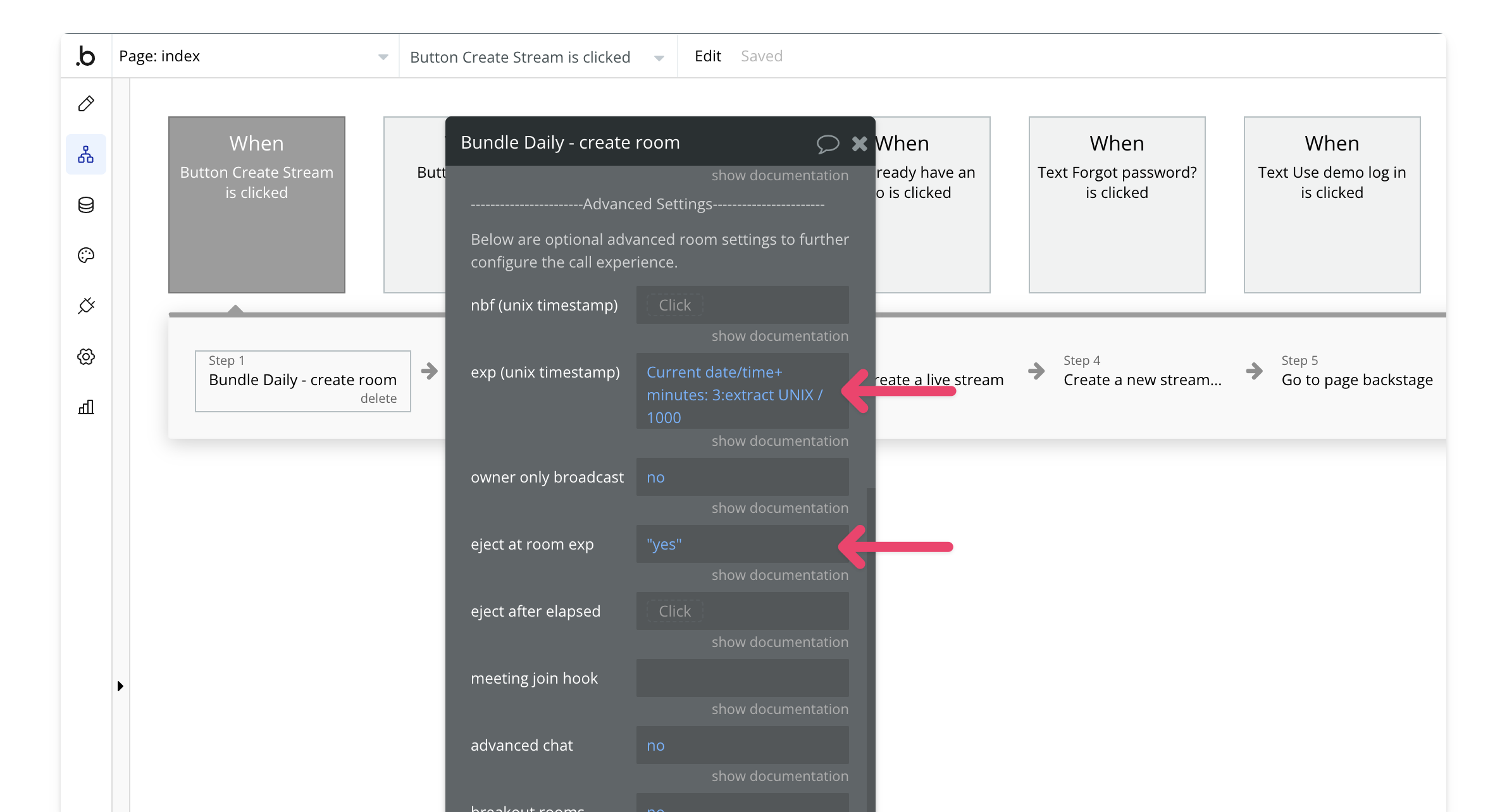
# Introduction
Source: https://tools.lunchpaillabs.com/introduction
PailFlow includes a core tiny-worker product and a separate Bots API for bot workflows.
# Tools
> **[PailFlow](https://usepipa.com)**
>
> A small helper that keeps your projects moving.
> See how teams use it day to day at usepipa.com.
> **[Bots](/pailflow/getting-started)**
>
> Set up bots to handle meeting notes and follow-ups.
> Share results in the tools your team already uses.
# Add-ons
Supported plugins for the Bubble ecosystem.
> **[Video, Audio & Live Streaming Bundle](/bubble/video-audio-live-bundle/getting-started)**
>
> Everything you need to build media rich applications in Bubble including video & audio calls, live streaming and media playback.
> **[Daily Video Conferencing](/bubble/daily/getting-started)**
>
> Integrate video and audio calls into your Bubble app with the Daily Video
> Plugin.
> **[Tavus](/bubble/tavus/getting-started)**
>
> Empower users to engage in real-time conversations with AI avatars.
> **[VAPI](/bubble/vapi/getting-started)**
>
> Create AI voice assistants that handle phone calls and conversations.
> **[Liveblocks](/bubble/liveblocks/getting-started)**
>
> Build collaborative apps like Figma, Pitch and Spline in Bubble.
> **[Twilio SMS](/bubble/twilio-sms/getting-started)**
>
> Send SMS messages using this free and lightweight plugin.
> **[Player style video](/bubble/player-style-video/getting-started)**
>
> Embed customizable video players with 10 unique themes developed by the [Mux
> team](https://www.mux.com/).
> **[Player style audio](/bubble/player-style-audio/getting-started)**
>
> Embed customizable audio players developed by the [Mux
> team](https://www.mux.com/).
> **[SmartSuite](/bubble/smartsuite/getting-started)**
>
> Perform CRUD operations on your SmartSuite solutions from within your Bubble
> app with this plugin.
> **[Mux](/bubble/mux/getting-started)**
>
> Create HLS live streams in Bubble through Mux.
*Image background patterns are from [Raycast Wallpapers](https://www.raycast.com/wallpapers).*
# Changelog
Source: https://tools.lunchpaillabs.com/pailflow/changelog
Track updates made to the PailFlow API. See what's new and improved.
***
**01/16/2026**
Added the ability to customize the bot's voice when joining meetings. The API now
supports 11 distinct voices: alloy, ash, ballad, coral, echo, fable, onyx, nova,
sage, shimmer, and verse. By default, the API uses the "echo" voice. Specify a
voice by adding the `voice` field to your `bot_config` when starting a bot.
**12/28/2025**
Official launch of the PailFlow API. The API enables you to add AI-powered bots
to video meetings for tasks like note-taking, meeting facilitation, transcription,
and insight extraction. Bots can join Daily.co rooms, interact with participants,
and send results via email or webhook callbacks.
> **[Need Help?](/support/plans)**
>
> View our options for free community and priority support.
> **[Have a feature request?](https://lunchpaillabs.canny.io/feature-requests?selectedCategory=pailflow)**
>
> Post your feature request on our
>
> [idea board.](https://lunchpaillabs.canny.io/feature-requests?selectedCategory=pailflow)
# Getting started
Source: https://tools.lunchpaillabs.com/pailflow/getting-started
Get started with PailFlow Bots for meeting and workflow automation.
This guide helps you get started with PailFlow Bots.
## What are PailFlow Bots?
PailFlow Bots are programmable workers you can run in meeting workflows.
They join calls, follow your instructions, and return structured outputs to your
systems.
With PailFlow Bots, you can:
* Join a Daily room URL and run a configured bot in that call
* Capture transcript and session output without managing call infrastructure
* Shape behavior with prompts, greeting text, voice, and bot configuration
* Get bot results from the status endpoint or webhook callbacks
* Stop running bots through the API when needed
## Getting Started
### 1. Request Access
Visit [pailflow.com/bots](https://www.pailflow.com/bots) and apply for API access.
### 2. Get Your API Key
Once your workspace is approved, generate an API key from your account settings.
Use this key to authenticate all API requests.
### 3. Configure Credits
Before making API calls, ensure your workspace has active usage credits.
> [!NOTE]
>
> Requests can fail with a 402 error when credits are not available.
### 4. Make Your First API Call
Once your API key and credits are ready, make your first `join` request. This
starts a worker session and runs your configured bot behavior in the room.
```bash theme={null}
curl -X POST https://api.usepipa.com/v1/api/bot/join \
-H "Authorization: Bearer YOUR_API_KEY" \
-H "Content-Type: application/json" \
-d '{
"room_url": "https://your-domain.daily.co/room-name",
"bot_config": {
"bot_prompt": "You are an implementation assistant that captures requirements and clarifies scope.",
"bot_greeting": "Hi! I am here to help capture requirements for this project. I will ask clarifying questions as we go."
}
}'
```
# Webhooks
Source: https://tools.lunchpaillabs.com/pailflow/webhooks
Webhook events sent when a PailFlow session completes. Configure the webhook by passing `webhook_callback_url` when you create or start a bot.
## Event: session\_complete
Sent after the call ends and the transcript, summary, and insights are processed.
### Payload
```json theme={null}
{
"event": "session_complete",
"transcript_id": "string | null",
"room_id": "string | null",
"room_name": "string",
"duration_seconds": 1234,
"transcript_text": "Full transcript text",
"summary": "Summary text",
"exit_reason": "participant_left | stop_phrase | force_leave | idle_timeout",
"insights": {
"summary": "...",
"overall_score": 8,
"strengths": ["..."],
"weaknesses": ["..."]
},
"insights_error": "string | null"
}
```
### Exit Reasons
| Exit Reason | Description |
| - | - |
| `participant_left` | The user left the room, and the bot was the only remaining participant |
| `stop_phrase` | The bot detected the configured stop phrase in the conversation and exited |
| `force_leave` | The bot was forcefully stopped via API (`POST /v1/bot/{bot_id}/stop`) |
| `idle_timeout` | The bot exited due to inactivity (no audio activity for 5 minutes) |
Notes:
* `transcript_text` is used in webhook payloads (the REST status endpoint returns the transcript as `transcript`).
* `insights` is omitted if insight generation is disabled or fails.
* `insights_error` is included only when insight processing fails.
* `exit_reason` is included when available (always present for normal completions).
## Event: bot\_join\_failed
Sent when a bot fails to join a Daily.co room (e.g., room not found, authentication error).
### Payload
```json theme={null}
{
"event_type": "bot_join_failed",
"workflow_thread_id": "string",
"room_url": "https://lunchpaillabs.daily.co/room-name",
"error_type": "room_not_found | auth_error | unknown",
"error_message": "Detailed error message from Daily.co",
"timestamp": "2026-01-12T17:21:30.092034+00:00",
"duration_seconds": 2
}
```
### Error Types
| Error Type | Description |
| - | - |
| `room_not_found` | The Daily.co room doesn't exist (404 error) |
| `auth_error` | Authentication failed when joining the room |
| `unknown` | Other errors (network issues, rate limiting, etc.) |
Notes:
* `duration_seconds` is how long the bot attempted to join before failing.
* Configure webhooks by passing `webhook_callback_url` when creating or starting a bot.
# Bundle Join Daily Room (Full Screen, Expiring)
Source: https://tools.lunchpaillabs.com/pailpal/bubble/workflows/bundle-join-room-expiration-full-screen
A workflow that creates and joins a full-screen video call room that expires after 15 minutes, using the Video, Audio & Live Bundle.
> [!WARNING]
>
> This workflow requires the **[Video, Audio & Live
> Bundle](https://bubble.io/plugin/video-audio--live-bundle-1727441795463x240182085842370560)**.
> Install it before proceeding.
## **What This Workflow Does**
This workflow **creates and joins a Daily video call room in full-screen mode** with a **15-minute expiration**,
It works like the free version but **leverages the video, audio, and live bundle**. In a live app, you'd likely save the room details in your database—but this workflow provides the **core structure** to create and join a room with an automatic expiration that **ejects participants when the time is up.**
The expiration is set using the **`exp` parameter,** which you can modify to adjust the expiration time. By default, this workflow **automatically ejects** all participants when the room expires. You can change this behavior by setting **`eject at room exp`** to **false.**
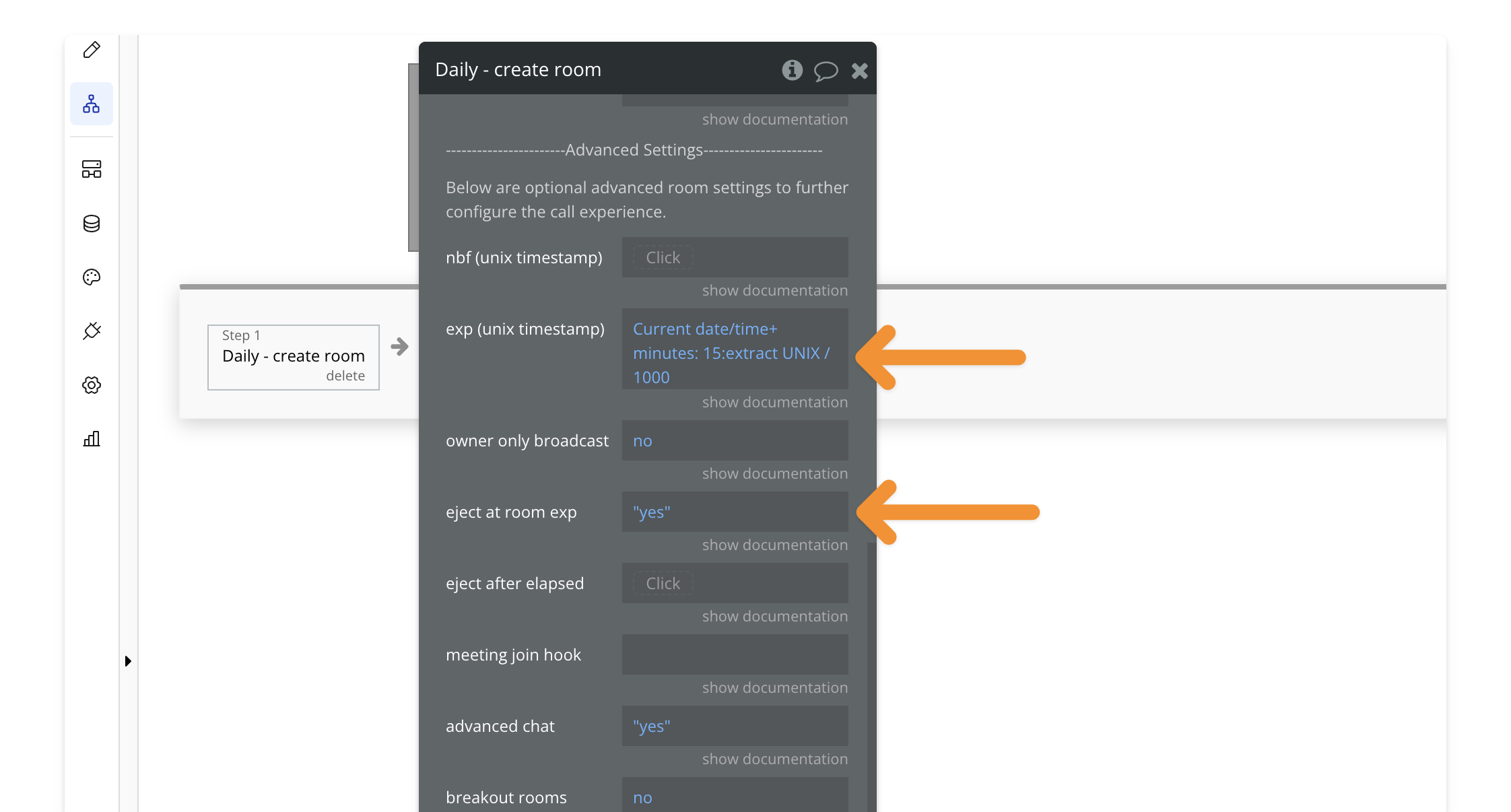
## **Key Features**
| Feature | Description |
| - | - |
| ✅ **Full-Screen Mode** | Joins the call in a full-screen overlay |
| ✅ **Expiring Room** | Room automatically expires after 15 minutes |
| ✅ **Auto-Eject Users** | Participants are removed when time is up (configurable) |
## **How to Install**
**🔍 Preview how to add a workflow to your editor.**
**1. Find the workflow**
Open the **PailPal extension**, go to **All** and search for **"Bundle Join
Daily Room (Full-Screen, Expiring)"**.
**2. Copy the workflow**
Click **"Copy"** on the workflow card to copy both the button and workflow.
**3. Select destination**
In **Bubble**, navigate to where you want to add the button.
**4. Paste the workflow**
Press **CMD+V (Mac) or CTRL+V (Windows)** to paste the workflow into your
app.
**5. Customize (Optional)**
Modify the button's styling to match your app's design.
# Bundle Join Daily Room (Full Screen, No Expiration)
Source: https://tools.lunchpaillabs.com/pailpal/bubble/workflows/bundle-join-room-no-expiration-full-screen
A workflow that creates and joins a full-screen video call room without expiration, using the Video, Audio & Live Bundle.
> [!WARNING]
>
> This workflow requires the **[Video, Audio & Live
> Bundle](https://bubble.io/plugin/video-audio--live-bundle-1727441795463x240182085842370560)**.
> Install it before proceeding.
## **What This Workflow Does**
This workflow **creates and joins a Daily video call room in full-screen mode** with **no expiration**.
It works like the free version but **leverages the video, audio, and live bundle**.
In a live app, you'd likely save the room details in your database—but this workflow provides the **core structure** to create and join a room in one click.
## **Key Features**
| Feature | Description |
| - | - |
| ✅ **Full-Screen Mode** | Joins the call in a full-screen overlay |
| ✅ **Persistent Room** | No expiration date |
| ✅ **One-Click Join** | Instantly creates and joins the room |
## **How to Install**
**🔍 Preview how to add a workflow to your editor.**
**1. Find the workflow**
Open the **PailPal extension**, go to **All** and search for **"Bundle Join
Daily Room (Full-Screen, No Expiration)"**.
**2. Copy the workflow**
Click **"Copy"** on the workflow card to copy both the button and workflow.
**3. Select destination**
In **Bubble**, navigate to where you want to add the button.
**4. Paste the workflow**
Press **CMD+V (Mac) or CTRL+V (Windows)** to paste the workflow into your
app.
**5. Customize (Optional)**
Modify the button's styling to match your app's design.
# Bundle Join Daily Room (Full Screen, Private)
Source: https://tools.lunchpaillabs.com/pailpal/bubble/workflows/bundle-join-room-private-full-screen
A workflow that creates and joins a full-screen private video call room with knocking enabled, using the Video, Audio & Live Bundle.
> [!WARNING]
>
> This workflow requires the **[Video, Audio & Live
> Bundle](https://bubble.io/plugin/video-audio--live-bundle-1727441795463x240182085842370560)**.
> Install it before proceeding.
## **What This Workflow Does**
This workflow **creates and joins a private Daily video call room in full-screen mode** with **knocking enabled**.
It works like the free version but **leverages the video, audio, and live bundle**. In a live app, you'd likely save the room details in your database—but this workflow provides the **core structure** to create and join a private room where **only authorized users can enter immediately, while others must knock to request access.**
### **How It Works**
This workflow has three key actions:
1️⃣ **Create a Private Room** → The room is created with **knocking enabled**, meaning users without a token must knock to request access.
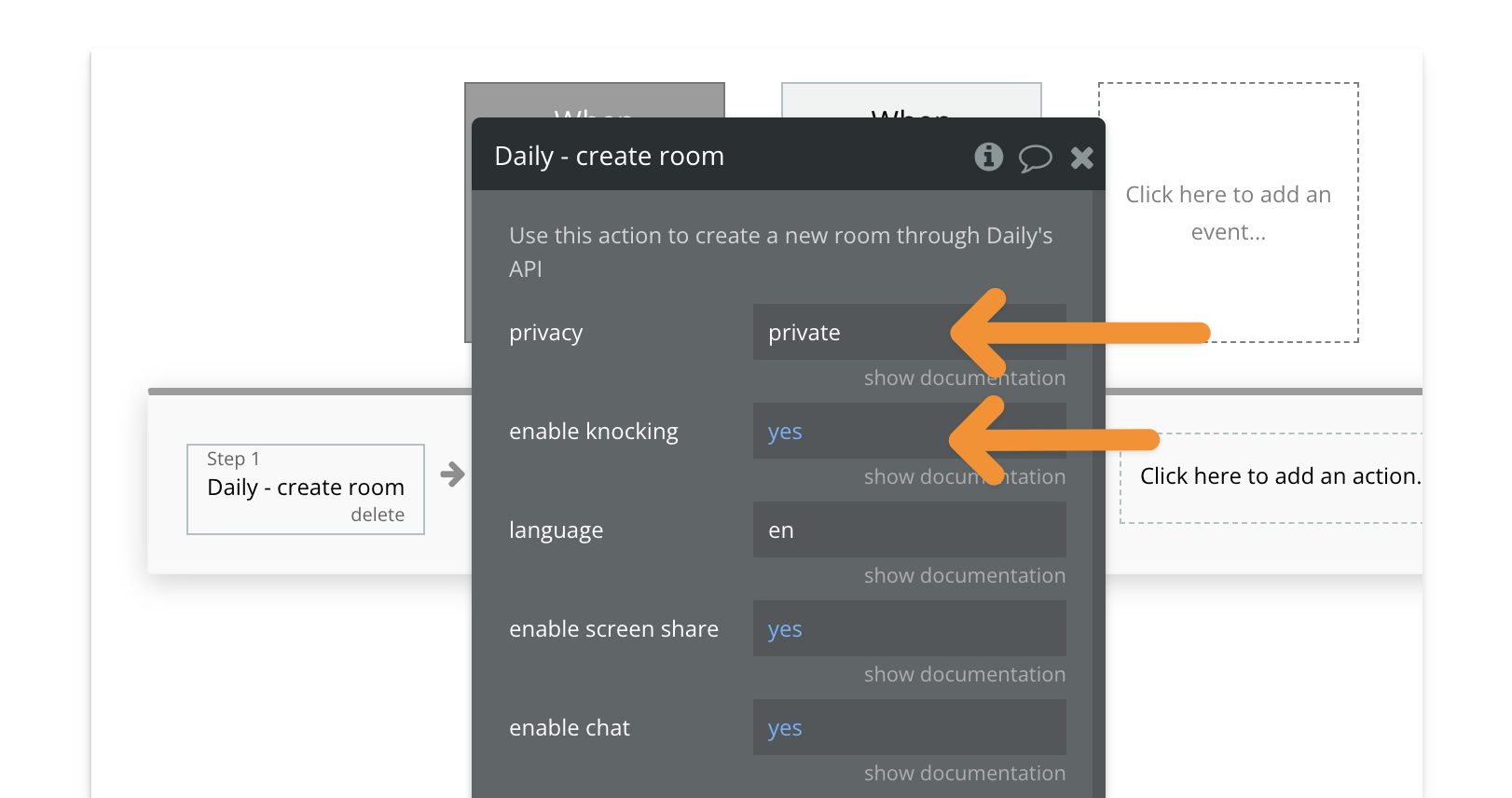
2️⃣ **Generate a Meeting Token** → The workflow generates an **owner token**, giving the host full control, including letting others in.
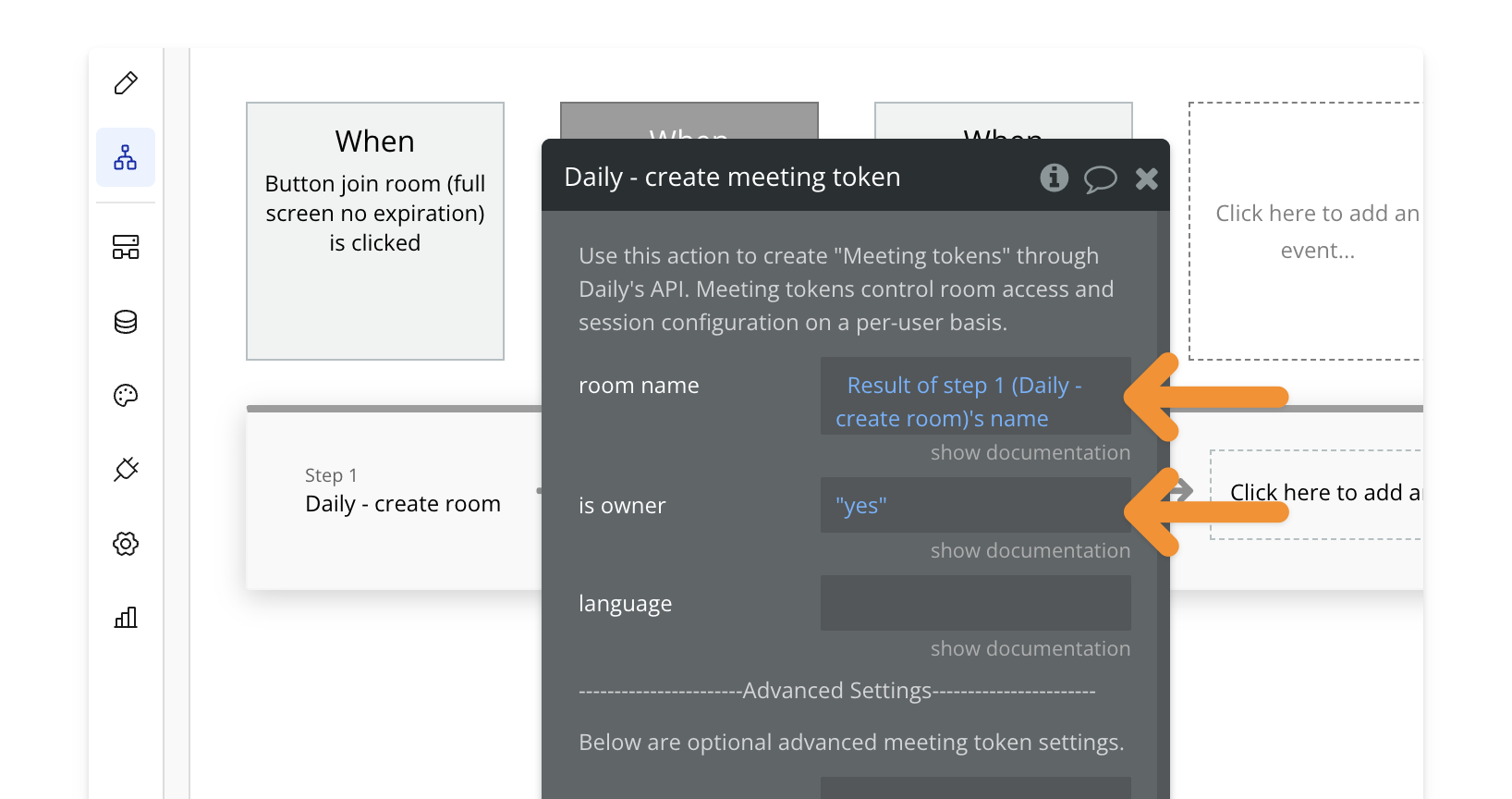
3️⃣ **Join Room in Full-Screen Mode** → The host joins the call in full-screen.
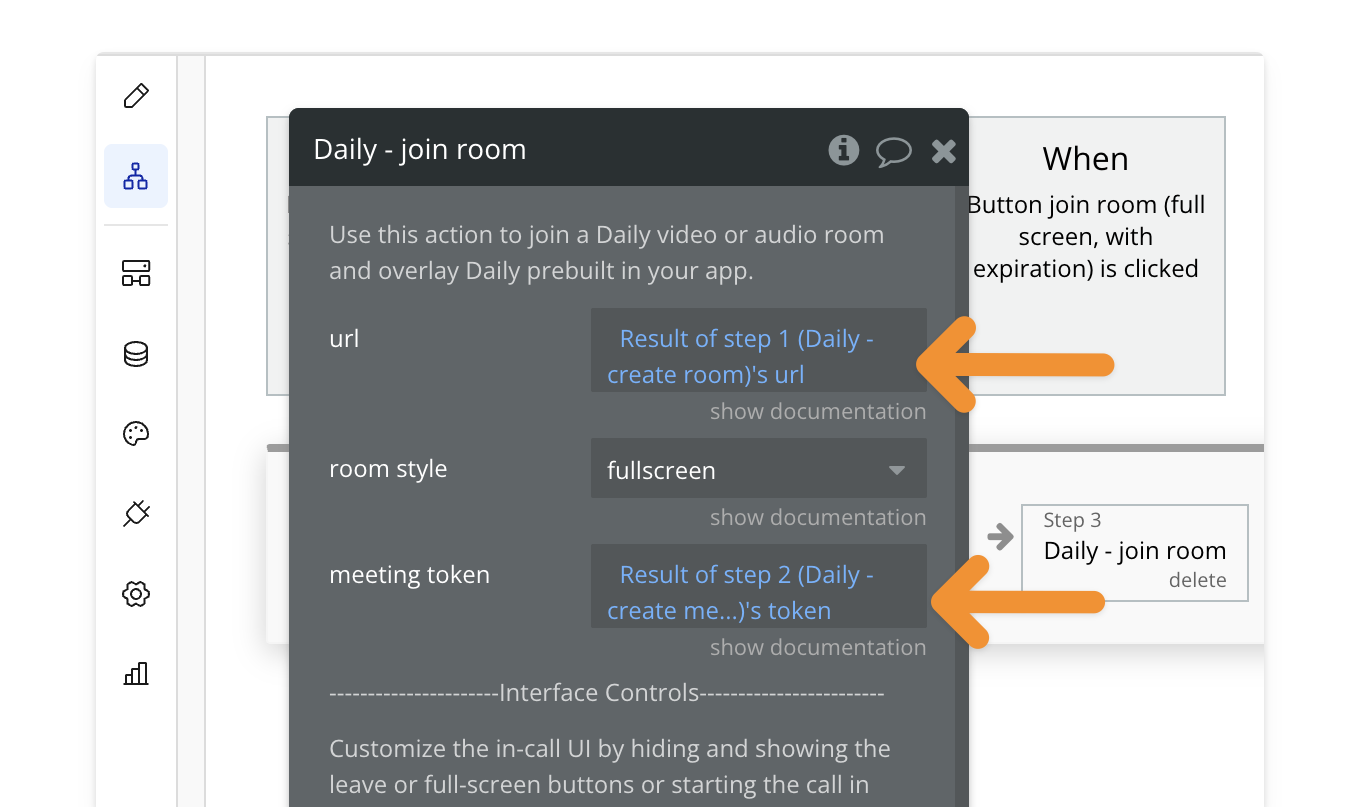
## **Key Features**
| Feature | Description |
| - | - |
| ✅ **Full-Screen Mode** | Joins the call in a full-screen overlay |
| ✅ **Private Room** | Only users with a token can enter immediately |
| ✅ **Knocking Enabled** | Users without a token must request access |
| ✅ **Owner Token Access** | The host can let others in and manage room permissions |
## **How to Install**
**🔍 Preview how to add a workflow to your editor.**
**1. Find the workflow**
Open the **PailPal extension**, go to **All** and search for **"Bundle Join
Daily Room (Full-Screen, Private)"**.
**2. Copy the workflow**
Click **"Copy"** on the workflow card to copy both the button and workflow.
**3. Select destination**
In **Bubble**, navigate to where you want to add the button.
**4. Paste the workflow**
Press **CMD+V (Mac) or CTRL+V (Windows)** to paste the workflow into your
app.
**5. Customize (Optional)**
Modify the button's styling to match your app's design.
# Join Daily Room (Full Screen, Expiring)
Source: https://tools.lunchpaillabs.com/pailpal/bubble/workflows/join-room-expiration-full-screen
A workflow that creates and joins a full-screen video call room that expires after 15 minutes.
> [!WARNING]
>
> This workflow requires the [Daily Video Conferencing
> Plugin](https://bubble.io/plugin/daily-video-chat-1622494385281x917140771709124600).
> Install it before proceeding.
## **What This Workflow Does**
This button **creates and joins a Daily video call room in full-screen mode** with a **15-minute expiration.**
In a live app, you’d likely save the room details in your database—but this workflow provides the **core structure** to create and join a room with an automatic expiration that **ejects participants when the time is up.**
The expiration is set using the **`exp` parameter,** which you can modify to adjust the expiration time. By default, this workflow **automatically ejects** all participants when the room expires. You can change this behavior by setting **`eject at room exp`** to **false.**

## **Key Features**
| Feature | Description |
| - | - |
| ✅ **Full-Screen Mode** | Joins the call in a full-screen overlay |
| ✅ **Expiring Room** | Room automatically expires after 15 minutes |
| ✅ **Auto-Eject Users** | Participants are removed when time is up (configurable) |
## **How to Install**
**🔍 Preview how to add a workflow to your editor.**
**1. Find the workflow**
Open the **PailPal extension**, go to **All** and search for **"Join Daily
Room (Full-Screen, Expiring)"**.
**2. Copy the workflow**
Click **"Copy"** on the workflow card to copy both the button and workflow.
**3. Select destination**
In **Bubble**, navigate to where you want to add the button.
**4. Paste the workflow**
Press **CMD+V (Mac) or CTRL+V (Windows)** to paste the workflow into your
app.
**5. Customize (Optional)**
Modify the button's styling to match your app's design.
# Join Daily Room (Full Screen, No Expiration)
Source: https://tools.lunchpaillabs.com/pailpal/bubble/workflows/join-room-no-expiration-full-screen
A workflow that creates and joins a full-screen video call room without expiration.
> [!WARNING]
>
> This workflow requires the [Daily Video Conferencing
> Plugin](https://bubble.io/plugin/daily-video-chat-1622494385281x917140771709124600).
> Install it before proceeding.
## What This Workflow Does
This button **creates and joins a Daily video call room in full-screen mode** with no expiration. It's a great starting point for using the Daily plugin.
In a live app, you'd likely save the room details in your database—but this workflow provides the **core structure** to create and join a room in one click.
## **Key Features**
| Feature | Description |
| - | - |
| ✅ **Full-Screen Mode** | Joins the call in a full-screen overlay |
| ✅ **Persistent Room** | No expiration date |
| ✅ **One-Click Join** | Instantly creates and joins the room |
## **How to Install**
**🔍 Preview how to add a workflow to your editor.**
**1. Find the workflow**
Open the **PailPal extension**, go to **All** and search for **"Join Daily
Room (Full-Screen, No Expiration)"**.
**2. Copy the workflow**
Click **"Copy"** on the workflow card to copy both the button and workflow.
**3. Select destination**
In **Bubble**, navigate to where you want to button.
**4. Paste the workflow**
Press **CMD+V (Mac) or CTRL+V (Windows)** to paste the workflow into your
app.
**5. Customize (Optional)**
Modify the button's styling to match your app's design.
# Join Daily Room (Full Screen, Private)
Source: https://tools.lunchpaillabs.com/pailpal/bubble/workflows/join-room-private-full-screen
A workflow that creates and joins a full-screen private video call room with knocking enabled.
> [!WARNING]
>
> This workflow requires the [Daily Video Conferencing
> Plugin](https://bubble.io/plugin/daily-video-chat-1622494385281x917140771709124600).
> Install it before proceeding.
## **What This Workflow Does**
This workflow **creates and joins a private Daily video call room in full-screen mode** with **knocking enabled**.
In a live app, you’d likely save the room details in your database—but this workflow provides the **core structure** to create and join a private room where **only authorized users can enter immediately, while others must knock to request access.**
### **How It Works**
This workflow has three key actions:
1️⃣ **Create a Private Room** → The room is created with **knocking enabled**, meaning users without a token must knock to request access.

2️⃣ **Generate a Meeting Token** → The workflow generates an **owner token**, giving the host full control, including letting others in.

3️⃣ **Join Room in Full-Screen Mode** → The host joins the call in full-screen.

## **Key Features**
| Feature | Description |
| - | - |
| ✅ **Full-Screen Mode** | Joins the call in a full-screen overlay |
| ✅ **Private Room** | Only users with a token can enter immediately |
| ✅ **Knocking Enabled** | Users without a token must request access |
| ✅ **Owner Token Access** | The host can let others in and manage room permissions |
## **How to Install**
**🔍 Preview how to add a workflow to your editor.**
**1. Find the workflow**
Open the **PailPal extension**, go to **All** and search for **"Join Daily
Room (Full-Screen, Private)"**.
**2. Copy the workflow**
Click **"Copy"** on the workflow card to copy both the button and workflow.
**3. Select destination**
In **Bubble**, navigate to where you want to add the button.
**4. Paste the workflow**
Press **CMD+V (Mac) or CTRL+V (Windows)** to paste the workflow into your
app.
**5. Customize (Optional)**
Modify the button's styling to match your app's design.
# Getting Started
Source: https://tools.lunchpaillabs.com/pailpal/getting-started
Install and integrate pre-built workflows with PailPal.
PailPal is a Chrome extension that helps you build faster with **Lunch Pail add-ons.**

## Key Features
| Feature | Description |
| - | - |
| One-Click Workflow Setup | Install pre-built workflows instantly |
| Best Practices Built-In | Workflows follow platform-specific recommendations |
| Saves Time & Effort | Skip manual setup and get started in minutes |
## Installation
**1. Install the extension**
PailPal is currently **in review** in the Chrome Web Store. If you'd like
**early access to the beta version**, [send a
note](mailto:help@lunchpaillabs.com).
**2. Pin the extension**
Click the puzzle piece icon in Chrome and **pin PailPal** for easy access.
**3. Use PailPal**
Click the PailPal icon when you're inside an editor to install a workflow.
## Platform Support
Currently, PailPal supports:
* [Bubble](/pailpal/bubble/getting-started)
*More platforms coming soon!*